
Understanding Caching
Since the earliest days of microprocessors, system designers have been plagued by a problem in which the speed of the CPU's operation exceeded the bandwidth of the memory subsystem to which it was connected. To avoid wasting CPU cycles while waiting for the memory to fetch the requested data, the universally adopted solution was to use an area of faster (and thus more expensive) memory to cache main memory data. This solution allowed the CPU to operate at its natural speed as long as the data it required was available in the cache.
The purpose of this article is to explain caching from the point of view of a kernel programmer. I also explain some of the common terms used to describe caches. This article is divided into sections whose kernel programming relevance is indicated; that is, some sections explain that cache properties are irrelevant to understanding the essentials of how the kernel handles caching. If you're coming from an Intel IA32 background, caching is practically transparent to you. In order to write kernel code that operates correctly on all the architectures Linux supports, however, you need to know the essentials of how caching works in general.
Simply put, a cache is a place that buffers memory accesses and may have a copy of the data you are requesting. Usually one thinks of caches (there may be more than one) as being stacked; the CPU is at the top, followed by layers of one or more caches and then the main memory. In this hierarchy, caches are quantified by their level. The cache closest to the CPU is called level one, L1 for short, and caches increase in level until the main memory is reached.
A cache line is the smallest unit of memory that can be transferred to or from a cache. The essential elements that quantify a cache are called the read and write line widths. These signify the minimum amount of data the cache must read or write from the memory or cache below it. Frequently, these quantities are the same, so caches often are quantified simply by the line width. Even if they differ, the longest width usually is called the line width.
The next property that quantifies a cache is its size. This number is an indication of how much data could be stored in the cache. Often, the performance rule of thumb is the bigger the cache, the better the benchmarks.
A multilevel cache can be either inclusive or exclusive. Exclusive means a particular cache line may be present in exactly one of the cache levels and no more than one. Inclusive means the line may be present simultaneously in more than one level of cache. Nothing prevents the line widths from being different in differing cache levels.
Finally, a particular cache can be either write through or write back. Write through means the cache may store a copy of the data, but the write must be completed at the next level down before it can be signaled as complete to the layer above. Write back means a write may be considered complete as soon as the data is stored in the cache. For a write back cache, as long as the written data is not transmitted, the cache line is considered dirty, because it ultimately must be written out to the level below.
One of the most basic problems with caches is coherency. A cache line is termed coherent when the data in the line is identical to the data stored in the main memory being cached. If this is not true, the cache line is termed incoherent. Lack of coherency can cause two particular problems. The first problem, which may occur for all caches, is stale data. In this situation, data has changed in main memory but the cache hasn't been updated to reflect the change. This usually manifests itself as an incorrect read, as illustrated in Figure 1. This is a transient error, because the correct data is sitting in main memory; the cache simply needs to be told to bring it in.
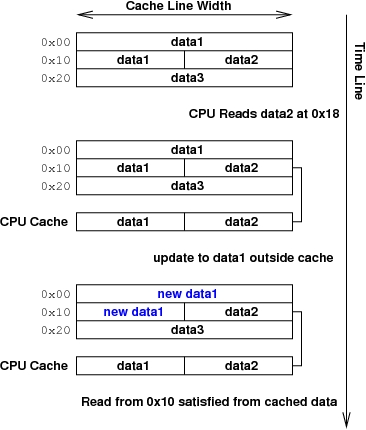
Figure 1. Stale Data Problem
The second problem, which occurs only with write back caches, can cause actual destruction of data and is much more insidious. As illustrated in Figure 2, the data has been changed in memory, and it also has been changed separately by a CPU write to the cache. Because the cache must write out one line at a time, there now is no way to reconcile the changes—either the cache line must be purged without being written, losing the CPU's change, or the line must be written out, thus losing the changes made to main memory. All programmers must avoid reaching the point where data destruction becomes inevitable; they can do this through the judicious use of the various cache management APIs.
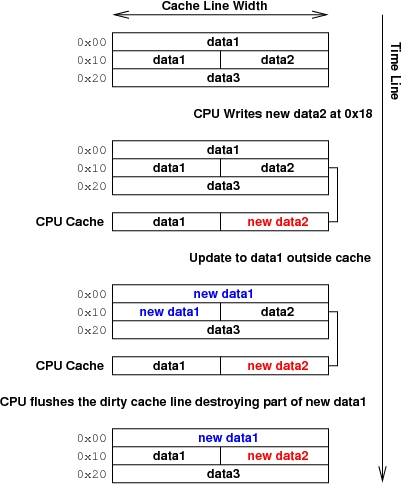
Figure 2. Data Destruction by Dirty Cache Lines
The situation where two sets of independent data lie in the same cache line, potentially leading to the data destruction detailed above, is termed cache-line interference. If you are laying out data structures in memory, the general rule to avoid this situation is never, ever have data that can be modified outside of the caches mixed with data the CPU may ordinarily use. If you absolutely have to violate this rule, make sure all externally modifiable elements of the structure are aligned L1_CACHE_BYTES, a value set at compile time to the largest possible cache width value for all the processors on which your code may run. The best thing to do is use kmalloc to allocate two separate regions. kmalloc never allocates two regions that overlap in a cache line.
The most basic instruction, called an invalidate, simply ejects the nominated line from all caches. Any reference to data in that line causes it to be re-fetched from main memory. Thus, the stale data problem may be resolved by invalidating the cache line before reading the data. In Linux, such an invalidation is done with:
void
dma_cache_inv(unsigned long address
              unsigned long size);
where address is the virtual address on which to begin, and size is the length of data to invalidate. Note that size is rounded up automatically to a multiple of the cache line width.
For write back caches, any dirty cache line may be written out, or flushed, to main memory using:
void
dma_cache_wback(unsigned long address,
                unsigned long size);
This flushing must be done before anything changes the main memory under the dirty cache line. You therefore must issue the flush before an external entity (such as a PCI card) modifies main memory and issue an invalidate after this flush but before the CPU accesses any data that has changed.
In theory, for write back caches an invalidate kills the cache line without actually writing the data out, thus destroying the data in the cache. A safer thing to do in this case is issue a flush and invalidate instruction:
void
dma_cache_wback_inv(unsigned long address,
                    unsigned long size);
This section explains how a cache actually works. The only vital piece of information you need from this section is a property called aliasing, which means that the same physical address in memory may be cached in multiple distinct cache lines. How the kernel actually manages the aliases is discussed in the following section.
In a directly mapped cache, as shown in Figure 3, the cache is divided up into cache lines of known width (four in the example). Each line in the cache is characterized by a unique index, so every byte in the cache is addressed by the index of the line and offset into the line. Each index of the cache also possesses a hidden number called the tag.

Figure 3. A Directly Mapped Cache
Every address in the system is divided into three pieces—tag, index and offset—along a power of two boundary (Figure 4). When a line is brought into the cache, the tag and index are extracted from the address. The line is stored in the cache at the required index, and the hidden tag is stored along with the line data. When the CPU makes reference to a particular address, the cache is consulted at the given index. If the tags match, the offset into the line is fetched to satisfy the address reference. If the tags do not match, the current line may be flushed back to main memory and the correct line brought into the cache.
Every cache-able address has one and only one corresponding index line, which can cause problems. For instance, if the processor reads a sequence of addresses that accidentally happen to correspond to the same cache index, the cache line must be evicted and re-fetched on each read. Such a situation easily can happen in, say, a for loop reading elements of a structure that happens to be about the same size as the cache. For directly mapped caches, the index sometimes is called the cache color, and this problem is called the cache-line coloring problem.
To get around the coloring problem of directly mapped caches, cache circuitry sometimes is arranged so that a cache lookup can compare tags simultaneously in more than one cache line. In an N-way associative cache, each index corresponds to N cache lines (and tags); thus, we can have up to N addresses with the same index simultaneously in the cache. The added parallel cache lookup circuitry tends to increase the cost of associativity somewhat, so it usually is found only in higher-end CPUs.
At the very top of the range, you might find a fully associative cache. This type of cache has no index at all, and all lines are consulted at once when looking for a particular tag.
All modern CPUs handle address translation, which means the virtual address used by the kernel or application to refer to memory isn't the same as the physical address where the data actually resides. The caches can be placed before or after address translation, and sometimes in a hierarchical cache there is a mixture of placements. Each of these placements has different properties and features as described below.
In physically indexed, physically tagged (PIPT) caches, the tag and index of the cache are both in physical memory, that is, after virtual address translation has been done. This process is nice and simple, but the disadvantage of PIPT caches is that a valid address translation must be in the TLB (translation lookaside buffer) of the CPU. If such a TLB entry needs to be fetched from memory before the address translation can be done, the advantage of caching the data is lost. Even if a TLB entry is present, the TLB lookup and the cache lookup must be done sequentially, making these caches slow.
In virtually indexed, virtually tagged (VIVT) caches, on the other hand, both the index and tag are in the virtual address space in which the CPU currently is operating. Although this makes cache lookups much faster (no address translation needs to be done before the lookup or after, if the cache lookup is successful), they suffer from several other problems:
Virtual address translations usually are changed as part of normal kernel operation, so the cache must pay careful attention to changes in TLB entries (and changes in address space) and flush cache lines whose translations have changed.
Even in a single address space, multiple virtual addresses may exist for the same physical address. Each of these virtual addresses would be cached separately, even though they represent the same data. This is called the cache-line aliasing problem.
Generally, though, the added lookup speed of a VIVT cache outweighs its disadvantages, making it the predominant cache type for non-x86 CPUs.
A type of hybrid cache designed to overcome some of the shortcomings of the VIVT cache without sacrificing too much of its speed advantage is virtually indexed, physically tagged (VIPT) caching. The index is on the virtual address, but the tag is on the physical address, so the combination (tag, offset) must specify the full physical address. This requirement causes the tags to be larger than the tags for other cache types.
The VIPT cache gains its speed advantage over PIPT because the address translation and the cache lookup now can be done in parallel. The CPU doesn't know if the cache line is valid (the tags match), however, until the address translation has completed.
The disadvantages of VIVT are overcome because the tag is physical, thus the VIPT cache automatically detects aliasing when it sees that two tags are identical in the cache. Thus, a VIPT cache may be constructed in such a fashion that cache-line aliasing never occurs.
This fourth theoretical type of cache, physically indexed, virtually tagged (PIVT), is basically useless and is not discussed further.
Any time the kernel sets up more than one virtual mapping for the same physical page, cache line aliasing may occur. The kernel is careful to avoid aliasing, so it usually occurs only in one particular instance: when the user mmaps a file. Here, the kernel has one virtual address for pages of the file in the page cache, and the user may have one or more different virtual addresses. This is possible because nothing prevents the user from mmaping the file at multiple locations.
When a file is mmaped, the kernel adds the mapping to one of the inode's lists: i_mmap, for maps that cannot change the underlying data, or i_mmap_shared, for maps that can change the file's data. The API for bringing the cache aliases of a page into sync is:
void flush_dcache_page(struct page *page);
This API must be called every time data on the page is altered by the kernel, and it should be called before reading data from the page if page->mapping->i_mmap_shared is not empty. In architecture-specific code, flush_dcache_page loops over the i_mmap_shared list and flushes the cache data. It then loops over the i_mmap list and invalidates it, thus bringing all the aliases into sync.
In their quest for efficiency, processors often have separate caches for the instructions they execute and the data on which they operate. Often, these caches are separate mechanisms, and a data write may not be seen by the instruction cache. This causes problems if you are trying to execute instructions you just wrote into memory, for example, during module loading or when using a trampoline. You must use the following API:
void
flush_icache_range(unsigned long start,
                   unsigned long end);
to ensure that the instructions are seen by the instruction cache prior to execution. start and end are the starting and ending addresses, respectively, of the block of memory you modified to contain your instructions.
These flush all the caches in the system and only the lines in the cache belonging to the particular process address space mm. Both of these are extremely expensive operations and should be used only when absolutely necessary.
When more than one CPU is in the system, a level of caching usually exists that is unique to each CPU. Depending on the architecture, it may be the responsibility of the kernel to ensure that changes in the cache of one CPU become visible to the other CPUs. Fortunately, most CPUs handle this type of coherency problem in hardware. Even if they don't, as long as you follow the APIs listed in this article, you can maintain coherency across all the CPUs.
I hope I've given you a brief overview of how caches work and how the kernel manages them. The contents of this article should be sufficient for you to understand caching in most kernel programming situations you're likely to encounter. Be aware, however, that if you get deeply into the guts of kernel cache management (particularly in the architecture-specific code), you likely will come across concepts and APIs not discussed here.
James Bottomley is the software architect for SteelEye. He maintains the SCSI subsystem, the Linux Voyager port and the 53c700 driver. He also has made contributions to PA-RISC Linux development in the area of DMA/device model abstraction.
