
GDL2: the GNUstep Database Library
Some of my previous articles presented the Graphical Object Relationship Modeler (Gorm) and Renaissance, two important projects for GNUstep. This article aims to provide a short introduction to GDL2—the GNUstep Database Library. While this article focuses on GDL2, the reader is encouraged to read previous GNUstep articles, (Linux Journal, April 2003 and March 2004) for a better understanding of Gorm and of the Objective-C language.
GDL2 is a free (LGPL) implementation of EOF, Enterprise Objects Framework. EOF was created by NeXT Computer, Inc. in 1994 as a collection of API to develop efficiently object-oriented database applications using the Objective-C language. It evolved from a lower-level framework, known as DB Kit, that was available on NeXTSTEP. Apple's implementations of EOF now are based on the Java language, leaving Objective-C developers with no choices but to consider rewriting their applications in Java or looking at a free implementation of EOF. GDL2 is aimed at compatibility with version 4.5 of EOF.
EOF is divided into multiple layers: EOAccess, EOControl and EOInterface. The role of the former is to transfer data from the RDBMS to enterprise objects and from objects to raw database data. EOControl is used to maintain an in-memory graph of enterprise objects and delegate modifications to the database using EOAccess. EOInterface is used to map enterprise objects to user interface elements. Unfortunately, EOInterface is not yet implemented in GDL2. Figure 1 presents the various layers, how they relate to Foundation, AppKit and how they relate in a typical client/server AppKit application that makes use of EOF.
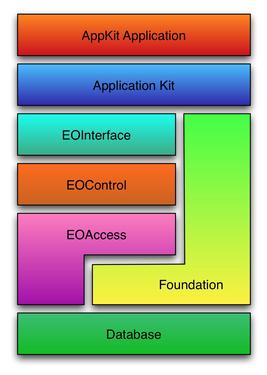
Figure 1. The EOF architecture applies a uniform object-oriented interface to diverse databases, with no SQL coding needed.
Furthermore, EOF allows developers to create database-oriented applications without writing any SQL. Instead, the developers concentrate on manipulating real objects. In addition, when synchronizing changes made to objects with the database, EOF has mechanisms to validate, enforce referential integrity, generate primary and foreign keys, manage transactions and provide locking—either pessimistic, optimistic or on-demand—to ensure integrity of the data thus, removing entirely this burden from the application developers.
The source code of the test application and all listings, fully commented, are available from the Linux Journal FTP site (see the on-line Resources section). You should refer to this source code for a better understanding of all listings shown in this article.
In order to install GDL2 and create our test application, we first must install GNUstep and Gorm. Furthermore, we need to install PostgreSQL because we are using the Postgres95 EOF adaptor in our example.
The latest stable release is always recommended. For this project, this includes GNUstep make 1.9.1, GNUstep base 1.9.1, GNUstep GUI 0.9.2, GNUstep back 0.9.2, Gorm 0.7.5 and PostgreSQL 7.4.2. When installing PostgreSQL, be sure to install the development packages for libpq header files, as they are required in order to compile GDL2. Debian provides the postgresql-dev package while Red Hat provides the postgresql-devel package. Once the requirements are installed, proceed with the following commands:
# wget ftp://ftp.gnustep.org/pub/gnustep/libs/gdl2-0.9.1.tar.gz
# tar -zxvf gdl2-0.9.1.tar.gz
# cd gdl2-0.9.1
# ./configure
# make
And finally, as root:
# make installThis will download GDL2 v0.9.1 from the GNUstep FTP server, compile and install it.
In the first GNUstep article, the Model-View-Controller (MVC) design pattern was introduced. When using EOF, much of the controller's logic described in the previous article now is being managed automatically by EOF. In fact, the application's user interface becomes the View, EOF the controller and database itself, the Model.
In this article, we create a trivial inventory management application that makes use of the MVC model. This application displays a window, a table view showing the inventory items and three buttons used to update the inventory, insert or delete a new item. Before creating the application, we need to create our inventory database and the credentials we will use in our test application. To do so, proceed with the following commands:
% su - postgres
% createuser --pwprompt inventory
Enter password for user "inventory": (specify a password)
Enter it again:
Shall the new user be allowed to create databases? (y/ n) y
Shall the new user be allowed to create more new users? (y/ n) n
CREATE USER

% createdb -O inventory inventory
CREATE DATABASE
Once the database and the user are created, we next create the sequence and table used by our test application. Be sure the authentication mechanisms in PostgreSQL are configured well before using the psql tool:
% psql -U inventory inventory

create sequence inventory_seq start with 1;

create table inventory (
 iid        int4,
 name       varchar(255),
 quantity   int4,
 order_date timestamp,
 primary key (iid)
);
Once the steps related to the database are completed, we now proceed, with Gorm, to create the user interface for the inventory application. To do so, open the modeler and from the Document menu, choose New Application. From the Inspector window, set the window title to Inventory. Then, from the Palettes window, drag a NSTableView object to the application's window and insert a third table column using copy/paste. Set the table columns' titles to Name, Quantity and Order Date. Also, set the table column identifiers to name, quantity and order_date respectively. Then, drag three buttons from the Palettes window to the application's window and set their respective title to Update, Insert and Delete.
From the File window, click on the Classes icon and select the NSObject item. From the Classes menu, choose Create Subclass.... Rename the controller class to AppController and create the window and tableView outlets. Furthermore, insert:, delete: and update: actions must be added. Once we have created the outlets and actions, we are ready to instantiate our controller class. Do so and then connect the window and tableView outlets, set the delegate/datasource on the tableview and the delegate/windowController on the window to our application's controller.
Furthermore, connect the actions on the buttons. From the Document menu, choose Save... and specify the name MainMenu.gorm. Additionally, connect the NSOwner's delegate outlet to AppController. Finally, from the Classes view, select AppController and create the class files (AppController.h and AppController.m). Overall, the user interface should look like Figure 2.
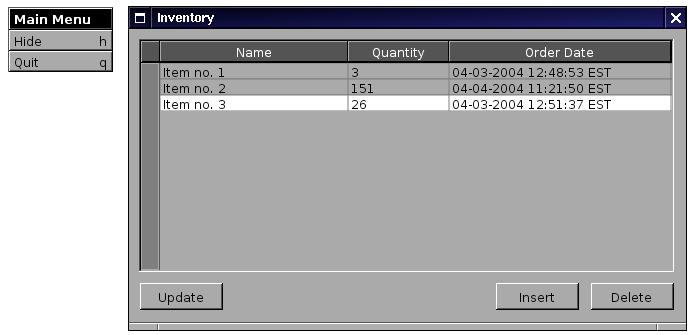
Figure 2. The user interface for the inventory application.
Once the user interface has been created, open AppController.h in your favorite editor and add the items and editingContext instance variables, as shown in Listing 1. Then, modify AppController.m in order to implement the -delete:, -insert: and -update: methods. Furthermore, you need to add the -init, -dealloc, -numberOfRowsInTableView, -tableView:objectValueForTableColumn:row:, -tableView:setObjectValue:forTableColumn:row:, -applicationDidFinishLaunching: methods as well as the application entry point, main() and the required #import directives for EOF headers. Listing 2 shows the complete source of the application's controller. A description of all methods is provided in the next section.
Listing 1. AppController.h
#include <AppKit/AppKit.h>

@interface AppController : NSObject
{
  id window;
  id tableView;
  id items;
  id editingContext;
}
- (void) update: (id)sender;
- (void) delete: (id)sender;
- (void) insert: (id)sender;
@end
Listing 2. AppController.m
#include <AppKit/AppKit.h>
#include "AppController.h"

#import <EOAccess/EOAccess.h>
#import <EOControl/EOControl.h>

@implementation AppController

- (id) init
{
  self = [super init];
  items = [[NSMutableArray alloc] init];
  return self;
}

- (void) dealloc
{
  [editingContext release];
  [items release];
  [super dealloc];
}

- (void) update: (id)sender
{
  [items removeAllObjects];
  [items addObjectsFromArray:
           [editingContext objectsForEntityNamed:
                             @"Item"]];
  [tableView reloadData];
}


- (void) delete: (id)sender
{
  int row;

  row = [tableView selectedRow];

  if (row < 0 || row >= [items count])
    {
      NSBeep();
      return;
    }

  [editingContext deleteObject:
                    [items objectAtIndex: row]];
  [editingContext saveChanges];

  [items removeObjectAtIndex: row];
  [tableView reloadData];
}


- (void) insert: (id)sender
{
  id aRecord;

  aRecord = [[EOClassDescription
               classDescriptionForEntityName:
                 @"Item"]
              createInstanceWithEditingContext: nil
              globalID: nil
              zone: NULL];

  [aRecord takeValue: @"<new item>"
           forKey: @"name"];
  [aRecord takeValue: [NSNumber numberWithInt: 0]
           forKey: @"quantity"];
  [aRecord takeValue: [NSCalendarDate date]
           forKey: @"order_date"];
  [editingContext insertObject: aRecord];
  [editingContext saveChanges];

  [items addObject: aRecord];
  [tableView reloadData];
}

- (int) numberOfRowsInTableView: (id) aTableView
{
  return [items count];
}

- (id)           tableView: (id) aTableView
 objectValueForTableColumn: (id) aTableColumn
                       row: (int) rowIndex
{
  id aRecord;

  aRecord = [items objectAtIndex: rowIndex];

  return [aRecord valueForKey:
                    [aTableColumn identifier]];
}


- (void) tableView: (id) aTableView
    setObjectValue: (id) anObject
    forTableColumn: (id) aTableColumn
               row: (int) rowIndex
{
  id aRecord;

  aRecord = [items objectAtIndex: rowIndex];
  [aRecord takeValue: anObject
           forKey: [aTableColumn identifier]];
  [editingContext saveChanges];
}

- (void) applicationDidFinishLaunching: (id) not
{
  EODatabaseContext *aDatabaseContext;
  EOModelGroup *aModelGroup;
  EODatabase *aDatabase;
  EOModel *aModel;

  aModelGroup = [[EOModelGroup alloc] init];
  aModel = [aModelGroup
             addModelWithFile:
               @"tool/Inventory.eomodeld"];
  [EOModelGroup setDefaultGroup: aModelGroup];
  [aModelGroup autorelease];

  aDatabase = [[EODatabase alloc] initWithModel:
                                    aModel];
  [aDatabase autorelease];

  [[aDatabase adaptor] runLoginPanel];

  aDatabaseContext = [[EODatabaseContext alloc]
                       initWithDatabase: aDatabase];

  [[EOObjectStoreCoordinator defaultCoordinator]
    addCooperatingObjectStore: aDatabaseContext];
  [aDatabaseContext autorelease];

  editingContext = [[EOEditingContext alloc]
                     init];
}
@end

int main(int argc, const char *argv[], char *env[])
{
  [NSApplication sharedApplication];
  NSApplicationMain(argc, argv);

  return EXIT_SUCCESS;
}
Once the AppController files are modified, proceed with the creation of the GNUmakefile, used to compile our application, and the InventoryInfo.plist file, used to specify the application name, description and the name of the main Gorm file to load upon startup. Listings 3 and 4 show the content of those files.
Listing 3. GNUmakefile
include $(GNUSTEP_MAKEFILES)/common.make
include $(GNUSTEP_MAKEFILES)/Auxiliary/gdl2.make
APP_NAME = Inventory
Inventory_OBJC_FILES = AppController.m
Inventory_RESOURCE_FILES = MainMenu.gorm
ADDITIONAL_OBJCFLAGS = -Wall -Wno-import
include $(GNUSTEP_MAKEFILES)/application.make
Listing 4. InventoryInfo.plist
{
  ApplicationName = "Inventory";
  ApplicationDescription = "Inventory application.";
  NSMainNibFile = "MainMenu";
}
Then, we need to create our EOModel programmatically. The EOModel is a correspondence between data stored in the database and an enterprise object. It defines entities for the tables in the databases and their attributes and relationships that correspond to table columns. Listing 5 shows tool/model.m, the tool used to create our model used by our application. For sake of simplicity, the model of our small inventory application defines only one entity.
Listing 5. tool/model.m
#import <Foundation/Foundation.h>
#import <EOAccess/EOAccess.h>

int main(int arcg, char *argv[], char **envp)
{
  NSAutoreleasePool *pool;
  EOAttribute *theAttribute;
  EOEntity *theEntity;
  EOModel *theModel;

  pool = [[NSAutoreleasePool alloc] init];

  theEntity  = [[EOEntity alloc] init];
  [theEntity setName: @"Item"];
  [theEntity setExternalName: @"INVENTORY"];
  [theEntity setClassName: @"EOGenericRecord"];

  theAttribute = [[EOAttribute alloc] init];
  [theAttribute setName: @"iid"];
  [theAttribute setColumnName: @"IID"];
  [theAttribute setValueClassName: @"NSNumber"];
  [theAttribute setExternalType: @"int4"];
  [theEntity addAttribute: theAttribute];

  [theEntity setPrimaryKeyAttributes:
               [NSArray arrayWithObject:
                          theAttribute]];
  [theEntity setAttributesUsedForLocking:
               [NSArray arrayWithObject:
                          theAttribute]];

  theAttribute = [[EOAttribute alloc] init];
  [theAttribute setName: @"name"];
  [theAttribute setColumnName: @"NAME"];
  [theAttribute setValueClassName: @"NSString"];
  [theAttribute setExternalType: @"varchar"];
  [theAttribute setWidth: 255];
  [theEntity addAttribute: theAttribute];

  theAttribute = [[EOAttribute alloc] init];
  [theAttribute setName: @"quantity"];
  [theAttribute setColumnName: @"QUANTITY"];
  [theAttribute setValueClassName: @"NSNumber"];
  [theAttribute setExternalType: @"int4"];
  [theEntity addAttribute: theAttribute];

  theAttribute = [[EOAttribute alloc] init];
  [theAttribute setName: @"order_date"];
  [theAttribute setColumnName: @"ORDER_DATE"];
  [theAttribute setValueClassName: @"NSCalendarDate"];
  [theAttribute setExternalType: @"timestamp"];
  [theEntity addAttribute: theAttribute];

  [theEntity setClassProperties:
               [theEntity attributes]];

  theModel = [[EOModel alloc] init];
  [theModel setName: @"Inventory"];
  [theModel setAdaptorName: @"Postgres95"];

  [theModel setConnectionDictionary:
              [NSDictionary dictionaryWithObject:
                              @"inventory"
                            forKey:
                              @"databaseName"]];

  [theModel addEntity: theEntity];

  [theModel writeToFile: [theModel name]];

  [pool release];

  return EXIT_SUCCESS;
}
For our small inventory application, we use EOF's built-in EOGenericRecord class for our EOEntity object, which describes our inventory table. We easily could define our own Item class and use it instead of EOGenericRecord in order to provide, for example, automatic validation of values the object can accept through mutation methods. In Listing 5, we also specify the attribute mappings used for our EOEntity. For example, the iid attribute is mapped to our IID database column and corresponds to the entity's primary key. In addition, it is used for locking during updates. When a value is read from the database, which has an int4 type, EOF automatically creates a NSNumber instance holding the corresponding value. The same operations are done for the three other attributes to be fetched into the application: name, quantity and order_date. Before leaving the tool's main() function, we set the name of the adaptor to be used, Postgres95 in this example, and the database name. We then write the EOModel on disk.
To compile the tool, a small GNUmakefile must be created. Listing 6 is the GNUmakefile.
Listing 6. tool/GNUmakefile
include $(GNUSTEP_MAKEFILES)/common.make
include $(GNUSTEP_MAKEFILES)/Auxiliary/gdl2.make
TOOL_NAME = model
model_OBJC_FILES = model.m
ADDITIONAL_OBJCFLAGS = -Wall -Wno-import
include $(GNUSTEP_MAKEFILES)/tool.make
after-clean::
        rm -rf Inventory.eomodeld
after-distclean::
        rm -rf inventory.eomodeld
Before running the test application, we first must run, only once, the tool that creates our EOModel. To do so, proceed with the following commands:
# cd tool
# make
# opentool shared_obj/model
This creates the Inventory.eomodeld directory, which holds all the information (the two plists) with regard to our EOModel. To compile and run our test application, proceed with the following commands:
# cd ..
# make
# openapp Inventory.app
Once the application has finished launching, -applicationDidFinishLaunching: is automatically invoked. In this method, we added the code to initialise EOF from our model. We also run the PostgreSQL's adaptor login panel (shown in Figure 3) in order to specify the user name/password and database name we want to use. In the future, GDL2 will offer the possibility to create databases directly from the login panel. For now, from this panel, enter inventory in the Username: and Database: fields, the password you assigned to the inventory user when creating it in the Password: field. Then, click on the Ok button.

Figure 3. Logging in to the inventory application
From the Inventory application, clicking on the Update button invokes the -update: method. In this method, we fetch all items from our database. Each item, which corresponds to a database row, is an instance of the EOGenericRecord class. Once EOF is done fetching the items, we reload our table view. Doing so automatically invokes -numberOfRowsInTableView: and -tableView:objectValueForTableColumn:row:. The former returns the number of fetched enterprise objects while the latter first gets the EOGenericRecord instance corresponding to the displayed row and returns the appropriate value for the table column using Key-Value-Coding (KVC).
Clicking on the Insert button calls the -insert: method in which we create an EOGenericRecord instance, set initial values (using KVC) and then register it to be inserted in our EOObjectStore. EOF automatically generates a unique ID, using the database sequence, and creates a database row. Finally, clicking on the Delete button invokes the -delete: method. In this method, we remove our enterprise object from the EOOjectStore, which removes the database row.
Live editing on the table view also is supported in our test application. The implementation of the -tableView:setObjectValue:forTableColumn:row: method offers us support for this functionality. In this method, we first obtain the enterprise object corresponding to our edited row. We then set the modified value to the right key, which is mapped to the right table column, based on our EOModel object.
As you have seen in this article, GDL2 provides a complete framework to develop database-oriented applications on GNUstep. Porting GDL2 applications to Mac OS X also is entirely possible. Mac OS X binary packages of GDL2, containing the PostgreSQL adaptor, are available directly from the GNUstep FTP server.
Furthermore, a lot of work recently has been done to develop a complete clone of EOModeler, which eases the creation of EOModel. We soon might no longer need to create the model programmatically or write the plist files manually. In addition, PostgreSQL is not the only supported database for GDL2; support for MySQL also is being developed. Adaptors also can be developed easily for other databases, flat files, LDAP or any kind of data feed that would map elegantly to enterprise objects.
EOF is an interesting framework for developing database-oriented applications. Late incarnations of EOF were bundled with WebObjects, a complete framework for creating dynamic Web-based applications. The GNUstep Project offers a free implementation of WebObjects, named GNUstepWeb. Mixing this technology with EOF sure is a winning combination, one that we hopefully will cover in an upcoming article.
Gorm: www.gnustep.org/experience/Gorm.html
Renaissance: www.gnustep.it/Renaissance/index.html
“Programming under GNUstep—An Introduction”: www.linuxjournal.com/article/6418
GNUstep Wiki on GDL2: wiki.gnustep.org/index.php/GDL2
WebObjects 4.5 Developer Documentation: developer.apple.com/documentation/LegacyTechnologies/Web Objects/WebObjects_4.5/webobjects.html
MySQL EOF Adaptor: mysqleoadaptor.sourceforge.net
Ludovic Marcotte (ludovic@inverse.ca) holds a Bachelors degree in Computer Science from the University of Montréal. He is currently a software architect for Inverse, Inc., an IT consulting company located in downtown Montréal.

