
Securing Your Network against Kazaa
Kazaa is the most popular file-sharing application in use today. Applications like it are known as peer-to-peer, or P2P, and allow users to search for and download files from each other. Kazaa apparently is used most often for sharing audio files in violation of copyright law.
Kazaa's proprietary network protocol, known as FastTrack, has been licensed to the developers of a number of similar products, including iMesh and Grokster. A stripped-down version of Kazaa called KazaaLite also is available. Plenty of other P2P applications exist, but the FastTrack family is by far the most popular, as well as the most difficult to block with packet-filtering firewalls, such as Linux's iptables.
Many network managers would like to block P2P traffic at their firewalls because of its high bandwidth usage, the security implications of uncontrolled file exchanges and potential legal action by copyright holders. This is not as easy as it might sound. A search on the Internet for information on blocking FastTrack traffic using iptables yields answers like “block port 1214”, “write a policy and discipline miscreants” or “it can't be done”. Blocking port 1214 used to work with early versions of FastTrack but doesn't with recent ones. Something more sophisticated is required. Although some “proxying” firewalls are able to block FastTrack traffic, iptables-based firewalls have issues that need resolving.
This article introduces a new open-source project called P2Pwall that develops software for preventing P2P clients on your network from making contact with peers on the outside. Its ftwall component blocks FastTrack traffic. More components will be written in due course to control other P2P protocols, and we invite you to become involved as a developer. The software has been tested with the following FastTrack clients: Kazaa 2.1.1, Kazaa 2.5, KazaaLite 2.0.2, iMesh 4.1 (build 132) and Grokster 1.7.
Modern Linux distributions include Netfilter and the iptables utilities. These components work together to allow Linux systems to be used as simple but effective firewalls; however, the FastTrack network protocol presents them with some interesting challenges:
It doesn't use fixed port numbers.
It is not limited to conversing with a small number of peers. It holds a cache of 200 peer addresses and tries to connect to all of them when it starts. The list changes regularly and is different on every machine.
The peer-finding logic is not dependent on a central directory.
Key parts of the protocol employ strong encryption.
Firewalls traditionally use one of two philosophies. The first is strict and blocks all ports except specific ones as required. The second is permissive and asymmetric and allows almost unlimited outbound connections while blocking almost all inbound ones. With both of these approaches, the port-agile FastTrack seeks out and exploits legitimately open ports. It can even exploit port 80. The strict paradigm plus a port-80 proxy is required to block FastTrack, but this approach is too restrictive for networks that want to retain a permissive paradigm while blocking P2P traffic.
The P2Pwall Project aims to address these issues by providing a number of tools and documents that enable the filtering of P2P traffic. The FastTrack filter ftwall is the first such tool and is available for download under the GPL from p2pwall.sourceforge.net. ftwall interacts with iptables using the QUEUE target. It analyses the packets being forwarded through the firewall and decides whether they should be forwarded or discarded, based on an understanding of the characteristics of the FastTrack protocol. It tries to prevent any FastTrack traffic from leaving, and hence entering, the network.
ftwall's role is to block outbound FastTrack connections only on the assumption that inbound connections are already blocked by iptables rules. Many firewalls already use blanket blocks on inbound connections with a limited number of server connections enabled. However, if a FastTrack client on the inside connects to a peer on the outside, the outsider can call back in to the insider over the established connection. So, if we can rely on the firewall to block inbound connections and on ftwall to block outbound ones, we have a solution; however, we need to have both bits in place.
Installing and configuring ftwall is a matter of downloading the sources, compiling them and writing a few iptables rules. A possible complication is that one optional enhancement to the logic requires the ip_string module to be present in the kernel. The module currently is considered experimental and therefore is not included in many Linux distributions. You probably will have to add it yourself if you want to use it. See the P2Pwall Web site for more information.
When an iptables rule specifies QUEUE as a target, any packets matched by the rule are put into a queue for collection by an application such as ftwall. The program can then drop the packet or pass it back to Netfilter for further checking and forwarding. A typical rule for invoking this mechanism looks like this:
iptables -A FORWARD -p tcp -i eth0 -dport 123 \
     -syn -j QUEUE
With this rule in place, all SYN packets from the network connected to eth0 and destined for port 123 on a remote host are passed to the program first. The program reads the packets and returns its verdict using the libipq library and ip_queue module.
QUEUE is a standard part of the iptables software delivered with most popular distributions. To verify that it is available on your system, type insmod ip_queue and check that no error message is displayed. For more details, see the Netfilter FAQ at www.netfilter.org/documentation/FAQ/netfilter-faq-4.html.
In order to explain the workings of ftwall, the description needs to go hand in hand with a partial explanation of FastTrack's connection logic. FastTrack connects to peers using three distinct approaches: a flood of UDP packets, parallel TCP/IP connections and a more traditional TCP/IP connection pattern. The software switches between modes if it believes it is being blocked. ftwall endeavors to keep clients running in the first mode for as long as possible, because this is the easiest to identify and allows a list of the peer addresses to be built up.
When a client starts, it sends large numbers of UDP packets through the firewall that are identifiable by their length and content. Netfilter queues these for processing by ftwall (Figure 1). Then, ftwall takes internal notes of the source and destination addresses of the packets and spoofs a reply to the client, thus preventing it from concluding that UDP packets are being blocked by the firewall and keeping it running in the first mode for a little longer.
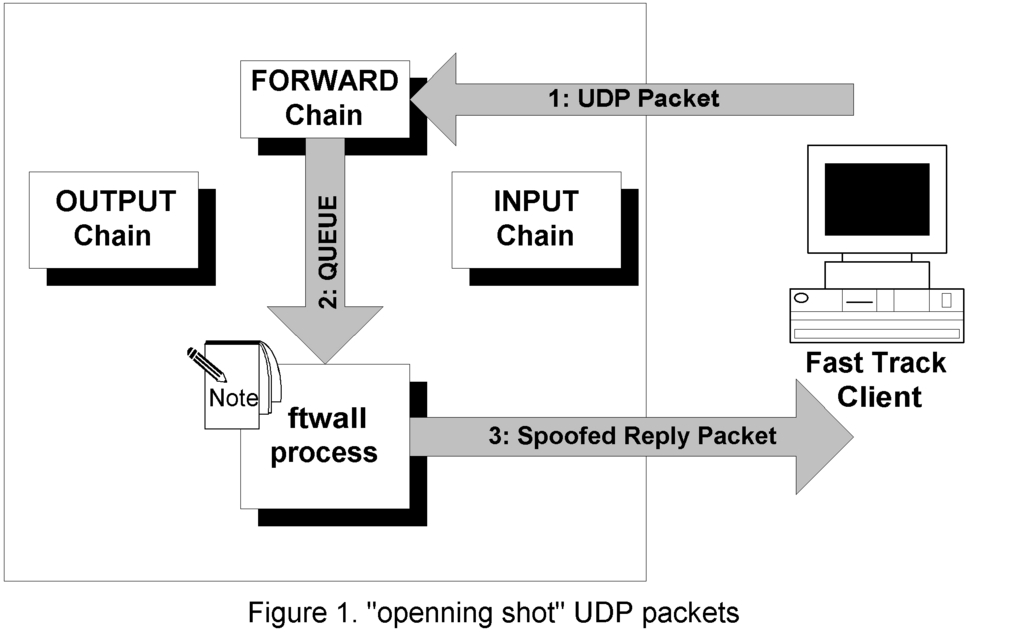
The iptables rule to set up this queuing, assuming eth0 is the home network interface, is:
iptables -A FORWARD -p udp -i eth0 -j QUEUE
When FastTrack receives the spoofed reply, it tries to use UDP to request some extra setup information and then attempts to make a TCP/IP connection to the same address. These UDP and TCP packets are passed to ftwall, which now knows that the destination addresses refer to FastTrack, and so it drops them (Figure 2). Other UDP non-FastTrack packets and TCP/IP SYN packets are returned to Netfilter for further checks and forwarded to their destination.
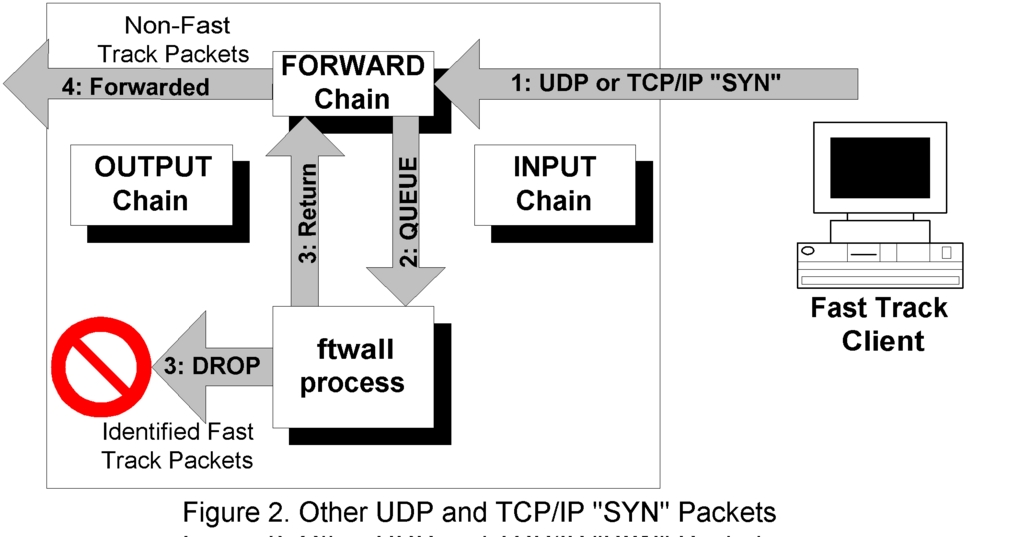
The rule to queue SYNs to ftwall is:
iptables -A FORWARD -p tcp -i eth0 --syn -j QUEUE
The client repeats this UDP and SYN sequence for a while—usually (but not always) until all the addresses it knows about have been attempted at least once. This means that all these addresses now also are known to ftwall as ones that should be filtered.
After a while, the client changes tack and switches to the parallel TCP/IP connection logic with strong data packet encryption. ftwall continues to block connections to addresses it noted during phase one. For any other addresses, the only clue that identifies them as FastTrack connections is the high number of SYN packets seen over a short period. If ftwall relied solely on the UDP packets to do the blocking, it would be defeated, particularly if the client hadn't tried all its known addresses in the first phase. The solution to this problem is a time lock.
In this new mode, the client mixes TCP/IP connection attempts to addresses that ftwall already knows about with others that haven't yet been revealed (if there are any). ftwall keeps a note of the time when the most recent known address was attempted and blocks all TCP/IP connections from the same source IP address for a configurable time after this. Each SYN packet sent to a known address resets the timer. Provided these connections are attempted frequently enough, ftwall continues to block them.
This logic has the side effect that all TCP/IP connections from a rogue workstation are blocked while FastTrack is running there, including accesses to Web and FTP sites. It can be argued that this is acceptable because the user of the workstation is breaking the organization's policy. Once the client application is closed, the timer ceases to be refreshed, and TCP/IP connections will be allowed again once it has expired. This takes two minutes with the default configuration.
After FastTrack has been working in this mode for a while, it appears to come to the conclusion that the parallel style of connection attempt is causing a problem, and it switches to its third mode. Now it slows down the rate of connection attempts and uses the more traditional approach of trying one address at a time, with a few seconds of timeout on each one. This new approach frustrates the logic we have built so far, and the client eventually breaks through. This can take over an hour to achieve, but clients that don't reveal all known addresses early on stand a reasonable chance of establishing a connection during this phase. And once a single connection is established, a completely new set of addresses is downloaded, and we are no better off than we would have been if no blocking was employed in the first place.
To defeat this third mode, ftwall needs more information to allow it to determine whether FastTrack is still in use. One way it can do this is with a little more spoofing. From time to time, ftwall sends the client a UDP packet that is a copy of the one that the client itself uses to open communications with a peer (Figure 3). If the FastTrack software is running on the workstation, it replies with a packet that can be recognized easily, thus causing the lock timer to be reset. The relatively small number and size of these probe packets means the impact on network usage is minimal.
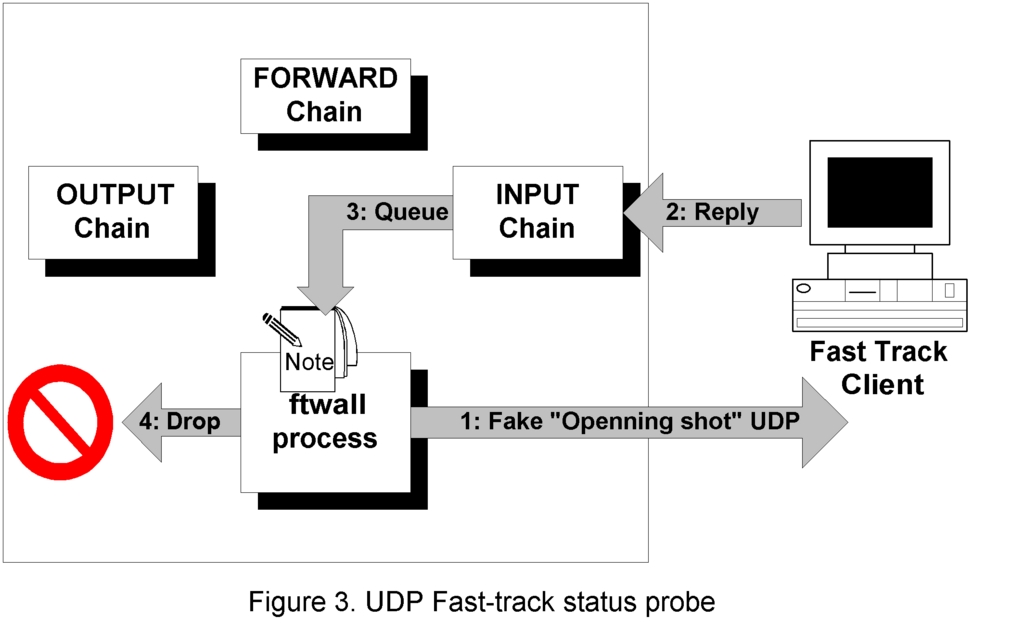
Because this packet is not for forwarding to a public address but destined for the firewall itself, an iptables rule in the INPUT chain is required to pass it to ftwall. The rule to use is:
iptables -A INPUT -p udp -i eth0 -j QUEUE
This keeps the client off-line permanently but is a little inefficient. If we choose the right time-lock timer, sending these UDP packets when it is half expired is all that is required to maintain the timer at a value that keeps the client blocked.
The final piece of the puzzle is a safety net that should not, in theory, be required. The logic described above depends on a set of recognizable UDP packets providing ftwall with the information it needs, but we need to consider what happens if these UDP packets don't arrive—if the user has disabled UDP transmission using the workstation's firewall software, for example. In this case, we have nothing that can be used to determine the addresses of peers being contacted.
However, we still have one option: inspect all TCP/IP data packets in an attempt to detect the actual transfer of files. FastTrack's use of encryption is limited to connection handshaking and searches. The shared files are transferred using clear-text HTTP, although this is not limited to port 80. The HTTP request headers include a number of fields that identify the FastTrack user, protocol and the address of a supernode, a node that provides index information. If these packets are queued for ftwall's inspection, it identifies those that look like the beginning of a FastTrack file download. From the information held in the HTTP headers, ftwall adds the target IP address and the supernode address to its list of blocked addresses and adds the client address to the list of those to which the time-lock logic is applied.
The install process for ftwall is described in depth in the INSTALL file included with the software and on the project Web site, but in summary, the steps are as follows:
Download sources from P2Pwall.sourceforge.net and unzip them.
Install the libipq library, if it is not already installed. On some systems, including Red Hat 7.x and 8, this means obtaining the iptables sources and compiling them.
Compile and install ftwall by running make and make install.
Add an entry to the bootloader directory, /etc/rc3.d, to launch ftwall.
Verify that the QUEUE mechanism is available, and add it if not. Most recent Linuxes already have this in place, but it can be added to those that don't by patching and rebuilding the kernel.
Create the iptables rules in the INPUT and FORWARD chains.
If you want to invoke the belt and braces option of inspecting the HTTP headers of the file downloads in case UDP is blocked on your network, add the string module to the kernel and iptables as well. This involves a kernel patch and rebuild.
Reboot.
With ftwall running on the firewall, FastTrack traffic is blocked from reaching the Internet. Provided your firewall also blocks inbound connections, your network is Kazaa-proof. FastTrack clients in the network still can talk to each other, but file sharing with external peers is prevented.
This approach has the limitation of being focused solely on FastTrack; however, the P2Pwall Project aims to extend its reach to address other P2P protocols in the future. If you want to get involved with the project in any way, please e-mail me at chris@lowth.com.
ftwall works with the FastTrack clients available at the time of this writing. It is possible the FastTrack protocol will change in future, in which case ftwall may need to be modified to match.
Chris Lowth (chris@lowth.com) works for Intercai Mondiale (www.intercai.co.uk), a UK-based telecommunications, IT and business consultancy. He lives with his wife, three sons and golden Labrador in London, England. He plays the guitar, designs Linux-based security software, enjoys a good thunderstorm more than sun bathing and maintains body weight following a strict diet of French cheese and Indian cuisine.

