
DVD Players
I love movies. I'm a fan of films from almost every genre, from various countries and in various languages. Last Christmas, Ivy and I received a DVD player from her kids, and since then I've become an unabashed convert to the medium. Images are sharper, sound is clearer and the medium itself permits my choice of amenities such as subtitling, scene selection (aka chapters) and language preference. The only real problem I have with the player is it resides at her house and not mine. I don't even own a television, so purchasing a standalone DVD player also would mean buying a TV, and that's a purchase I'd rather not make. However, I do have a nice 19" monitor attached to my computer and a good video card to drive it. So the logical step is to add a DVD drive to my machine and configure my system for DVD playback. This article describes how I did that, the problems I encountered and my impressions of the software used for the job.
I learned a lot about hardware while setting up my system for DVD play. My machine is capable of enjoyable glitch-free playback, but it took some tweaking to squeeze the most performance out of it. Here, I describe my system as it was used for this article, but I also describe what I recommend for a more current base system. Hardware matters a lot in this domain, so make sure your system can handle the audio/video requirements for the best DVD viewing and listening experience.
My DVD drive is an inexpensive unit purchased from a friend who had it lying around his apartment. dmesg reports this information about the drive:
hdd: LITEON DVD-ROM LTD163D, ATAPI CD/DVD-ROM drive
If you're in doubt as to what kind of drive is in your machine, run dmesg | grep DVD for a report. Linux has exceptional support for DVD drives; in fact, the Linux Hardware Compatibility HOWTO states that virtually all ATAPI and SCSI DVD-ROM and DVD-RW drives are supported. If you're looking for recommended brands or are concerned about a specific drive, a quick search on Google should turn up the needed information.
The base machine also includes an 800MHz AMD Duron processor, two 15GB hard disks and 512MB of RAM. The display hardware is a generic 19" monitor connected to an NVIDIA GeForce2 video card with 64MB of video RAM. Audio is handled by a Sound Blaster Live! Value card and a sound system that includes a Yamaha DMP7 digital mixer, a 100-watt QSC power amplifier and a pair of Yorkville Sound YS-10 studio monitors. The kernel is compiled for low latency, and all drives are tuned for optimal disk throughput.
I prefer a faster CPU, something 1GHz or higher. I have received reports of decent DVD playback on 600MHz and slower machines, but at less than 1GHz you need to tune your other system components more finely. If you like to watch films in wide-screen mode, I recommend at least a 19" screen for comfortable viewing. Your graphics chipset should support the XFree86 Xv extension (most do), and your card should have at least 16MB of video RAM. The Creative Labs Sound Blaster Live! or Audigy 2 sound cards are excellent choices for stereo or 5.1 audio output configurations. The low-latency kernel is not absolutely necessary, but your DVD drive performance can and should be optimized. I discuss kernel options and tuning your drive in the next section.
One more note regarding an optimal audio system. Many DVDs support 5.1 Surround Sound and other audio options that may or may not be possible under Linux. An inexpensive 5.1 speaker system is fine for casual use, but if you're serious about sound you probably want to invest in a high-quality system. See the Tom's Hardware Guide URL in this article's Resources section on the Linux Journal Web site (/article/7174) for more information regarding available 4.1 and 5.1 sound systems for PC sound cards.
The base Linux installation used for these tests is a heavily modified Red Hat 7.2, but the methods and procedures described here should apply to any relatively recent mainstream distribution with only minor changes (if any). Plain-vanilla Linux is not likely to yield optimal results for DVD performance, so following are a few tips I gathered from the Web and from the documentation for various players tested. The main considerations concern optimizing the kernel itself, tuning X, tuning the DVD drive and ensuring you have the correct device mountpoint.
Some kernel options should be activated for optimizing DVD playback. I strongly urge the application of Andrew Morton's low-latency patches, and it also may be advisable to apply Robert Love's preemptive kernel patch. The combination of these patches provides very low latency (below 3msecs) over sustained periods of time. My kernel of choice is currently 2.4.18, but Andrew's and Robert's patches are available for a variety of kernel releases (see Resources for more information).
You also should make sure your kernel has enabled support for the RTC and MTRR options (found under the Character devices and Processor type and features kernel configuration sections, respectively). RTC provides access to the real-time hardware clock of your PC. According to the kernel configuration help file, all PCs have such a clock but it is not enabled by the default kernel configuration. Although it is not absolutely required, many Linux audio and video applications can utilize this clock for a finer timing response (MPlayer likes it), so I suggest building it directly into your kernel or as a dynamically loadable module.
According to the kernel configuration help, enabling the MTRR (memory type range registers) provides a mechanism that is used:
...to control processor access to memory ranges. This is most useful if you have a video (VGA) card on a PCI or AGP bus. Enabling write-combining allows bus write transfers to be combined into a larger transfer before bursting over the PCI/AGP bus. This can increase performance of image write operations 2.5 times or more.
So, if you have a PCI or AGP video card you will want to enable this option.
Under the ATA/IDE/MFM/RLL Support section, I advise enabling the options for generic PCI bus-master DMA support and the use of PCI DMA by default.
The last step is to configure sound support for your hardware. I use the ALSA sound system, so all I do is enable sound card support in the kernel options. The ALSA drivers are built in normal user space and installed as root as loadable kernel modules. You safely can use the available kernel modules instead of ALSA, but in my opinion the ALSA drivers are superior. In fact, ALSA will become the de facto kernel sound system for Linux kernels beyond the 2.5.x series.
I began my tests with XFree86 4.1.0. Everything seemed to work fine except for an annoying problem with xine: after closing that player my X server would unceremoniously crash, dumping me back at the console prompt. When I upgraded to XFree86 4.3.0 and the latest driver for my GeForce2 from NVIDIA (1.0-4363), all problems were resolved. Because XFree86 4.3.0 fixes a number of problems and bugs found in the earlier versions, I suggest the upgrade to anyone using any of these players, not only xine. And, if you're using an NVIDIA card you always should use their latest drivers.
As mentioned earlier, XFree86 provides a video output driver called Xv, but other drivers are available for the frame-buffer device, SDL (Simple DirectMedia Layer) video output and X11/Xshm. The driver you select affects playback performance. Xv normally is preferred, but you can experiment with whatever drivers are supported by your player of choice for the best output.
My X environment also includes the Blackbox window manager. I prefer simple and fast, and Blackbox fits the bill for me. Be advised that your DVD-viewing mileage may vary in part due to your window manager or desktop environment of choice, and you may need to adjust your available video resources accordingly.
It may come as a surprise to learn that you can tune your DVD and CD-ROM drives as easily as you can tune your hard disks. The hdparm utility can optimize drive performance to peak efficiency, run it (as root) with at least the following parameter options:
hdparm -c1 -d1 -a8 -u1 /dev/hdd
where -c1 enables 32-bit I/O, -d1 enables DMA access, -a8 sets the filesystem read-ahead value and -u1 sets the drive's interrupt-unmask flag. /dev/hdd should specify your particular DVD drive device location.
The parameters shown above work well with my DVD drive, but I urge you to read the hdparm manual page (man hdparm) before running the utility. Your DVD drive is a read-only device, so filesystem corruption is not an issue here. You might, however, inadvertently lower your drive's efficiency with non-optimal settings.
It has been brought to my attention that Red Hat 8.0 users have reported difficulties enabling DMA on their DVD drives. If you're running that distribution, add the following line to your /etc/modules.conf to fix the problem:
options ide-cd dma=1
The players reviewed here all expect to find the default hardware mountpoint at /dev/dvd. Though they all also allow a user-specified location, I suggest making things easier by making /dev/dvd. Typically the drive itself actually is /dev/cdrom, so you may need to create a link from /dev/cdrom to /dev/dvd. Simply issue the following command (again as root) to make the link:
ln -sf /dev/cdrom /dev/dvd
If you have multiple CD/DVD-type drives, you need to specify the correct device number for /dev/cdrom; for example, mine is /dev/cdrom1 because my CD-RW drive sits at /dev/cdrom.
I tested the players with a variety of DVDs, all legitimately manufactured and purchased. My local library lends DVDs, many of which are in less-than-optimal condition, and they played fine on the test system, with the single exception of an incredibly bad duplication of Bruce Lee's Chinese Connection. I even was able to watch a truly awful DVD of dubious origin, a remarkable event given that our standalone DVD player wouldn't even recognize the disc in its drive. I'm happy to report that in all tests the options for subtitling, language selection, chapter jumps and skins worked.
So your kernel is configured, the DVD drive is installed and connected, and you're ready to watch Shrek for the 40th time. All you need now is a player application, and happily Linux has some excellent DVD player software. The profiles below focus on four of the most popular players: MPlayer, Ogle, VideoLAN Client and xine. See the Freshmeat listings for other available players and DVD amenities.
I've already used a standalone DVD player, so I expect to find most of its features in whatever software player I select. In the players reviewed here, I looked for support for these minimum features: standard transport controls (start, stop, pause, fast-forward and rewind), scene selection, subtitling and audio preferences and DVD menus. In addition to the amenities found on the standalone hardware player, I expect a software DVD player to switch from windowed to full-screen view easily and to offer random seek/relocate, keyboard control of all transport functions and skin support.
Most of my expectations were satisfied by the players I reviewed. See Table 1 for an overview of versions, features, licensing and CPU stress. All of them performed with excellent results, with no clear winner in the “Best Of” category. My advice is to try them all, then use the one(s) that seem best to you. In terms of weight, Ogle is the lightest (it's a DVD-only player) while the others all come in with about the same metric tonnage. Although I briefly described building the programs, the reader should check the player Web sites for available RPMs and other prepackaged binaries.
Table 1. Comparison Table of Linux DVD Players [*Indicates whether a GUI is an optional or default feature of the build process. **The figures shown represent average low-to-peak-CPU usage reported by gkrellm during play of the Blade Runner DVD. System load included XMMS, five active workspaces (under the Blackbox window manager) and an active DSL network connection running either Netscape or Opera.]
| Player | Version Tested | Subtitles | Menu Support | Random Seek | Keyboard Control | GUI* | CPU Usage** | License |
|---|---|---|---|---|---|---|---|---|
| MPlayer | 0.90 | Yes | No | Yes | Yes | Optional | 40%–50% | GPL |
| Ogle | 0.9.1 | Yes | Yes | Yes | Yes | Optional | 20%–40% | GPL |
| VideoLAN Client | 0.5.3 | Yes | Yes | Yes | Yes | Default | 20%–30% | GPL |
| xine | 1-beta12 (lib) 0.9.21 (ui) | Yes | Yes | Yes | Yes | Default | 20%–40% | GPL |
Much of the magic performed by these players comes from their use of video codecs (compression/decompression libraries) found in Windows and the Mac OS. In particular, MPlayer and xine require certain codecs to play files in formats such as Microsoft's ASF/WMV and Apple's QuickTime MOV. These codecs usually are not provided by the source or binary packages for the players themselves, but they are acquired easily. I advise getting whatever collections are currently available. Most of us want the standard packages, but if you're a die-hard video fanatic you might as well download and install them all. The legal status of acquiring and utilizing these codecs is somewhat unclear, but because they are available now I suggest getting them right away. It might prove difficult to do so at a later date.
The notorious DeCSS is a descrambler for DVDs encrypted with the Content Scrambling System (CSS). The original DeCSS software was proprietary and binary-only, but it has been reverse engineered and has spread through the Internet. A great deal of ink and ill-will has been spilled over CSS, and the DVD legal battles are far from over. For more information regarding the issues involved, please read the material at cyber.law.harvard.edu/openlaw/DVD. None of the players discussed here require DeCSS. The open-source libdvdcss is used for runtime CSS decryption and does not require a region-locked DVD player.
MPlayer is undoubtedly the most full-featured player reviewed here. It is considerably more than a DVD player, handling files in far too many video and audio formats to list here. Suffice it to say that if it's video, MPlayer likely can play it.

Figure 1. MPlayer with Blue Skin
MPlayer's DVD support meets the standard expectations listed above, and it adds a few features I now can't live without, including its equalizer, a control for audio equalization (EQ) as well as video EQ. Brightness, contrast, hue and saturation can be controlled by the equalizer's sliders. Both audio and video EQ can be controlled in real time with smooth responses. Another nice feature is the ability to set the aspect ratio, that is, how much of your available screen space is occupied by the picture. I don't use this feature so much with DVDs, as most discs are available in wide-screen or standard formats, often on the same disc. Finally, MPlayer provides preset normal, double and full-screen modes for your viewing pleasure.
I really like MPlayer, but I must advise that its build procedure can be somewhat complex. Look over the myriad of configuration options carefully before building the program (see the results from ./configure --help). For instance, the MPlayer GUI is not included by default and must be enabled explicitly. DVD menus are supported with libdvdnav, but the documentation for MPlayer 0.90 indicates that menu support currently is not working. MPlayer's extensive documentation explains every aspect of the program, including compilation details. Look there before you post a complaint to the MPlayer mail list.
One more note concerning MPlayer: its developers are not fond of certain versions of GCC 2.96, nor do they particularly recommend NVIDIA graphics cards. Their stated position is to not answer questions from users with systems owning those components, which is a bit of a problem for me because I have an NVIDIA card and a version of GCC 2.96 on my machine. Nevertheless, I have compiled and used MPlayer under those build conditions and am quite happy with the results. If you have problems when compiling MPlayer with those factors, a Google search should resolve them. In all fairness, I must add that the MPlayer developer and user community is otherwise quite helpful.
Unlike the other players reviewed, Ogle is strictly a DVD player—but what a DVD player it is. Ogle was the first player to support DVD menus, and its other amenities include bookmarks, time skipping, multichannel audio, SPDIF audio output (a digital audio format) and crop and zoom video. The bookmarks function is unique and sweet: I can stop anywhere within a movie, bookmark my position, then return to that position later simply by clicking on the mark. It may not seem like an exciting feature, but it is handy. With the Goggles GUI, Ogle also supports the option to start play upon opening; that is, Ogle automatically starts playing the disc in the drive.
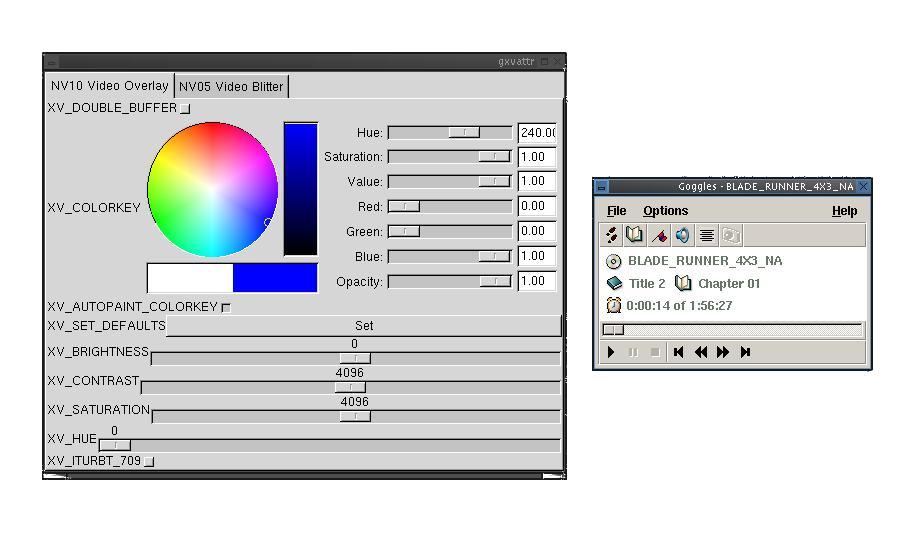
Figure 2. Ogle with Goggles GUI and gxvattr
Ogle by itself can be used from the command line. It also can be built with a native GUI, and a number of third-party GUIs are available from the Ogle Web site. Personally, I like having a control panel handy, and I especially like the appearance of the Goggles GUI, but Ogle's keyboard mapping is excellent. Also, the Goggles GUI requires the FOX toolkit, which is not commonly found in mainstream Linux distributions. The Ogle Web site can direct you to the Goggles home, where you can find out how to acquire the FOX toolkit.
I'm also happy that Ogle's documentation directed me to the xvattr utility. The xv driver typically is the default video output driver for Ogle and the other players reviewed here, and its capabilities usually can be modified by preference settings in the players themselves. However, xvattr is a standalone utility that queries your video card for its specific xv-related capabilities and allows direct user control over them from the command line (or the gxvattr GUI). I found it to be quite handy when trying to resolve some frame rate difficulties due to my NVIDIA card's default double buffering (I was able to switch it off using xvattr). I advise using xvattr to learn more about your video card's particular xv-related capabilities.
VideoLAN Client (VLC) is one part of a project intended to provide a cross-platform client/server solution for A/V (audio/video) streaming over high-bandwidth networks. According to the excellent VideoLAN documentation, the project includes the VideoLAN Server (VLS), which can stream MPEG-1, MPEG-2 and MPEG-4 files, DVDs, digital satellite channels, digital terrestrial television channels and live videos on the network in unicast or multicast. It also includes the VideoLAN Client (VLC), which can be used as a server to stream MPEG-1, MPEG-2 and MPEG-4 files and DVDs on the network in unicast or multicast. It also can be used as a client to receive, decode and display MPEG streams under multiple operating systems.

Figure 3. VideoLAN Client Controls and Preferences Dialog
As a standalone DVD player, VLC's performance is in line with the rest of the players reviewed. Its CPU usage was the lowest measured, making VLC a first-choice solution for networked machines or relatively low-powered systems. VLC's GUI isn't especially exciting, but it works smoothly and flawlessly. If you don't need extensive file format support or if your system fits the target model, then I have no hesitation recommending VLC.
If MPlayer and xine were horses in a race, they'd be side by side at the finish line. xine is somewhat easier to build (the xine developers are not as parochial about your compiler and video card), and it includes all needed libraries within the source package, as well as its GUI in the default build. It also supports DVD menus by default, plays a wide variety of video formats and uses a video EQ similar to the one found in MPlayer. xine's GUI is a little strange at first, but it is actually well organized and easily navigated.
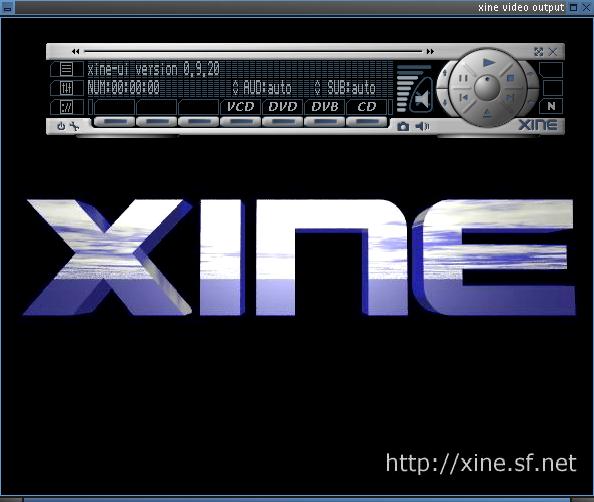
Figure 4. xine with default GUI
xine's performance is second to none. I was concerned about the results of my original test of its CPU usage, but I discovered the program remembered a “sticky” setting I had made while experimenting with its video output drivers. I had told xine to try the xshm driver, not realizing that subsequent sessions would continue to use that driver. Nothing was wrong with the driver itself, I simply noticed that xine's CPU usage was much higher than the results for the other players. Resetting the output driver to xv dramatically lowered CPU consumption, so I've been a little more careful with any changes I make to xine's default settings. You also can run the handy xine-check for a résumé of your system's capabilities analyzed with regard to xine's performance.
The only feature I miss in xine is an interface for random chapter selection. I can jump to scenes before or after the current location, but at this time there is no graphic representation of the chapters tree à la Ogle or MPlayer. However, scene selection from the DVD menu itself is fully supported, so as long as the disc includes a menu with scene selection, xine performs random chapter jumps. One other item of possible complaint is xine's inclusion of its required libraries within the source tree. Apparently this bothers some people, but I consider it to be a great convenience. I didn't have to run around the Web to find what I needed to complete the build; all I needed (except the Win32 and Apple codecs) was included with the original package.
Incidentally, although xine's default GUI is handsome and perfectly usable, a variety of alternative user interfaces can be found on the xine home page. Some nice-looking GUIs are shown, including one that shows your video output in an ASCII character display.
As with the other players, xine's community maintains a number of highly active mail lists. If you have questions about xine that are not answered in its excellent documentation, you certainly can find help from its community of developers and users.
Rather than trying to rewrite the excellent and exhaustive advice found at bunkus.org, here is some brief advice regarding ripping a DVD. Get a big hard disk, install either mencode or transcode (and its dvd::rip GUI) and follow the detailed instructions on the bunkus site. Ripping a DVD can involve a large number of options, so plan ahead for best results. The author of the bunkus site recommends at least 10GB of free space per disc ripped. Also, even using a fast CPU, the ripping process can consume many hours.
I don't own a DVD burner, so I can give no useful advice regarding the process other than mentioning that Jörg Schilling's excellent cdrecord is at the heart of it. However, as with ripping DVDs, a number of on-line articles are listed in the Resources section on the Web (/article/7174) that describe the process in some detail.
While preparing material for this article I asked members of the Linux Audio Users mail list what DVD software they used. MPlayer and xine were the clear winners, but one respondent asked whether I intended to cover hardware DVD decoding boards. Alas, I have no experience with such hardware and welcome feedback from any readers who have used them.
Apparently none of the developers of the players reviewed ever wanted to be accused of supplying inadequate documentation. MPlayer, VideoLAN Client and xine supply especially extensive docs for developers and normal users. Ogle provides somewhat less exhaustive documentation, but it's also the most narrowly focused player reviewed, and its manual page (man ogle) is excellent. All of these players have extensive support available through highly active mail lists and list archives.
The players reviewed all show remarkable longevity and maturity. Linux may not be an obvious first choice for a multimedia platform, but it's certainly becoming difficult to ignore the fact that it is rapidly evolving into a superb platform for audio and video play. I encourage readers to check out the software listed and reviewed here, and I look forward to receiving your reports. Have fun, but remember to try to get some real work done too.
My thanks to all the development teams working to bring a better DVD experience to Linux users everywhere. Thanks also to Siggi Langauf and Bill Fink for their assistance with xine and their astute criticism of my first drafts of this article. I am responsible for remaining inaccuracies and errors, and I welcome civil corrections and addenda.
Dave Phillips is a musician, teacher and writer living in Findlay, Ohio. He has been an active member of the Linux audio community since his first contact with Linux in 1995. He is the author of The Book of Linux Music & Sound, as well as numerous articles in Linux Journal.

