
Shielded CPUs: Real-Time Performance in Standard Linux
In a multiprocessor system, a shielded CPU is a CPU dedicated to the activities associated with high-priority real-time tasks. Marking a CPU as shielded allows CPU resources to be reserved for high-priority tasks. The execution environment of a shielded CPU provides the predictability required for supporting real-time applications. In other words, a shielded CPU makes it possible to guarantee rapid response to external interrupts and to provide a more deterministic environment for executing real-time tasks.
In the past, a shielded CPU could be created only on symmetric multiprocessing systems. With the advent of hyperthreading (where a single CPU chip has more than one logical CPU), even a uniprocessor can be configured to have a shielded CPU.
The shielded CPU approach to providing high-end real-time performance allows the developer of a real-time application to achieve results comparable to the results achieved using a small real-time executive. For example, the results compare to approaches such as RTAI or RT/Linux, where Linux is run as one process under a real-time executive. The advantages of using a pure Linux environment for application development as opposed to one of these executives are many. For example, Linux has support for many device drivers, lowering the overall cost of implementing a complete application solution. A wide variety of high-level languages for better programming efficiency is supported. This is important for commercial applications; programming efficiency may not be central to the design of the real-time system, but it is helpful during the development phase and can provide additional functionality in the end system. Furthermore, Linux offers complex protocol stacks such as CORBA, extensive graphics capabilities and advanced application development tools.
Besides all of the functionality available in standard Linux today, an ever-expanding list of features is being developed for the Linux operating system, due to the strong momentum of the Linux phenomenon. By using Linux as the basis for an application design, a user will have many more options in the future.
A real-time application is one that must respond to a real-world event and complete some processing task by a given deadline. A correct answer delivered after the deadline becomes an incorrect answer. The deadlines themselves are application-dependent and can vary from tens of microseconds up to several seconds. For hard real-time applications, no deadlines can be missed. This means that worst-case measurements of system metrics are the only thing that matters to a hard real-time application, because these are the cases that cause a missed deadline.
Because the occurrence of a real-world event is communicated to a computer system by way of an interrupt, a real-time operating system must provide guaranteed worst-case interrupt response time. In responding to an interrupt and giving control to the real-time application, the computer system has performed the first step needed to meet the deadline. Once the real-time application is running, the system also must provide the application with deterministic execution times. If the time it takes to execute the code associated with a real-time application's response varies widely, deadlines are missed.
To guarantee good interrupt response, the operating system must be able to preempt quickly any tasks currently executing when an interrupt occurs. Because the 2.4 Linux series does not allow one task to preempt the execution of another task executing inside the kernel, a kernel based on this series has poor worst-case interrupt response. A preemption patch is available to make a task executing within the kernel preemptible. Even in a Linux kernel that has the preemption patch installed, however, a hidden problem exists that still causes long interrupt response delays.
The job of any operating system is to coordinate the execution of the many tasks sharing the resources of the system. The data structures that describe these shared resources can be corrupted if they are accessed by multiple tasks at the same time. Therefore, all operating systems have critical sections of code that can be accessed only by tasks in a sequential fashion. When a high-priority task suddenly becomes runnable—because an interrupt occurred—that task cannot take control of the CPU if another task currently is executing inside of one of these critical sections. This means that long, critical sections have a big impact on the ability of the system to respond to an interrupt. The low-latency patches address some of the longer critical sections in the Linux kernel by making algorithmic changes that shorten the critical sections.
In general, the more complex a subsystem is, the longer the critical sections. Because Linux supports many such complex subsystems, including the filesystems and networking and graphics subsystems, its critical sections are very long compared to the critical sections in a small real-time OS. The preemption patch and the low-latency patches have improved the responsiveness of Linux greatly. Still, many critical sections can last tens of milliseconds—not acceptable for the deadlines required by many real-time applications.
As defined previously, a shielded CPU is dedicated to running a high-priority task and the interrupt(s) associated with that task. To create a shielded CPU, the operating system must provide the ability to set a CPU affinity for both processes and interrupts. The 2.4 series of Linux has the ability to set CPU affinity for interrupts, and open-source patches are available that provide this capability for processes. (See “Kernel Korner: CPU Affinity”, LJ, July 2003).
Because a shielded CPU does not run background tasks, a high-priority task on a shielded CPU never is prevented from responding to an interrupt because another task currently is executing inside of a critical section on that CPU. Interrupts always execute at a priority higher than any task, and because they occur at unpredictable points in time, non-real-time interrupts can cause significant non-determinism in a process' predicted execution time. A shielded CPU is not permitted to run interrupts unless the interrupt is one that a high-priority task on the shielded CPU is using.
With the ability to set CPU affinity on processes and interrupts, it would be possible to set up a cheap implementation of CPU shielding. However, this implementation would rely upon all processes to honor the shielded CPU by not changing their affinity to include the shielded CPU. A stronger implementation is desirable, and one such implementation is described below.
The user interface for specifying CPU shielding is a /proc interface that allows an administrator to specify a mask of CPUs that are shielded, as well as a command that manipulates this mask. This interface allows a CPU to be marked dynamically as shielded. Once a CPU is shielded, no process can have its CPU affinity set to include the shielded CPU unless this prohibition precludes the process from executing on any CPUs. Thus, users must select a shielded CPU specifically as the CPU where their tasks should execute in order to run on the shielded CPU. Only a privileged process can add CPUs to its affinity mask.
This implementation requires changes to the code that sets a process' affinity. The routine sys_sched_setaffinity() sets a CPU affinity. This routine is changed to remove a shielded CPU from any user-specified mask when a CPU affinity is set:
p->cpus_allowed_user = new_mask;
if (new_mask & ~shielded_proc)
    new_mask &= ~shielded_procs;
set_cpus_allowed(p, new_mask);
Notice that the shielded CPU bits are not removed if their removal would leave the process with no CPUs on which to execute. The field cpus_allowed_user is a new field in the task structure that holds the original process affinity as specified by the user. Whenever the mask of shielded CPUs changes, the code above needs to be reiterated over all processes in the system. This requires knowing the original CPU affinity for this process, as set by the user. The code that implements a change to the shielded CPU mask looks like this:
for_each_task(p) {
   new_mask = p->cpus_allowed_user & cpu_online_map;
   if (new_mask & ~shielded_proc)
      new_mask &= ~shielded_procs;
   if (new_mask != p->cpus_allowed)
      set_cpus_allowed(p, new_mask);
}
To measure interrupt response time, the realfeel benchmark from Andrew Morton's Web site was used. This test was chosen because it uses the Real Time Clock (RTC) driver, a mechanism for generating interrupts common to many Linux variants. This test measures the response to an interrupt generated by the RTC driver. The RTC driver is set up to generate periodic interrupts at a rate of 2,048Hz. The RTC driver supports a read system call that returns to the user when the next interrupt has fired. The clock used to measure interrupt response is the IA-32 TSC timer, which has a resolution based on the CPU's clock speed. To measure interrupt response time, the test first reads the value of the TSC and then loops doing reads of /dev/rtc. After each read completes, the test finds the current value of the TSC. The difference between two consecutive TSC values measures the duration that the process was blocked waiting for an RTC interrupt. The expected duration is 1/2,048 of a second. Any time beyond the expected duration is considered latency in responding to an interrupt.
To measure worst-case interrupt response time, a strenuous background workload must be run on the system. This workload must provide the system with sufficient overhead to cause delays in the ability of the system to respond to interrupts as well as the resource contention that causes non-deterministic execution. The Red Hat stress-kernel RPM was chosen as the workload. The following programs from stress-kernel were used: TTCP, FIFOS_MMAP, P3_FPU, FS and CRASHME.
The TTCP program sends and receives large data sets over the loopback device. FIFOS_MMAP is a combination test that alternates sending data between two processes by way of a FIFO and operations on an mmaped file. The P3_FPU test manipulates floating-point matrices through various operations. The FS test performs all sorts of operations on a set of files, such as creating large files with holes in the middle, then truncating and extending those files. Finally, the CRASHME test generates buffers of random data, then jumps to that data and tries to execute it. Although no Ethernet activity is generated on the system, the system remains connected to a network and handles standard broadcast traffic during the test runs.
A new version of stress-kernel's NFS_COMPILE test was used because the original version had errors in its cleanup that prevented the test from being run for an extended period of time. The NFS_COMPILE script is the repeated compilation of a Linux kernel, using an NFS filesystem exported over the loopback device. The system used to run all tests was a dual-processor Pentium 4 Xeon with 1GB of memory and a SCSI disk drive.
RedHawk Linux version 1.3, from Concurrent Computer Corporation, was used to measure interrupt response on a shielded CPU. RedHawk is a Linux kernel based on kernel.org 2.4.21. It should be noted that shielded CPUs are only one of the real-time enhancements made to the RedHawk Linux kernel. Some of the other enhancements also contributed to the reported performance numbers below. For example, various open-source patches have been applied to this kernel, including Robert Love's preemption patch, Andrew Morton's low-latency patches and the O(1) scheduler from the 2.5 Linux tree. Other changes that might impact the performance of this test include algorithmic changes to reduce the remaining worst-case critical sections in the Linux kernel and changes to allow bottom-half interrupt processing to be performed inside of a kernel dæmon, whose scheduling policy and priority can be specified.
Figure 1 compares the interrupt response measured under RedHawk Linux using a shielded CPU and without using a shielded CPU. The difference between these runs is striking. In both test cases, most of the time the system was able to respond to the RTC interrupt in less than 100 microseconds. This shows that, in general, Linux responds to an interrupt in a timely manner. However, as stated above, the most important aspect of system metrics for a real-time system is the worst-case timings. This is because the worst cases are examples of system behavior that can cause a real-time application to miss its deadline.
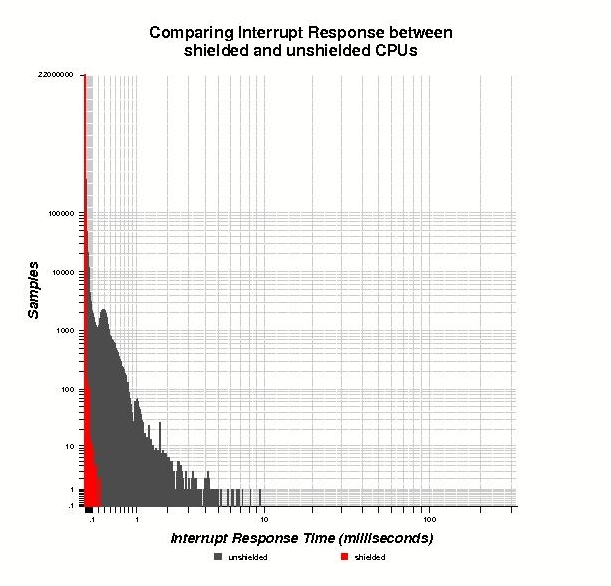
Figure 1. Comparing Interrupt Response between Shielded and Unshielded CPUs
In the shielded CPU case, the worst-case interrupt response time for the RTC interrupt was 220 microseconds. In the case where CPU shielding was not used, all interrupts responded in less than 10 milliseconds, an order of magnitude worse than the worst-case interrupt response time on a shielded CPU. Although less than one percent of the samples in this test case were greater than 200 microseconds, in many thousands of cases the interrupt response exceeded 500 microseconds. In a real-time system, each of these cases would be an opportunity for a missed deadline.
The same interrupt response test also was run on an unmodified 2.4.21 kernel.org kernel (Figure 2) as well as on Red Hat version 8.0 (Figure 3). This Red Hat kernel does not contain the preemption patch, but it does contain the low-latency patches, which are meant to address the longest critical sections in the Linux kernel. Because shielded CPUs are not present in either of these kernels, the results are reported only for the non-shielded case.
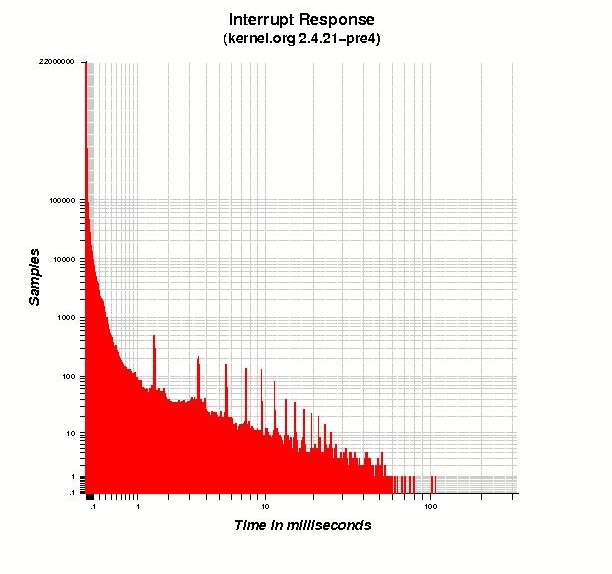
Figure 2. Interrupt Response (kernel.org 2.4.21-pre4)
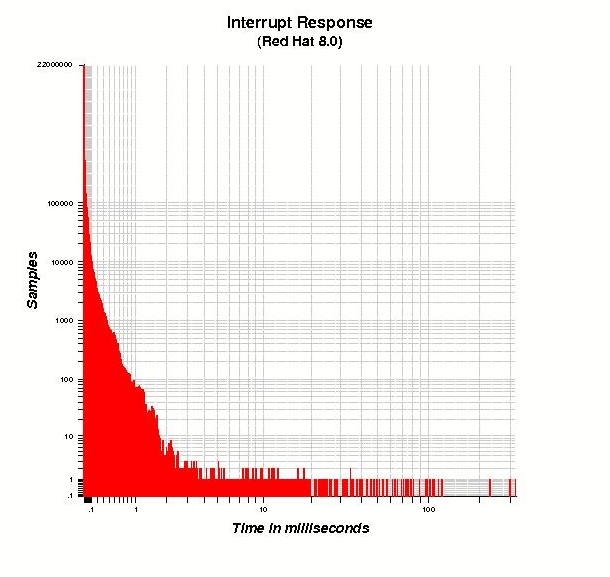
Figure 3. Interrupt Response (Red Hat 8.0)
These kernels show a typical interrupt response time similar to that measured on the RedHawk kernel, with most interrupts occurring in less than 100 microseconds. However, the worst-case interrupt response for these kernels is even worse than the non-shielded case under RedHawk Linux, with kernel.org showing a worst-case interrupt response of 107 milliseconds and Red Hat showing a worst-case interrupt response of 323 milliseconds. These results are not surprising considering that these kernels are tuned to achieve fairness between the processes that share the system and for general system throughput rather than for guaranteed real-time response.
It has been shown that a shielded CPU offers a significant improvement in the worst-case interrupt response time for a Linux system. Shielded CPUs are effective because they reserve critical computing resources for the highest priority tasks in the system. This is accomplished without affecting the standard application programming interface of Linux.
This article has discussed only the response to the RTC interrupt; it was chosen because it is a standard feature in most Linux implementations. It is possible, however, to achieve even better interrupt response guarantees by using other interrupt sources and more highly optimized device drivers. For a more extensive exploration of the shielded CPU concept as well as test results for a device driver that provides an even better interrupt response guarantee, see the whitepaper at www.ccur.com/isddocs/wp-shielded-cpu.pdf.
Stephen Brosky is Chief Scientist of the Integrated Solutions Division of Concurrent Computer Corporation. He was also a member of the IEEE committee that developed the POSIX 1003.1b and 1003.1c standards for real-time application interfaces and threads interfaces.


