
Kernel Korner - Exploring Dynamic Kernel Module Support (DKMS)
Source is a wonderful thing. Merged module source in the kernel tree is even better. Most of all, support for that source is what really counts. In today's explosion of Linux in the enterprise, the ability to pick up the phone and find help is critical. More than ever, corporations are driving Linux development and requirements. Often, this meets with skepticism and a bit of anxiety by the community, but if done correctly, the benefits are seen and felt by everyone.
The dynamic kernel module support (DKMS) framework should be viewed as a prime example of this. DKMS, a system designed to help Dell Computer Corporation distribute fixes to its customers in a controlled fashion, also speeds driver development, testing and validation for the entire community.
The DKMS framework is basically a duplicate tree outside of the kernel tree that holds module source and compiled module binaries. This duplication allows for a decoupling of modules from the kernel, which, for Linux solution and deployment providers, is a powerful tool. The power comes from permitting driver drops onto existing kernels in an orderly and supportable manner. In turn, this frees both providers and their customers from being bound by kernel drops to fix their issues. Instead, when a driver fix has been released, DKMS serves as a stopgap to distribute the fix until the code can be merged back into the kernel.
Staying with the customer angle for a bit longer, DKMS offers other advantages. The business of compiling from source, installing or fidgeting with rebuildable source RPMs has never been for the faint-of-heart. The reality is that more Linux users are coming in with less experience, necessitating simpler solutions. DKMS bridges these issues by creating one executable that can be called to build, install or uninstall modules. Further, using its match feature, configuring modules on new kernels could not be easier, as the modules to install can be based solely on the configuration of some kernel previously running. In production environments, this is an immense step forward as IT managers no longer have to choose between some predefined solution stack or the security enhancements of a newer kernel.
DKMS also has much to offer developers and veteran Linux users. The aforementioned idea of the decoupling of modules from the kernel through duplication (not complete separation) creates a viable test bed for driver development. Rather than having to push fixes into successive kernels, these fixes can be distributed and tested on the spot and on a large scale. This speedup in testing translates to an overall improvement in the speed of general development. By removing kernel releases as a blocking mechanism to widespread module code distribution, the result is better tested code that later can be pushed back into the kernel at a more rapid pace—a win for both developers and users.
DKMS also makes developers' lives easier by simplifying the delivery process associated with kernel-dependent software. In the past, for example, Dell's main method for delivering modules was RPMs containing kernel-specific precompiled modules. As kernel errata emerged, we often were taken through the monotonous and unending process of recompiling binaries for these new kernels—a situation that no developer wants to be in. However, Dell still favored this delivery mechanism because it minimized the amount of work and/or knowledge customers needed to have to install modules. With DKMS, we can meet these usability requirements and significantly decrease our workload from the development standpoint. DKMS requires module source code to be located only on the user's system. The DKMS executable takes care of building and installing the module for any kernel users may have on their systems, eliminating the kernel catch-up game.
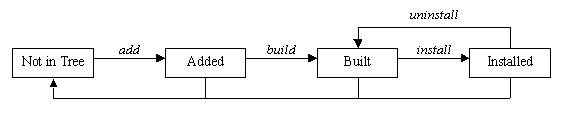
Figure 1. Module States in DKMS
With all of this up-front hype about DKMS, perhaps it might be best to settle into the particulars of actually how the software is used. First, using DKMS for a module requires that the module source be located on the user's system and that it be located in the directory /usr/src/(module))-((module-version))/. In addition, a dkms.conf file must exist with the appropriately formatted directives within this configuration file to tell DKMS such things as where to install the module and how to build it. More information on the format of the dkms.conf file can be found later in this article. Once these two requirements have been met and DKMS has been installed on the system, the user can begin using DKMS by adding a module/module-version to the DKMS tree. The example add command:
dkms add -m qla2x00 -v v6.04.00
would add qla2x00/v6.04.00 to the extant /var/dkms tree. This command includes creating the directory /var/dkms/qla2x00/v6.04.00/, creating a symlink from /var/dkms/qla2x00/v6.04.00/source to → /usr/src/qla2x00-v6.04.00/ and copying the dkms.conf file from its original location to /var/dkms/qla2x00/v6.04.00/dkms.conf.
Once this add is complete, the module is ready to be built. The dkms build command requires that the proper kernel sources are located on the system from the /lib/module/kernel-version/build symlink. The make command used to compile the module is specified in the dkms.conf configuration file. Continuing with the qla2x00/v6.04.00 example:
dkms build -m qla2x00 -v v6.04.00 -k 2.4.20-8smp
compiles the module but stops short of installing it. Although build expects a kernel-version parameter, if this kernel name is left out, it assumes the currently running kernel. However, building modules for kernels not currently running also is a viable option. This functionality is assured through the use of a kernel preparation subroutine that runs before any module build is performed. This paranoid kernel preparation involves running a make mrproper, copying the proper kernel .config file to the kernel source directory, running a make oldconfig and, finally, running a make dep. These steps ensure that the module being built is built against the proper kernel symbols. By default, DKMS looks for the kernel .config file in the /lib/modules/kernel-version/build/configs/ directory, utilizing Red Hat's naming structure for those config files. If the kernel .config file is not located in this directory, you must specify a --config option with your build command and tell DKMS where the .config file can be found.
Successful completion of a build creates, for this example, the /var/dkms/qla2x00/v6.04.00/2.4.20-8smp/ directory as well as the log and module subdirectories within this directory. The log directory holds a log file of the module make, and the module directory holds copies of the compiled .o binaries.
With the completion of a build, the module now can be installed on the kernel for which it was built. Installation copies the compiled module binary to the correct location in the /lib/modules/ tree, as specified in the dkms.conf file. If a module by that name is already found in that location, DKMS saves it in its tree as an original module, so it can be put back into place at a later time if the newer module is uninstalled. The example install command:
dkms install -m qla2x00 -v v6.04.00 -k 2.4.20-8smp
creates the symlink /var/dkms/qla2x00/v6.04.00/kernel-2.4.20-8smp → /var/dkms/qla2x00/v6.04.00/2.4.20-8smp. This symlink is how DKMS keeps tabs on which driver version is installed on which kernel. As stated earlier, if a module by the same name is installed already, DKMS saves a copy in its tree in the /var/dkms/module-name/original_module/ directory. In this case, it would be saved to /var/dkms/qla2x00/original_module/2.4.20-8smp/.
To complete the DKMS cycle, you also can uninstall or remove your module from the tree. Uninstall removes the module you installed and, if applicable, replaces it with its original module. In scenarios where multiple versions of a module are located within the DKMS tree, when one version is uninstalled, DKMS does not try to understand or assume which of these other versions should be put in its place. Instead, if a true original_module was saved from the original DKMS installation, it is put back into the kernel. All of the other module versions for that module are left in the built state. An example uninstall would be:
dkms uninstall -m qla2x00 -v v6.04.00 -k 2.4.20-8smp
If the kernel version parameter is unset, the currently running kernel is assumed, but the same behavior does not occur with the remove command. Remove and uninstall are similar in that a remove command completes all of the same steps as does an uninstall. However, if the module-version being removed is the last instance of that module-version for all kernels on your system, after the uninstall portion of the remove completes, remove physically removes all traces of that module from the DKMS tree. In other words, when an uninstall command completes, your modules are left in the “built” state. However, when a remove completes, you have to start over from the add command before you can use this module again with DKMS. Here are two sample remove commands:
dkms remove -m qla2x00 -v v6.04.00 -k 2.4.20-8smp
dkms remove -m qla2x00 -v v6.04.00 --all
With the first remove command, the module would be uninstalled. If this module/module-version were not installed on any other kernel, all traces of it would be removed from the DKMS tree. If, say, qla2x00/v6.04.00 also was installed on the 2.4.20-8bigmem kernel, the first remove command would leave it alone—it would remain intact in the DKMS tree. That would not be the case in the second example. It would uninstall all versions of the qla2x00/v6.04.00 module from all kernels and then completely expunge all references of qla2x00/v6.04.00 from the DKMS tree. Thus, remove is what cleans your DKMS tree.
DKMS also comes with a fully functional status command that returns information about what is currently located in your tree. If no parameters are set, it returns all information found. Logically, the specificity of information returned depends on which parameters are passed to your status command. Each status entry returned is of the state added, built or installed. If an original module has been saved, this information also is displayed. Some example status commands include:
dkms status
dkms status -m qla2x00
dkms status -m qla2x00 -v v6.04.00
dkms status -k 2.4.20-8smp
dkms status -m qla2x00 -v v6.04.00 -k 2.4.20-8smp
Another major feature of DKMS is the match command. The match command takes the configuration of DKMS-installed modules for one kernel and applies it to some other kernel. When the match completes, the same module/module-versions installed for one kernel are then installed on the other kernel. This is helpful when you are upgrading from one kernel to the next but want to keep the same DKMS modules in place for the new kernel. In the example:
dkms match --templatekernel 2.4.20-8smp
↪-k 2.4.20-9smp
--templatekernel is the match-er kernel from which the configuration is based. The -k kernel is the match-ee upon which the configuration is instated.
For systems management purposes, the commands mktarball and ldtarball also have been added to DKMS. These commands allow the user to make and load tarball archives, respectively, into the DKMS tree to facilitate using DKMS in deployments where many similar systems exist. This allows the system administrator to build modules on only one system. Rather than build the same module on every other system, the built binary can be applied directly to the other systems' DKMS tree. Specifically, mktarball creates a tarball of the source for a given module/module-version. It then archives the DKMS tree of every kernel version that has a module built for that module/module-version. Consider the example:
dkms mktarball -m qla2x00 -v v6.04.00
↪-k 2.4.20-8smp,2.4.20-8
Depending on the -k kernel parameter, mktarball archives only certain binaries compiled for those kernels specified. If no kernel parameter is given, it archives all built module binaries for that module/module-version.
With ldtarball, DKMS simply parses the archive created with mktarball and applies whatever is found to that system's DKMS tree. This leaves all modules in the built state; the dkms install command then can be used to place the module binaries into the /lib/modules tree. Under normal operation, ldtarball does not overwrite any files that already exist in the system's DKMS tree. However, the archive can be forced over what is in the tree with the --force option. An example ldtarball:
dkms ldtarball --config
↪qla2x00-v6.04.00-kernel2.4.20-8smp.tar.gz
The last miscellaneous DKMS command is mkdriverdisk. As can be inferred from its name, mkdriverdisk takes the proper sources in your DKMS tree and creates a driver disk image that can provide updated drivers to Linux distribution installations. A sample mkdriverdisk might look like:
dkms mkdriverdisk -d redhat -m qla2x00
↪-v v6.04.00 -k 2.4.20-8BOOT
Currently, the only supported distribution driver disk format is Red Hat, but this easily could expand with some help from the community in understanding driver disk requirements and formats on a per-distribution basis. For more information on the extra necessary files and their formats for DKMS to create Red Hat driver disks, see people.redhat.com/dledford. These files should be placed in your module source directory.
For maintainers of DKMS packages, the dkms.conf configuration file is the only auxiliary piece necessary to make your source tarball DKMS-ready. The format of the conf file is a successive list of shell variables sourced by DKMS when working with your package. For example, an excerpt from the qla2x00/v6.04.00 dkms.conf file:
MAKE="make all
↪INCLUDEDIR=/lib/modules/$kernelver/build/include"
MAKE_smp="make SMP=1 all
↪INCLUDEDIR=/lib/modules/$kernelver/build/include"
LOCATION="/kernel/drivers/addon/qla2200"
REMAKE_INITRD="yes"
MODULE_NAME="qla2200.o:qla2200_6x.o
↪qla2300.o:qla2300_6x.o"
CLEAN="make clean"
MODULES_CONF_ALIAS_TYPE="scsi_hostadapter"
MODULES_CONF0="options scsi_mod
↪scsi_allow_ghost_devices=1"
shows that each of the shell variable directives should be coded in all capital letters. One of the current exceptions to this rule is the MAKE_ directive. DKMS uses the generic MAKE= command to build your module. But, if a MAKE_kernel-regexp-text command exists and the text after the MAKE_ matches (as a substring) the kernel for which it is being built, then this alternate make command is used. In the above example, you can see how DKMS would use the MAKE_smp directive on any smp kernel for which it was building this module. Similar PATCH_ commands also exist. When the text after the underscore matches the kernel for which a module is being built, that patch first is applied to the module source. This allows developers to distribute one source tarball, with one dkms.conf and multiple patches. Yet, different patches can be applied as necessary to the source to ensure all modules function correctly on all kernels.
Also notice that dkms.conf accepts the $kernelver variable, which, at build time, is replaced with the kernel version for which the module is being built. This is especially important so the correct include directories are referenced when compiling a module for a kernel that is not currently running.
DKMS and RPM actually work quite well together. The only twist is that to make it function properly, you have to create an RPM that installs source. Although normal practice is to install source only with source RPMs, a source RPM does not necessarily work with DKMS; it will not let you do much besides install the source. Instead, your source tarball needs to be included with your RPM, so your source can be placed in /usr/src/module-module-version/ and the proper DMKS commands can be called. The %post and %preun basically are DKMS commands. Here is a sample .spec file:
%define module qla2x00

Summary: Qlogic HBA module
Name: %module_dkms
Version: v6.04.00
Release: 1
Vendor: Qlogic Corporation
Copyright: GPL
Packager: Gary Lerhaupt <gary_lerhaupt@dell.com>
Group: System Environment/Base
BuildArch: noarch
Requires: dkms gcc bash sed
Source0: qla2x00src-%version.tgz
Source1: dkms.conf
BuildRoot: %{_tmppath}/%{name}-%{version}-%{release}-root/

%description
This package contains Qlogic's qla2x00 HBA module meant
for the DKMS framework.

%prep
rm -rf qla2x00src-%version
mkdir qla2x00src-%version
cd qla2x00src-%version
tar xvzf $RPM_SOURCE_DIR/qla2x00src-%version.tgz

%install
if [ "$RPM_BUILD_ROOT" != "/" ]; then
	rm -rf $RPM_BUILD_ROOT
fi
mkdir -p $RPM_BUILD_ROOT/usr/src/%module-%version/
install -m 644 $RPM_SOURCE_DIR/dkms.conf
$RPM_BUILD_ROOT/usr/src/%module-%version
install -m 644 qla2x00src-%version/*
$RPM_BUILD_ROOT/usr/src/%module-%version

%clean
if [ "$RPM_BUILD_ROOT" != "/" ]; then
        rm -rf $RPM_BUILD_ROOT
fi

%files
%defattr(0644,root,root)
%attr(0755,root,root) /usr/src/%module-%version/

%pre

%post
/sbin/dkms add -m %module -v %version
/sbin/dkms build -m %module -v %version
/sbin/dkms install -m %module -v %version
exit 0

%preun
/sbin/dkms remove -m %module -v %version --all
exit 0
Because DKMS is a recently conceived framework, many things can be added, removed or recoded as the community decides. The latest project information for DKMS can be found at www.freshmeat.net/projects/dkms. You can ask questions and provide feedback by joining the DKMS-devel mailing list at lists.us.dell.com/mailman/listinfo.
In the December 2002 issue of Linux Journal, Linus Torvalds was quoted as saying, “Basically, all of the commercial people have their own agenda, and that's very healthy because you want to have these often-conflicting agendas to push the system into something that actually works for everybody.” As a commercial reseller of Linux-enabled products, Dell is interested in finding a good solution to the ongoing module/kernel issue, both to support the community and to create a better Linux experience for their customers. DKMS was designed with this in mind.
Gary Lerhaupt (gary_lerhaupt@dell.com) is a software engineer on Dell's Linux Development team. He also has collaborated on the Dell Oracle9i Real Application Clusters (RAC) initiative deployed on Red Hat Linux. Gary has a bachelor's degree in Computer Science and Engineering from The Ohio State University.

