
Floppies for the New Millennium
Late in 2002, my wife bought me an Easy Disk USB flash memory device built around an NAND-type flash chip with an ARM7 controller. It's a cute little plastic thing about the size and shape of a stubby cigar or a wide pen, and I routinely keep it in my pocket for convenience. This particular one has a 32MB capacity and is sold at your local PC clone shop for about $10–$20 US, but various capacities are available, ascending by powers of two all the way up to 2GB for about $600. The sweet spot on today's market is probably 256MB for about $80–$90 US; though offerings and prices are in flux as manufacturers continue to expand the market (Table 1). The smaller units seem to be vanishing as stocks run out, and the 2GB ones are just now hitting the market.
Table 1. Typical Street Pricing
| Capacity | Price (US) | Price/MB |
|---|---|---|
| 8MB | $28 | $3.50 |
| 16MB | $21 | $1.31 |
| 32MB | $30 | $0.93 |
| 64MB | $40 | $0.63 |
| 128MB | $58 | $0.45 |
| 256MB | $91 | $0.36 |
| 512MB | $170 | $0.33 |
| 1GB | $321 | $0.31 |
| 2GB | $600 | $0.29 |
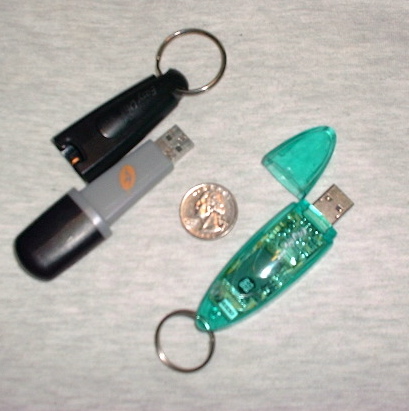
Figure 1. Two USB flash drives. Left: my 32MB Easy Disk. Right: my wife's 128MB Soyo Pen Drive Pro. The Easy Disk's attachment point is on its dustcap, which thus remains on your key chain, belt or wherever, while the business end is in use. Soyo (like most flash drives, unfortunately) flubs this by putting its attachment point on the wrong end.
For some computer users, the gadget that finally made USB part of daily computing was a digital camera or scanner, or a USB mouse or keyboard. For me, it was this unassuming little widget. Why? Because it solves the same problems we used to solve with floppy disks, updated to modern performance and capacity standards.
Floppies themselves are obsolete on account of low capacity, speed and reliability, but the need exists more than ever for impromptu file transport between machines, especially for those of us who travel about with laptops. Ideally, everyone would have compatible 802.11a, b or g wireless or infrared networking or would be able to plug in to an available Ethernet hub, but that won't be reliably true in the near term. Even a crossover Ethernet cable, foolproof and compact as it is on the hardware level, requires software cooperation on both ends, which often doesn't happen.
Iomega Zip disks are lovely for capacities up to 100MB, but most people don't have the drives. CD-R/CD-RW drives are more of an archival medium than they are casual disk storage, because one must assemble and burn session data to create them. Floppies are, by modern standards, too slow, too fallible and too tiny. So, there's been a functionality gap into which USB flash memory drives step nicely. They're fast, spacious, nonvolatile, durable, compact, cheap and compatible with all recent PCs and Macs, regardless of operating system.
When USB first appeared on PCs, physically connecting devices like Easy Disks entailed the serious inconvenience of reaching around to the system unit's back panel to find the USB ports. You still will sometimes encounter this situation, especially on PCs whose USB ports have gone unused. People who use such ports regularly tend to attach USB hubs to them for ease of access, such as the hubs increasingly built in to current production monitors. Also, many of the newer workstation case designs move their USB ports to the front panel.
The storage medium inside the hard plastic shell is NAND-type flash memory, which is neither fish nor fowl. It's not volatile like the classic (but exotic) electronic disk drives. Material written to a flash disk will stay good for a decade or more, with no need for AC power or batteries. It's not fragile like a hard disk, nor are there moving parts as in hard, floppy and Zip disks. Its write operations, at about 1MB/s, are much slower than those of CD-R or even CD-RW drives and are poky compared to a hard drive's. Read operations, on the other hand, are about five times faster and don't wear the device.
The literature on NAND flash disks suggests that they wear out after about 10,000 erase/write cycles, which just might sneak up on you, given that you can't hear any signs of distress. Any write operation requires that the onboard controller chip first zero out a fairly large data block, typically 8 or 16KB. Eventual block failure will occur from fatigue after too many erase/write cycles, at best requiring that the controller chip's hardware-level ECC functions mark as bad that entire block, and at worst causing device failure, if key filesystem information was stored there.
The point is that, although the design encourages you to treat flash disks as random-access devices, their wear characteristics are more like those of sequential media, such as magnetic tape. Accordingly, when using flash disks as Linux mass storage, you should take measures at the software level to limit wear.
In addition to the USB form factor, you'll also find NAND-type flash memory in PC Card (PCMCIA) devices—plus in a half-dozen or so closely related physical formats commonly used for data storage in digital cameras, PDAs, cellular phones and the like: CF (CompactFlash), MMC (MultiMedia Card), SD (Secure Digital), SmartMedia, Memory Stic, XD-Picture, Microdrive and Memory Gate. Most and perhaps all of those latter flash types omit the logic circuitry that enables USB flash disks to self-monitor for ECC purposes, support boot code and so on, being closer to simple flash storage with a standard access port. Most mentions of flash devices you'll encounter will turn out to concern CF-type media or similar; take care not to confuse these with USB flash drives.
Given a 64MB USB flash disk, one should be able to put entire Linux mini-distributions, such as the LNX-BBC, on them. If your machines have BIOS support for booting from USB, it might be worthwhile to experiment.
Some of us old-fogy x86 Linux users have been slow to warm to USB. In the 2.2 kernel days, we initially heard of people needing to solve driver problems to benefit their fancy digital cameras and thought “better them than us”. Linux USB support was first pioneered by Inaky Perez Gonzalez, and then rewritten by Linus Torvalds, Greg Kroah-Hartman and others, and was initially rough going.
Then, USB scanners, printers, mice, video cameras, ISDN and xDSL devices, modems, floppy drives, loudspeakers, joysticks, digital tablets, MP3 players, wireless devices, PDAs, sundry mass-storage devices and just about everything else hit the market—USB started looking a whole lot less like the Useless Serial Bus we used to joke about. Fortunately, the kernel's driver support caught up in the interim, but its architecture may be a bit unfamiliar to many. If you're lucky, your distribution will have made the messy details fade to background, but in case it hasn't, read on.
Linux's USB support starts with the kernel needing to recognise your motherboard's USB chipset, which will be a UHCI (Intel) or OHCI-class (Compaq and others) device, requiring the usb-uhci or usb-ohci kernel driver, respectively. (Both also will need the usbcore driver.) If lspci -v returns USB information that includes I/O ports at, then you have a UHCI controller. If the returned USB-controller text includes Memory at, then it's OHCI.
When you're done tweaking module loading (if necessary), the output of lsmod should include all three required drivers. For example, my laptop machine lists:
Module              Size  Used by    Not tainted
usb-uhci           20676   0  (unused)
usb-storage        97120   1
usbcore            48000   1  [usb-uhci usb-storage]
The usb-storage driver is a translator that lets random-access-type USB devices be addressed using SCSI block-device names—we'll return to that later. Without it, you'd need some other intermediary to access files from the USB layers, such as the gPhoto2 application.
If you're running a 2.3.38 or later kernel (and you should really upgrade to 2.4.x or later, at this point), you also should add the following line to /etc/fstab to enable USB device tracking:
none /proc/bus/usb usbdevfs defaults 0 0
After this, type mount -a. Now, you're all done except for mounting the actual mass-storage device. The above step does not mount the device—usbdevfs is strictly an abstract support filesystem similar to /proc, used by the USB subsystem.
All of the above USB-configuration details should be taken care of automatically by modern Linux installer programs, but it is covered here in case it's not. If you're reasonably lucky, all you need to do is plug the drive in to a USB port or hub and mount it.
I created a mountpoint directory of /mnt/fob from which to hang the flash drive. That name owes to the drive being about the same size as a key fob or an old pocket watch (fob watch), lurking in one's trouser pockets in roughly the same fashion.
That was the easy part. Next was a wild ride trying to chase down how to mount it properly. My browsing of on-line materials suggested that USB flash drives, as with Iomega Zip disks, would be treated as SCSI. A glance at /proc/scsi/scsi after plugging in the Easy Disk clarifies that it's recognised as the first SCSI device and moreover that it's a rebranded DiskOnKey unit OEMed from M-Systems, Inc. Intuition therefore suggested mounting /dev/sda1 (on an otherwise IDE-based system), but intuition turned out to be dead wrong in the Easy Disk's case. Making the attempt resulted in this puzzling error:
guido:~# mount -t vfat /dev/sda1 /mnt/fob
mount: block device /dev/sda1 is write-protected,
mounting read-only
mount: /dev/sda1 is not a valid block device
Some other USB flash drives reportedly do mount precisely in that way, whereas I found out that the Easy Disk mounts as /dev/sda, not /dev/sda1 or any other partition number—that is, it treats the drive as a device lacking the ability to house a partition table. The explanation of this curiosity turns out to lie in the ATAPI Removable Media Device (ARMD) BIOS Specification, laid down by Compaq and Phoenix in 1997 to generalise how a floppy-like drive should behave on the ATA bus in anticipation of traditional floppy drives going the way of the dodo. ARMD devices are basically big floppy disks, which per the spec have no partition table. Thus, the Easy Disk happens to be an ARMD (floppy-like) device. Apparently, many other USB flash disks are, by contrast, treated as regular ATAPI drives.
Like most flash devices, the Easy Disk came preformatted with the MS-DOS FAT filesystem. That raises, of course, the question of whether it might be rewritten to use less antique disk formats instead. I never tested that, partly because FAT, for all its faults, is supported by almost all UNIX workstations, Macs and MS Windows boxes. Partly, I shied away from attempting other filesystems in order to reduce device fatigue.
Now, some further elaboration of the mount command:
# mount -o uid=1000,gid=1000,noatime -t vfat \
/dev/sda /mnt/fob/
The uid and gid mount options are those of my own login account to set file ownerships. More significant is the noatime, provided in order to eliminate unnecessary erase/write cycles. Don't forget, simply doing an ls on any directory will increment the files' atime (access time).
Alert readers may be thinking: “Wait, there's no atime on FAT filesystems!” True. There's only a single timestamp field for each file or directory, but Linux deals with this by updating that single time value on any occasion it ordinarily would update atime, mtime or ctime. So, disabling atime still reduces the frequency of erase/write operations, even on FAT.
All of those mount options can and should be put in /etc/fstab:
/dev/sda  /mnt/fob  vfat
↪uid=1000,gid=1000,user,noauto,noatime 0 0
One further oddity—no matter what you do, the flash disk always mounts read-only:
mount: block device /dev/sda is write-protected,
mounting read-only
This happens even if you specify rw among the mount options. However, you subsequently can enable write access after mounting the flash disk, by remounting with the rw option:
# mount -o rw,remount /mnt/fob
Exactly why /bin/mount insists that the flash disk is write-protected and must be mounted read-only is a genuine mystery. Although some flash disks' plastic casings reportedly sport write-protect switches, the Easy Disk's doesn't. My best guess is that mount is heeding a request from the Easy Disk's built-in controller chip, intended to minimise accidental device fatigue. And it works. As a side benefit, the read-only default seems to render harmless your unplugging of the device when, inevitably, you forget to unmount it first—making it truly a hot-plug device.
Having coped with the hurdles and minor oddnesses of getting Linux support configured for the flash drive—or pen drive, as they are sometimes called—what strikes one most about these devices is how they fade to background. You simply rely on them and take them for granted, which is the mark of any truly successful technology. Documents and applications you use frequently, GnuPG and other crypto keys and files you need to transport among computers, regardless of operating system, are stored on the flash disk and dropped into your pocket. You don't have to worry about magnetic fields, mechanical shock, spontaneous bit-rot or anything else. It simply plugs in to a free port and works. There's nothing else quite like it.
Resources
Article about using Linux on a flash drive that registers as /dev/sda1 instead of /dev/sda: www.gctglobal.com/Download/3rd_LED/PalmKey/palmkey.html.
ATAPI Removable Media Device (ARMD) BIOS Specification, formerly the ATAPI Removable Drive (ARMD) Specification: www.phoenix.com/resources/specs-atapi.pdf.
Linux also supports CF devices and can boot from them. See the Memory Technology Device (MTD) Subsystem for Linux Site: www.linux-mtd.infradead.org.
Rick Moen is a sysadmin, writer and IT guy in the San Francisco Bay area where he has been a longtime member of its Linux community for which he runs an on-line calendar of upcoming events, BALE (Bay Area Linux Events, linuxmafia.com/bale).
