
Intermediate Emacs Hacking
Customizing Emacs is important to get the most out of it. You can change the way it operates to reflect your way of doing things, which in turn makes you more efficient. Just as custom-built boots fit better than factory boots, a customized Emacs fits you better than standard, off-the-shelf Emacs.
Emacs changes can be session-specific or permanent. You can customize Emacs directly by executing commands in the mini-buffer or by modifying variables using the set-variable command. These changes are volatile, meaning you lose them when you end your session. To make permanent changes, you can create or modify an init file. Emacs examines several init files when it loads. Probably the easiest way to customize is to edit .emacs, stored in your home directory. Before loading your .emacs file, Emacs loads default.el from your library path. Emacs also looks in its load path for site-start.el, which system administrators may use to provide site-wide customization. Alternatively, you can make permanent Emacs changes through the Customize menu (Options→Customize Emacs in version 21.1 and up). This gives you a GUI-based front end for modifying your .emacs file.
Like most GUI front ends, Customize is not as powerful as hacking the text configuration file, but it is easier to use. Fire up the Customization group, and you notice that Emacs builds the menus on the fly. That way it's always up to date (Figure 1).
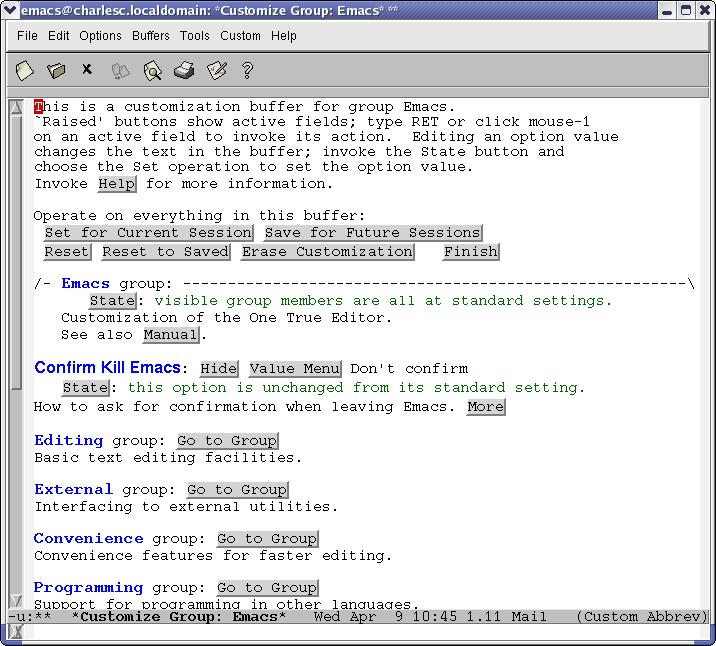
Figure 1. The Top-Level Customization Menu
To navigate Customize's tree structure, either point to a button and press Return or click on the button. Full Emacs searching also works in the Customize buffers. Each level in the tree is represented in a buffer, and you can manipulate Customize buffers as usual. For example, when you are done with a level, kill the buffer.
I'd like to turn on the PHP speedbar whenever I enter PHP mode, for example, when I visit a PHP file. To do this, I follow the menu tree to PHP mode customization (Figure 2). As you can see, I've toggled the state but haven't yet saved my changes. I can set it only for this session, or I can save the change for future sessions. When I do the latter, Emacs edits my .emacs file. You can verify the change by searching for the variable name in .emacs.

Figure 2. Setting the Speedbar to Turn On in PHP Mode
If you aren't sure of the name of a variable or where to find it in Customize's vast tree, you can use regular expression searches on variable names and their contents. If you want to change how Emacs prints, you could search on the regex “print” and Emacs would build a custom Customize menu for you. See the menu under Options→Customize Emacs for these and other options.
You also can modify Emacs' behavior by editing ~/.emacs directly. This is a good way to add function and insert bulk customizations you may learn about from other people. For example, C mode can be modified by setting variables that affect how it operates.
Many modes are customized on a per-buffer basis. This means you write a short function that sets the variables and set that function to be executed whenever Emacs enters the mode. The outline of it is:
(defun rays_c_mode ()
  "ray's c/c++ mode hook"
  (message "Loading Ray's C mode...")
  ...
  (message "Loading Ray's C mode... Done")
  )
(add-hook 'c-mode-common-hook 'rays_c_mode)
The Lisp function defun defines a function, in this case rays_C_mode. The function takes no parameters; it prints out messages only for the user's benefit. The last line adds the function rays_c_mode to C mode's mode hook, that is, a list of functions executed whenever Emacs enters C mode. You can see more of Ray's C mode in my personal .emacs file (see Resources).
It is customary to name the variables for a particular mode by prepending the mode's name to them. To see variables associated with a particular mode, then, make a regex search on the variable name, with M-X apropos-variable. For C mode, we eliminate a lot of false hits with the regex “^c-”. When Emacs returns a list of the results, move to that buffer and press Return on any variable that interests you for more information.
To find out what else you can search on, try M-X apropos-command RET apropos RET. "apropos-zippy"? I'll let you examine that one.
A function can, of course, call other functions. This possibility is one of several things that make editing your .emacs file and programming in Emacs Lisp more powerful than using Customize.
Emacs, as usual, offers you a lot of flexibility for printing. You can print by sending the raw contents of the buffer to the printer. This is quick and easy, but it may not give you exactly what you wanted. You have far more control over PostScript printing, so that may be the way to go. For one thing, font-locked (colorized) buffers print in color on color printers and in gray scale on monochrome printers, where Ghostscript supports those features.
Probably the most common change to Emacs in the printing area is changing the name of Emacs' default printer. This can be nil, which tells Emacs to use the default printer, lp in Linux or UNIX. Or, it can be a printer name such that the lp dæmon recognizes it as a printer name. If you have Red Hat's printtool or similar, you can get printer names from it. Failing that, look in /var/spool/lpd/ for the names of your printers. Emacs can use any printer for which you can define a local queue, including remote printers.
Two variables are set to indicate the printer, one for PostScript printing and one for non-PostScript printing. The code below shows how I set up Emacs under Linux and Windows. The Windows definition uses a remote printer on the computer charlesc. Setting both printers to the same computer works only because the server is a Linux box. The printcap detects PostScript and runs it through Ghostscript before printing it:
;; Begin setup for printing on Win32
(if (and  (>= sams-Gnu-Emacs-p 20)
	   (memq window-system '(win32 w32)))
    (progn (setq printer-name "//charlesc/lp")
	   (setq ps-printer-name "//charlesc/lp"))
  )
;; End setup for printing on Win32

;; Begin setup for printing on Linux
(if (and  (>= sams-Gnu-Emacs-p 20)
	  (string-equal system-name "charlesc.localdomain"))
    (progn (setq printer-name "lp")
	   (setq ps-printer-name "lp"))
  )
;; End setup for printing on Linux
Emacs' PostScript printing is very powerful. By default, it prints a gray box at the top of each page with the buffer's name, the data, a page number and a count.
You can set a text string and other characterstics of a watermark on each page or on selected pages. For example, a watermark of Preliminary or Draft is a good idea for code reviews; see the variable ps-print-background-text. You also can use an EPS image, such as a picture of Tux or the Free Software Foundation's GNU logo, for a watermark.
We geriatric cases who don't like 8.5 point type can change the value of ps-font-size. The value contans two numbers, the first for landscape and the second for portrait printing. Whether to print landscape or portrait is controlled by the variable ps-landscape-mode.
You can modify the default PostScript header and add a footer as well. For two-sided printing, you may specify left and right headers and footers. And if you want to save trees, look at ps-n-up-printing. It lets you print multiple pages on a sheet of paper.
Emacs supports multiple frames or windows. You can launch another frame with Ctrl-X 5 2, or remove one with Ctrl-X 5 0. The initial frame created when Emacs is launched has a number of graphics characteristics defined by the variable initial-frame-alist. Subsequent frames are governed by default-frame-alist. Use these two variables identically. Each variable is a list of sub-variables and their values, rather like a hash in Perl. For example, to set the initial position of the first frame on the screen, use:
(setq initial-frame-alist
    '((top . 40) (left . -15)
      (width . 96) (height . 40)
      (background-color . "Gray94")
      (foreground-color . "Black")
      (cursor-color	. "red3")
      (user-position t)
      ))
This definition sets the Emacs initial frame 40 pixels from the top of the screen, 15 pixels from the right (hence the negative number for left), with a width of 96 characters and a height of 40 lines. It sets the default background and foreground text colors and then sets the cursor color.
This definition is also where you set your font, if you don't like the default. The program xfontsel comes with XFree86, and you can use it to find a suitable font (Figure 3). Press Select as an option, and xfontsel puts it into the clipboard. Add another pair of parentheses to the definition of initial-frame-alist, insert the phrase font . and insert a pair of quote marks. Then recover the font definition between the quotes with Ctrl-Y, like any other clipboard entry:
(font . "-adobe-courier-*-r-*-*-*-140-*-*-*-*-*-*")
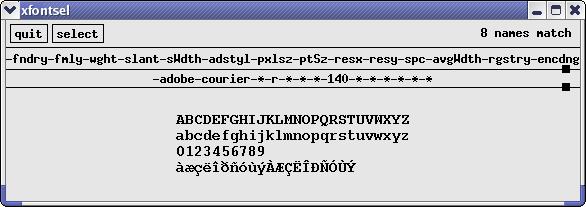
Figure 3. Selecting a Font with X's Utility Program xfontsel
If you are wondering how I get the colors in my screenshots, that's how I do it.
If you have problems with these settings, look in your .Xresources file for any Emacs settings. Any settings in .Xresources overrides these definitions. To get rid of the overrides, comment them out of the .Xresources file and restart X.
Until recently, Emacs had no support for variable-width fonts, and fixed-width fonts are fine for most purposes. But with support for proportional fonts and non-English character sets included in recent versions, you now can define your own sets of fonts within Emacs. Fontsets allow word-processor ease of control over fonts. For examples, take a look at the headers in Emacs' Info and the Customize menus; see also Emacs' info nodes on fontsets.
For more information on fonts under X, see Emacs' info node on Font Specification Options.
I explained how to automate turning on the speedbar in the discussion of the Customize Emacs system. Speedbar is a separate frame (window) that allows mouse-click navigation among Emacs buffers. As you can see from the illustration, the speedbar allows for tree structures, like Emacs' Info system. Click on the + to open subnodes, and click on the – to close them (Figure 4).
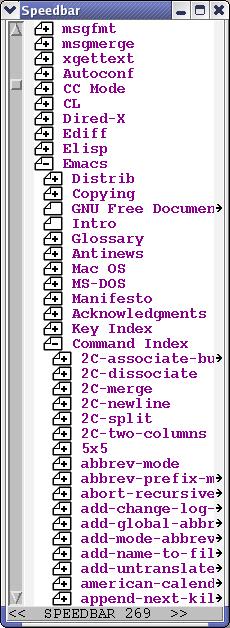
Figure 4. Emacs' Speedbar Point-and-Click Browsing Interface
When you are editing in certain modes—Rmail, Info and GUD, for example—the speedbar shows other selections to be edited in that mode. For example, when you are in Info mode, the speedbar displays nodes. Otherwise, it shows files in the directory where the file in the current buffer is located.
If you have a lot of files open in Emacs, the speedbar is a useful tool. I often have more than 30 files open simultaneously, and the speedbar helps me manage and switch between them.
In the article “Getting Started with Emacs”, LJ, March, 2003, I demonstrated how to use Emacs as a server, letting programs like crontab and mutt use Emacs for file editing. To carry this further, you can use Emacs as the editor for any application that can call on an external editor, including mail readers. However, Emacs has at least two mail modes and a powerful newsreader called GNUS.
To send a message, Ctrl-X M (or M-X mail) puts you in mail mode. Simply edit a message and send it (Figure 5). As the screen capture shows, you see a skeleton of an e-mail ready for you to fill in the blanks. You can use control character sequences to move to (and create, if necessary) additional headers, like FCC. You can use tab completion in the headers. There, it looks at local system users and the contents of any e-mail aliases you have defined in your .emacs.
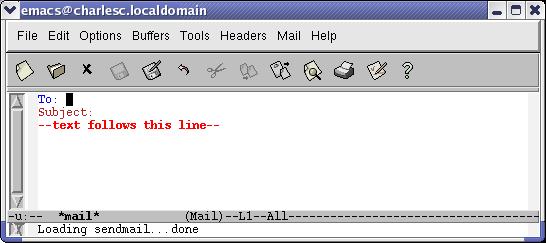
Figure 5. A Skeleton E-mail in Emacs' Mail Mode
You can insert your signature with Ctrl-C Ctrl-W, or you can have Emacs do that for you by setting mail-signature to t in your .emacs file. If you want to get fancy and write a Lisp program to select a signature for you based on, well, whatever you can write Lisp code to detect.
You can run a spell-checker on your message. Entering M-X ispell-message checks only the body of the message, skipping any quoted material.
In Emacs, read and reply to your incoming mail with rmail mode (M-X rmail) (Figure 6). One of the first things you may wish to do is create a summary buffer or automate it by modifying the rmail mode hook. This creates a buffer familiar to most users: one line per message with the date, source e-mail address, data size and subject in that line. As you can see in Figure 7, the message in the rmail buffer is highlighted in green. The normal Emacs navigation keys work in the summary buffer.
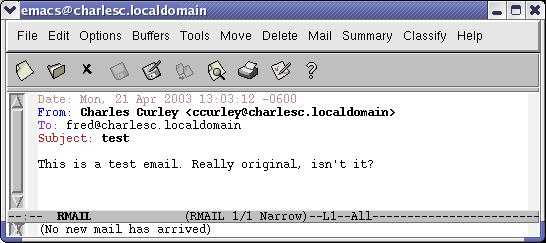
Figure 6. An E-mail Message in rmail Mode
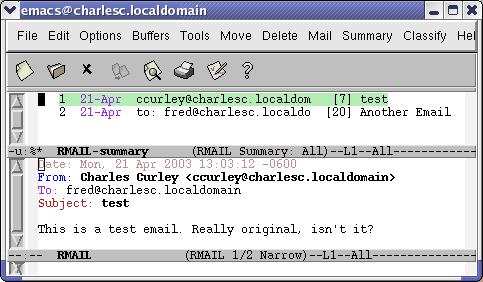
Figure 7. rmail Mode with a Summary
Emacs mail operates in a somewhat convoluted way in order to accommodate multiple operating systems. When you start an rmail buffer, it moves mail from your inbox file, typically in /var/spool/mail on Linux, into a file, ~/RMAIL. This is the file you normally edit. You can put e-mail into ~/RMAIL at any time with the G key. If you have a POP or IMAP account, try using fetchmail to put your mail in the inbox.
Emacs uses the Babyl mail file format. You can export individual messages as text files; entire rmail files can be exported in mailbox format.
Most mail readers use multiple mail files (directories, if they use maildir mail format). Emacs can shift from one rmail file to another, but you may not need to. Instead, you can create customized summaries using regular expressions and other search patterns. You can specify summaries based on recipients, a regular expression search within the subject or labels.
You can have multiple rmail files and associate each one with one or more inboxes. This means that folks with spam filters such as SpamAssassin, already running or using procmail recipes to deliver their e-mail to separate files need not abandon that investment. Each time you visit an rmail file, Emacs gets any new mail from the associated input files.
You can reply and forward e-mail in rmail mode. Either one opens up a mail mode buffer with the e-mail headers already completed. You can use Ctrl-C Ctrl-Y to yank in the message to which you are replying. If you want to reply to multiple e-mails, switch to the rmail buffer, select a different message, switch back and yank the new current message. To be RFC-compliant, you will have to set the quoting character by customizing mail-yank-prefix to use the string >.
Resources
Author's .emacs: www.charlescurley.com/~ccurley/emacs.init.html
Emacs Beginner's HOWTO: www.tldp.org/HOWTO/Emacs-Beginner-HOWTO.html, or possibly already on your computer with the rest of the LDP docs.
Emacs' Built-in Help System: Ctrl-H
Emacs for Vi Users: grok2.tripod.com
“Emacs: the Free Software IDE”, by Charles Curley, LJ June 2002: /article/5765
Emacs Wiki: www.emacswiki.org/cgi-bin/wiki.pl
fetchmail: www.catb.org/~esr/fetchmail
“Getting Started with Emacs”, by Charles Curley, LJ, March 2003
GNU Emacs Home Page: www.fsf.org/software/emacs/emacs.html
GNU Emacs Lisp Reference Manual: www.gnu.org/manual/elisp-manual-20-2.5/elisp.html
GNU Emacs Tutorial (Old, but Still Useful): www.futureone.com/~sponge/tutorial/emacs/index.html
How do I make common modifications to my Gnu Emacs .emacs file? www.yak.net/fqa/124.html
Procmail: www.procmail.org
Programming in Emacs Lisp: An Introduction, by Robert J. Chassell: www.gnu.org/manual/emacs-lisp-intro/emacs-lisp-intro.html
SpamAssassin: spamassassin.org
Tips—emacs “Nifty ways to get your work done in /the/ editor”: www.portico.org/index.php3?catList=28
“very unofficial .emacs home”, by Ingo Koch: www.dotemacs.de
Charles Curley (www.charlescurley.com) teaches Linux at two Wyoming colleges. He also writes software and articles and books, using open-source software tools such as Emacs. His desktop has been a “Microsoft Free Zone” for more than three years, and he contributed to Sams' Teach Yourself Emacs in 24 Hours (ISBN: 0-672-31594-7).

