
SCO Linux 4
SCO Linux 4 is a server operating system intended for the same market segment as Red Hat Enterprise Linux. SCO Linux is based on UnitedLinux, a common base Linux distribution put together by four companies: SCO Group, SuSE, Conectiva and Turbolinux.
UnitedLinux has embraced all the major Linux standards, including the filesystem hierarchy standard (FHS), Linux standard base (LSB) and Open18N internationalization. On top of this stable foundation, each partner in UnitedLinux can ship extra features or customizations. For the most part, though, it should be easy to move from one version of UnitedLinux to another.
UnitedLinux clearly is intended to run on servers rather than on workstations. It uses the Linux 2.4.19 kernel with the O(1) scheduler patch applied, and it has server features enabled, including large memory, IPv6, logical volume management (LVM) and enterprise volume management system (EVMS).
Although UnitedLinux supports the major server architectures—x86, IA-64 or Itanium, AMD's x86-64 and IBM's zSeries, iSeries and pSeries—SCO Linux 4 currently supports only IA-32. SCO has promised IA-4 support in the near future. SuSE Linux Enterprise Server 8, also based on UnitedLinux, offers x86, IA-64 and IBM zSeries, iSeries and pSeries support.
SCO Linux 4 is distributed on three CDs. The first is the installer CD, and it also contains SCO-specific packages to install. The other two CDs are the standard CDs for UnitedLinux 1.0. They provide the common core of UnitedLinux, and any Linux distribution based on UnitedLinux 1.0 includes them.
The installer is a rebadged YaST2 installer from SuSE. It correctly detected most of the hardware in my test system and set it up with sensible defaults. It partitioned my disk and set up ReiserFS on the main partition.
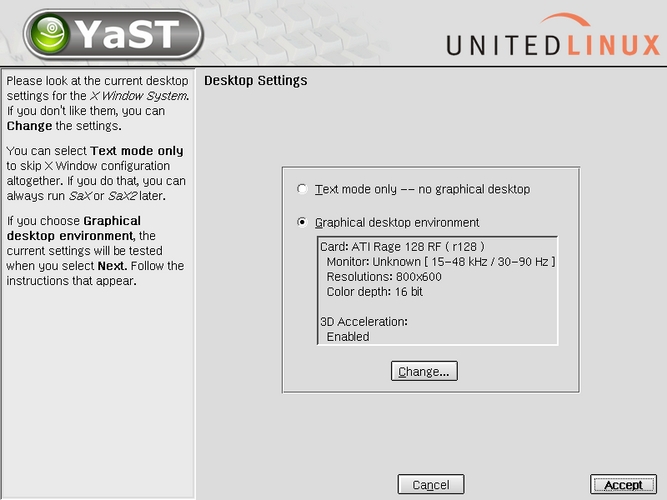
Figure 1. YaST2 installer, rebadged for UnitedLinux. The SuSE lizard remains.
For the most part, the installer worked well and the installation went smoothly. There were a few rough edges, but nothing an experienced Linux user will have trouble handling. For example, when I tried the GNOME desktop, I received an error message because the hostname wasn't in /etc/hosts. When I tried the KDE desktop, an error message from the sound server came up because the driver module for the sound card was not loaded. Someone new to Linux probably will need to contact SCO support to sort out a few things.
The packages available for installation are mostly server-oriented. It is possible to install packages from SuSE if something you want is missing. To test this, I installed the SuSE 8.0 package for Stella, an emulator for the Atari 2600 game system. It worked perfectly, and now I can play old Atari games on my enterprise server.
It's possible to configure a SCO Linux 4 system using SuSE's YaST2, either character-based or GUI, but the recommended and supported way is to use Webmin. Webmin is a web-based front end for system administration that makes many tasks as easy as clicking buttons on a web page. Also included is Webmin's companion system, Usermin, a similar system that lets users configure their own accounts. Webmin and Usermin can be run locally or from any computer that can access the web server on the SCO Linux 4 system.
Many services are included, but few are enabled by default. Using Webmin, it's easy to start up only the services you need or set them to start up on particular init levels.
When you log in with KDE 3, you see a nice desktop, ready to go. Icons are set on your desktop for Webmin and Usermin, and the KDE panel has a selection of useful program launchers.
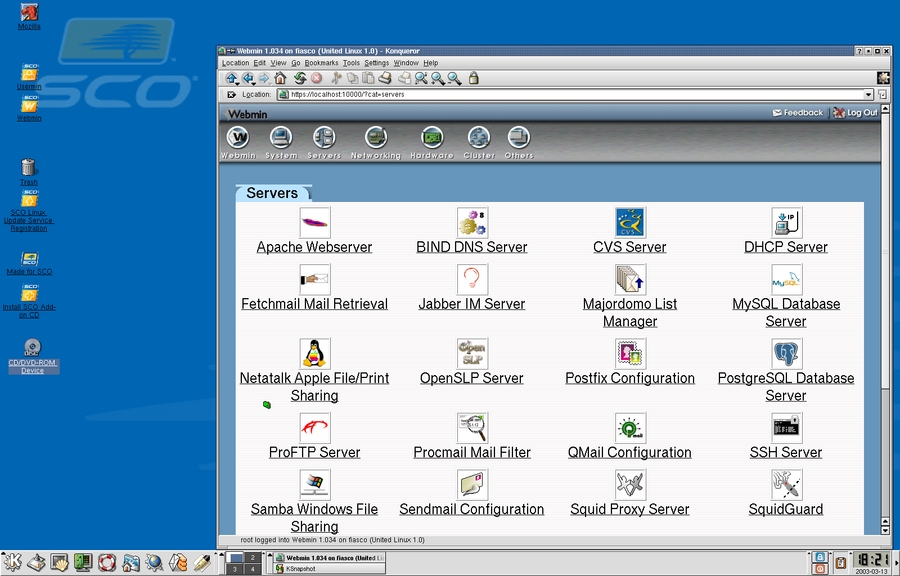
Figure 2. The KDE desktop, with a Webmin session in Konqueror.
Not so on the GNOME 2 desktop; it is barren, with few launchers to be found. UnitedLinux includes only the minimum core of GNOME 2.0—even GNOME Terminal is missing. The GNOME 2 support includes everything you need to run GNOME 2 applications under KDE or to launch KDE applications from the GNOME desktop. But if you actually want to work in the GNOME 2 environment, plan on spending some extra time installing missing pieces of GNOME and setting up a usable desktop.
DocView is a slick web interface that uses ht://Dig to put all the system documentation at your fingertips. You get man pages, GNU info pages, HOWTOs, Perl documentation and KDE documentation, all nicely browseable and searchable. GNOME, Python and other subjects are searchable but not included in the table of contents for browsing. To add them you would need to edit DocView files in /usr/lib or set up your own documentation pages.
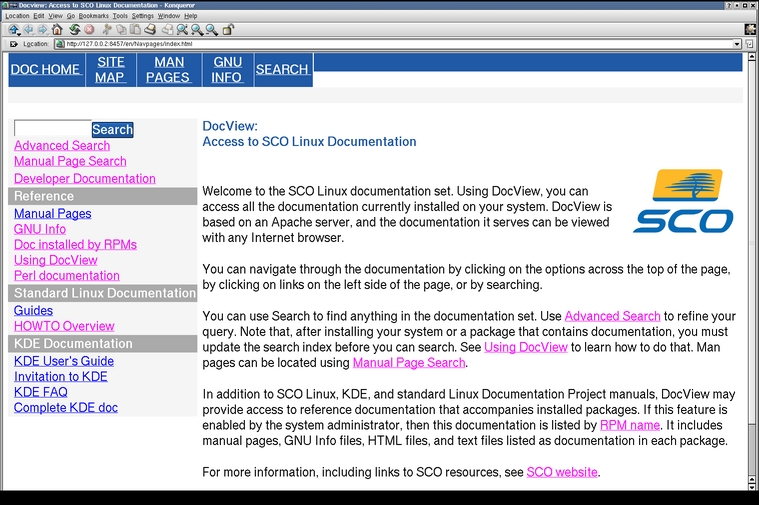
Figure 3. DocView, a Slick Web Browser Interface to Documentation
Basic development tools are included, and they are up to date. GCC/g++ 3.2, Python 2.2.1, Perl 5.8.0 and gdb 5.2.1 are all included, but integrated development environments, such as KDevelop, Anjuta or IDLE, are not. However, Glade 1.1.1 for GNOME 2.x is included.
Both sendmail 8.12.6 and postfix 1.1.11 are included. Apache 1.3.26 (rather than 2.x) is included with all the usual modules. Apache works right out of the box, serving up a “Hey, it worked!” page with a handful of useful links. Both Sun and IBM Java are present, along with JServe and Tomcat. Samba 2.2.5 and OpenLDAP 2.1.4 are included, along with pam_ldap and other support libraries. The Squid 2.4 caching proxy server also is provided. Tape backup is handled by Amanda 2.4.2, which allows you to use one server with a big tape drive to back up many systems.
SCO Linux 4 also provides the bare bones of a high-availability clustering solution: packages for Linux Virtual Server, DRBD, Heartbeat and Mon. Very little documentation about these services is available, either installed on your system or on the SCO web site. The SCO web site, under its Knowledge Center heading, has one technical article on Heartbeat that is helpful, but there is nothing on LVS, DRBD or Mon. The Red Hat web site contains much more documentation on high availability than this, and SCO Linux 4 has no equivalent of the Red Hat Cluster Manager.
SCO also includes their sysinfo tool. It's a script in /etc that looks all over the system, pulls out a lot of useful information and builds a web page with the results. Anyone supporting a large number of servers will like this feature.
SCO makes support information available on their web site. Most of it requires you to log in before you can access it. Unfortunately, there isn't much information there yet, and what is there is organized in a confusing manner. For instance, a page for Security Advisories (www.sco.com/support/security) does not list any security advisories for SCO Linux 4. All information about SCO Linux 4 is in the Support Knowledge Center. At press time, there are 64 technical articles covering SCO Linux 4; 56 are notices of new packages (security patches or upgrades), four are bug information articles and four are general information articles. The general information articles include the Heartbeat article, an article on setting up Squid, how to allow root to log in remotely and where to get System V compatibility libraries.
The UnitedLinux installer can be automated with an XML options file. It also can import configuration files from Red Hat's Kickstart and convert them to the UnitedLinux XML format. There is no documentation about these features, however, either on the SCO web site or on the system. After I inquired about this, SCO technical support sent me a URL to a page on the SuSE web site that documents this information.
SCO's phone support was good. When I called SCO technical support, the people I spoke with were able to answer my questions quickly. They also followed up by e-mail to make sure my problems were solved. SCO has promised to support all releases of SCO Linux for a minimum of two years.
Updates are handled with the Advanced Package Tool (APT) system. APT originally was developed for the Debian GNU/Linux distribution, but Conectiva ported it to work with RPM packages. Once you have registered with SCO, you can update all packages on your system to the latest with one command, or you can update only specific packages. If you update a package that depends on other packages, APT updates the other packages as well, automatically. APT can get the packages from SCO's servers, using the Internet or from a Service Pack CD.
SCO's upgrade policy states you are not required to upgrade any packages if you don't want to do so. If you are calling support with a problem, though, they may tell you to upgrade some packages as the solution to the problem.
During this review, SCO did not make an important security update available quickly, although other distributions did. On March 3, 2003, the CERT Coordination Center published a remote root compromise in sendmail, reported by Internet Security Systems. Red Hat and SuSE had patches available the same day as the CERT announcement, but SCO released their patch 11 days later. This left the phone support person in the unenviable position of having to tell me that no update was available. He did, however, send an RPM to me for testing. This RPM turned out to be the same one that was ultimately released a week later. It is surprising that SCO would take so long to release a major security patch to sendmail.
In the meantime, I downloaded the SuSE RPM for sendmail and tried it out; it installed with no problems. If the SCO phone support person had not been able to get the RPM to me early, I could have installed the SuSE RPM as a temporary fix.
SCO Linux 4 is licensed on a per-server basis, with four levels of support: base for $599, classic for $699, business for $1,249 and enterprise for $2,199. This price structure is similar to Red Hat Advanced Server's, but it is slightly less expensive at each price level. (At press time, Red Hat announced a lower server price point: Red Hat Enterprise Linux ES Base Edition is $349.)
UnitedLinux 1.0, upon which SCO Linux 4 is based, has some rough edges. SCO hasn't smoothed them out yet, and their available documentation isn't much better than you can get by surfing the Internet. On the other hand, with Webmin and APT, it should be easy to keep your servers humming once you do have them set up. Except for that one scary security situation, the tech support is good.

Steve R. Hastings first used UNIX on actual paper teletypes. He enjoys bicycling with his wife, listening to music, petting his cat and making his Linux computers do new things.

