
Running Linux on the Xbox
In November 2001, Microsoft entered the video console business with the Xbox, a machine that continues to outperform all other consoles in terms of processor speed and video performance. As with the SEGA Dreamcast, hackers started to port Linux to the Xbox in May 2002. Only three months later, the first kernel messages from an Xbox running Linux were published on the Internet. Now, a year after the start of the project, Linux runs reliably on all versions of the Xbox, and Xbox Linux is ready for daily use.
The Xbox is driven by a 733MHz Intel Celeron processor and contains 64MB of DDR RAM (shared with video), an NVIDIA GeForce3 graphics processing unit (GPU), an 8GB or 10GB hard disk, a DVD-ROM drive, Ethernet connectivity, four USB-style controller connectors and TV-out (Figure 1 lists the details). This hardware overview sounds more like the description of a decent PC than a gaming console. The Xbox does not merely contain some typical PC components, such as an Intel CPU or an NVIDIA GPU, it actually is a PC in a smaller black case, with minor modifications. The Xbox chipset consists of the NV2A Northbridge and the MCPX Southbridge, both from NVIDIA. The NVIDIA nForce chipset for PCs is almost the same as the Xbox chipset. Its Southbridge IC is labeled MCP and contains exactly the same functionality as the MCPX: two USB controllers, an IDE controller, an Ethernet device and AC97-compatible Dolby Digital sound.
Figure 1. The Xbox hardware in a tree view. The numbers on the right are the PCI locations and IDs.
The background of the Xbox is simple. Because Microsoft already had an operating system, system libraries and the DirectX libraries for the PC, they decided to build the Xbox based on this well-known architecture. Initially, Microsoft wanted AMD to produce the CPU and the chipset for the Xbox; the video chip would come from NVIDIA. But Microsoft later changed its mind, switching to Intel for the CPU. So NVIDIA licensed the chipset from AMD, manufactured the ICs for the Xbox and sold the same design as nForce for the PC market.
The similarity of the Xbox to a PC not only made the process of installing and running Linux a lot easier, it made a lot more sense for people to use the Xbox as a computer. Unlike Dreamcast, PlayStation 2 or the GameCube, the Xbox always is equipped with a hard disk and Ethernet. And the PC hardware also makes it possible to use standard Linux distributions on the Xbox, with minor modifications.
Because of its price and its compactness, an Xbox running Linux can be used as a desktop computer (see Figure 2) or a server, replacing a standard PC, and because of its TV connectivity, it also can be used as an entertainment device for watching video or listening to audio.
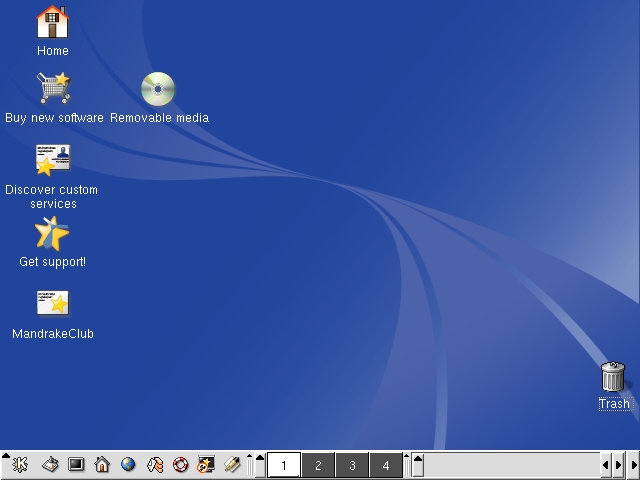
Figure 2. A KDE Desktop at 640 × 480 on an Xbox Running Mandrake Linux 9.0
Despite the similarity of the Xbox to a standard PC, installing Linux on an Xbox is not simply a matter of inserting an installation CD. For one thing, the Xbox boot process is a lot different from a PC's. PCs have a PCBIOS (basic I/O system) in ROM, which contains 16-bit library routines for keyboard, video and hard disk I/O, as well as a simple bootloader that reads the first sector from a storage device and runs it. The Xbox has no such BIOS. Its 256KB ROM image contains a statically linked, stripped-down, Windows 2000-based kernel, which runs the moment the Xbox is turned on. The hard disk—which is locked by an individual ATA password, so it cannot be read when connected to a computer or replaced with another hard disk—does not contain any operating system components. When the Xbox kernel is started, it unlocks the hard disk and tries to run the default.xbe file from a CD or DVD. If such a file cannot be found, it runs xboxdash.xbe from hard disk. This is the system configuration and audio CD player application permanently stored on the hard disk.
These .xbe files are executables, which are a lot like Linux ELF files, except they are signed digitally with Microsoft's 2048-bit RSA key. Changing a single byte within the file makes the signature invalid, and the file will be rejected by the Xbox kernel. Because of the lack of Microsoft's private key, the Xbox Linux Project cannot reproduce a valid signature; thus, we cannot create executables accepted by a standard Xbox. Two approaches are possible to get your own code running: replace the ROM or find a game with a bug that can be exploited.
The standard way for most people to get Linux running on an Xbox is to open the box and install a replacement ROM chip that overrides the onboard ROM chip. This so-called modchip can contain either a hacked version of Microsoft's ROM, which has the signature test, the hard disk test and some other things disabled, or a clean-room ROM implementation that gives the Xbox the personality of a regular PC. Although Xbox Linux supplies a bootloader that makes Linux run on hacked Microsoft ROMs (which Linux sites do not supply, but can be found on the Internet), the use of the Xbox Linux Project's clean-room implementation, called Cromwell, is recommended for legal reasons. The Cromwell ROM does not run Xbox games.
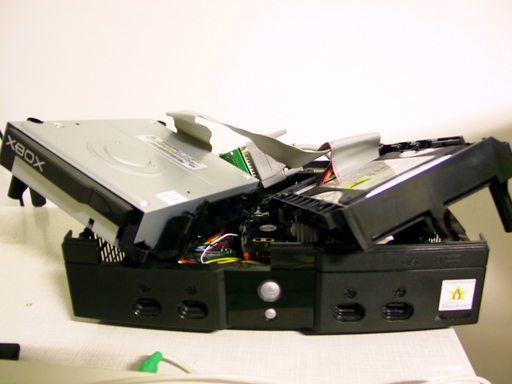
Figure 3. The Xbox dissected: the Philips DVD drive is on the left, and the Seagate hard disk is on the right. The green board in the background is a modchip that is, in this case, connected to a computer's parallel port.
Modchips that replace the onboard ROM are available from many video game hardware stores on the Internet for about $50 US. The first generation of modchips had to be soldered into the Xbox board parallel to the original Flash chip, which required about 30 wires. Second-generation modchips were connected to the LPC bus on the Xbox board, and they typically required only nine wires. Current modchips can be screwed onto the board without any soldering. They usually ship empty and can turn themselves off completely, so if you use the Xbox Linux Clean BIOS, you still can run Xbox games.
Because the original ROM contents are stored in a reprogrammable Flash chip on the Xbox board, it also is possible to overwrite the Flash contents in order to have a permanently modded machine, without installing any additional hardware devices. This can be done by installing a modchip, bridging two pairs of points on the board to disable the write protection of the Flash IC, running Linux, disabling the modchip and, finally, running an application called raincoat in Linux to reprogram the onboard Flash. Now, the modchip can be removed permanently, so you can use one modchip to convert a lot of Xboxes to Linux.
Recently, an anonymous researcher found an exploitable bug in the Electronic Arts game 007 Agent Under Fire. In a post on an Xbox forum, he explained how to use a modified saved game to run the Linux bootloader. By connecting the write-protection bridges on the board, this method can be used to reprogram the onboard Flash within a Linux instance that has been started by this modified saved game, without even temporarily installing a modchip. This is the cheapest and most simple way to make an Xbox Linux-compatible.
All these methods apply only to Xbox consoles that have been on the market to date. Microsoft keeps changing the Xbox design. By the time you read this article, a new board layout of the Xbox might have the LPC bus or the reprogrammability of the onboard Flash removed. Refer to the Xbox Linux web site for the latest information on this topic.
Having a modded Xbox with either a modified Microsoft BIOS or the Xbox Linux BIOS means you can start the Linux installation—but how do you interact with the installer? The Xbox does have USB connectivity; all controllers, memory units and the Xbox Live headset are standard USB 1.1 devices, but with different connectors. By attaching an adapter, you can connect any USB keyboard, mouse, webcam, printer or scanner that is supported by the PC version of Linux. These adapters are sold on the Internet for about $10-$15 US, but it also is possible to build your own with little effort. All you need is an Xbox controller extension cable, which has the connector to plug in to the Xbox on one side, as well as a USB female connector. Both cables contain four wires in different colors; simply cut both cables and reconnect the wires to create a USB-female-to-Xbox-male adapter cable.
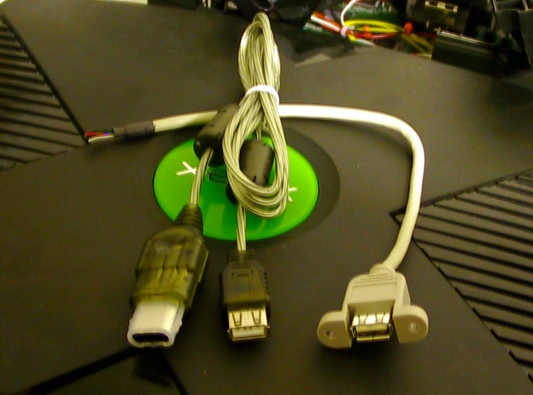
Figure 4. A USB adaptor cable can be built easily by using an XBox controller extension cable and the USB female connector on the right. You also can buy prebuilt cables like the one on the left.
The slot for the memory unit on your controller is another USB port, so you also can solder the USB female connector there.
If you plan to buy a USB keyboard and mouse for the Xbox, try to get a keyboard with a USB or PS/2 mouse connector built in. This way, you need only one Xbox-to-USB adapter. Macintosh keyboards have proven to work very well—and they don't have Windows keys, either.
With a modded Xbox, a keyboard and a mouse, you now can choose either to build Xbox Linux yourself or to take one of our prebuilt installations. At the moment, Xbox Linux offers three main distributions: Mandrake, Debian and the Xbox Linux Live System. The latter is a version of Linux without X but with Trolltech's Qtopia. It does not install into the hard disk, and it can be controlled with an Xbox controller. It is supposed to give newbies an impression of the possibilities available with Linux. Mandrake and Debian are full distributions that install into the hard disk. Mandrake 9.0 is available now, and 9.1 will be available soon. Both are based on the PC versions of Mandrake Linux and are 100% compatible with them and their RPM packages. They contain GNOME, KDE and many popular applications. The Xbox version of Debian can be booted into X from CD, but it also can be installed to hard disk. Debian has smaller release cycles and is updated more often, therefore it is used by most developers.
All those who don't want to use the prebuilt distributions but want to do everything themselves, and those who want to know how it works, should have a look at the Xbox Linux bootloaders, the kernel and the XFree patches.
As pointed out earlier, Xbox Linux can be booted either through the Xbox Linux Clean BIOS or from an unsigned .xbe file that pretends to be a game and starts Linux on a modified Microsoft BIOS. Both these applications are based on the same bootloader code, which loads the kernel and initial RAM disk from CD/DVD or hard disk, reserves 4MB of RAM for video and passes 60MB to the Linux kernel. Details about the kernel and initrd filenames and locations are read from the file linuxboot.cfg, which must reside in the same directory as the .xbe file in the case of the Microsoft BIOS. In the case of the Clean BIOS, the user can choose from where to read it.
In order for a Linux kernel to work on the Xbox, only one byte has to be changed—but for a perfectly adapted kernel, you need more changes. The Xbox has a severe bug in its PCI chipset that makes the machine crash when Linux tries to enumerate the PCI devices at boot time. By narrowing the region of PCI device numbers that are checked, this crash can be avoided. Another issue is the timer frequency: the Xbox system timer is off by about 6%, making music play too fast and making the kernel report the CPU clock frequency incorrectly.
The shutdown and reboot sequence is handled differently on the Xbox, but by adding some code to the kernel, it is able to reset and shut down the machine properly. Because copy restrictions often have been circumvented on other gaming consoles by inserting a legitimate game first and quickly replacing it with a copy, the Xbox, by default, reboots if you press the Eject button. Software can avoid this by replying to a request sent by the PIC16L chip that says not to reboot. Another patch in the kernel takes care of this. Yet some other code patches the report of the DVD drive, which pretends not to support video DVDs, although it does. On the Xbox Linux site, you can download patches for some well-known kernel versions that include all these modifications, plus support for the Xbox hard disk partitioning scheme and the Xbox hard disk filesystem (FATX). The modified files also are available in the Xbox Linux CVS. You have to enable the option for Xbox support in the kernel configuration.
Xbox Linux runs well in VESA framebuffer mode; that is, the bootloader sets up a fixed graphics mode and Linux inherits it, always writing into video memory but never accessing the actual video hardware. Alternatively, a patched version of the rivafb accelerated framebuffer driver is available, which allows changing the console video mode at runtime. In any case, you have to enable a framebuffer driver in the kernel configuration, because Xbox Linux does not support text mode yet.
With a minimal patch for the ALSA sound system, again available from the Xbox Linux CVS, the Xbox sound hardware can work with the i810 driver. The binary-only network driver for the NVIDIA nForce card, which you can download from the NVIDIA web site, works on the Xbox without any modification. An SMBus driver is needed if you want to enable the eject fix or to access the 256 bytes of EEPROM on the motherboard. You can use either the i2c-xbox module in the Xbox Linux CVS or the amd-756 module from the lm_sensors project. Both work equally well.
XFree runs out of the box if you use the framebuffer driver and turn off PCI enumeration in the configuration file. A modified version of the nvdrv driver provides video mode change at runtime and 2-D acceleration (GLX extensions). Multimedia applications can render their window into an off-screen buffer, and the video hardware stitches it into the visible screen when displaying it, scaling it in hardware. Precompiled versions of the driver are available. nvdrv is the open-source driver for NVIDIA graphics hardware, which does not support 3-D acceleration. Efforts are underway to patch the binary-only, 3-D-aware XFree driver available from NVIDIA.
The Xbox hardware details are quite impressive, enough for playing DVD or DivX video in Linux. But for optimal performance, you should try to optimize the compilation of your applications for the actual hardware. The machine's Celeron is a Pentium III class CPU, and it supports the 686 instruction set, as well as MMX and SSE. Applications, including mplayer, detect this automatically. If you use the nvdrv XFree driver, you can enable GLX support for video applications. mplayer, for instance, is fastest in X with the nvdrv driver, even faster than it is in framebuffer mode. Also, keep in mind that you should decrease the hardware resolution instead of making the application scale the video output. In 640×480 mode, the PlayStation emulator epsx runs quite well with the picture scaled to 400 × 300 pixels.
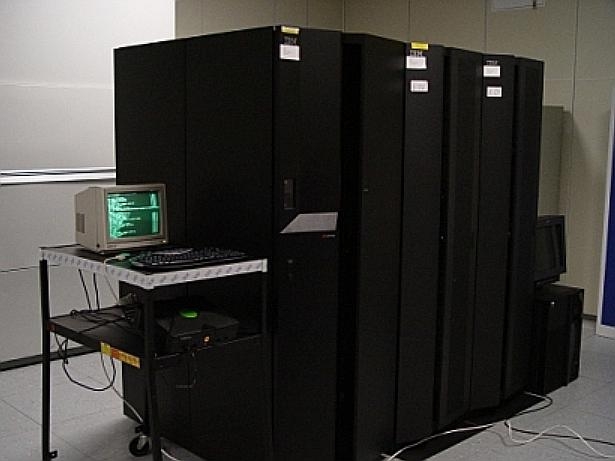
Figure 5. A German data center is using an Xbox-based Domino Server, running a clustered environment with Domino on an IBM pSeries. The Xbox is the small system on the left.
Although the Xbox is equipped with only 64MB of RAM—which can be extended to 128MB with excellent soldering skills—desktop environments, such as GNOME and KDE, and applications like OpenOffice.org run quite well. With the help of VMware, you even can use MS-DOS and Windows 95/98/NT/2000 on the Xbox. With a minimal X window, no desktop environment and no window manager, you can run Windows with up to 48MB of RAM.
With 1:1 ports of common Linux distributions for the PC and all major Linux applications running on the Xbox, it is ready for use on a desktop computer, a server or a multimedia device. With its excellent hardware and PC compatibility, there is more than simple hack value to it.


