
A Beginner's Guide to Using pyGTK and Glade
The beauty of pyGTK and Glade is they have opened up cross-platform, professional-quality GUI development to those of us who'd rather be doing other things but who still need a GUI on top of it all. Not only does pyGTK allow neophytes to create great GUIs, it also allows professionals to create flexible, dynamic and powerful user interfaces faster than ever before. If you've ever wanted to create a quick user interface that looks good without a lot of work, and you don't have any GUI experience, read on.
This article is the direct result of a learning process that occurred while programming Immunity CANVAS (www.immunitysec.com/CANVAS). Much of what was learned while developing the GUI from scratch was put in the pyGTK FAQ, located at www.async.com.br/faq/pygtk/index.py?req=index. Another URL you no doubt will be using a lot if you delve deeply into pyGTK is the documentation at www.gnome.org/~james/pygtk-docs. It is fair to say that for a small company, using pyGTK over other GUI development environments, such as native C, is a competitive advantage. Hopefully, after reading this article, everyone should be able to put together a GUI using Python, the easiest of all languages to learn.
As a metric, the CANVAS GUI was written from scratch, in about two weeks, with no prior knowledge of pyGTK. It then was ported from GTK v1 to GTK v2 (more on that later) in a day, and it is now deployed to both Microsoft Windows and Linux customers.
In a perfect world, you never would have to develop for anything but Linux running your favorite distribution. In the real world, you need to support several versions of Linux, Windows, UNIX or whatever else your customers need. Choosing a GUI toolkit depends on what is well supported on your customers' platforms. Nowadays, choosing Python as your development tool in any new endeavor is second nature if speed of development is more of a requirement than runtime speed. This combination leads you to choose from the following alternatives for Python GUI development: wxPython, Tkinter, pyGTK and Python/Qt.
Keeping in mind that I am not a professional GUI developer, here are my feelings on why one should chose pyGTK. wxPython has come a long way and offers attractive interfaces but is hard to use and get working, especially for a beginner. Not to mention, it requires both Linux and Windows users to download and install a large binary package. Qt, although free for Linux, requires a license to be distributed for Windows. This probably is prohibitive for many small companies who want to distribute on multiple platforms.
Tkinter is the first Python GUI development kit and is available with almost every Python distribution. It looks ugly, though, and requires you to embed Tk into your Python applications, which feels like going backward. For a beginner, you really want to split the GUI from the application as much as possible. That way, when you edit the GUI, you don't have to change a bunch of things in your application or integrate any changes into your application.
For these reasons alone, pyGTK might be your choice. It neatly splits the application from the GUI. Using libglade, the GUI itself is held as an XML file that you can continue to edit, save multiple versions of or whatever else you want, as it is not integrated with your application code. Furthermore, using Glade as a GUI builder allows you to create application interfaces quickly—so quickly that if multiple customers want multiple GUIs you could support them all easily.
Two main flavors of GTK are available in the wild, GTK versions 1 and 2. Therefore, at the start of a GUI-building project, you have to make some choices about what to develop and maintain. It is likely that Glade v1 came installed on your machine. You may have to download Glade v2 or install the development packages for GTK to compile the GTK v2 libglade. Believe me, it is worth the effort. GTK v2 offers several advantages, including a nicer overall look, installers for Windows with Python 2.2 and accessibility extensions that allow applications to be customized for blind users. In addition, version 2 comes installed on many of the latest distributions, although you still may need to install development RPMs or the latest pyGTK package.
GTK v2 and hence pyGTK v2 offer a few, slightly more complex widgets (Views). In the hands of a mighty GUI master, they result in awesome applications, but they really confuse beginners. However, a few code recipes mean you can treat them as you would their counterparts in GTK v1, once you learn how to use them.
As an example, after developing the entire GUI for CANVAS in GTK v1, I had to go back and redevelop it (which took exactly one day) in GTK v2. Support was lacking for GTK v1 in my customers' Linux boxes, but installing GTK v2 was easy enough. The main exception is Ximian Desktop, which makes pyGTK and GTK v1 easy to install. So, if your entire customer base is running that, you may want to stay with GTK v1. One thing to keep in mind though—a Python script is available for converting projects from Glade v1 to Glade v2, but not vice versa. So if you're going to do both, develop it first in Glade v1, convert it and then reconcile any differences.
The theory behind using Glade and libglade is it wastes time to create your GUI using code. Sitting down and telling the Python interpreter where each widget goes, what color it is and what the defaults are is a huge time sink. Anyone who's programmed in Tcl/Tk has spent days doing this. Not only that, but changing a GUI created with code can be a massive undertaking at times. With Glade and libglade, instead of creating code, you create XML files and code links to those files wherever a button or an entry box or an output text buffer is located.
To start, you need Glade v2 if you don't have it already. Even if you do, you may want the latest version of it. Downloading and installing Glade v2 should be easy enough once you have GTK v2 development packages (the -devel RPMs) installed. However, for most people new to GUI development, the starting window for Glade is intimidatingly blank.
To begin your application, click the Window Icon. Now, you should have a big blank window on your screen (Figure 1).

Figure 1. The cross-hatched area in the starting window is a place to put another widget.
The important thing to learn about GUI development is there are basically two types of objects: widgets, such as labels and entry boxes and other things you can see, and containers for those widgets. Most likely, you will use one of three kinds of containers, the vertical box, the horizontal box or the table. To create complex layouts, its easiest to nest these containers together in whatever order you need. For example, click on the horizontal box icon. Clicking on the hatched area in window1 inserts three more areas where you can add widgets. Your new window1 should look like Figure 2.

Figure 2. A basic three-pane vbox with the top pane selected.
You now can select any of those three areas and further divide it with a vertical box. If you don't like the results, you always can go back and delete, cut and paste or change the number of boxes from the Properties menu (more on that later).

Figure 3. The top pane has been split by a two-pane hbox, which is selected.
You can use these sorts of primitives to create almost any sort of layout. Now that we have a beginning layout, we can fill it with widgets that actually do something. In this case, I'll fill them with a label, a text entry, a spinbutton and a button. At first this looks pretty ugly (Figure 4).

Figure 4. The initial window filled in with widgets.
Remember that GTK auto-adjusts the sizes of the finished product when it is displayed, so everything is packed together as tightly as possible. When the user drags the corner of the window, it's going to auto-expand as well. You can adjust these settings in the Properties window (go to the main Glade window and click View→Show Properties). The Properties window changes different values for different kinds of widgets. If the spinbutton is focused, for example, we see the options shown in Figure 5.

Figure 5. The Glade interface for changing a widget's properties is customized for each type of widget.
By changing the Value option, we can change what the spinbutton defaults to when displayed. Also important is to change the Max value. A common mistake is to change the Value to something high but forget the Max, which causes the spinbutton initially to display the default but then revert to the Max value when it is changed, confusing the user. In our case, we're going to use the spinbutton as a TCP port, so I'll set it to 65535, the minimum to 1 and the default to 80.
Then, focus on the label1 and change it to read Host:. By clicking on window1 in the main Glade window, you can focus on the entire window, allowing you to change its properties as well. You also can do this by bringing up the widget tree window and clicking on window1. Changing the name to serverinfo and the title to Server Info sets the titlebar and the internal Glade top-level widget name appropriately for this application.
If you go to the widget tree view and click on the hbox1, you can increase the spacing between Host: and the text-entry box. This may make it look a little nicer. Our finished GUI looks like Figure 6.

Figure 6. The GUI in Glade does not look exactly like it does when rendered, so don't worry about the size of the Host: area.
Normally, this would take only a few minutes to put together. After a bit of practice you'll find that putting together even the most complex GUIs using Glade can be accomplished in minutes. Compare that to the time it takes to type in all those Tk commands manually to do the same thing.
This GUI, of course, doesn't do anything yet. We need to write the Python code that loads the .glade file and does the actual work. In fact, I tend to write two Python files for each Glade-driven project. One file handles the GUI, and the other file doesn't know anything about that GUI. That way, porting from GTK v1 to GTK v2 or even to another GUI toolkit is easy.
First, we need to deal with any potential version skew. I use the following code, although a few other entries mentioned in the FAQ do similar things:
#!/usr/bin/env python

import sys

try:
 import pygtk
  #tell pyGTK, if possible, that we want GTKv2
  pygtk.require("2.0")
except:
  #Some distributions come with GTK2, but not pyGTK
  pass

try:
  import gtk
  import gtk.glade
except:
  print "You need to install pyGTK or GTKv2 ",
  print "or set your PYTHONPATH correctly."
  print "try: export PYTHONPATH=",
  print "/usr/local/lib/python2.2/site-packages/"
  sys.exit(1)

#now we have both gtk and gtk.glade imported
#Also, we know we are running GTK v2
Now are going to create a GUI class called appGUI. Before we do that, though, we need to open button1's properties and add a signal. To do that, click the three dots, scroll to clicked, select it and then click Add. You should end up with something like Figure 7.
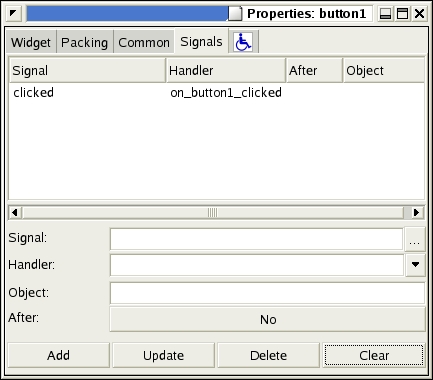
Figure 7. After Adding the Event (Signal) Handler
With this in place, the signal_autoconnect causes any click of the button to call one of our functions (button1_clicked). You can see the other potential signals to be handled in that list as well. Each widget may have different potential signals. For example, capturing a text-changed signal on a text-entry widget may be useful, but a button never changes because it's not editable.
Initializing the application and starting gtk.mainloop() gets the ball rolling. Different event handlers need to have different numbers of arguments. The clicked event handler gets only one argument, the widget that was clicked. While you're at it, add the destroy event to the main window, so the program exits when you close the window. Don't forget to save your Glade project.
class appgui:
  def __init__(self):
    """
    In this init we are going to display the main
    serverinfo window
    """
    gladefile="project1.glade"
    windowname="serverinfo"
    self.wTree=gtk.glade.XML (gladefile,windowname)
    # we only have two callbacks to register, but
    # you could register any number, or use a
    # special class that automatically
    # registers all callbacks. If you wanted to pass
    # an argument, you would use a tuple like this:
    # dic = { "on button1_clicked" : \
             (self.button1_clicked, arg1,arg2) , ...

dic = { "on_button1_clicked" : \
            self.button1_clicked,
            "on_serverinfo_destroy" : \
            (gtk.mainquit) }
    self.wTree.signal_autoconnect (dic)
    return

#####CALLBACKS
  def button1_clicked(self,widget):
    print "button clicked"

# we start the app like this...
app=appgui()
gtk.mainloop()
It's important to make sure, if you installed pyGTK from source, that you set the PYTHONPATH environment variable to point to /usr/local/lib/python2.2/site-packages/ so pyGTK can be found correctly. Also, make sure you copy project1.glade into your current directory. You should end up with something like Figure 8 when you run your new program. Clicking GO! should produce a nifty button-clicked message in your terminal window.

Figure 8. The Initial Server Info GUI
To make the application actually do something interesting, you need to have some way to determine which host and which port to use. The following code fragment, put into the button1_clicked() function, should do the trick:
host=self.wTree.get_widget("entry1").get_text()
port=int(self.wTree.get_widget(
  "spinbutton1").get_value())
if host=="":
  return
import urllib
page=urllib.urlopen(
  "http://"+host+":"+str(port)+"/")
data=page.read()
print data
Now when GO! is clicked, your program should go off to a remote site, grab a Web page and print the contents on the terminal window. You can spice it up by adding more rows to the hbox and putting other widgets, like a menubar, into the application. You also can experiment with using a table instead of nested hboxes and vboxes for layout, which often creates nicer looking layouts with everything aligned.
You don't really want all that text going to the terminal, though, do you? It's likely you want it displayed in another widget or even in another window. To do this in GTK v2, use the TextView and TextBuffer widgets. GTK v1 had an easy-to-understand widget called, simply, GtkText.
Add a TextView to your Glade project and put the results in that window. You'll notice that a scrolledwindow is created to encapsulate it. Add the lines below to your init() to create a TextBuffer and attach it to your TextView. Obviously, one of the advantages of the GTK v2 way of doing things is the two different views can show the same buffer. You also may want to go into the Properties window for scrolledwindow1 and set the size to something larger so you have a decent view space:
self.logwindowview=self.wTree.get_widget("textview1")
self.logwindow=gtk.TextBuffer(None)
self.logwindowview.set_buffer(self.logwindow)
In your button1_clicked() function, replace the print statement with:
self.logwindow.insert_at_cursor(data,len(data))
Now, whenever you click GO! the results are displayed in your window. By dividing your main window with a set of vertical panes, you can resize this window, if you like (Figure 9).
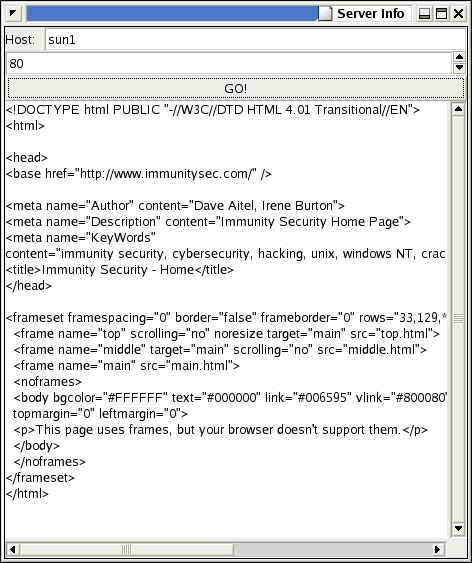
Figure 9. Clicking GO! loads the Web page and displays it in the TextView.
Unlike GTK v1, under GTK v2 a tree and a list basically are the same thing; the difference is the kind of store each of them uses. Another important concept is the TreeIter, which is a datatype used to store a pointer to a particular row in a tree or list. It doesn't offer any useful methods itself, that is, you can't ++ it to step through the rows of a tree or list. However, it is passed into the TreeView methods whenever you want to reference a particular location in the tree. So, for example:
import gobject
self.treeview=[2]self.wTree.get_widget("treeview1")
self.treemodel=gtk.TreeStore(gobject.TYPE_STRING,
                             gobject.TYPE_STRING)
self.treeview.set_model(self.treemodel)
defines a tree model with two columns, each containing a string. The following code adds some titles to the top of the columns:
self.treeview.set_headers_visible(gtk.TRUE)
renderer=gtk.CellRendererText()
column=gtk.TreeViewColumn("Name",renderer, text=0)
column.set_resizable(gtk.TRUE)
self.treeview.append_column(column)
renderer=gtk.CellRendererText()

column=gtk.TreeViewColumn("Description",renderer,
                          text=1)
column.set_resizable(gtk.TRUE)
self.treeview.append_column(column)
self.treeview.show()
You could use the following function to add data manually to your tree:
def insert_row(model,parent,
               firstcolumn,secondcolumn):
    myiter=model.insert_after(parent,None)
    model.set_value(myiter,0,firstcolumn)
    model.set_value(myiter,1,secondcolumn)
    return myiter
Here's an example that uses this function. Don't forget to add treeview1 to your glade file, save it and copy it to your local directory:
model=self.treemodel
insert_row(model,None,'Helium',
           'Control Current Helium')
syscallIter=insert_row(model,None,
                    'Syscall Redirection',
                    'Control Current Syscall Proxy')
insert_row(model,syscallIter,'Syscall-shell',
           'Pop-up a syscall-shell')
The screenshot in Figure 10 shows the results. I've replaced the TextView with a TreeView, as you can see.
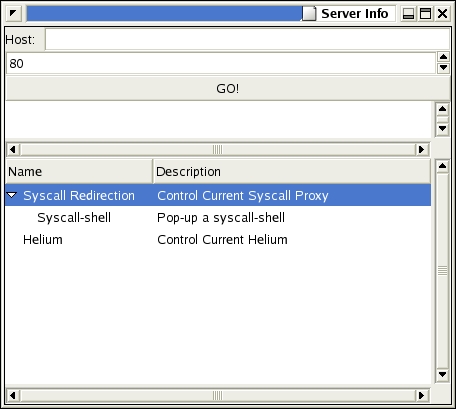
Figure 10. An Example TreeView with Two Columns
A list is done the same way, except you use ListStore instead of TreeStore. Also, most likely you will use ListStore.append() instead of insert_after().
A dialog differs from a normal window in one important way—it returns a value. To create a dialog box, click on the dialog box button and name it. Then, in your code, render it with [3]gtk.glade.XML(gladefile,dialogboxname). Then call get_widget(dialogboxname) to get a handle to that particular widget and call its run() method. If the result is gtk.RESPONSE_OK, the user clicked OK. If not, the user closed the window or clicked Cancel. Either way, you can destroy() the widget to make it disappear.
One catch when using dialog boxes: if an exception happens before you call destroy() on the widget, the now unresponsive dialog box may hang around, confusing your users. Call widget.destroy() right after you receive the response and all the data you need from any entry boxes in the widget.
Some day, you probably will write a pyGTK application that uses sockets. When doing so, be aware that while your events are being handled, the application isn't doing anything else. When waiting on a socket.accept(), for example, you are going to be stuck looking at an unresponsive application. Instead, use gtk.input_add() to add any sockets that may have read events to GTK's internal list. This allows you to specify a callback to handle whatever data comes in over the sockets.
One catch when doing this is you often want to update your windows during your event, necessitating a call to gtk.mainiteration(). But if you call gtk.mainiteration() while within gtk.mainiteration(), the application freezes. My solution for CANVAS was to wrap any calls to gtk.mainiteration() within a check to make sure I wasn't recursing. I check for pending events, like a socket accept(), any time I write a log message. My log function ends up looking like this:
def log(self,message,color):
"""
       logs a message to the log window
        right now it just ignores the color
        argument
        """
        message=message+"\n"
        self.logwindow.insert_at_cursor(message,
                                     len(message))
        self.handlerdepth+=1
        if self.handlerdepth==1 and \
        gtk.events_pending():
            gtk.mainiteration()
        self.handlerdepth-=1
        return
The entry in the pyGTK FAQ on porting your application from GTK v1 to GTK v2 is becoming more and more complete. However, you should be aware of a few problems you're going to face. Obviously, all of your GtkText widgets need to be replaced with Gtk.TextView widgets. The corresponding code in the GUI also must be changed to accommodate that move. Likewise, any lists or trees you've done in GTK v1 have to be redone. What may come as a surprise is you also need to redo all dialog boxes, remaking them in GTK v2 format, which looks much nicer.
Also, a few syntax changes occurred, such as GDK moving to gtk.gdk and libglade moving to gtk.glade. For the most part, these are simple search and replaces. Use GtkText.insert_defaults instead of GtkTextBuffer.insert_at_cursor() and radiobutton.get_active() instead of radiobutton.active, for example. You can convert your Glade v1 file into a Glade v2 file using the libglade distribution's Python script. This gets you started on your GUI, but you may need to load Glade v2 and do some reconfigurations before porting your code.
Don't forget you can cut and paste from the Glade widget tree. This can make a redesign quick and painless.
Unset any possible positions in the Properties window so your startup doesn't look weird.
If you have a question you think other people might too, add it to the pyGTK FAQ.
The GNOME IRC server has a useful #pygtk channel. I couldn't have written CANVAS without the help of the people on the channel, especially James Henstridge. It's a tribute to the Open Source community that the principal developers often are available to answer newbie questions.
The finished demo code is available from ftp.linuxjournal.com/pub/lj/listings/issue113/6586.tgz.
Dave Aitel is the founder of Immunity, Inc., a New York-based security consulting company. CANVAS is Immunity's penetration testing and exploit development framework, written entirely in Python using pyGTK. More information on Immunity is available at www.immunitysec.com.

