
The USB Serial Driver Layer, Part II
In the first part of this article [LJ, February 2003], I introduced the USB serial layer and the basics of how to register a driver with the layer. This article explains some of the details about how data flows through the layer and how USB serial devices show up in sysfs.
In Part I of this article, I briefly mentioned the generic USB driver in the context of getting a USB device to communicate through it easily, with no custom kernel programming. Unfortunately, I didn't explain exactly how to do this, and many people wrote in with questions.
To create a USB device that works with the generic USB serial driver, all that is needed is two bulk USB endpoints on the device, one IN and one OUT. The generic USB serial driver will bind those two endpoints together into a single tty device that can be read from and written to from user space. For example, a device with the endpoints as described by /proc/bus/usb/devices (Figure 1) shows up as a single port device and produces the following kernel message when plugged in:
Generic converter detected
Generic converter now attached to ttyUSB0
    (or usb/tts/0 for devfs)
Then any user can send data to the device through the /dev/ttyUSB0 node.

Figure 1. A Sample /proc/bus/usb/devices Entry
If a device has more than one bulk IN and bulk OUT pair, multiple ports are assigned to the device. For example, a device with the endpoints as described by /proc/bus/usb/devices (Figure 2) shows up as a two-port device and produces the following kernel messages when plugged in:
Generic converter detected
Generic converter now attached to ttyUSB0
    (or usb/tts/0 for devfs)
Generic converter now attached to ttyUSB1
    (or usb/tts/1 for devfs)
For this device, both /dev/ttyUSB0 and /dev/ttyUSB1 can be used to communicate.
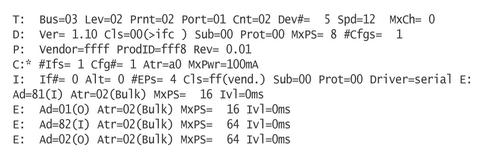
Figure 2. Entry for a Two-Port Device in /proc/bus/usb/devices
The order of the endpoints is not important, so all of the IN endpoints could be first, followed by the OUT endpoints (unlike the previous examples that alternate). The USB serial core will take all of the IN and OUT endpoints and pair them up in the order they are seen. It also will assign an interrupt endpoint to a bulk pair, if one is present, but the interrupt endpoint will not be used by the generic driver; it can be used only by a USB serial driver within the kernel.
To get the generic USB serial driver to bind to the device, the USB vendor and product IDs need to be specified as a module parameter when the usbserial module is loaded. For example, to bind to the previously described device with a vendor ID of ffff and product ID of fff8, use the following command:
modprobe usbserial vendor=0xffff product=0xfff8
If the user cannot be expected to load the usbserial module with the specific device ID, or if more than one device ID should be used by the generic USB serial driver, a very tiny driver can be written. An example of this is shown in Listing 1. In this driver, no callback functions are specified, only the product and vendor IDs of the devices that should be controlled. This is shown in the declaration of the struct usb_serial_device_type:
static struct usb_serial_device_type tiny_device = {
    .owner =            THIS_MODULE,
    .name =             "Tiny USB serial",
    .short_name =       "tiny",
    .id_table =         id_table,
    .num_interrupt_in = NUM_DONT_CARE,
    .num_bulk_in =      NUM_DONT_CARE,
    .num_bulk_out =     NUM_DONT_CARE,
    .num_ports =        1,
};
Specific vendor and product IDs should be listed in the id_table
pointer:
static struct usb_device_id id_table [] = {
    { USB_DEVICE(MY_PRODUCT_ID, MY_DEVICE_ID1) },
    { USB_DEVICE(MY_PRODUCT_ID, MY_DEVICE_ID2) },
    { USB_DEVICE(MY_PRODUCT_ID, MY_DEVICE_ID3) },
    { }     /* Terminating entry */
};
Listing 1. The Tiny Tiny USB Serial Driver
In all, this driver contains only two functions, which are two and three lines long, and three variable definitions. With it, all of the generic USB serial driver functionality will occur for the specified devices. The driver automatically will be loaded for the device when it is plugged in to the system, which is also a nice feature. This has to be one of the smallest working Linux kernel drivers possible. Compile it with:
echo "obj-m := tiny_tiny_usbserial.o" > Makefile
make -C <path/to/kernel/src> SUBDIRS=$PWD modules
The Windows operating system also supports this kind of device interface through the Windows USB OPOS serial driver, which will create virtual “COM” ports for the device. This allows hardware vendors to create USB devices that do not require any custom driver development for both Linux and Windows machines, which can be highly desirable.
When a USB-to-serial device is plugged in, a long series of steps are taken to allow a specific USB-to-serial driver to control an individual tty device. The steps are as follows:
The USB hub driver detects a new device. It assigns a USB number to the device and reads the basic USB description from the device, which it then populates into a struct usb_device with a number of struct usb_interfaces that represent the whole USB device.
The USB core takes the device and registers the USB interfaces with the kernel driver core.
The kernel driver core looks through the currently registered list of USB drivers to determine if any of them will accept this device.
Because this is a USB-to-serial device, the USB serial core accepts control of the device from the kernel driver core.
The USB serial core builds up a single struct, usb_serial, and calls the specific USB serial driver's probe() function with this structure.
The USB serial driver's probe() function initializes the device if it should and then returns control back to the USB serial core.
The USB serial core creates the struct usb_serial_port structures depending on the number of serial ports on this specific device and then calls the USB serial driver's attach() function, if present.
After the attach() function returns, the individual struct usb_serial_port structures are registered with the kernel driver core.
The kernel driver core calls back into the USB serial core for every individual port.
The USB serial core calls the individual port_probe() function in the USB serial driver for the port, if present, and then registers the port with the tty layer, completing the initialization process.
After this process, the tty device node is bound to the individual USB serial port. When the device node is opened by a user, the following steps happen in the kernel:
The kernel looks up the device node and determines that the tty layer has registered this node, so it calls the tty layer's open function.
The tty layer looks up the device and determines that the USB serial core has registered this node with it, so it calls serial_open() in the drivers/usb/serial/usb-serial.c file.
The serial_open() function determines what specific USB serial driver is registered for this node.
The module count for the specified USB serial driver is incremented in order to prevent it from being unloaded while a user is talking to the device.
If the specified USB serial driver has an open() function, it is called with struct usb_serial_port for the specific port being passed to it.
The USB serial driver then can do any hardware-specific open functionality that is needed and send off any USB urbs that are necessary to start accepting data from the device.
When a user calls write() on the device node to send data to the specified serial port, the following steps happen in the kernel:
The kernel calls the tty_write() function within the tty core. It has previously set up this pointer during the open call, so it will not look it up again.
tty_write() calls the line discipline's write() function for this specific tty device.
The line discipline calls the USB serial core serial_write() function.
The serial_write() function determines the specific USB serial driver used by this file and calls the write() function of it.
The USB serial driver can then copy the data into a buffer and send it out the USB connection to the device, handling any special formatting issues the device might require.
After the data has been sent completely, the driver can wake up the tty device in order to send any buffered data to it. This should be done with the simple call:
schedule_work(&port->work);
When data is received by the USB serial driver for a specific port, it should place the data into the specific tty structure assigned to that port's flip buffer:
for (i = 0; i < data_size; ++i) {
    if (tty->flip.count >= TTY_FLIPBUF_SIZE)
        tty_flip_buffer_push(tty);
    tty_insert_flip_char(tty, data[i], 0);
}
tty_flip_buffer_push(tty);
When a user calls read() on the device node, any data in the tty
flip buffer for this port is returned.
When the device node is closed by the user, the following steps occur within the kernel:
The tty_release() function is called in the tty core by the kernel.
tty_release() determines if this is the last reference held on this device node (remember, a device node can be opened by multiple programs at the same time). If it is, the USB serial core serial_close() function is called.
The serial_close() function calls the USB serial driver's close() function, allowing it to shut down any pending USB transfers and get into a quiet state.
The USB serial core then decrements the module count for the USB serial driver, possibly allowing it to be unloaded.
In the previous description of how the USB serial device becomes bound to a specific USB serial driver, the kernel driver core is called a number of times. This happens because the USB serial core is represented as a bus within the kernel driver model, allowing multiple ports to be present on a single USB device.
For example, the following device is an eight-port USB-to-serial device on the first USB bus in the system. Its location in sysfs is /sys/devices/pci0/00:09.0/usb1/1-1/1-1.1. Within that directory are the following directories and files: 1-1.1:0/, bcdDevice, bConfigurationValue, bDeviceClass, bDeviceProtocol, bDeviceSubClass, bmAttributes, bMaxPower, bNumConfigurations, bNumInterfaces, idProduct, idVendor, manufacturer, name, power, product, serial, speed, ttyUSB0/, ttyUSB1/, ttyUSB2/, ttyUSB3/, ttyUSB4/, ttyUSB5/, ttyUSB6/ and ttyUSB7/.
The files in this directory provide the USB-specific information for this device, as do the files in the 1-1.1:0/ directory, which is the first interface on this device. The ttyUSB* directories are created by the USB serial core and contain the following files: dev, name and power.
The dev file contains the major and minor number for this specific device, which then can be used to determine the proper device node for talking to it. In the /sys/bus/usb directory, this USB device is seen as being bound to the io_edgeport USB driver (Figure 3).
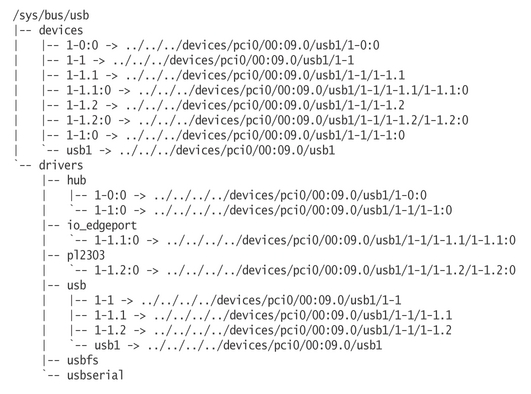
Figure 3. The /sys/bus/usb Tree
There is also a usb-serial bus, which shows the individual USB serial ports that are registered with the kernel (Figure 4). As these individual ports are tty devices, they also show up in the tty class directory (Figure 5).
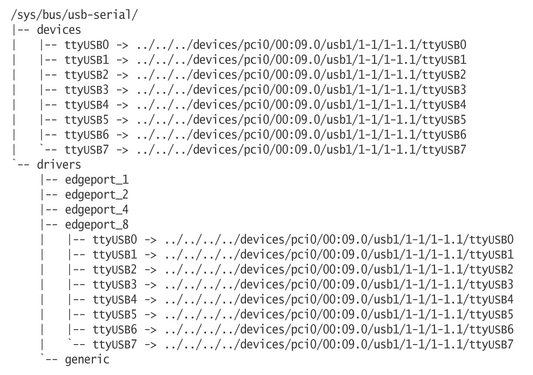
Figure 4. The /sys/bus/usb-serial Tree
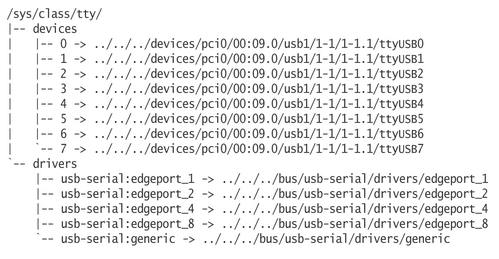
Figure 5. The /sys/class/tty Tree
Through all of these different links back to the single USB device, the type of USB device, how many tty ports it has and what type of USB serial driver controls it, easily can be determined. This is also much more information than what was shown in the /proc/tty/driver/usb-serial file, as described in Part I of this article.
The sysfs interface is described here only briefly, but it contains a wealth of information about all physical and virtual devices that are contained in a system at a given point in time. For a better description of sysfs and the kernel driver model, see Pat Mochel's 2003 linux.conf.au paper at www.kernel.org/pub/linux/kernel/people/mochel/doc/lca.
Greg Kroah-Hartman is currently the Linux USB and PCI Hot Plug kernel maintainer. He works for IBM, doing various Linux kernel-related things and can be reached at greg@kroah.com.
