
Configuring a Virtual Server Instance for Quick Recovery
We've all been there—word gets around that you are the “go to” guy for something, and the next thing you know people start knocking on your cubicle. For me, this particular scenario happened very recently.
It was a typical Wednesday afternoon, and I was cruising along with the daily tasks of a typical IT systems engineer. You know, rebooting Windows servers, applying endless security patches and so on. The Linux boxes were fine. Nothing really to do there but check the logs, the backups and snicker over the uptime.
So I'm sitting in my palatial 8“ x 8” cubicle having a nice cup of Starbucks, when it happens. I hear the unmistakable sound of rushed breathing behind me. Kind of like Darth Vadar, but without the shiny black helmet. You know what flashes through your mind in situations like this: someone has a last minute problem and expects me to fix it for them.
Before me stands a recently ordained project manager who proceeds to babble on about how a business group needs a new development/test environment ready to go in a day and a half—nice planning, huh?. Already my mind is thinking about the late nights and possibly a ruined weekend. You see, they want me to be around to build and rebuild Windows servers as they test different versions of code for a project in the final stages of development. Should the programs or activities pooch a server, they need someone to quickly rebuild and configure it for continued testing. Right, no problem.
Now, I'm a salary kind of guy. There's no chance of gratuitous overtime here, just a hearty, “You can take care of this for us right? Good. Gotta go!” So, what's the solution? You guessed it—Linux to the rescue. If you have read any of my previous articles here on the Linux Journal web site describing the use and configuration of Linux with VMware's GSX server, you can probably see where I'm going with this. By utilizing the VMware GSX server product running on a Red Hat Linux server, I can host multiple instances of pretty much any OS out there. To solve Mr. Last Minute project manager's issues, we can use virtual instances of Windows 2000 AS running on a Linux host server to handle all the testing needs of the requesting business group.
Besides the fact that it's cool to be able to run multiple instances of virtual servers on a single Linux host server, easily being able to manage or back out changes to the OS and applications within the virtual server instances is even cooler.
VMware uses something called disk modes in both its server and workstation products. These modes provide you with the ability to control which changes get written to disk within the virtual instance and which can be undone or rolled back. The three disk modes available are persistent, undoable and non-persistent. The first mode, persistent, is just what it sounds like it would be. Anything installed or changed on the instance (applications, configuration changes, etc.) is committed to disk as normal. As soon as the OS commits the data to the disk, it is there permanently (well, until it crashes).
With undoable mode, you have the option of keeping or discarding any changes made to the server during a working session. All changes are kept in a redo log, which allows you either to commit the changes to disk or to back out the changes completely. Using this mode is way faster than uninstalling everything you added and trying to clean up the mess in the registry.
Finally, we have nonpersistent mode, aka, manager or tester mode. This mode is where we really can save time and headaches for our project manager friend, who is still breathing down our necks. Placing a virtual server instance in nonpersistent mode lets testers bang away at it with their test code and applications. Should they pooch the server or need to start over fresh, all we do is shut the server down and power it back up again, all fresh and clean. You see, once the virtual server is built and configured the way we want it, we place the disks in nonpersistent mode. That way we have a clean build every time the virtual server boots. If the testers break the server or the code behaves badly, we simply power cycle the instance and start over.
As an added bonus, once the first virtual server instance is created, configured and ready to go, we can stop the instance and clone it. This gives us exact clone backup instances if need be. It also works if the need arises for more servers. These backup instances can be on-line and ready to go in minutes. We are talking about five minutes vs. two or more hours per server; try that with physical hardware or Norton Ghost.
To take advantage of these disk modes (again, this works for virtual instances in either GSX/ESX or VMware workstation environments), open the configuration editor in the VMware Remote Console for your virtual instance. Be sure you do this with the virtual server powered off. Next select the appropriate disk device list (SCSI or IDE) and the active disk. In the box to the right, select the Mode drop down and then the particular mode you would like to use. This step looks a little different if you are using the remote console under Windows (Figure 1). Click OK and restart the virtual server. That's all there is to it.
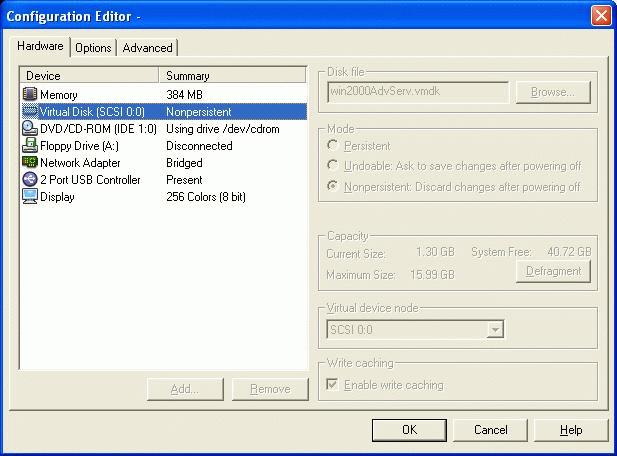
Figure 1. Virtual Server Remote Console Under Windows
Keep in mind that you can change modes whenever you deem it necessary. For instance, if you are currently running in persistent mode, but need to test a service pack, you can stop the instance and place the disks in nonpersistent mode. This way if a problem comes up, you can back it out. Otherwise, if the coast is clear, you can commit the changes once you know it's safe. Another use for nonpersistent mode would be to create a safe environment and see what that new virus does to a Microsoft OS and, ultimately, your production servers.
Finally, a word of caution. If you plan to run GSX virtual servers on Linux, be sure to use the latest kernel release and ext3 filesystem supported by VMware. Trust me here, you don't want all your virtual servers living on an ext2 filesystem when the power goes out. I lost an entire partition and could not find a working superblock to recover from (no, this was not a production box, and the UPS has been replaced). With the ReiserFS, I never have had a problem.
Once again, a profound thanks to Linux and the good people at VMware. As it turned out my weekend wasn't a wash after all, and the testing went on without issue (thanks again to undoable mode).
With the performance and stability that Linux provides, I can run multiple virtual servers on a single box and save our IT shop big bucks, and nobody knows the difference. In fact, unless a business partner or customer asks, they don't even know they are working on a virtual server. Don't ask, don't tell.
Jeffrey McDonald is a UNIX systems engineer at a Fortune 500 company based in central California.
email: jeffrey.mcdonald@attbi.com
