
An Introduction to the Spambayes Project
The Spambayes Project is one of many projects inspired by Paul Graham's “A Plan for Spam” (www.paulgraham.com/spam.html). This famous article talks about using a statistical technique called Bayesian Analysis to identify whether an e-mail message is spam. For the full story of how the mathematics behind Spambayes works and how it has evolved, see Gary Robinson's accompanying article on page 58.
In a nutshell, the system is trained by a set of known spam messages and set of known non-spam, or “ham”, messages. It breaks the messages into tokens (words, loosely speaking) and gives each token a score according to how frequently it appears in each type of message. These scores are stored in a database. A new message is tokenized and the tokens are compared with those in the score database in order to classify the message. The tokens together give an overall score—a probability that the message is spam.
The fact that you train Spambayes by using your own messages is one of its strengths. It learns about the kinds of messages, both ham and spam, that you receive. Other spam-filtering tools that use blacklists, generic spam-identification rules or databases of known spams don't have this advantage.
The Spambayes software classifies e-mail by adding an X-Spambayes-Classification header to each message. This header has a value of spam, ham or unsure. You then use your existing e-mail software to filter based on the value of that header. We use a scale of spamminess going from 0 (ham) to 1 (spam). By default, < 0.2 means ham and > 0.9 means spam. Any e-mail between those figures is marked as unsure. You can tune these thresholds yourself; see below for information on how to configure the software.
Spambayes is different from other spam classifiers in three ways: its test-based design philosophy, its tokenizer and its classifier.
We can all think of obvious ways to identify spam: it has SHOUTING subject lines; it tells you how to Make Money Fast!!!; it purports to be from the vice president of Nigeria or his wife. It's tempting to tune any spam-classification software according to obvious rules. For instance, it should obviously be case-sensitive, because FREE is a much better spam clue than free. But the Spambayes team refused from the outset to take anything at face value. One of the earliest components of the software was a solid testing framework, which would compare new ideas against the previous version. Any idea that didn't improve the results was ditched. The results were often surprising; for instance, case sensitivity made no significant difference. This prove-it-or-lose-it approach has helped develop an incredibly accurate system, with little wasted effort.
The tokenizer does the job of splitting messages into tokens. It has evolved from simple split-on-whitespace into something that knows about the structure of messages, for instance, tagging words in the Subject line so that they are separately identified from words in the body. It also knows about their content, for instance, tokenizing embedded URLs differently from plain text. All the special rules in the tokenizer have been rigorously tested and proven to improve accuracy. This includes deliberately hiding certain tokens—for example, we strip HTML decorations and ignore most headers by default. Surprising decisions, but they're backed up by testing.
The classifier is the statistical core of Spambayes, the number cruncher. This has evolved a great deal since its beginnings in Paul Graham's article, again through test-based development. Gary's article, “A Statistical Approach to the Spam Problem” (page 58), covers the classifier in detail.
The Spambayes software is available for download from sf.net/projects/spambayes. It requires Python 2.2 or above and version 2.4.3 or above of the Python e-mail package. If you're running Python 2.2.2 or above, you should already have this. If not, you can download it from mimelib.sf.net and install it: unpack the archive, cd to the email-2.4.3 directory and type setup.py install. This will install it in your Python site-packages directory. You'll also need to move aside the standard e-mail library; go to your Python Lib directory, and rename the file email as email_old.
Because the project is in constant development, things are sure to change between my writing this article and the magazine hitting the newsstand. I'll publish a summary of any major changes on an Update page at www.entrian.com/spambayes.
Some of the things we're working on as I write this article include more flexible command-line training; enabling integration with more e-mail clients, such as Mutt; web-based configuration; security features for the web interface; and easier installation. I'll provide full details of these items on the Update page.
Three classifier programs are in the Spambayes software: a procmail filter, a POP3 proxy and a plugin for Microsoft Outlook 2000. I cover the procmail filter and the POP3 proxy in this article. A web interface (covered below) and various command-line utilities, test harnesses and so on are also part of Spambayes; see the documentation that comes with the software for full details.
If you use a procmail-based e-mail system, this is how the Spambayes procmail system works:
All your existing mail has a new X-Spambayes-Trained header. The software uses this to keep track of which messages it has already learned about.
The software looks at all your incoming mail. Messages it thinks are spam are put in a “spam” mail folder. Everything else is delivered normally.
Every morning, it goes through your mail folders and trains itself on any new messages. It also picks up mail that's been refiled—something it thought was ham but was actually spam and vice versa. Be sure to keep spam in your spam folder for at least a day or two before deleting it. We suggest keeping a few hundred messages, in case you need to retrain the software.
You'll need a working crond to set up the daily training job. Optionally, you can have a mailbox of spam and a mailbox of ham to do some initial training.
To set up Spambayes on your procmail system, begin by installing the software. I'll assume you've put it in $HOME/src/spambayes. Then, create a new database:
$HOME/src/spambayes/hammiefilter.py -n
If you exercise the option to train Spambayes on your existing mail, type:
$HOME/src/spambayes/mboxtrain.py \
-d $HOME/.hammiedb -g $HOME/Mail/inbox \
-s $HOME/Mail/spam
You can add additional folder names if you like, using -g for good mail folders and -s for spam folders. Next, you need to add the following two recipes to the top of your .procmailrc file:
:0fw
| $HOME/src/spambayes/hammiefilter.py
:0
* ^X-Spambayes-Classification: spam
$HOME/Maildir/.spam/
The previous recipe is for the Maildir message format. If you need mbox (the default on many systems) or MH, the second recipe should look something like this:
:0:
* ^X-Spambayes-Classification: spam
$HOME/Mail/spam
If you're not sure what format you should use, ask your system administrator. If you are the system administrator, check the documentation of your mail program. Most modern mail programs can handle both Maildir and mbox.
Using crontab -e, add the following cron job to train Spambayes on new or refiled messages every morning at 2:21 AM:
21 2 * * * $HOME/src/spambayes/mboxtrain.py -d
$HOME/.hammiedb -g $HOME/Mail/inbox
-s $HOME/Mail/spam
You also can add additional folder names here. It's important to do this if you regularly file mail in different folders; otherwise Spambayes never learns anything about those messages.
Spambayes should now be filtering all your mail and training itself on your mailboxes. But occasionally a message is misfiled. Simply move that message to the correct folder, and Spambayes learns from its mistake the next morning.
Many thanks to Neale Pickett for the information in this section.
If you don't use Procmail or don't want to mess with it, or if you want to set up the software on a non-UNIX machine, you can use the POP3 proxy. This is a middleman that sits between your POP3 server and your e-mail program, and it adds an X-Spambayes-Classification header to e-mails as you retrieve them. You also can use the POP3 proxy with Fetchmail; simply reconfigure Fetchmail to talk to the POP proxy rather than your real POP3 server.
The web interface lets you pretrain the system, classify messages and train on messages received via the POP3 proxy, all through your web browser. The software is configured through a file called bayescustomize.ini. This is true of the Procmail filter as well. There's no need to change any of the defaults to use it out-of-the-box, but the POP3 proxy needs to be set up with the details of your POP3 server. All the available options and their defaults live in a file called Options.py, but you need to look at that only if you're terminally curious or want to do advanced tuning. The minimum you need to do is create a bayescustomize.ini file like this:
[pop3proxy]
pop3proxy_servers: pop3.example.com
where pop3.example.com is wherever you currently have your e-mail client configured to collect mail. The proxy runs on port 110 by default. This is fine on non-UNIX platforms, but on UNIX you'll want to use a different one by adding this line:
pop3proxy_ports: 1110to the [pop3proxy] section of bayescustomize.ini. If you collect mail from more than one POP3 server, you can provide a list of comma-separated addresses in pop3proxy_servers and a corresponding list of comma-separated port numbers in pop3proxy_ports. Each port proxies to the corresponding POP3 server.
You can now run pop3proxy.py. This prints some status messages, which should include something like:
Listener on port 1110 is
    proxying pop3.example.com:110
User interface url is http://localhost:8880
This means the proxy is ready for your e-mail client to connect to it on port 1110, and the web interface is ready for you to point your browser at the given URL. To access the web interface from a different machine, replace localhost with the name of the machine running pop3proxy.py.
You now need to configure your e-mail client to collect mail from the proxy rather than from your POP3 server. Where you currently have pop3.example.com, port 110, set up as your POP3 server, you need to set it to localhost, port 1110. If you're running the proxy on a different machine from your e-mail client, use machinename, port 1110.
Classifying your mail is now as easy as clicking “Get new mail”. The proxy adds an X-Spambayes-Classification header to each message, and you can set up a filter in your mail program to file away suspected spam in its own folder. Until you do some training, however, all your messages are classified as unsure.
Once you're up and running, you should check your suspected spam folder periodically to see whether any real messages slip through, so-called false positives. As you train the system, this will happen less and less often.
Initial training isn't an absolute requirement, but you'll get better results from the outset if you do it. You can use the upload a message or mbox file form to train via the web interface, either on individual messages or UNIX mbox files.
Once you're up and running, you can use the web interface to train the system on the messages the POP3 proxy has seen. The Review messages page lists your messages, classified according to whether the software thought they were spam, ham or unsure. You can correct any mistakes by checking the boxes and then clicking Train. After a couple of days (depending on how much e-mail you get), there'll be very few mistakes.
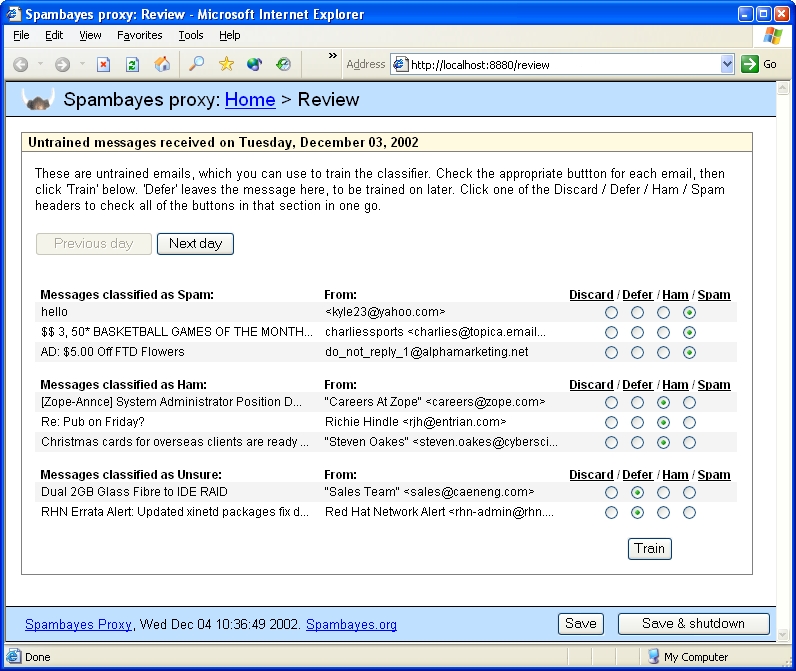
Figure 1. Spambayes Proxy Web Training Page
Spambayes does an excellent job of classifying your mail, but it's only as good as the data on which you train it. Here are some tips to help you get the best results:
Don't train on old mail. The characteristics of your e-mail change over time—sometimes subtly, sometimes dramatically—so it's best to use recent mail.
Take care when training. If you mistakenly train a spam message as ham, or vice versa, it will throw off the classifier.
Try to train on roughly as much spam as ham. This isn't critical, but you'll get better results with a fair balance.
The Spambayes software is in constant development. Many people are involved, and we have many ideas about what to do next. Here's a taste of where the project might go:
Improving the tokenizer and classifier as new research reveals more accurate ways to classify spam.
Intelligent autotraining: once the system is up and running, it should be possible for it to keep itself up-to-date by training itself, with users correcting only the odd mistake. We're already doing something along these lines with the Procmail system, but we're looking at ways of making it more automated and compatible with all platforms.
SMTP proxy: to train the system from any e-mail client on any platform, you could send a message to a special ham or spam address. This could be a simple way to correct classification mistakes, and it would combine well with intelligent auto-training techniques.
Database reduction: the more you train the system, the larger its database gets. We're looking at ways to keep the database size down.
Integration with spam-reporting tools: the web interface and the e-mail plugins could let you report spams to systems like Vipul's Razor and Pyzor.
More e-mail client integration: we already have the Outlook plugin, and we'd like to integrate with more e-mail clients. The POP3 proxy and the web interface work well with any e-mail client, but having a Delete as Spam button right there in your e-mail client is much more convenient than switching to your web browser.
Better documentation: we aim to publish documentation on how to set up Spambayes on all the popular platforms and e-mail clients.
By the time this article is in print, some of these things already may be happening; see my Update page at www.entrian.com/spambayes for details.
email: richie@entrian.com
Richie Hindle is a professional software engineer in the UK. He works full-time writing business intelligence software, and in his spare time he works on Spambayes and his own Python projects at www.entrian.com. He only occasionally wears a silly hat.

