
Scripting for X Productivity
Linux offers graphical user interfaces (GUIs) with high resolution, multiple windows and menus. But with a GUI, human/computer interaction is the real speed bottleneck: as long as doing something requires ten mouse clicks in ten different points, it takes the same amount of time, regardless of the hardware. At the command line, the traditional UNIX answer is the toolbox philosophy. You can automate anything with a script and connect small specialized programs with pipes. A third solution combines the two approaches and is easy and powerful enough to suit most needs. Any stock X environment, regardless of the window manager or desktop environment, can become much faster and more flexible than it usually is.
We have more fingers than hands and 101 keys to one mouse. Although drawing and similar tasks are quicker with mice or tablets, often our fingers must stay on the keyboard anyway. If a command or choice requires one single user action, pressing a key or two is much faster than clicking mouse buttons, not to mention RSI issues. Also, when we do touch the mouse, it should do what we need immediately.
Keys and mouse buttons can be shuffled around or mapped to specific meanings (accented vowels) or GUI actions (maximize window) using xmodmap. One of its beneficiaries has been left-handed people, who use it to reverse the order of the mouse buttons. Add this line in .xinitrc, or put the quoted part in a .xmodmaprc file:
xmodmap -e "pointer = 3 2 1"
Lately, xmodmap has been used to make mouse wheels work correctly under Linux (see Resources). It also can make wheels work faster by binding your most frequent actions to those extra keys available on the latest keyboards. For example, the magic line for an IntelliMouse Explorer is:
xmodmap -e "pointer = 1 2 3 6 7 4 5"
When speaking about keyboards, modifier means a key that changes the effect or state of other keys. The standard modifiers are Shift, Ctrl, Lock, Alt and five more simply called modN, with N=1,2..5. xmodmap can assign these meanings to any physical keys. The most frequent case is probably the swapping of the Ctrl and Caps Lock keys, described in the man page. On the same note, the meaning of the Windows key could be changed to mod4 in this way, assuming its keycode is 115:
xmodmap -e 'keycode 115 = Alt_R Meta_R'
Keys can be programmed to start applications too, but this is specific to window managers. In Blackbox 0.65, for example, keystrokes are mapped to programs with the bbkeys utility. A line like the following in $HOME/.bbkeysrc:
KeyToGrab(F1),WithModifier(None),WithAction(ExecCommand),\
DoThis(xterm -geometry 80x25 -e mutt)
would allow you to start mutt in an 80 × 25 xterm window by simply pressing F1. Many other window managers allow such bindings; check their documentation.
As already mentioned, any shell script can be given windows to enable communication with the user, and any graphical client (and X itself) can receive direct input from text programs. The first case happens when a shell script needs user interaction, but it isn't possible; say the user would rather die than type or there isn't a keyboard (Internet kiosks). The second scenario includes users who need to pass some unpredictable text to an X client from console programs without manual cut-and-paste capabilities. This does happen in real life: mutt and lynx may be all we need to read e-mail and surf the Net, but what if some e-mail or Web page says “Check out this movie preview”, and you want to start Mozilla on that page with one click.
Starting an X window from a script has been possible for at least ten years, with tools like the now defunct Xscript. A modern solution is Xdialog, a GTK+-based widget generator. The script in Listing 1 shows an almost real-life example; it lets the user choose the best ISP, the account to be used and where to log the connection report. It then starts a traditional pppd/chat script (called netconn in the example), passing to it all the parameters collected graphically. Let's examine the GUI side in detail.
Listing 1. GUI Front End for an Internet Connection Script
#! /bin/bash

/bin/rm -f /tmp/netsettings

echo -n "PROVIDER=" > /tmp/netsettings
Xdialog --menubox "ISP selection menu" 20 40 5 \
"ISP_1"  "Lowest price in business hours"  \
"ISP_2" "More economic on weekends"       \
"ISP_3"     "Fastest ftp server" 2>> /tmp/netsettings

RETVAL=$?
# add control code here

echo -n "ACCOUNT=" >> /tmp/netsettings
Xdialog --inputbox "Enter account name"  10 25 \
"son" 2>> /tmp/netsettings

echo -n "LOGFILE=" >> /tmp/netsettings
Xdialog -fselect /tmp 20 80  2>> /tmp/netsettings

source /tmp/netsettings
netconn $PROVIDER $ACCOUNT $LOGFILE
The script starts removing the old version of the netsettings file, which stores all the user choices. For each variable needed by the netconn script, an assignment line in bash syntax is written to /tmp/netsettings. The left part simply is echoed without newline (echo -n). The second part, the actual value chosen by the user, is captured by Xdialog.

Figure 1. Invoking Xdialog
The first invocation (see Figure 1) allows the user to choose the best ISP. We also added some explanatory text (ISP selection menu) and specified the height (20) and width (40) of the window, as well as the height of each entry (5). In the case of Figure 1, after the user presses the OK button, /tmp/netsettings will contain this one line:
PROVIDER=ISP_1
Error checking can and should happen by saving the exit code of every call to Xdialog in a variable (RETVAL in Listing 1) and checking it to know what the user really did. We omitted this code for brevity, but keep in mind that a RETVAL of 1 means “Cancel pressed”; 255 means the user closed the box, and 0 means a choice actually was made.
The second Xdialog command allows the user to type in an account name or to accept the default value (Figure 2). The last one (Figure 3), displays a file selection window in which one can type or select with the mouse the name and location of the current log file. At this point, all the user choices are in /tmp/netsettings, so we simply must source that file and launch the connection.

Figure 2. Entering the Account Name
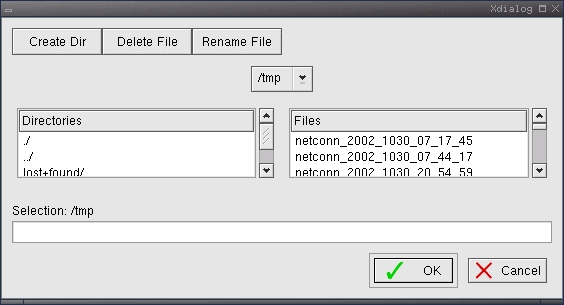
Figure 3. Finding the Log File
Xdialog offers many more types of input widgets, from radio buttons to range slides and calendars. Quite a few of these provide feedback to the user. The author uses the --msgbox option, for example, to pop up a window listing how many messages have been downloaded by fetchmail, sorted by account. Other possibilities include gauge and progress bars, info boxes with timeouts and file display windows. Consequently, Xdialog can be attached to scripts doing CD burning, audio and video playback, backups—you name it.
What if the same script must be used when X is not running? No problem; menus and boxes can be drawn in character terminals, too. Simply use the character-oriented equivalent, dialog.
Returning to the URL example, we can pass a URL to a browser without typing by using xclip, which captures the last mouse selection and echoes it. We put it together with the utility gnome-moz-remote, which either starts a new instance of Mozilla or opens the given URL with your already-running Mozilla. Put the following command in a script:
gnome-moz-remote --newwin "'xclip -o'" \
&> /dev/null &
Call it start_browser.sh, and bind it to a macro to run it from the application that must be enabled to launch external clients. In mutt, such a macro could be:
macro pager \cn "!start_browser.sh\n" 'open URL'
At this point, whenever we see a URL inside mutt, we'll simply highlight it with the mouse and press Ctrl-N. Inside the script, xclip echoes the selected text, and everything is as if we had started the browser by hand and then typed that text in the Location window.
xclip has a couple of distant cousins, xclipboard and xcutsel, that manage the X clipboard and cut buffer. These two programs are useful when it is necessary to see the clipboard content and to move the selection between applications that don't support them. Check the related man pages for more information.
How do we make X believe we are moving the cursor with the mouse and using its buttons when we actually are pressing or releasing keys? The xbut program performs both these tasks. You can set up a simple configuration file to make keys work like mouse movements or clicks.
It is possible to go even farther with xwit, the X Window Interactive Tool, which directly places the X pointer to an absolute screen position. Besides warping the pointer, xwit moves and iconifies windows. To iconify the current xterm, sleep, and then pop it back up, use:
xwit -iconify; sleep 2; xwit -pop
This tool can be handy for long-running tasks; substitute the program name for the sleep command, and it will iconify the window, do the work and get back in your face when it's done.
Finally, a flexible X-automation tool is xte, part of the xautomation package. Use xte -h to see a list of the X events it supports. This example goes to a point 320 pixels from the left edge of the screen and 50 pixels down and then fakes a click there with button 1:
xte 'mousemove 320 50' 'mousedown 1'
'mouseup 1'
A fast and effective environment is one in which you can start any authorized process (whether in the background or interactive, text or GUI-based) on every other machine to which you have access as quickly, securely and transparently as possible. Of course, the right way to do it is through OpenSSH. But even if you're using RSA or DSA authentication for security—and to save having to remember a password per host—you have to type your SSH passphrase for every connection. Luckily, a valuable SSH partner, ssh-agent, remembers your SSH private key or keys and takes over the job of performing any authentication that requires the private key. Practically speaking, this means if you start X as a child process of ssh-agent, every local X client started later is able to use ssh-agent for authentication.
You can start your window manager as a child of ssh-agent in .xinitrc or .Xsession; put ssh-agent before the window manager. If you have sawfish, change it to ssh-agent sawfish, and everything that runs in your X session, including any SSH programs, will be able to use ssh-agent.
GNOME starts ssh-agent by default. To add it to KDE, find your KDE startup script and add ssh-agent to it as you would for a window manager.
The ssh-add command is the one that actually makes available identities known to the agent. You can make sure ssh-agent is running and knows your identity with ssh-add -L.
If the computer is left unattended, everybody walking by has immediate access, no questions asked, to all hosts where you can log in. Log out, or use ssh-add -D to delete your identity from the agent.
We explained how the numerical keycodes corresponding to extra keys can be remapped to mean other events, but how does one come to know them in the first place? The solution is the diagnostic tool xev, which opens an Event Tester window and reports in the original terminal everything that happens to that window. On the author's system, pressing the left Windows key returns (notice the keycode value and comments):
KeyRelease event, serial 23, synthetic NO, window
↪0x1000001,
 root 0x46, subw 0x0, time 1108438536, (175,176),
 root:(627,425), state 0x40, keycode 115
 ↪(keysym 0xffeb,
 Super_L), same_screen YES, XLookupString gives
 ↪0 characters:
 ""
Last but not least, screenshots are necessary to show off your shell script GUIs, aren't they? Even in this case, plain X and ImageMagick suffice, without needing fancier front ends installed. The images for this article all were grabbed and converted to PNG format with the following standard commands, all properly documented in their man pages:
xwd -out temp_image -frame
xwdtopnm temp_image  > fig1.pnm
convert fig1.pnm fig1.png
The first command dumps the window selected with the cursor, frame included, into temp_image, and the second and the third convert that file first to “portable anymap”, then to PNG format. It goes without saying that these three commands may be inserted easily in a shell script that asks, through Xdialog, which to grab (screen or window) and in which file to save the result.
For many users, the standard, full-blown desktop environments have either too many features, which slow the PC down, or too few to fulfill their specific needs. The tools and techniques described here can help users greatly improve their productivity and also can be a lifesaver whenever the same PC is shared by CLI and mouse addicts.
Resources
Remote Control of Mozilla: www.mozilla.org/unix/remote.html
ssh-agent: www.cvrti.utah.edu/~dustman/no-more-pw-ssh, www.arches.uga.edu/~pkeck/ssh, www.linuxgazette.com/issue67/nazario2.html and www.linuxgazette.com/issue64/dellomodarme.html
xautomation (includes xte): hoopajoo.net/projects/xautomation.html
xclip: people.debian.org/~kims/xclip
xclipboard: www.modperldev.com/portfolio/samples/perl/irc/xchat_clipboard.html and sandklef.com/software/xbut
xdialog: jan.netcomp.monash.edu.au/SW.html#XScript
xmodmap: www.deadman.org/X/xbuttons.html, koala.ilog.fr/colas/mouse-wheel-scroll, www.tldp.org/HOWTO/Keyboard-and-Console-HOWTO-15.html, www.sandklef.com//software/xikbd and www.fedu.uec.ac.jp/ZzzThai/xio
Marco Fioretti is a hardware systems engineer interested in free software both as an EDA platform and (as the current leader of the RULE Project) as an efficient desktop. Marco lives with his family in Rome, Italy.

