
High Availability Linux with Software RAID
RAID, redundant array of independent (or inexpensive) disks, is a system that employs two or more disk drives in combination, through hardware or software, for performance and fault tolerance. RAID has a number of different configurations referred to as levels. The most common RAID levels and their functions are:
Level 0: data striping, no redundancy.
Level 1: disk mirroring.
Level 3: similar to 0 but one specific disk is used to stripe data.
Level 5: low-level data striping across all disks with stripe error correction.
For more information, refer to www.acnc.com/04_01_00.html for a thorough discussion on the various RAID levels.
Data striping is the ability to spread disk writes across multiple disks. This alone can result in improved performance as well the ability to create one large volume from multiple disks. For instance, if you had nine 6GB drives, you ordinarily would be forced to create at least nine partitions when configuring your system. This partitioning scheme, however, may not make sense for your situation. If you created a RAID 0 out of the nine drives, it would appear to the system as one 54GB drive, which you could then partition as you saw fit. In this scenario, though, if one disk fails then the entire array would fail.
Disk mirroring uses two drives at a time and duplicates exactly one drive to the other. This duplication provides hardware redundancy; if one drive fails, the other can continue to operate independently. Software errors can propagate across the mirror, however, corrupting both disks.
Level 3 assigns one disk in the array to be used for parity (error correction), and the data is then striped across all the other disks in the array. The advantage here is any one disk in the array can fail without any data loss. However, you must give up one disk's worth of space for error correction. Level 3 does not work well with a software RAID solution, and it also has performance drawbacks, as compared to Level 5.
Level 5 stripes data and the error correcting parity data across all the disks in the array. As a result, one disk can fail without loss of data. When this happens, the RAID is said to be operating in degraded mode. If more than one disk fails at the same time, though, the entire array will fail.
This article focuses on using software RAID Level 5 under a fresh installation of Red Hat 8.0 and testing the fault tolerance of the RAID. RAID support for Linux has matured over the years, and the ability to install a system that can boot into a RAID-configured set of disks is standard.
Before actually rebuilding my server with RAID 5, I wanted to be able to test out the installation, tools and failure modes in a safe environment. I also wanted the tests to be as close as possible to the real configuration of my physical hardware.
I have been using VMware (www.vmware.com) since its first beta release in the late 1990s. I highly recommend it for anyone who has to develop on multiple platforms or who needs to do any type of testing on multiple platforms. Using VMware, I was able to set up a Linux virtual machine with six 9GB SCSI drives (as are found on my server) on a machine with only one real physical IDE drive.
As we will see, creating a high availability (HA) Linux server using RAID 5 is a pretty straightforward process. There is one catch, however; you must have at least one native partition that contains the /boot directory. This has to do with the kernel needing to load the drivers that support RAID from a native disk before it can actually mount the RAID. This little detail makes things interesting. Namely, affects the way the drives in the RAID are partitioned and how you recover from a failure of the particular drive that contains the native partition.
In order to configure my Linux VM to match my physical machine as closely as possible, I created six 9GB SCSI drives (Figure 1). One of the nice things about creating the virtual drives is they do not initially take up as much space as you assign to them. Instead, the files grow to accommodate data placed on them inside the VM. So, as far as the VM is concerned, it has 54GB at its disposal. But the complete test installation takes up about 1GB of physical space from my actual hard drive.
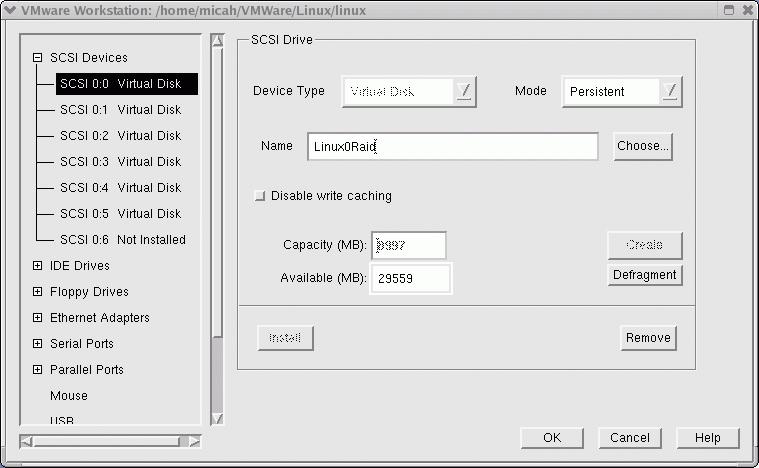
Figure 1. VM Configuration
After configuring VMware to reference the physical CD-ROM drive for the VM's CD-ROM drive, I placed the first Red Hat 8.0 disk into the drive and powered on the VM. There are a few partitioning requirements at this step. First, each partition used in a RAID volume should be the same size. Second, one partition on one of the drives should be native and should mount at /boot. Third, for RAID 5, one partition's worth of space in a RAID volume needs to be "sacrificed" to account for parity (error correction) data. Because my physical machine has 512MB of RAM, I wanted to have 1GB of swap space. Table 1 shows my partitioning scheme.
Partition | Size (MB) | Type (hex value) |
/dev/sda1 | 250 | Linux (83) |
/dev/sda2 | 8750 | RAID autodetect (fd) |
/dev/sdb1 | 250 | RAID autodetect (fd) |
/dev/sdb2 | 8750 | RAID autodetect (fd) |
/dev/sdc1 | 250 | RAID autodetect (fd) |
/dev/sdc2 | 8750 | RAID autodetect (fd) |
/dev/sdd1 | 250 | RAID autodetect (fd) |
/dev/sde1 | 250 | RAID autodetect (fd) |
/dev/sde2 | 8750 | RAID autodetect (fd) |
/dev/sdf1 | 250 | RAID autodetect (fd) |
/dev/sdf2 | 8750 | RAID autodetect (fd) |
Once the drives are partitioned in this way, I can create the RAID 5 volumes. Table 2 shows the RAID volume configuration.
RAID volume | Partitions | Size |
md0 | /dev/sdb1, /dev/sdc1, /dev/sdd1, /dev/sde1, /dev/sdf1 | 1GB |
md1 | /dev/sda2, /dev/sdb2, /dev/sdc2, /dev/sdd2, /dev/sde2, /dev/sdf2 | 43.75GB |
Because of parity, each RAID volume of five partitions has a size of four times the partition size. Table 3 shows my final partition table.
The filesystem type used for the volumes is EXT2. By default, though, Red Hat 8.0 wants to create EXT3 journaling filesystems. At this time, the combination of a journaling filesystem and software RAID makes for very poor performance. There is a lot of talk about working on these performance issues, but for now, EXT2 is the way to go.
During the Red Hat 8.0 install, I used Disk Druid to set up the partitions as outlined above and illustrated in Figures 2 and 3. I used the GRUB boot loader and installed the boot image on /dev/sda. For testing purposes, I installed only about 500MB worth of packages on the VM.
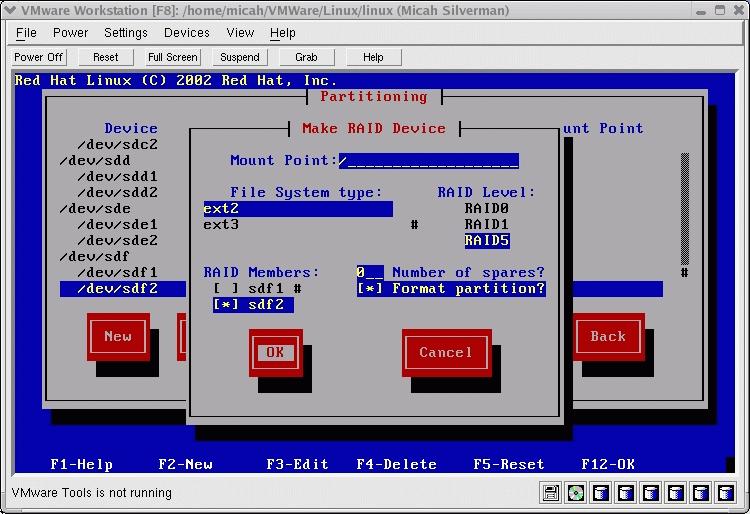
Figure 2. Partitioning with Disk Druid
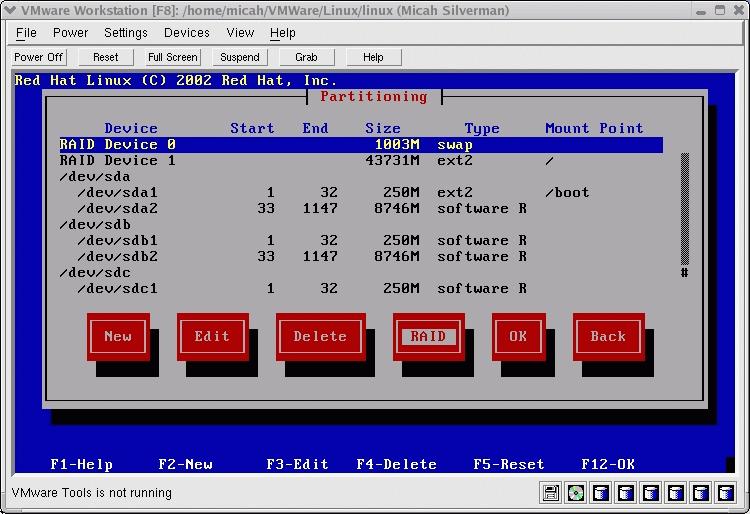
Figure 3. Setting Up the RAID Device
After the installation has completed, inspection of the files /etc/fstab and /etc/raidtab reflects the partitioning scheme and RAID configuration outlined above.
Executing cat /proc/mdstat as root displays information about the RAID configuration. Here is sample output:
Personalities : [raid5]
read_ahead 1024 sectors
md0 :   active raid5 sdf1[4] sde1[3] sdd1[2] sdc1[1] sdb1[0]
        1027584 blocks level 5, 64k chunk, algorithm 0 [5/5] [UUUUU]
md1:    active raid5 sdf2[5] sde2[4] sdd2[3] sdc2[2] sdb2[1] sda2[0]
        44780800 blocks level5, 64k chunk, algorithm 0 [6/6] [UUUUUU]
This output shows us each of the partitions participating in the RAID volumes and its status. The last two columns in the second line displays important information for each RAID volume. Specifically, it shows the the total drives and active drives (for example, [5/5]) and the status of each drive (U for up? The documentation is unclear).
Using this configuration, if any one of the drives from /dev/sdb through /dev/sdf fails, both RAID volumes /dev/md0 and /dev/md1 would be running in degraded mode but without any data loss. If the /dev/sda drive fails, the RAID volume /dev/md1 would be running in degraded mode without any data loss. In this scenario, however, our /boot partition and the master boot record on /dev/sda would be lost. This is where the creation of a bootable recovery CD comes in.
Creating a bootable CD recovery disk can be done easily with the mkbootdisk utility. In order to include the /boot partition on the recovery CD, however, a small patch needs to be applied to mkbootdisk (Listing 1). Also, you must have the mkisofs package installed. The following commands, issued as root, take of this:
cd /sbin
cp mkbootdisk mkbootdisk.orig
patch -p0 \ mkbootdisk.patch
After the patch is applied, the following command creates the bootable recovery CD:
cd /tmp
mkbootdisk --device bootcd.iso --iso 2.4.18-14
When using the --iso option, the specified --device is expected to be a filename to which an ISO image will be written. The last parameter, 2.4.18-14, specifies which kernel to use.
We can check the ISO image by using the following commands:
cd /tmp
losetup /dev/loop1 bootcd.iso
mount /dev/loop1 /mnt
They create a loopback device on which the ISO image is then mounted. Upon inspection, you should see the complete /boot directory on the CD image.
For a physical machine, this image would be burned onto a CD. For the purposes of testing, VMware can use an ISO image directly as a virtual CD-ROM drive.
Now for the fun part. One of the advantages of using VMware for testing is the ability to fail hardware without having to worry about possible repercussions to physical hardware. In order to ensure that the system behaves as expected, I ran two failure tests: failing a pure RAID drive and failing a mixed native and RAID drive.
To fail a drive under VMware, I simply shut down the VM, move the files representing a particular virtual drive to a backup folder and re-create a fresh virtual drive. This process effectively creates a fresh unpartitioned drive--exactly what the situation would be if a drive had failed and been replaced.
For the first test, I "failed" the fourth drive in the array. After a successful boot in the VM, I looked at /proc/mdstat:
Personalities : [raid5]
read_ahead 1024 sectors
md0 :   active raid5 sdf1[4] sde1[3] sdd1[2] sdc1[1] sdb1[0]
        1027584 blocks level 5, 64k chunk, algorithm 0 [5/4] [UU_UU]
md1:    active raid5 sdf2[5] sde2[4] sdd2[3] sdc2[2] sdb2[1] sda2[0]
        44780800 blocks level5, 64k chunk, algorithm 0 [6/5] [UUU_UU]
It is a little counterintuitive, but the status is indicated starting with the lower drive numbers from left to right. So, for md0, [UU_UU] indicates that drives 0 and 1 are up, drive 2 is down and drives 3 and 4 are up. These correlate to sdb1, sdc1, sdd1, sde1 and sdf1, respectively. For md1, [UUU_UU] indicates that drives 0 through 2 are up, drive 3 is down and drives 4 and 5 are up. These correlate to sda2, sdb2, sdc2, sdd2, sde2 and sdf2, respectively.
As we would expect, the sdd drive has failed. At this point the RAID is running in degraded mode. If another drive were to fail, there would be data loss.
We can reintegrate the "new" drive into the array while the system is running. To do this, we need to partition the drive and use the raidhotadd utility. The drive should be partitioned exactly as it was originally. For this drive, both partitions are of type Linux raid autodetect (fd). After the drive is repartitioned, execute the following commands:
raidhotadd /dev/md0 /dev/sdd1
raidhotadd /dev/md1 /dev/sdd2
cat /proc/mdstat
After which, you should see something like the following output:
Personalities : [raid5]
read_ahead 1024 sectors
md0 :   active raid5 sdf1[4] sde1[3] sdd1[2] sdc1[1] sdb1[0]
        1027584 blocks level 5, 64k chunk, algorithm 0 [5/4] [UU_UU]
        [===>.................]  recovery = 18.3% (47816/256896)
finish=0.5min speed=6830K/sec
md1:    active raid5 sdf2[5] sde2[4] sdd2[3] sdc2[2] sdb2[1] sda2[0]
        44780800 blocks level5, 64k chunk, algorithm 0 [6/5] [UUU_UU]
When the sync process is finished for md0, a similar process begins for md1. When completed, you should see that /proc/mdstat appears as it did earlier (with all the Us present) and that the array is no longer in degraded mode.
For the second test, I "failed" the first drive in the array. For this test, we must have the bootable CD-ROM created earlier. It either can be burned onto a CD or the file can be referenced in the VMware configuration (Figure 4).
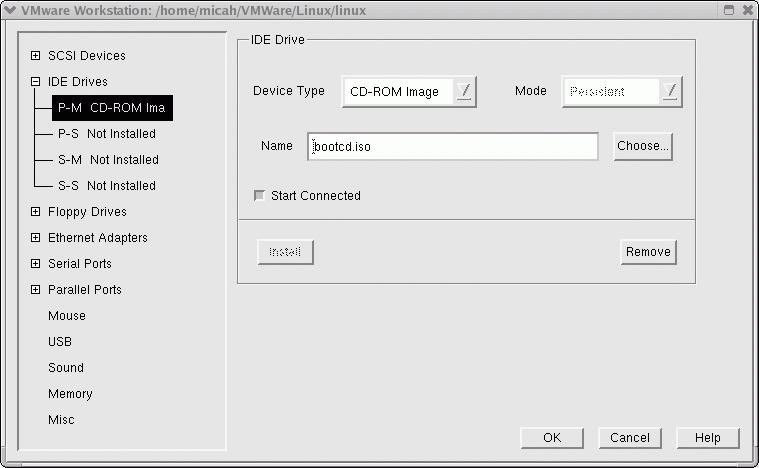
Figure 4. Prepping VMware for the Bootable CD-ROM
When you boot off the CD, the welcome screen created by the mkbootdisk script appears (Figure 5). The boot fails part way through when the system attempts to mount the /boot partition. This is because the drive /dev/sda1 is not available. Enter the root password to get to maintenance mode, and then edit the filesystem table file using the command vi /etc/fstab. For now, simply comment out the line that contains the /boot entry. On my installation, the fstab file had a label reference for the /boot entry. I prefer to reference the drive directly, so I changed this entry to /dev/sda1 and then commented it out. Type exit and the system reboots, again booting off the CD. This time, it is able to start up completely.
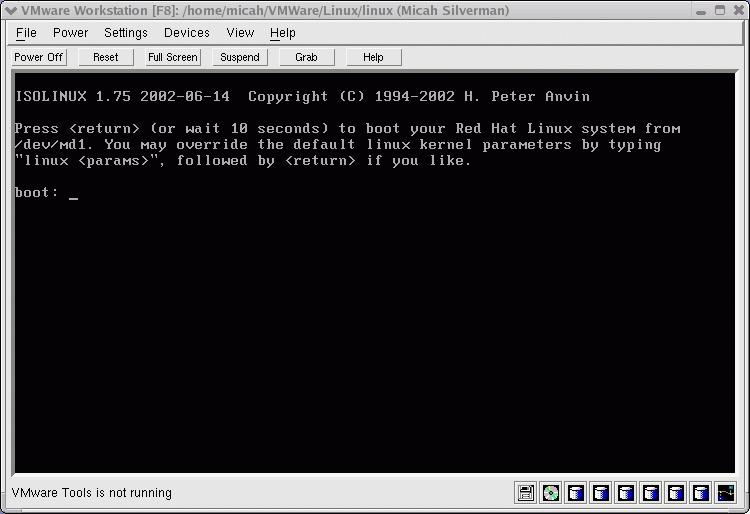
Figure 5. Boot Disk Welcome Screen
You should notice that the md1 RAID volume is running in degraded mode by inspecting /proc/mdstat, as before. The tasks to restore the failed first drive are as follows:
Partition the drive.
Use the raidhotadd utility to rebuild the md1 RAID.
Format the native partition on the drive.
Copy the /boot files from the CD to the drive.
Uncomment the /etc/fstab file.
Install the GRUB boot loader in the MBR (master boot record) of the drive.
The drive should be partitioned exactly as it was originally. That is, the first 250MB partition should be type Linux (83), and the second 8750MB partition should be type Linux raid autodetect (fd). You can then enter the command:
raidhotadd /dev/md1 /dev/sda2
to rebuild the md1 RAID. Inspect /proc/mdstat as before to check on the status of the synchronization process.
The native partition should be formatted with the command mke2fs /dev/sda1. Assuming that the CD-ROM drive is mounted on /mnt/cdrom, the following commands restore the /boot partition:
mount /dev/sda1 /boot
cp -p -r /mnt/cdrom/boot/* /boot
Next, edit the /etc/fstab, and uncomment the line containing the /boot partition. Finally, use GRUB to install the boot loader on the drive's MBR. A thorough discussion of GRUB is outside the scope of this article, but the following commands use the original GRUB configuration defined when Red Hat 8.0 was installed:
grub
root (hd0,0)
setup (hd0)
quit
Once the md1 RAID is rebuilt, the system is ready to be rebooted without the recovery CD. Make sure the recovery CD is removed from the CD-ROM drive or that the image reference in the VMware configuration is removed, and reboot. The system should come up normally. A look at /proc/mdstat should show both RAID volumes, with all members up and running.
Using a combination of software RAID and a recovery CD, a high availability Linux server can be set up and configured easily. It is conceivable that a drive could fail, putting the RAID into degraded mode, without the system administrator knowing immediately. A cron job could be created to periodically examine the /proc/mdstat file and send an e-mail or page if the RAID volumes were found to be in degraded mode.
After testing with VMware, I used the same technique outlined above to install Red Hat 8.0 on my physical machine. I also went through the same testing procedure on the physical machine, including failing a pure RAID drive, failing the first mixed RAID and native drive, restoring RAID volumes in degraded mode, booting of the recovery CD, rebuilding the native partition and installing the boot loader on the MBR. It worked flawlessly, and my system has been reborn as an HA server.
Micah Silverman has been working in software development and computer security since the 1980s. He's been working with Linux since 1991. Micah is a CISSP (Certified Information Systems Security Professional) and a Certified Java Programmer.

