
Linux Powers Four-Wall 3-D Display
The cost per performance of PC clusters is making them a viable alternative to traditional high-end visualization supercomputers. Rapid evolution in commodity PC hardware has both driven down costs and accelerated obsolescent computing cycles. A general rule to follow for buying graphics capability from SGI is to budget $250,000 US per graphics pipe. For those who cannot afford to outfit an Onyx-class computer with four graphics pipes, extra raster managers may be added to two pipes to drive a four-wall display system. In contrast, our experimental cluster costs less than $1,000 US per node. With the addition of a video matrix switcher, the grand total was less than $15,000 US. Even with the fast obsolescence cycles, the price difference is so great that an organization could afford to replace or upgrade the graphics clusters many times during the lifetime of one SGI system. Another advantage of PCs is the wide availability of low-cost parts. Overall, the PCs are cost effective, powerful and flexible.
We present an experiment that integrates a commodity cluster into an existing four-wall display system—a Surround-Screen Visualization System (SSVR) from Mechdyne Corporation. The objective is to attain active stereo visualization on multiple walls using genlocking, swap-locking and data-locking capabilities.
High-end visualization supercomputers offer multiwall, active stereo visualization packaged together. Stereo presentation and coordination of scene graph data is taken care of automatically by the computer in hardware or by the invocation of proprietary software libraries. The cluster was designed from the beginning to attempt to replace aging SGI computing equipment used to drive our current four-wall display system. We are finding ourselves taxing the capabilities of an Onyx 2 system with Infinite Reality 2 graphics by demanding increasing numbers of polygons to be rendered while needing a fixed frame rate for active stereo. When implementing a cluster, these issues must be dealt with in order to produce a coherent scene across many screens.
Communication between the cluster nodes is vital. Data such as pixels, geometric primitives or even scene graph data is passed among the nodes. The way data is handled and the type of data passed greatly impacts the network bandwidth requirements of the cluster. Two basic approaches for setting up a graphics clustering communication software architecture are client/server and master/slave.
In the client/server approach, a single node serves data to the graphics rendering clients. The advantage to this arrangement is many applications may embed a server that works with the same rendering client nodes. This environment is very flexible. The disadvantage is a higher consumption of network bandwidth. Most client/server clusters rely upon relatively expensive Myrinet or gigabit Ethernet hardware.
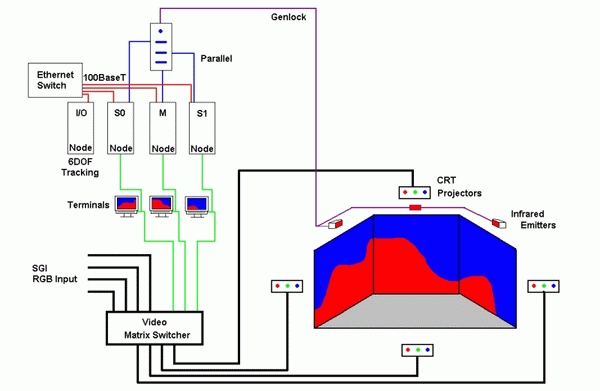
Figure 1. Commodity Cluster Configuration Diagram
The master/slave approach, used in this project, consists of multiple nodes, where each node of the graphics cluster locally stores and runs an identical copy of the graphics application. Consequently, only a small amount of information is required to be shared among the nodes, and network bandwidth becomes less of a concern. This information may simply include input device data and timestamps. In this configuration, the master node handles application state changes.
All graphics clusters must satisfy the following three requirements:
Genlocking: the process of synchronizing the video frames from each node in a cluster so that they produce a fluid, coherent image. Genlocking may be achieved through software or hardware.
Swap Locking: the process of synchronizing the frame buffer rendering and swapping. This is necessary because each view of a scene contains different amounts of data and numbers of polygons to render. These may produce different rendering times for each frame for each node.
Data Locking: the process of synchronizing the views to maintain consistency across the screens. This becomes an issue since each node in the cluster renders its frames from locally stored information.
We used a set of standard PC configurations equipped with MSI G4Ti4600 graphics adapters powered by NVIDIA's GeForce4 Ti graphics processing unit (GPU) and 128Mb of DDR video memory. Although not completely necessary, the PCs were identical, which made software installation easier. The PCs communicated via 100BaseT networking adapters and a 100BaseT switch.
The projectors of the SSVR are connected to an Extron CrossPoint Plus 124 matrix video switcher. The switcher is capable of accepting video input from 12 sources and output to four sources.
Since genlocking and data locking are handled in software through the parallel ports, a special box (Figure 2) was fabricated to handle the signaling appropriately. This box was also built from commercial off-the-shelf hardware for less than $20 US. Besides controlling the switcher, this box also outputs a genlocking signal to a set of Crystal Eyes infrared emitters.

Figure 2. A fabricated box that handles genlocking and data locking through parallel port connections.
A variety of software is used to deal with the active stereo and scene synchronization needs of the cluster. The commodity cluster was built upon a standard installation of Red Hat Linux 7.2, and the kernel was then patched to include the Real-Time Application Interface (RTAI), which allows for low latency and task completion timing.
SoftGenLock and RTAI are used in concert to provide a software active stereo solution. The RTAI kernel module detects the vertical refresh of the monitor and changes a pointer in the video card memory that tells the video card what to draw on the screen. A double-sized buffer is provided to the application by specifying a virtual frame buffer in XFree86, which is twice the size of the actual frame buffer being drawn to the screen. For example, if displaying at a resolution of 1024 × 768 in active stereo, the virtual desktop would need to be at a resolution of 2048 × 768. The RTAI kernel module splits the frame buffer in half and alternatingly displays the scene in 1024 × 768 pieces. An application draws in stereo by rendering to the right and left sides of the X frame buffer for the right and left eye.
Genlock/data lock is achieved by synchronizing the machines in the cluster over the parallel ports. The RTAI kernel module writes to one pin on the parallel port and reads from another to make sure that the other machines in the cluster have completed a frame. The master tells all the other nodes in the cluster when to draw, and the other nodes in the cluster report back when they are ready for a new frame. Data lock is achieved by making sure that the slave machines in the cluster are on the correct eye when the parallel port is in a certain state.
SoftGenLock does not synchronize applications between the nodes of a cluster; it provides data lock and stereo. It is the responsibility of the application to synchronize the viewing frustum and animations in the application. Lastly, since SoftGenLock only uses VGA registers, it potentially can work with any graphics card.
When installing a PC cluster, a lot of issues must be dealt with before setup. Here are the important points and some recommendations on how to set up the system properly:
Be sure to have adequate HVAC, power and network access where the cluster will be set up.
Set up the cluster and display system in separate rooms, because noise levels from fans, drives, etc., may be distracting.
Prepare to deal with a lot of issues associated with laying down the cables. The time taken at this stage to label and check the cabling for proper size and lengths will save time later. This will alleviate problems with signal degradation and simply losing a cable in the “nest”.
Create a master power switch to turn off all units at once.
We constructed and installed a three-wall cluster in less than two weeks. This cluster was configured to use active stereo and has the ability to demonstrate swap locking and data locking.
We tested the PC commodity cluster by implementing a simple visualization software system. We utilized an interoperable software architecture, VR Juggler, which provides a set of programming abstractions for interfacing with a variety of display, tracking and computing systems and a variety of interaction devices. The software, which is used for visualizing terrain information, has a variety of display modes including stereo. It can be recompiled to work on different computing architectures and reconfigured at execution time by including different default device configuration files.
The application integrated smoothly with the cluster system and performed better than expected. The quality of the displays and stereo viewing was comparable to the same software running on three walls using an SGI Onyx 2 with IR2 graphics. However, the cluster was able to visualize the data with better performance. Figure 3 shows the cluster software running in the four-wall display system on the three side walls.

Figure 3. A Test Application Driving a Four-Wall Display
The use of a graphics PC cluster is now becoming a viable low-cost alternative to the use of single large visualization supercomputers. The PCs and related video hardware are fairly cheap, computationally powerful and flexible. There also is an abundance of software available for them, such as VR Juggler, which allow for applications to interface with a variety of display systems and interaction devices easily. Our cluster experiment explored the feasibility of phasing out and replacing existing expensive single large computing hardware. The results show we can make this kind of transition in the near future, and we believe our experiences will be motivation for others to follow suit.
The author would like to thank the following people for their support and contributions to the project: Aaron Bryden, Greg S. Schmidt, Ian Roth and J. Edward Swan II.

Douglas B. Maxwell (vrdeity@yahoo.com) is a mechanical engineer and recently transferred to the Naval Undersea Warfare Center's Weapons and Countermeasure Control group in Newport, Rhode Island. His previous post was the Naval Research Laboratory Virtual Reality Lab in Washington, DC. He specializes in design synthesis, simulation and training in virtual environments.
