
OpenOffice.org Address Books and Form Letters
OpenOffice 1.0 is a multi-platform office suite based on the StarOffice code base. It includes standard applications such as a word processor, a spreadsheet program, a presentation manager and a drawing program. This article will introduce the form letter ability of OpenOffice.org's word processor and illustrate several ways to import data into the application.
Form letters are documents that contain fields that are populated when the document is printed. The information used to populate these fields is pulled from a database called an address book.
Address books can be imported from existing sources such as Netscape's address book or an LDAP server. They can also be created from a dBase file, spreadsheets or plain-text files. OpenOffice.org's wizard, called AutoPilot (see Figure 1), can ease the task of importing address information. Examples of using AutoPilot are presented below.
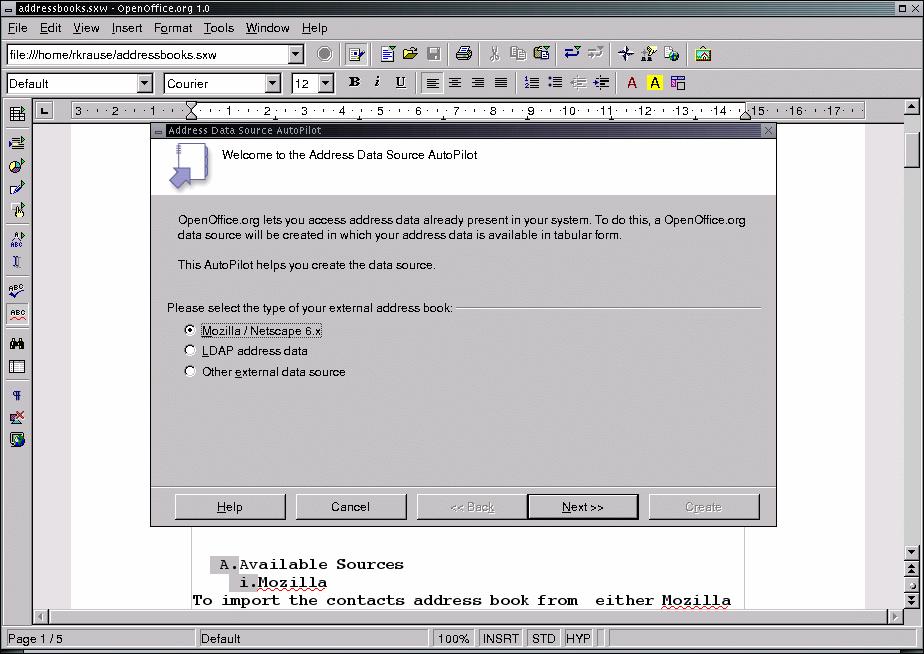
Auto Pilot
After an address book has been created, the information it contains can be accessed by clicking View -> Data Sources (see Figure 2). This opens up a new window along the top edge of the document that lists all of the available data sources.
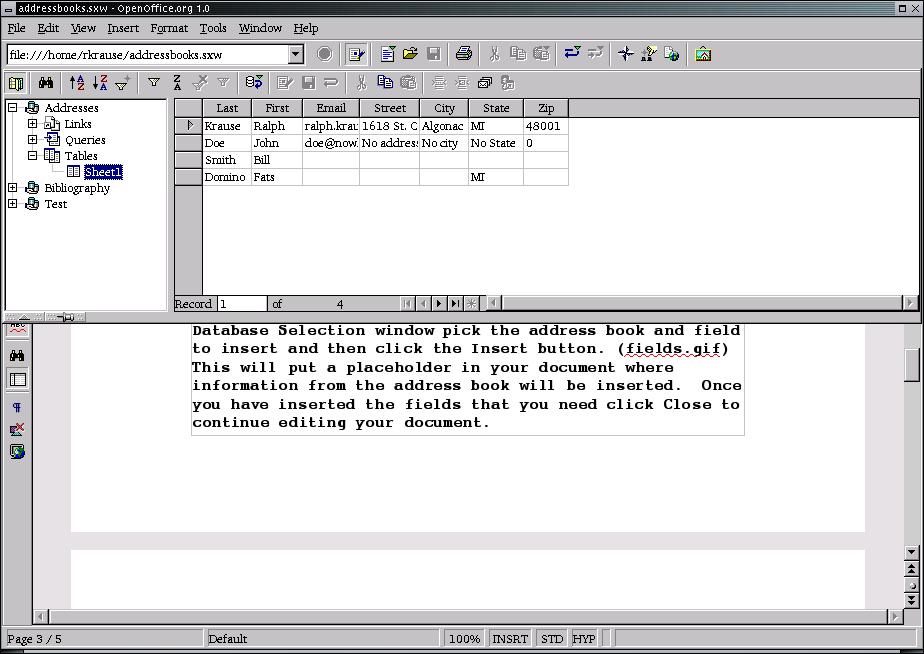
Viewing Data Sources
To import the address book from either Mozilla 1.0 or Netscape 6, click File -> AutoPilot -> Address Data Source. Select Mozilla / Netscape 6.x and click the Next button. Select whether to use the Personal or Collected addresses, and click the Next button. Finally, supply a name for this data source, and click the Create button.
An OpenOffice.org spreadsheet can be used as an address data source fairly easily. When you create a spreadsheet to use as an address book, the first line should contain column headings such as First Name, Last Name, Phone and Email Address. These column headings will be used when the spreadsheet is imported.
In the AutoPilot's Address Data Source wizard, select Other External Data Source and click Next. Click on the Settings button, which brings up the Create Address Data Source window (see Figure 3).
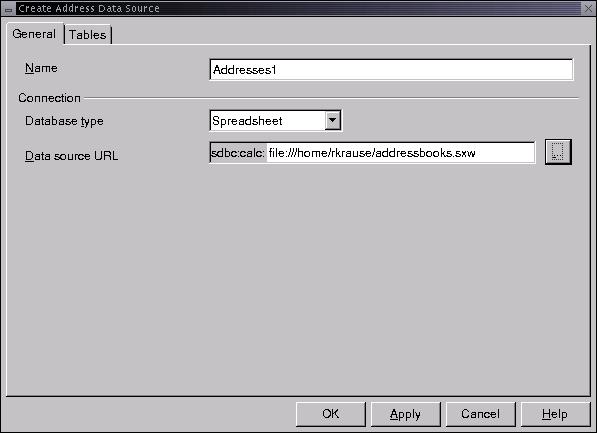
Create the Address Data Source
Select Spreadsheet in the database type dropdown box, and enter the spreadsheet filename in the Data Source URL field. Click OK to close the Create Address Data Source window.
Next, map the spreadsheet columns to OpenOffice.org's address fields. This is accomplished by clicking on the Field Assignment button, selecting the appropriate spreadsheet column header for each address field and then clicking OK (see Figure 4).
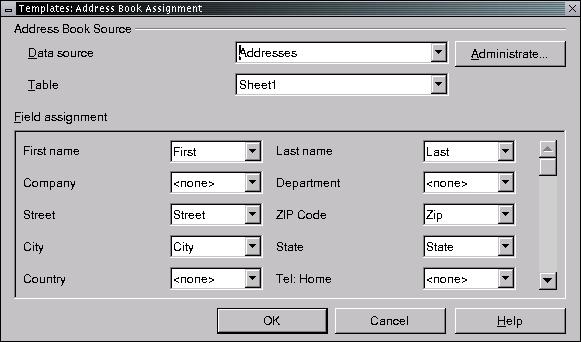
Mapping Columns to Address Fields
Plain-text files also can be imported and used as address data sources. The first line of the file should contain field headings separated by tabs.
Again, select Other External Data Source from the Auto Pilot and click on the Settings button. In the Create Address Data Source window, select Text as the database type and specify the directory containing the text file as the Data Source URL.
Click on the Text tab and put a check next to Text Contains Headers. Select the appropriate data field separator (tabs in this case) and the extension that you used for the text file. Click on the Tables tab and put a check mark next to the text file containing your address data, then click OK. Match OpenOffice.org's address fields with the headings in the first line of your text file, the same way as you would with spreadsheets, and click OK.
Another choice for an address data source is an LDAP server. Selecting LDAP from the AutoPilot's Address Data Source window and then clicking Settings will bring up the Create Address Data Source window. Here you can specify the LDAP server's location and the user name and password required to access the server.
A documented issue with OpenOffice 1.0 is that the first connection to an LDAP server must be made as root. After this first connection is made, normal users can then access the server. I was able to connect to a test OpenLDAP server on my system, but I could not display any information from it. The OpenOffice.org web site indicates this is another known problem.
Finally, you can use dBase files as an address source. Simply pick Other from the AutoPilot's menu and select dBase as the Database type. Select the directory containing the .dbf file, and then make sure the correct filename is checked. After clicking OK, go through the field assignment procedure to map OpenOffice's address fields to the fields in the database.
One advantage of using a dBase file is you can edit the records it contains when the Data Sources window is displayed. Address books from other sources can't be edited from the Data Sources window.
OpenOffice.org does have some quirks when dealing with address books. Clicking the refresh button on the View Data Source window didn't actually update the data shown. The only way to show the updated information is to restart the application.
Another problem is the application will hang if you hide the Data Sources window while Mozilla/Netscape's address book is being viewed.
A form letter is a document containing fields populated by information from an address book. There are two ways to insert these fields into a document. One way is to position the cursor where you want the field and then click Insert -> Fields -> Other (keyboard shortcut Ctrl-F2). Click on the Database tab and select Form letter field in the Type list. In the Database Selection window pick the address book and field to insert, and then click the Insert button (see Figure 5). This will put a placeholder in your document where information from the address book will be inserted. Once you have inserted the fields that you need, click Close and continue editing your document.
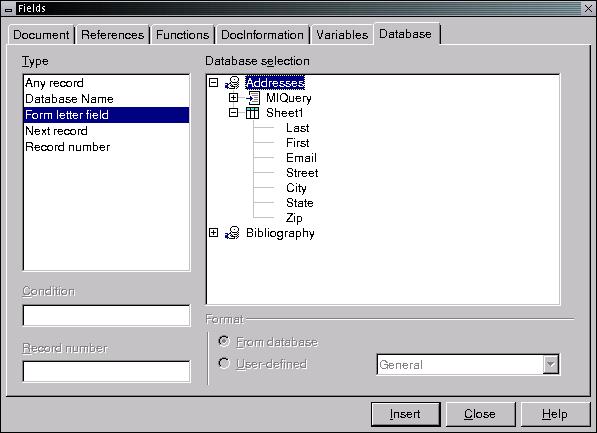
Creating a Placeholder
The second way to insert fields is to display an address book in the Data Sources window and then drag column names from the table into your document.
After you have created and saved your form letter template, you have to generate the letters that will be sent to each addressee. These letters can be printed out, saved as individual files on your hard drive or sent as e-mail messages.
To generate form letters, click File -> Form Letter. This will bring up the Form Letter window where you can select which addressees to use (all, selected or a specific range). Choose whether the letters should be printed, saved to disk or e-mailed, and then click OK. Note that in order to send your form letters as e-mail, you must have Netscape 6.x installed. OpenOffice.org can't send form letters as e-mail using Mozilla.
OpenOffice.org offers you the ability to filter your address book data using SQL statements. Because you can create address books with custom fields, you can target form letters to specific customers based upon criteria such as a purchased product or a renewal date. You can also limit your form letter to addressees in specific area codes, zip codes or states.
To use this feature, open the Data Source Administration window (see Figure 6) by clicking Tools -> Data Sources. Select the database you wish to use, and then click on the Queries tab. Clicking on the New Queries button will bring up a SQL statement builder window (see Figure 7). This window allows you to build a query and run it to see its results. Make sure you include all the fields in your query that you will insert into your letter. Once the query works as you would like, you can save it with a descriptive name and use it again.
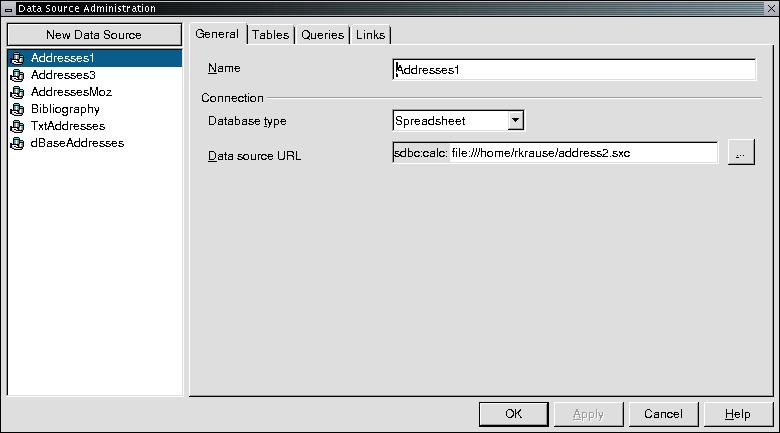
Filtering with SQL Statements
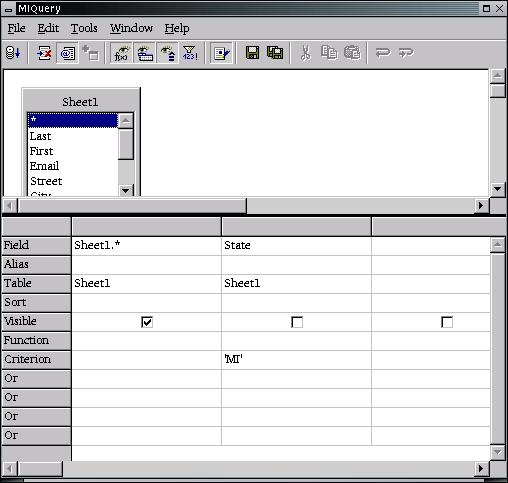
SQL Statement Building
To insert fields from an SQL query, select the query as your database selection in the Fields dialogue (Insert -> Fields -> Other). When you generate the form letters (File -> Form Letters), select the query you wish to use from the Form Letter window instead of an address book table.
Using OpenOffice.org 1.0 to write this article, I found that it has some quirks. It did crash a few times, but I didn't lose any of my work. Additionally, OpenOffice.org 1.0 can take a considerable amount of time to download over a slow internet connection. However, its price and capabilities can make the OpenOffice suite worth a try.
Ralph Krause (www.netperson.net/~rkrause) lives in Michigan's lower peninsula and spends his time writing, programming, reading and maintaining several web sites.
email: rkrause@netperson.net
