
IBM's Journaled Filesystem
New features are constantly being added to the Linux kernel; one of them is the support for journaling filesystems. JFS from IBM is one of the many journaling filesystems available now for Linux. This article explains JFS internals and characteristics, how to install and configure it on a Linux server and the operational experience of JFS at the Ericsson Research Lab in Montréal.
A filesystem is used to store and manage user data on disk drives. It ensures that the integrity of the data written to the disk is identical to the data that is read back. In addition to storing data in files, a filesystem also creates and manages information, such as free space and inodes, about the filesystem itself. Filesystem structures commonly are referred to as metadata, everything concerning a file except the actual data inside the file. Elements of the file, such as its physical location and size, are tracked by metadata.
A journaling filesystem provides improved structural consistency and recoverability. It also has faster restart times than a non-journaling filesystem.
Non-journaling filesystems are subject to corruption in the event of a system failure. This is because a logical file operation often takes multiple media I/Os to accomplish and may not be reflected completely on the media at any given point in time. For example, the simple task of writing data to a file can involve numerous steps:
Allocating blocks to hold the data.
Updating the block pointers.
Updating the size of the file.
Writing the actual data.
If the system is interrupted when these operations are not fully completed, the non-journaling filesystem ends up in an inconsistent state. In this case, these filesystems rely on their fsck utility to examine all of the filesystem's metadata (for example, directories and disk addressing structures) to detect and repair structural integrity problems before restarting. fsck can be rather time consuming, with the amount of time being dependent on the size of the partition, the number of directories and the number of files in each directory. In the case of a large filesystem, journaling becomes crucial. A journaling filesystem, on the other hand, can restart in less than a second.
JFS was designed to support fast recovery from system outages, large files and partitions and a large number of directories and files. To meet these requirements, JFS provides a sub-second filesystem recovery time, achieved by journaling only the metadata. JFS also provides 64-bit scalability, with petabyte ranges for files and partitions. In addition, B+tree indices are used on all filesystem on-disk structures. For better performance, B+trees are used extensively in place of traditional linear filesystem structures.
A file is allocated in sequences of extents. An extent is a sequence of contiguous aggregate blocks allocated to a JFS object as a unit. An extent is contained wholly within a single aggregate (and therefore, a single partition). Large extents, however, may span multiple allocation groups. An extent can range in size from 1 to 224 - 1 blocks. JFS, for example, uses a 24-bit value for the length of an extent. The maximum extent, if the block size is 4K, would be 4K * 224 - 1 bytes and is equal to (~64G). Note that this limit applies only to a single extent; in no way does it limit the overall file size. Extents are indexed in a B+tree for better performance in inserting new extents, locating particular extents and so forth.
In general, the allocation policy for JFS tries to maximize contiguous allocation by allocating a minimum number of extents, with each extent as large and contiguous as possible. This allows for larger I/O transfers, resulting in improved performance.
IBM introduced its UNIX filesystem as the Journaled Filesystem (JFS) with the initial release of AIX Version 3.1. This filesystem is now called JFS1 on AIX. It has been the premier filesystem for AIX for the past ten years and has been installed in millions of customers' AIX systems. In 1995, work began to make the filesystem more scalable and to support machines with more than one processor. Another goal was to have a more portable filesystem capable of running on multiple operating systems.
Historically, the JFS1 filesystem is closely tied to the memory manager of AIX. This design is typical of a closed-source operating system or a filesystem supporting only one operating system.
The new Journaled Filesystem, on which the Linux port was based, was first shipped as part of the OS/2 Warp Server for eBusiness in April 1999, after several years of designing, coding and testing. It also shipped with OS/2 Warp Client in October 2000. Parallel to this effort, some of the JFS development team returned to the AIX Operating System Development Group in 1997 and started to move this new JFS source base to the AIX operating system. In May 2001, a second journaled filesystem, Enhanced Journaled Filesystem (JFS2), was made available for AIX 5L. Meanwhile, in December 1999, a snapshot of the OS/2 JFS source was taken, and work was begun to port JFS to Linux.
In December 1999, three potential journaling filesystems were begun or were in the process of being developed or ported to Linux. Ext2 was adding journaling to its filesystem under the name of ext3. SGI began to port their XFS filesystem from IRIX. The third filesystem was being developed by Hans Reiser and came to be called ReiserFS. But none of these filesystems were fully functional on Linux in 1999. IBM believed that JFS was a strong technology and could add value to the Linux operating system.
Contacts were made with the top Linux filesystem developers and the possibility of adding yet another journaling filesystem was explored. One of the basic underlying philosophies of Linux is that choice is good, so the idea of another journaling filesystem was accepted.
IBM started moving JFS to Linux in December 1999, and by February 2000, they had released the first source code. This initial release contained the reference source code, the mount/unmount function and support for the ls command on a JFS partition.
JFS has been incorporated into the 2.5.6 Linux kernel and also is included in Alan Cox's 2.4.X-ac kernels, beginning with the February 2002 release of 2.4.18-pre9-ac4. Alan's patches for the 2.4.x series are available from kernel.org. You also can download a 2.4 kernel source tree and add the JFS patches to this tree. JFS comes as a patch for several of the 2.4.x kernels, so get the latest kernel from kernel.org.
At the time of this writing, the latest kernel is 2.4.18 and the latest release of JFS is 1.0.20. We use them in the following section. The JFS patch is available from the JFS web site. You also need both the utilities (jfsutils-1.0.20.tar.gz) and the filesystem (jfs-2.4.18-patch and jfs-2.4-1.0.20.tar.gz) patches. Several Linux distributions are already shipping JFS: Turbolinux, Mandrake, SuSE, Red Hat and Slackware all ship JFS in their latest releases.
If you use any of the previously named distributions, you do not need to patch the kernel for the JFS code. You need only to compile the kernel to support JFS (either as built-in or as a module).
First, download the standard Linux kernel. If you have a /usr/src/linux directory, move it, so it won't replaced by the linux-2.4.18 source tree. After you download the kernel, named linux-2.4.18.tar.gz, save it under /usr/src and untar it. This operation will create a new /usr/src/linux directory.
The next step is to get the JFS utilities and the appropriate patch for kernel 2.4.18. Create a directory for JFS source, /usr/src/jfs1020, and download to that directory the JFS kernel patch, the jfs-2.4-18-patch and the JFS patches, jfs-2.4-1.0.20.tar.gz. At this point, you have all the files needed to patch the kernel.
Next, change to the directory of the kernel 2.4.18 source tree to apply the JFS kernel patch:
% cd /usr/src/linux
% patch -p1 < /usr/src/jfs1020/jfs-2.4-18-patch
% cp /usr/src/jfs1020/jfs-2.4-1.0.20.tar.gz .
% tar zxvf jfs-2.4-1.0.20.tar.gz
Configure the kernel and enable JFS by going to the Filesystems section of the configuration menu and enabling JFS support, CONFIG_JFS_FS=y. You also have the option to configure JFS as a module. In this case you need only to recompile and re-install kernel modules:
% make modules && make install_modulesOtherwise, if you configured the JFS option as kernel built-in, you need to recompile the kernel (in /usr/src/linux):
% make dep && make clean && make bzImageThen, recompile and install modules (only if you added other options as modules):
% make modules && make modules_installFinally, install the new kernel:
% cp arch/i386/boot/bzImage /boot/bzImage-jfs
% cp System.map /boot/System.map-jfs
% ln -s /boot/System.map-jfs /boot/System.map
Don't forget to run lilo. (If you have never recompiled the kernel, read the Kernel-HOWTO to learn how.)
After you compile and install the kernel, you should compile and install the JFS utilities. Save the jfsutils-1.0.20.tar.gz file into /usr/src/jfs1020 and then:
% tar zxvf jfsutils-1.0.20.tar.gz
% cd jfsutils-1.0.20
% ./configure
% make && make install
Having built and installed the JFS utilities, the next step is to create a JFS partition. In the following example, we use a spare partition; the next section will demonstrate how to migrate an existing partition into JFS.
If there is unpartitioned space on the disk, you can create a partition using fdisk. In our test system, we had /dev/hdb3 as a spare partition, so we formatted it as a JFS partition. After the partition is created, reboot the system to make sure the new partition is able to create the JFS.
To create the JFS, apply the following command:
% mkfs.jfs /dev/hdb3
After the filesystem has been created, you need to mount it. To get a mount point, create a new empty directory, such as /mnt/jfs, and use the following mount command:
% mount -t jfs /dev/hdb3 /mnt/jfsWhen the filesystem is mounted, you are ready to try out JFS.
To unmount JFS, simply use the umount command with the same mount point as before:
% umount /mnt/jfs
In the previous section, we explained how to create a JFS filesystem using an existing spare partition. Now, we demonstrate how to migrate your current system from another filesystem, such as ext2, to JFS. We look at how to introduce a JFS partition to your Linux configuration. In a second step, we make that partition the root filesystem.
What partition scheme do you need to create a JFS root partition? The migration process requires an empty partition. Let's assume that /dev/hda5 is the current root partition and that it uses ext2. We use /dev/hda6, which is our empty partition, as our JFS root partition. This partition needs to be of equal or larger size than the current root partition. The ext2 partition will be duplicated on the JFS partition. Afterward, if you do not wish to keep the ext2 partition, you can reformat it without losing your Linux system.
In order to create a root JFS partition on /dev/hda6, follow the instructions mentioned earlier to get support for JFS in the kernel. To make this partition a bootable partition for Linux, you need to reproduce a complete Linux installation. A simple way of doing so is to copy all the files to the JFS partition. First, mount the filesystem:
% mount -t jfs /dev/hda6 /jfs
Then, copy all files from ext2 filesystem to the JFS partition:
% cd /
% cp -a bin etc lib boot dev home usr var [...] /jfs
  You need special handling for /proc and /tmp:
        % mkdir /jfs/proc
        % chmod 555 /jfs/proc
        % mkdir /jfs/tmp
        % chmod 1777 /jfs/tmp
It is important to create /proc and /tmp with the correct
permissions. Permission 1777 means the only people who can rename
or remove any file in that directory are the file's owner, the
directory's owner and the superuser. The last steps involve
changing /etc/lilo.conf and /etc/fstab. First, we change lilo.conf
to boot using the kernel on our JFS partition. Notice that root is
different from the first entry we made as well as from the label.
Thus, the image to be booted will not be found in /dev/hda5/boot,
but in /dev/hda6/boot:
image=/boot/vmlinuz-jfs
        label=jfs-kernel
        read-only
        root=/dev/hda6
Finally, we need to change /jfs/etc/fstab to tell the Linux system
what filesystem it is using. Change the following line:
LABEL=/ / ext2 defaults 1 1so that it says:
/dev/hda6 / jfs defaults 1 1Now, you can reboot and choose jfs-kernel. This will start Linux with the JFS root filesystem.
After a crash, the log replay occurs automatically. Instead of the usual fsck messages, you should see JFS journaling messages. Replaying the log is necessary when a filesystem becomes unstable.
One of the responsibilities of the Open Systems Lab at Ericsson Research is to design, implement and benchmark carrier-class platforms that run telecom applications. These carrier-class platforms have strict requirements regarding scalability, reliability and high availability. They must operate nonstop, regardless of hardware or software errors, and they must allow operators to upgrade hardware and software during operation without disturbing the applications that run on them. As a result, they must offer extreme reliability and high availability, often referred to as a five-nines availability (99.999% uptime).
To maintain such availability, these carrier-class platforms were designed with many features that allow software to be upgraded while the system is running and providing service. These features include fault tolerance implemented in the software, network redundancy to handle catastrophic situations such as earthquakes and in-service upgrade features.
Although many precautions have been taken to protect the system, there is always a remote chance that the processor (or server node) will fail. Thus, as a last resort, we need to reboot the processor. In this extreme case, we need to be able to reboot the processor and bring it to normal status, serving requests as soon as possible, with a minimal downtime.
Our interest in journaling filesystems for the carrier-class Linux platform came from the fact that these filesystems provide a fast filesystem restart. In the case of a system crash, a journaling filesystem can restore a filesystem to a consistent state more quickly and more reliably than other filesystems.
Initially, we started to experiment with the IBM JFS in early 2000. The JFS team was helpful and supportive, and their representative, Steve Best, visited our lab in January 2001. Since then, we have been following JFS development closely and upgrading our servers to support the latest versions.
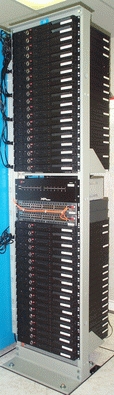
Figure 1. 1U Rackmount Units Used to Test JFS
The first installations of JFS were done on 1U rackmount units with Celeron 500MHz processors, 256MB of RAM and 20GB IDE disks. These units provided us with a working environment to test JFS and to experiment with its features using some of our applications. Since JFS version 1.0.0 was released in June 2001, we decided to install JFS on our test Linux platform, shown in Figure 2.

Figure 2. Telecom-Grade HW Used to Test JFS on Linux
Our Linux systems are designed to serve short transaction-based requests. JFS provides a log-based, byte-level filesystem targeted for transaction-oriented systems, which makes it quite suitable for our type of systems.
The advantages of JFS from a telecom point of view are that it provides improved structural consistency, recoverability and much faster restart times than non-journaling filesystems, such as traditional UNIX filesystems. In most cases, the other filesystems are subject to corruption in the event of a system crash. They rely on restart-time utilities like fsck, which examines all of the filesystem's metadata to detect and repair structural integrity problems. This is a time-consuming and error-prone process; in a worst-case scenario, it can lose or misplace data. Telecom platforms cannot afford a process that prolongs a system's downtime.
With JFS, in case of a system failure, a filesystem is restored to a consistent state by replaying the log and applying log records for the appropriate transactions. The recovery time associated with this log-based approach is much faster, because the replay utility examines only the log records produced by recent filesystem activity, rather than examining all filesystem metadata.
JFS is a key technology for servers because it provides fast filesystem restart times in the event of a system crash. The JFS team's most important goal is to create a reliable, high-performance filesystem. The JFS team is making great progress in porting JFS to Linux. From a performance point of view and based on the various published benchmarks, JFS comes out as a winner. To get involved, visit the JFS Project page on developerWorks.
The Open Systems Lab at Ericsson Research for supporting our work with Linux and open-source software.
Steve Best (sbest@us.ibm.com) works in the Linux Technology Center of IBM in Austin, Texas. He is currently working on the Journaled Filesystem for Linux Project. Steve has done extensive work in operating system development with a focus in the areas of filesystems, internationalization and security.
David Gordon (gordd00@dmi.usherb.ca) is finishing his Bachelor's degree in Computer Science at Sherbrooke University in Québec, Canada. He is a co-op student with the Ericsson Research Lab in Montréal.
Ibrahim Haddad (Ibrahim.Haddad@Ericsson.com) is a researcher at the Ericsson Corporate Unit of Research in Montréal, Canada. He is involved with the system architecture of third-generation wireless IP networks. Ibrahim represents Ericsson on the Technical Sub-Groups of the Open Source Development Lab (OSDL). He is currently a DrSc Candidate at Concordia University.

