
Understand Quicksort with DDD
Sorting is one of the most common functions performed by a computer, and Quicksort is one of the most efficient ways to do it. This article demonstrates the usefulness of a graphical debugger for learning how Quicksort works.
DDD (Data Display Debugger) is a free, visual front end that can control many popular debuggers. This article uses DDD to work through a simple C implementation of Quicksort.
First, find a copy of DDD and install it. Binary and source packages are available for RPM-based distributions at rpmfind.net, and Debian packages are available at debian.org. This article was written using DDD version 3.3.1 on Red Hat 7.3. This article also makes the following assumptions: 1) you have a GNU/Linux-enhanced computer and it is plugged in; 2) you know basic C concepts including arrays, loops and recursion; and 3) you have a capable C compiler, such as GNU's GCC. Even if you don't know anything about programming, try stepping through the code anyway. It's good for you.
CAR Hoare described the Quicksort algorithm in a much-cited 1962 paper, and it is still in common use 40 years later. The divide-and-conquer approach of Quicksort is probably where it got the prefix quick; by segregating smaller elements from larger elements it eliminates the need for many comparisons. In contrast, a selection sort compares every element to every other element. This is not to say that Quicksort is always faster or that it's the best way to sort; it's simply cool to know. The implementation in this article is not an optimized or extensible quicksort. It only works on integer arrays.
This code was largely borrowed from The Practice of Programming by Brian W. Kernighan and Rob Pike:
#include <stdio.h>
#include <stdlib.h>
#include <time.h>
/* from: The Practice of Programming (pp: 32-34)
 *   by: Brian W. Kernighan and Rob Pike
 */
/* swap: interchange v[i] and v[j] */
void swap( int v[], int i, int j )
{
  int tmp;
  tmp = v[i];
  v[i] = v[j];
  v[j] = tmp;
}
/* quicksort: sort v[0]..v[n-1] into increasing
 * order
 */
void quicksort( int v[], int n )
{
  int i = 0, last = 0;
  if ( n <= 1 )              /* nothing to do */
    return;
  swap( v, 0, rand() % n );  /* move pivot elem
                                to v[0] */
  for ( i = 1; i < n; i++ )  /* partition */
    if ( v[i] < v[0] )
      swap( v, ++last, i );
  swap( v, 0, last );        /* restore pivot */
  quicksort( v, last );      /* sort smaller
                                values */
  quicksort( v+last+1, n-last-1 );  /* sort larger
                                       values */
}
void print_array( const int array[], int elems )
{
  int i;
  printf("{ ");
  for ( i = 0; i < elems; i++ )
    printf( "%d ", array[i] );
  printf("}\n");
}
#define NUM 9
int main( void )
{
  int arr[NUM] = { 6, 12, 4, 18, 3,
                  27, 16, 15, 19 };
  /* commented out to aid in predictability
   * srand( (unsigned int) time(NULL) ); */
  print_array(arr, NUM);
  quicksort(arr, NUM);
  print_array(arr, NUM);
  return EXIT_SUCCESS;
}
Save the code to a file called easy_qsort.c. Next, compile the code:
$ gcc -Wall -pedantic -ansi -o qsortof -g \
easy_qsort.c
The most important argument to GCC is notably -g, which adds debugging symbols to the code.
Try running the program to make sure everything is kosher:
$ ./qsortof
{ 6 12 4 18 3 27 16 15 19 }
{ 3 4 6 12 15 16 18 19 27 }
The first line of output is the unsorted array, the second line is the array after running through the quicksort function.
So how does it work? Let's turn to our new friend DDD:
$ ddd qsortof
This should bring up DDD. Close any Tips and About:Help windows that pop up, and you should see something like Figure 1.
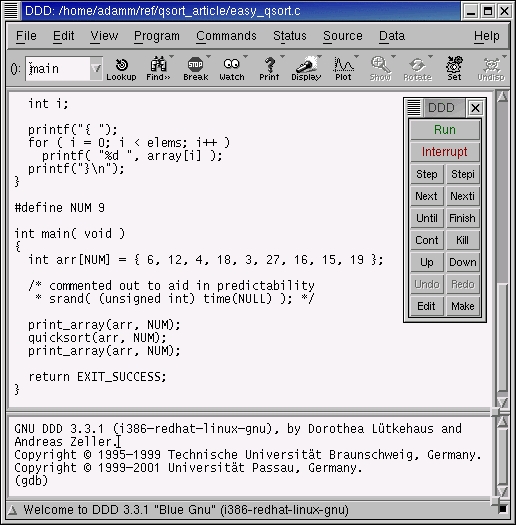
Figure 1. Freshly Started DDD
It would be a good idea to turn on line numbering now. Click the check box next to Display Source Line Numbers in the Edit-->Preferences-->Source menu. Now we can add a breakpoint and start debugging.
First, select the nothing to do line by clicking on its line number in the margin. Then, click the Set/Delete Breakpoint at () button, and click the Run button in the floating command tool.
At this point you should see a red stop sign at the line with the breakpoint and a green arrow on the same line (the code that is about to execute). Let's use DDD to display some inside information.
To begin, select Data-->Display Local Variables. Next, select Data-->Display Arguments, and then select Status-->Backtrace. Finally, type graph display v[0]@n into the console window, and press Enter. This displays elements 0 through n of the v[] array (see Figure 2).

Figure 2. Break at if (n <= 1)
The breakpoint is set so that we don't do anything if the array we were given contains one or less elements. Because this is a recursive quicksort, this test is necessary to end recursion when an array with one element is passed in (more on this later).
After this test, we pick our pivot and move it to the beginning of the array. Click the Next button until the green arrow points to the call to the swap function. Next continues to the next line without descending into subroutine calls. Step would attempt to step into other subroutines. Now, click Next once more to see what happens.
My machine swapped the 0th and 1st elements of v[], meaning rand() % n returned 1. If you debug this program a few times you may notice that rand() % n always returns 1. Not very random, you say? In this example, by commenting out the call to srand(), the pseudo-random generator is never seeded and rand() returns predictable results.
The chosen pivot will serve to divide numbers smaller than itself from numbers larger than itself. The pivot was moved to v[0] because we don't know where it should be until we examine the entire array.
The “partition” loop steps through each element of the array and compares it to the pivot (the number 12, in my case). Last is pre-incremented, so the element at index 1 is swapped with itself (I know it's a waste). Optimizing this algorithm is left as an exercise for the masochistic reader. Note that you can click Interrupt, then Run to start over at any time.
Click Next until i equals 3 and last equals 2 (watch the Locals display in the graphical Data Window). The “if” test inside the partition loop is now comparing 18 to 12. The test fails (Next), so i is incremented (Next), and last still equals 2.
Keep Next-ing until i equals 9. My array is now { 12 6 4 3 18 27 16 15 19 }. Another click on Next and 3 is swapped with 12, seated between the smaller numbers from the larger ones.
After restoring the pivot value to its original place, we recurse into quicksort, sending a pointer to v[0] and telling it to expect a three-element array (the smaller numbers). Then we recurse into quicksort again, sending a pointer to v[4] and announcing a five-element array (the larger numbers). Those quicksort calls again recurse until only one-element arrays are passed into the recursive calls. Only then will the recursive calls return—deepest call first—until we return to the main function with a sorted array. Whew!
If you get deep into recursive quicksort() calls, you'll notice that the v[0]@n display is disabled. Adding a button makes re-creating this display a snap. To create the button, click Commands-->Edit Buttons...-->Data Buttons. Into the text entry field, enter:
graph display v[0]@n // Varray
A button titled Varray should pop up at the top of the Data Window. When the v[0]@n display reads (Disabled), right-click on the display and select Undisplay. Then, click the new Varray button. If it is still disabled, try Next-ing a few times and clicking the button again.
Previously, I had you turn on the stack backtrace window. It's interesting when you're deep in quicksort() calls to examine the stack by clicking on other lines in the backtrace window. You can see how the current calling context was reached and what the data looked like at different points in the stack.
If you're really sick and twisted, try View-->Machine Code Window to see the actual assembler instructions being executed.
DDD is great at displaying linked lists and other data structures. Try it! Also, I've mentioned that this quicksort implementation is nowhere near optimized. To see a highly optimized version, check out qsort.c in the GNU C library.

Adam Monsen is a recovering Pre-Med student, now a “software engineer” at a Seattle, Washington-based startup called Classmates.com. His hobbies include playing the piano, surfing and cat juggling. Adam likes coding Perl, Java and sometimes even C on his Red Hat GNU/Linux 7.3 desktop.
