
Getting Started with Emacs
This article is a whirlwind introduction to Emacs that assumes you have Emacs installed and running (easy enough on most Linux distributions). It also assumes that you have used Emacs' built-in tutorial. Program development in Emacs is not the topic, as that was covered in my June 2002 LJ article “Emacs: the Free Software IDE” [available at www.linuxjournal.com/article/5765].
To launch Emacs from an xterm, enter emacs &. The ampersand puts Emacs into the background. As X provides the display for Emacs, this setup is fine.
You also can run Emacs in a console by entering emacs without the ampersand. To run Emacs in an xterm without opening a new window, launch it with emacs -nw. These console and xterm modes are great for situations where you don't have X, such as an SSH connection to a remote server. But if you have SSH set up to forward X, you can run Emacs (and other X applications) remotely.
If you haven't taken the Emacs tutorial, now is the time to do it. Pressing Ctrl-H then T gets you to it. The tutorial is ancient as computers go (1985), so it ignores cursor keys and other modern conveniences. Emacs supports these features but the tutorial doesn't take them into account. It's a good idea to be aware of, if not learn, some of the Emacs keystrokes, though. You can set bash and many other GNU programs to use them. So, for example, Ctrl-B and Ctrl-N can do exactly the same things in Emacs as they do in bash. In fact, Emacs-style key bindings are the default in bash.
The tutorial should teach you basic cursor movement, how to abort an Emacs command, Emacs windowing, the relationship between buffers and files and so on. Probably the most important thing to remember from the tutorial is the movement keys are usually a given key (F for forward) with different modifiers for different ranges. For example, Ctrl-F moves one character forward, and M-F moves a word forward (M- is Emacs notation for Meta, which on most keyboards means the Alt key).
Emacs existed long before web browsers, so it uses the term frame for what X calls a window, and window for a section within a frame. As this is an Emacs article, this article uses Emacs terminology. To display a new window with a horizontal split, use Ctrl-X 2. For a new window with a vertical split, use Ctrl-X 3. Whereas Ctrl-X 5 1 gives you a whole new frame to play in, Ctrl-X 0 and Ctrl-X 5 0 kill off the current window and frame, respectively.
Another highlight of the tutorial is an introduction to Emacs' incremental search commands. They make life much easier, so learn and remember them.
Ctrl-H is the gateway to Emacs' help system. Pressing Ctrl-H ? gives you a menu for different parts of the help system. The Info system (Ctrl-H I) gives you access to FSF documentation in FSF's Info format. A form of hypertext that predates the World Wide Web, it is arranged in a tree structure. You also can go to an Info node for an Emacs function with Ctrl-H Ctrl-F. This section provides information on the current major and minor modes (more on those in a moment), the warranty and license under which Emacs is provided and other information. Because Emacs' help system is displayed by Emacs, the cursor movement keystrokes you learned in the tutorial apply to the help system.
According to the top Emacs info page, Emacs is the extensible, customizable, self-documenting, real-time display editor. It is extensible because it is written in Emacs Lisp, or elisp, a dialect of Lisp especially customized for Emacs and text processing. You therefore can extend Emacs by writing code in elisp. Furthermore, you can customize it by changing the values of existing elisp variables. Self-documenting might be a slight exaggeration, but elisp does encourage programmers to document. And as we've seen, there is extensive help available.
Users also can customize Emacs by adapting it to specific applications. Do this by switching to what is called a major mode. Only one major mode can be active in a buffer at a time, but you can switch major modes on the fly. For example, when writing CGI scripts it is useful to toggle between Perl mode and HTML Helper mode.
To identify the current modes active in a buffer, see the mode line. In parentheses you will find one or more modes, with the current major mode listed first. Not all minor modes identify themselves in the mode parentheses, but their action is obvious, such as Column Number mode.
Major modes are generally associated with file extensions. A Lisp variable, auto-mode-alist, does this association, and we'll show you how to add to it. Emacs also recognizes associations with shebang entries in the first line of scripts, like this one for Perl:
#! /usr/bin/perl
And you can always force the mode in the first line of a document by surrounding it with -*-, like this:
# -*- shell-script -*-To switch manually from one major mode to another, use M-X mode-name. For example, M-X perl-mode puts Emacs into the major mode for editing Perl.
Major modes provide a number of useful facilities. They usually provide custom indentation and pretty printing options suitable to the subject at hand. There is often some way to insert a comment with a short key sequence. A region of text can be commented out with M-X comment-region. One advantage of using Emacs for all your editing is the functions (and their keystrokes and menu entries) available in one major mode tend to be available in another, so if you know how to edit C in Emacs, you probably can edit SQL in Emacs as well (Figure 1).

Figure 1. C mode in Emacs, showing font locking (color syntax highlighting). The indenting is courtesy of C mode.
Major modes typically provide what Emacs calls font locking, a feature everyone else calls syntax coloring. It automatically associates syntax with colors. For example, comments show up in red, data types in green and strings in a light red. Another advantage of editing with Emacs is that color associations operate across modes, so comments are red regardless of whether you are working in assembler or XML.
Major modes redefine how keystrokes operate, usually the Tab and Delete keys. Also, major modes have mode-specific commands accessed with the prefix Ctrl-C. For example, to validate an SGML document in PSGML mode, use Ctrl-C Ctrl-V.
One of the most powerful major modes around is Lennart Staflin's PSGML mode (see Resources). It facilitates inserting SGML or XML tags and provides automatic pretty printing comparable to C mode. PSGML mode has font locking and other goodies, but it also reads the DTD and uses it to enforce proper tag nesting. For example, in DocBook, it won't let you insert a <sect4> directly into a <sect1>. It also is a front end for a validator (Figure 2).

Figure 2. Editing a Linux Documentation Project document in the DocBook SGML DTD in Emacs. The font locking highlights tags and entities for you.
Other major modes that almost anyone will find useful are Dired mode, Ediff mode, W3 and the calendar and diary. Dired mode is for editing directories. You can navigate from directory to directory, visit files and edit file metadata, such as permissions and ownership. One of the more powerful features of Dired mode is the ability to grep a number of files and have Dired mark the hits. You can then visit each hit in sequence and edit it. This allows you to manipulate files en masse, including renaming them or deleting them.
One mode that has proven to be quite useful is the calendar/diary. Not just any calendar tool, Calendar mode allows you to do date manipulations in and conversions between Gregorian and Julian, Copt, Hebrew and Islamic calendars. And, for something completely different, date your next intra-office memo in the Persian or Mayan calendar. Or, send your next bug report to the Free Software Foundation in the French Revolutionary Calendar (Figure 3).
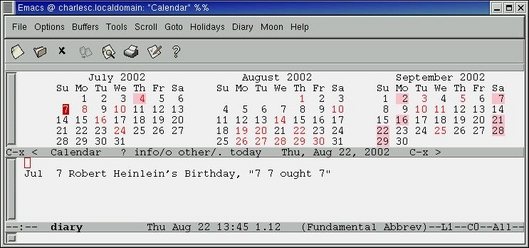
Figure 3. Emacs' Calendar and Diary
Somewhat more useful than obscure calendars is the diary. With the diary, you can set appointments, anniversary reminders, cyclical events (such as “every third Thursday of the month”) and other types of events. If you specify the event time, Emacs will remind you as the time approaches. Not only is this diary system useful, but it runs in Emacs, so it runs on any computer on which Emacs runs—and that's most of them. The diary file is portable as well.
Ediff mode is useful for selectively applying patches. You also can use it to update files on several computers, such as my .emacs and diary files. Because it is selective, ediff lets you propagate changes in both directions. This can be important if you set appointments on your laptop and your secretary sets them on your desktop (Figures 4 and 5).
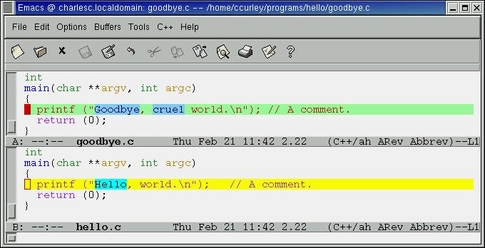
Figure 4. Diffing two files. Emacs shows not only which lines are changed, but what the changes are.

Figure 5. The control window for Ediff mode.
If browsing the World Wide Web is your thing, take a close look at William M. Perry's W3 mode. It is a web browser written in Emacs Lisp.
Add-ons, called minor modes, supplement major modes. Most minor modes operate regardless of the major mode, so they can operate in different documents. For example, Show Paren mode matches parentheses for you. It is useful for the C programmer even in Text mode, and it's a godsend to the Lisp programmer.
Minor modes can be turned on and off as you wish. For example, when programming, Auto Fill mode (for filling, or line wrapping, paragraphs) is useful in comments, but a nuisance outside of them.
Some minor modes are global; they extend across all buffers when they are active. Others are local to a buffer. To activate a given mode, append -mode to its name and execute that command. So to activate Parentheses mode, press M-X then type show-paren-mode. To deactivate it, run the command again.
Several useful buffer-local minor modes are Abbrev mode (autocorrection on the fly), Auto Save mode, Font-Lock mode (color highlighting), Flyspell mode (spell checking on the fly) and Overwrite mode. Two useful minor modes that apply to all buffers are Line Number mode and Column Number mode. These print the current position of point in the mode line, usually over to the right.
Another useful mode is Ispell, which lets you spell check your buffer. It has special submodes for checking e-mail messages, programming language comments and strings, and other special uses.
Key to customizing Emacs is the initialization file, ~/.emacs. Administrators usually provide a global init file. If you don't like it you can tell Emacs to ignore it in your own init file. And, you can start Emacs with no init file with emacs -q, useful for debugging. The init file is nothing but some elisp used to set up Emacs the way you (or your administrator) like it (Figure 6).

Figure 6. Editing the author's .emacs, an example of Emacs Lisp, in Emacs.
You also can set variables in the init file. I customize HTML Helper mode by setting some mode variables:
(setq html-helper-do-write-file-hooks t)
(setq html-helper-build-new-buffer t)
(setq html-helper-address-string "<a href=
\"mailto:ccurley@trib.com\">Charles
Curley</a>")
Short useful functions, or macros, also go into .emacs. For example, the following function inserts today's date at point:
(defun insert-date ()
  "Insert the current date according to the variable
\"insert-date-format\"."
  (interactive "*")
  (insert (format-time-string insert-date-format
                              (current-time))))
Keystrokes and key sequences also can be bound to functions. This
allows you to use the key sequence to activate the function. For
example, having written the function insert-date, I can bind it to
the F3 function key with this line:
(global-set-key [f3] 'insert-date)You also can use this capability to remap your keyboard. If you don't like some of the long key sequences in Emacs, you can rebind them.
The other way to customize Emacs is with the Customize menu, accessed with M-X customize or from the Options pull-down menu. This extensive menu system allows users to change variables and store the changes in your init file.
A number of programs, such as crontab and mutt, invoke an external program as their editor. To let them run Emacs, set Emacs up to run as a server by putting this line into your .emacs file:
(server-start)
Next, set the environment variable EDITOR or VISUAL to emacsclient. In Bash, add this to your /etc/bashrc or your ~/x.bash_profile:
export VISUAL=emacsclientNow, when you execute crontab -e or edit a message in mutt, you edit in your existing Emacs session instead of waiting for a new Emacs to start up. To finish editing and make emacslient exit, end your session in that buffer with Ctrl-C # instead of Ctrl-X K.
For emacsclient to work, Emacs must be running when the external program invokes it. This is consistent with the preferred way of using Emacs, which is to start Emacs when you log in and leave it running until you log out. One result of using emacsclient is you only have one instance of Emacs running at any one time. While memory is cheap today, it wasn't always so. And even today, if you want to run Linux on your laptop or elderly computers, conserving memory is always a good idea.
You might want to have Emacs edit your mail in Mail mode. If you use mutt, add this to your .emacs file:
;; Automatically go into mail-mode if
filename starts with /tmp/mutt
(setq auto-mode-alist (append (list (cons
"^\/tmp\/mutt" 'mail-mode))
                                  auto-mode-alist))
Of course, to comply with the RFCs on netiquette, you will want Auto Fill mode active when you edit mail. Most major modes have a hook they execute on entering the mode and another they execute on leaving. Here is how to get Mail mode to invoke Auto Fill mode:
(defun my-mail-mode-hook ()
  (auto-fill-mode 1)
  )
(add-hook 'mail-mode-hook 'my-mail-mode-hook)
When you are done writing your e-mail, if you want to annoy the NSA, use Spook. To protest the Communications Decency Act (a decent thing to do) and annoy a lot of American politicians, see Bruce.
Finally, before we take our leave of this wild and woolly editor, let me bring the etc directory (in the Emacs directory tree) to your attention. It contains a number of useful documents, such as an Emacs English language reference card, in source (refcard.tex) and postscript (refcard.ps) form. Translations of the reference card into other languages are available. There is also some background material on Emacs and the GNU Project and a copy of the GPL.
Something you rarely find in proprietary software (at least, not deliberately) is present in Emacs: humor. Check out the bug report from the year 2199, the word list for Spook mode, some explanations of what Emacs stands for and more. And if you really want to exercise your font server, visit the file “HELLO”.
email: ccurley@trib.com
Charles Curley (w3.trib.com/~ccurley) writes about and teaches Linux. Naturally, he wrote this article using Emacs on Linux.
