
What Has 1.1 Terabytes, 9,503 BogoMips and Flies?
We've been doing “building the Ultimate Linux Box” articles in LJ since 1996. In that time, we have seen Linux scale to IBM mainframes, 32-way ccNUMA boxes and other exotic hardware. As much as we'd like to explain how to build them, most of us aren't going to have the space, power or budget for a 32-processor system that we can tear down whenever we want to put in another sound card.
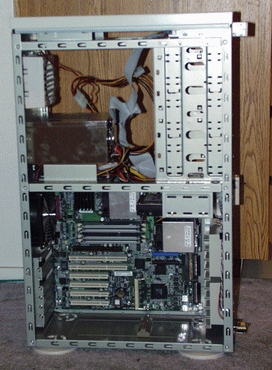
A large tower case has plenty of space for working inside and keeps cables out of the way. You can mount all drives on the upper level, so plenty of air can get to the hot processors. This is before installing drives and cards.
So our Ultimate Linux Box is more of an ultimate Linux workstation or an ultimate Linux small server—big enough to be faster than you need for most uses and small enough to be practical in an office or home environment.
The first question, of course, is whether to buy or build your machine. On the one hand, you can do things for your hand-built system that a mass-market PC manufacturer probably won't:
Pick the very best case for the exact hardware you want to run, your work environment, your aesthetic sensibilities and your desire to work inside easily.
Use a top-quality power supply and quiet, ball-bearing fans.
For non-ultimate systems, you can put a really good SCSI card, SCSI drives and Ethernet card on what is otherwise a low-end desktop machine. This type of configuration will work well for most Linux developer workstations and small server tasks, but mass-market vendors won't usually build them because they don't appeal to people who buy systems by comparing CPU clock speeds and prices.
Leave off the parts that will end up gathering dust: your keyboards and mice will last several generations of hardware, and you probably already have a box with a CD burner.
On the other hand, there are two things that a mass-market PC manufacturer can provide that you probably won't:
Professional thermal and acoustic engineering. Your homebrew system will likely end up with more fans, a bigger case and a bigger power supply than a mass-market system with similar performance numbers. This doesn't necessarily have to translate into more noise, if you're careful.
Relationships with hardware vendors who don't respect you. One of the big differences between our box and the Hewlett-Packard x4000 we reviewed in the LJ June 2002 issue is that we're using an ATI video card, and HP uses NVIDIA.
But if you're working with interesting new versions of core software, such as the kernel and X, you might not find much help from the traditional Linux channels for proprietary modules. At USENIX this year, Linus Torvalds said, “They may work, but you're not getting the full advantage of Linux.” The only case when you could possibly accept a non-Linux kernel module is when you're not doing any “Linux-y” stuff with the box—if you treat it like just another PC and don't recompile the kernel or hack anything whatsoever. Oh, and if you completely trust your hardware vendor.
The intermediate route, which is ordering your system from a low-volume or custom shop serving the Linux market, is worth considering if you want to save shopping and building time, as well as get good advice on Linux-friendly parts. Linux hardware vendors are an informal, peer-to-peer reputation system for selecting good parts, and this works surprisingly well. You can go to the web sites of the good ones, see complete lists of every piece of hardware that will go into your system and get a no-hassle warranty on the complete box.
For this year's Ultimate Linux Box, we started with a base configuration of the Glacier Dual Xeon workstation from Aspen Systems Inc. in Colorado, and here's why. Think of the Ultimate Linux Box as a Beowulf node, one with good graphics and sound and a lot of reliable storage, in a tower case.
Companies that build Beowulf clusters are good places to look for the fastest processors and motherboards and the most reliable memory, because cluster users are picky about such things.
Unfortunately, our schedule for this article caught us in the middle of Intel's much-awaited transition from RAMBUS to DDR memory. We had to go to press before we could get our hands on a dual Xeon motherboard with both DDR and AGP support, which should be available soon. But if you're playing in Ultimate Linux Box territory, dual Xeon is the way to go. So, we got the RAMBUS-based SuperMicro P4DC6 recommended by Alan Taub at Aspen. Our box clocked out at 9,503 BogoMips with a 2.4.18 kernel. Yow!

SCSI on the motherboard is cheaper than a separate SCSI card. Big fans are good. CPU coolers are shiny.
Since we're writing in the bad old days of RAMBUS for all you happy future people in DDR-land, the best we can offer in the motherboard department is a bunch of mindless platitudes. So do yourself a favor and check the web sites of people who build Linux boxes and then have to take the phone calls when customers have problems with them.
Four features commonly found on some motherboards but not on others are SCSI, Ethernet, sound and video. Don't rule out a motherboard because it has something you won't use. Due to the size of the Linux network server market, all the common Ethernet chipsets you'll find on motherboards, such as the Intel EtherExpress Pro100, are well supported. And if you're planning to build a SCSI system, the price difference between a motherboard with and without SCSI is generally less than the price of a SCSI card.
None of the video or sound chipsets they put on motherboards are Ultimate Linux Box-class, but if you're considering reusing the motherboard for a server later, it doesn't hurt. If you're like many office Linux users and rarely use sound, you might as well use what comes with the motherboard.
The trickiest part of building a Linux system is 3-D graphics. We chose an ATI video card over an NVIDIA one this year. See Frank LaMonica's Sidebar on some possible effects of this choice. Monarch Computer Systems hooked us up with a Hercules 3-D Prophet, which is a nice RADEON 8500-based card that will enable you to start working with the cutting-edge, open-source clean 3-D drivers when they come out.
The sound support front is a happier place. We used the ALSA drivers, and with a properly set up ALSA-based system you shouldn't need to disable the sound chipset on the motherboard to use a high-end sound card. You can use both. We would run the motherboard's audio in and out as a dedicated conference system to chat with headquarters, while saving the Sound Blaster Live! for playing Ogg Vorbis files on headphones. We still like the now-inexpensive Sound Blaster Live! for the ubiquitous kernel support, easy setup, good sound and, most important, the fact that 32 programs can have the audio device open at the same time.
Until now, we've always recommended a safe, high-performance but expensive choice for storage: two of the fastest-spinning SCSI hard drives you can find. This is still a good conservative option. However, when some people from 3ware showed up at a Silicon Valley Linux Users Group meeting with an Escalade 7850 Storage Switch, we decided to try it out.
So this is the first time we've had RAID 5 and a terabyte of storage on a workstation, and it was surprisingly easy to get working. We had to reboot from an MS-DOS disk to run the utility to update the 7850's firmware, but the current version of the driver is in the 2.4.18 kernel. Red Hat 7.3 and SuSE 8.0, the two distributions we tried, recognized the array out of the box.
You'll be surprised to find the 3ware driver in /usr/src/linux/drivers/scsi, not in drivers/ide. From the kernel's point of view, the ATA RAID controller looks like a SCSI device. You can't make a terabyte filesystem on pre-2.4.18 kernels, so be sure you have 2.4.18 or later.
The web-based management utility, 3DM, that currently ships with the hardware is proprietary, but 3ware assures us that some time in July there will be a scriptable, command-line management tool under the GPL. 3DM presents a clean, easy-to-use interface that is simple to install. You also can rebuild an entire RAID array from a web form.
If you want to use 3DM, you might need to reconfigure your web browser. 3DM runs on port 1080, and Mozilla reported that, “Access to the port number given has been disabled for security reasons.” To override this, add the line:
pref("network.security.ports.banned.override",
     "1080");
to Mozilla's all.js configuration file, which probably lives in usr/lib/mozilla/defaults/pref/all.js.
3ware claims to be able to do hot-swap if you have the appropriate drive cage. However, we installed the drives normally and didn't test this functionality. We did get excellent performance numbers though. With eight Maxtor ATA drives, we got 173.1MB/s reads and 23.5MB/s writes to an ext3 filesystem on an otherwise unloaded system. This was about the same read performance as a single 10,000RPM SCSI drive, but almost six times as fast for writes.
Driver author Adam Radford recommends two /proc tweaks to speed things up, and we used them. Set /proc/sys/vm/max-readahead to 256, and set /proc/sys/vm/min-readahead to 128.
You don't want to make an Ultimate Linux Box your first PC-building project because of the sheer cost of the parts. Salvage one good box out of a desktop machine with a bad hard drive and a server with a bad motherboard, or something like that. We assume that you know the basics of static protection, reading the Fine Manual for the hardware and not electrocuting yourself. If your Linux box-building tool of choice is a web form, you can skip this part.
Besides the basics, some tools you probably will want are a hemostat for fetching dropped screws and moving jumpers, wire cutters for removing cable ties, a nut driver set, a power screwdriver cranked down to minimum torque and a label maker.
Big tower cases are a win when you're putting together your own box; you have the flexibility to put what you want where you want. We still like the Lian-Li aluminum cases, one of which we used last year.
Our least favorite color is Dumb PC Beige, no matter what you call it. (“Putty” is a typical vendor name for this ugly color. Cool, just what I'd like to have in my den, a big block of putty!) Unfortunately, many of the cool-looking cases in other colors are designed for gamers who run hot processors and video cards but only one or two ATA drives. So it is with a heavy heart that we must recommend the SuperMicro sc760 series, not only for its capacious size but also for its excellent flexibility in drive and fan placement.
SuperMicro cases are available with many convenient spots for drives and fans, many of which you won't have to use. Different models support motherboards with and without the special Xeon mounting holes, so decide on your motherboard before selecting the case. Working inside is easy: remove the locking front panel and both sides open out like a book.
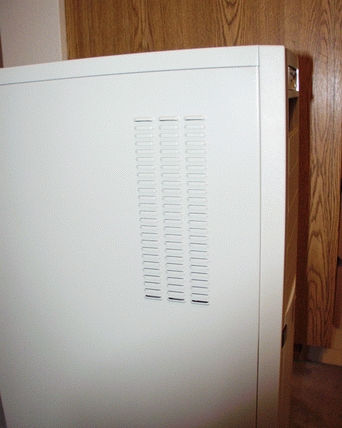
SuperMicro reduces cooling difficulties with vents on the side of the case.
Think of the case, or any well-designed full tower, as a two-story building—the motherboard and expansion cards live on the bottom floor, and the drives and power supply live upstairs. There is one 12cm exhaust fan directly behind the processors on the first floor, and you can place up to three intake fans at the front. Upstairs, there is one exhaust fan above the power supply, and you can mount up to four fans on the sides of the drives. We recommend leaving off the drive carrier downstairs, if you can, and putting your hard drives in the 5.25" bays with adapter brackets. This gives you more usable intake space at the front of the bottom floor and puts the drives where the side fans can blow on them.
All the ribbon cables from the 3ware card to the drives add up to a surface area of about two and a half square feet. That much cable, placed sloppily, would block a lot of airflow. We bundled the cables together into a flat bunch with Velcro ties and looped the extra length upstairs behind the drives instead of downstairs around the motherboard. Because we have side fans, this is the safest place for it.
It's always important to balance intake and exhaust fans. The natural instinct is to “blow out the hot air”, but too many exhaust fans will drop the pressure inside the case, canceling out the efforts of the power supply fan and trapping hot air inside the power supply. When the power supply goes, it generally takes something more expensive with it. Because hot air rises, it's hard to go wrong with low front intake fans and high rear exhaust fans.
A nice touch you will probably want to add is thumbscrews in place of the Philips screws for the case sides. The Lian-Li case is already fitted with thumbscrews throughout because the aluminum is very soft. Don't use a screwdriver, manual or power, on an aluminum case.
All the surfaces of the SC760 are paintable, drillable and are easily removable without unplugging a single wire. If you want candy-apple red and a blowhole, you can easily take all the beige stuff on a nice trip to the sheet metal shop and the spray booth without moving drives or cards.
You'll notice that we didn't mention all the peripherals, such as keyboards, mice and monitors. Monitors, keyboards and mice are a matter of personal aesthetic judgment, and your ability to pick one hands-on is probably going to be pretty good. How many computers have your current favorite keyboard and mouse outlasted, anyway?
What about CD burners, DVD drives and tape drives? Well, in a recent reader survey, we saw that 95% of our readers have multiple computers. We recommend that you set up one of your other machines as a backup server or CD ripping/burning station.
That should be enough information to get you started on the journey to custom Linux box building, so in the immortal words of the SuSE installer, “have a lot of fun”.

Don Marti is technical editor of Linux Journal.

