
Scriptwriting for ze Web and Everywhere Else
François, mon ami, what are you doing? Ah, I see your creative juices are flowing, non? Dragons, spaceships, world-spanning Linux systems...that is a marvelous story. And, I see that you have included the restaurant as part of the setting. This is wonderful! But why this flurry of cranial activity, François?
What is this? Ah, the March 2002 Linux Journal theme is web scripting and you are writing a script for an upcoming webcast. You want to write scripts for the Web? Why limit yourself there? Why not write for television, radio or the stage? With the right tools and your Linux system, you are ready for anything. As it turns out, it is a good thing that we are always ready, because our guests are here.
Vite, François, to the cellar. Bring up the Australian Margaret River Chardonnay. A wonderful wine, thoughtful and aromatic. Vite!
While François is getting the wine, I will let you know what was happening here, mes amis. This month's theme was, alas, misinterpreted by my faithful waiter. When you came in, he was working on a screenplay for what he hopes will be a successful webcast. Rather than discourage him, we'll concentrate today's menu on that very topic, bringing stories to life. Ah, François, excellent. Please pour for our friends.
Laying out a scene and creating the perfect dramatic presentation requires some finesse with outlines and organizing your thoughts. That is exactly what Peter Teichman was, er, thinking about when he wrote Think, a Gtk/GNOME application that lets you create outlines based on a hierarchical structure. The result is then saved as an XML document. For a peek at Peter's Think, go to primates.ximian.com/~peter/think and pick up the latest source. After extracting the code, you can then build it using the classic ./configure three-step:
tar -xzvf thnk-0.2.1.tar.gz
cd think-0.2.1
./configure
make
make install
To run Think, just type think & at the command prompt. Figure 1 shows Think in action.
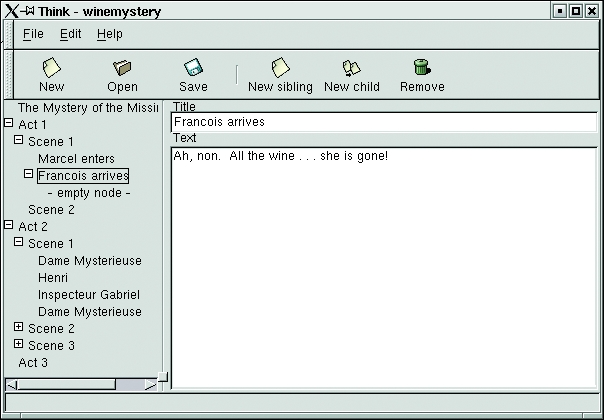
Figure 1. GNOME Think
When using this simple little thought organizer, you create nodes and subnodes, renaming them as you go to something that makes more sense to you than “- empty node -”. Each one of these nodes can have associated text. For instance, dialogue text describes scene two, a subnode of Act 1. Each of these nodes can be dragged and dropped in different locations on the left-hand-side listing. To simplify the structure, each major node can be collapsed to a single line item.
Of course, you do not have to download a thing if you do not want to. Odds are pretty good that you already have that fabled editor, Emacs, loaded on your system. You don't even need to be running a graphical desktop because Emacs will run in text mode as well. Why not try out its outline mode? It is all very simple really. Here is what you do.
Start up Emacs by typing emacs some_filename at the command line. If the file does not already exist, it will be created for you. This is the basic Emacs editing mode. To use the outlining feature, press Esc-X, followed by the words outline-mode (see Figure 2).

Figure 2. Entering Emacs Outline Mode
All you have to do is start typing. For each level (or node, in Think-speak), type an asterisk (*). For a sublevel, type two asterisks (**) and so on. You can type whatever you want below those headings, just as you would in any editor. To collapse a level, sublevel or tree, Emacs employs Ctrl-C sequences. Table 1 shows some of those sequences.
Table 1. Emacs Control Sequences
Of course, if you are running Emacs in X or graphical mode, you can just click on the Show and Hide menu items in the menubar. When a level is collapsed, its first line or title will appear with the trailing ellipses (. . .) and the information that follows it will be hidden. If you look at Figure 3, you'll see me spinning the “Mystery of the Missing Wine” using Emacs' outline mode.
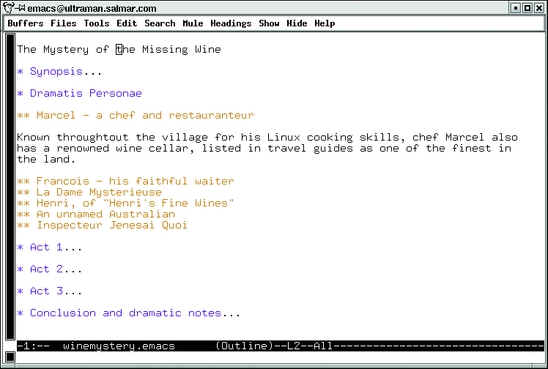
Figure 3. The mystery unfolds with an Emacs outline.
When Christopher Tomaras Lansdowne wanted to write some comedy sketches, he turned his hand to a little Perl and XML and put together GScriptWriter, a Gtk tool that lets you define the basics of a story, enter characters, then pull them from a drop-down list as you create dialogue and action for them. This simple program also does a nice job of exporting to HTML.
You can pick up GScriptWriter by visiting the site at cs.alfred.edu/~lansdoct/linux/gscriptwriter. Once you have the source, install it like this:
tar -xzvf gscriptwriter-0.1.2.tar.gz
cd gscriptwriter-0.1.2
./gscriptwriter.pl
As you have already noticed, there is no compilation involved here. Simply run the script and you'll get a nice Gtk interface wherein you can define and work with all aspects of writing a comedic script. Right now, François is hard at work on a mystery taking place in this very restaurant.
You can organize the flow of your script by selecting lines and then moving them up or down in your script. Save your work, then use the HTML export feature. You'll wind up with a nice, clean finished product (once the mystery has been unraveled, of course). GScriptWriter is a work-in-progress, but the Perl code means you can modify it easily and use it as the base for your own needs.
For some, stories are those things you read on Slashdot.org that just don't come quickly enough. To rectify this problem, point your browser to bbspot.com/toys/slashtitle/index.html, a rather amusing site that generates pseudo-random Slashdot stories. Pay them a visit, mes amis, and you will understand what I mean. But we digress, non?
As you can see, the word story carries a lot of different meanings. Message boards are a collaborative effort that allow users to work together on ideas in a central location via the World Wide Web. A story develops with one individual posting the beginnings of an idea. Others respond, continue the discussion, and suddenly you either have chaos or the beginnings of the next great drama. In the right environment, a flexible message board can be a wonderful tool.
The next item on the menu is called Phorum. Phorum is free, open-source software and is distributed with a simple, Apache-like license. It requires a PHP-enabled, Apache server and one of the supported database types. This database can be PostgreSQL, MySQL, Sybase and others. Phorum is designed to be pretty database-independent, and the install will do an auto-detect for currently running database servers.
Speaking of installation, you should find this one very simple. Start by visiting the Phorum web site at phorum.org and grab the latest source distribution. Start by extracting the source into your web server's hierarchy:
tar -xzvf phorum-3.3.1a.tar.gz
mv phorum-3.3.1a.tar.gz
/usr/local/apache/htdocs/phorum
cd /usr/local/apache/htdocs/phorum
From here, you may want to take a moment to run the secure script to define locations and permissions relating to Phorum's security. You will find it in the scripts directory:
bash scripts/secureIf you are running a virtual web server, this may be particularly important. Since the layout of Phorum may be well known, you may want to change the name of the admin directory. That is the first question you will be asked. I would suggest that you also answer yes to the question regarding protecting this directory with an .htaccess file. Finally, the Phorum install will ask you what user name your Apache server runs as. In my case, it was www.
The remainder of the installation is done on-line. You do this by pointing your browser to the admin directory. If you changed it when you ran the secure script, you'll want to use that pathname:
http://yourwebserver/phorum/admin
Phorum automatically will try to detect your installed database. If you have multiple database packages (as I did), you will need to choose one at this time. For my install, I chose PostgreSQL. After clicking on Submit, I was then asked for my database server name (localhost), the database name, and a user name and password. Before you go ahead and fill in all those fields, let me give you a word of warning. That database user will have to be one that actually exists, unless your database installation requires no username and password (which wouldn't be a good thing). In the PostgreSQL world, adding a user looks like this:
createuser user_nameThat user needs to be able to create and update databases. Then, you'll need to create an empty database. I called mine (perhaps unimaginatively) phorum. We do not have time to cover all the databases, but if you should happen to be running PostgreSQL, make sure that the “postmaster” is running with the -i flag to allow for TCP and web connections to the database:
/usr/bin/postmaster -D /var/lib/pgsql/data -iMeanwhile, back at our browser installation, I fill in the remainder of my fields, click Submit, and then I am presented with a nice message about table creation and database updates being successful. A toast, mes amis! Ah, but wait. As they say on la télévision, there is more. I need to specify an admin user name and password on the next screen. Finally, on the last screen, a URL to your Phorum and an e-mail address for the administrator. Click Submit one final time and you are done.
You then will be directed automatically to the admin login screen. Enter the newly created Phorum admin name and password, and it is now time to beautify your collaborative world. You can change the color scheme as well as define the number of messages per page, whether your collaborators are allowed to post with attachments and what size those attachments can be. Figure 5 shows Phorum's admin screen.
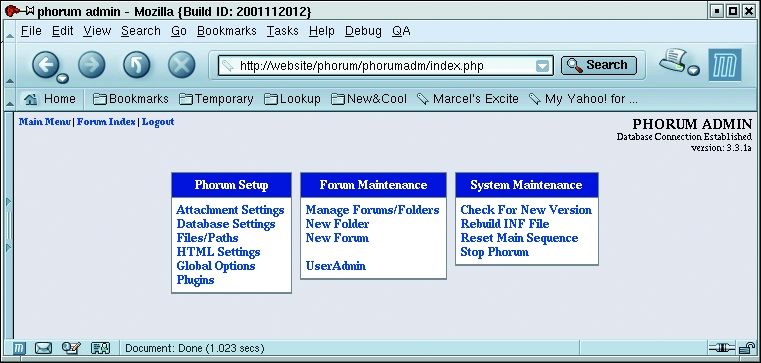
Figure 5. Phorum's Admin Screen
Since discussions aren't much use without topics, you may want to spend a few moments to seed your new Phorum with discussion topics. The associated dialogues are simple and easy to use, allowing you to specify who may post, whether the discussion is moderated, as well as display options like color and layout.
You've configured things, created forums and discussion groups, and chosen your colors. It's time to turn Phorum over to the users. Because of its simple nature, you can easily plug it into an existing web site by loading it as a frame, for instance. Many of the sites that use Phorum do so in exactly this manner. You also can have them point their browsers to the phorum hierarchy on your web site:
http://your_website_address/phorum
Now users can create their own profiles, read, post and reply to other posts. Whether they actually require a login profile will depend on the requirements you set up when you created the discussion areas through the Phorum admin screen. Figure 6 shows a Phorum discussion in process.
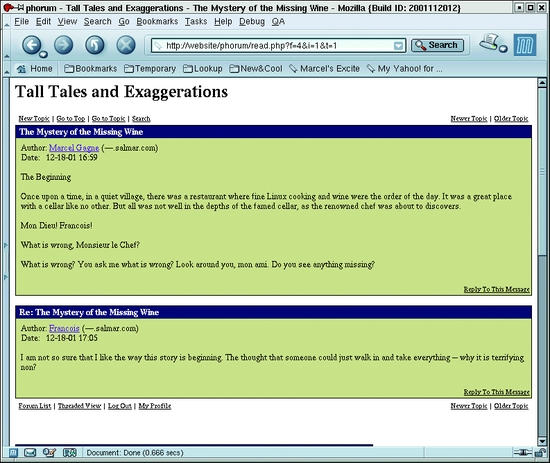
Figure 6. Funny Things Going on at the Phorum
Once again, mes amis, it is just about closing time here at Chez Marcel. The clock, she is unforgiving, non? François, our guests' glasses are running dry. Please, refill them a final time before we close for the evening. Until next time, mes amis, thank you once again for visiting Chez Marcel. A votre santé! Bon appétit!
Marcel Gagné (mggagne@salmar.com) is president of Salmar Consulting Inc., a systems integration and network consulting firm, and the author of Linux System Administration: A User's Guide, published by Addison-Wesley.
