
Keep Track of Your Money
Recently, I took the big step: I became a freelancer. It's great, but even after a short while, I began to realize that there were some changes in my behavior concerning finances and spending money. So I thought decided to start keeping track of my personal accounts, especially with having more time to go shopping. I never thought I would do this, but now I do, and I'm feeling more secure knowing exactly how I spend my income.
I decided that Freshmeat would probably be the best place to start, I entered the keyword "financial", and there was what I was looking for: a whole category named Office/Business::Financial::Accounting, with over 50 projects. Now I wasn't going to test this many applications, so I selected from those using my standard criteria for applications: that it run on my Linux box, be rather straightforward to install (because I'm no guru), be open source (dependencies also) and be under active development.
I based my selection on Freshmeat indications about license type and last update date, and at first I selected 18 different projects, but after encountering various problems or difficulties, I decided to focus on Emma, GnuCash, jGnash and QHacc.
Emma (Easy Money Management) requires GTK+, GNOME and preferably Python as well. As I was running Ximian in my desktop environment, this was no problem. I downloaded the emma-0.7-7.i386.rpm package first to try the easy way. You always can compile the source later if it doesn't work. I installed the RPM package, which took about two seconds, and eagerly started the emma program. And there was my first image, after only three tries!
I felt at home immediately. Emma has the GNOME look and feel, with help windows and help functions where you expect them, e.g., each button has a little help bar that appears when you hold the mouse over it for a second. I like a program that doesn't scare me, so I appreciate an intuitive user interface. Emma sets up a series of standard accounts, including all kinds of costs and expenses, ranging from car and child-care bills to income from tax refunds and lotteries (see Figure 1). Your actual data is saved in a plain-text file, which you can store anywhere. Afterward, you start Emma with this file as an argument to the emma command.

Figure 1. Emma Screenshot
There is, as far as I could see, no currency defined, so this is an international application. Accounting is always double-entry, so you will know where your money came from and, more importantly, where it went. As shown in the picture, Emma supports hierarchical accounts; for example, health care is split up into dental care, hospital costs, medicaments, doctor costs and vision care. You even can plan expenses in advance with the schedule function. Transactions can be limited, sorted and highlighted in several ways, which allows the transaction overview to be interpreted easily. It has nice colors, too.
After entering some test transactions, I wanted to try the Report Creation Druid, which seemed like a nice idea and is fairly adaptable (see Figure 2), but Emma crashed with a segfault when I tried to do something with the report. Also, there was supposed to be a charting function, according to the Emma Project home page, but I didn't have it. Maybe I should have compiled the source.

Figure 2. Report Creation Druid
According to the author, it should be fairly easy to adapt Emma to your specific needs using the Python interface, for example, linking Emma to your bank account. Emma is available in German, French, Japanese, Polish and Swedish, and there is a Debian package. There's a mailing list and a list of authors in case you are have any trouble. There's still a good deal of work to do, but Emma can be a useful program the way it is now. I gave them a good score on Freshmeat, and I think we will be hearing more on Emma in the future.
GnuCash came with the Ximian distribution (gnucash-1.4.11-ximian.5.i386.rpm), but I had never tried it before. Starting it from the menu didn't work, so I tried the command line. I was informed that GnuCash needs a library called libguile.so.9. A flaw in Red Carpet? Who knows. Anyway, I downloaded a newer Guile (1.4), and this time the application started successfully. Overnight there was another update (using Red Carpet, again), so I don't expect any troubles here. GnuCash saw that I hadn't run the program since the last update, which apparently had something to do with currencies. All my data was converted to some new scheme, and behold, it was even prettier than before (see Figure 3). GnuCash certainly meets my criterium concerning frequent updates. It requires GTK+, GNOME, Guile (as mentioned), Glade, G-wrap and slip for "normal" use, which are all included in the general Linux distributions.

Figure 3. GnuCash Screenshot
Accounts and transactions between accounts can be entered in a comfortable way, and use of different currencies is supported (including the Euro), provided you supply exchange rates to the program (see Figure 4). GnuCash makes a wide range of reports, pie charts, balance sheets and the like--everything you would want for making a business presentation, a financial plan for a new company or that kind of thing. I wish it had existed when I was writing a business plan.
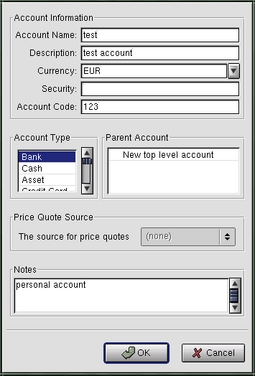
Figure 4. Supplying Exchange Rates
GnuCash provides support for general ledger, stock keeping and even taxes, but I'm not the right person to check if this complies with local rules. It is certainly fit to serve general bookkeeping purposes. Hierarchical accounts and grouping of accounts are supported with a handy general overview and details in separate windows. Transactions can be split into their components, e.g., I payed this amount to the company that installed my home office, but the total invoice consists of service, parts and taxes. You can search transactions with the Transaction Finder, which is a very useful feature. Double-entry accounting can be enabled on a per-account basis and several account categories are defined, which provides the flexibility I need as a homeworker, where the line between business and private isn't always too clear. Files are stored in a directory called .gnucash in your home directory, reports by default in your home directory and your actual account information in any file you want.
If needed, this program can grow with your business: recently multi-user support has been added, using a PostgreSQL back end. In the case of a growing enterprise, it is easy to imagine that you may have to enter a lot of transactions in a short time. This can be realized using the Import function, which uses QIF data files. A web interface also can be added.
There's a GnuCash mailing list, plenty of documentation and examples and information for developers. GnuCash is definitely a mature product, but the developers still are looking ahead, planning on implementing more features.
The next application I tried was jGnash, a Java archive. jGnash requires JDK1.3 or higher, but luckily my test machine already was equipped with a working Java installation because my husband needed it for one of his projects. And the application comes with sources, so I thought, "Why not?" The program came with the simple explanation:
To execute: java -jar jgnash_0.2.jar
To extract source: jar xvf jgnash_0.2.jar
Not that difficult, is it? So I entered the execute command and a whole bunch of error messages about fonts not being found scrolled over the screen. I thought, "There goes my luck", but then finally got an image after a while. After the initial shock of running my first Java application, I was pleasantly surprised at the speed and response time. Of course it doesn't integrate as nicely with my desktop environment as a GNOME-based program, but on the other hand, jGnash is cross-platform (see Figure 5).
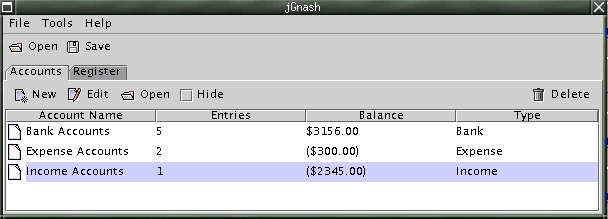
Figure 5. jGnash Screenshot
jGnash also supports hierarchical accounts, credit and debit accounts, sets up a Bank Account, and an Expense and Income Account by default. Transfers can be entered in a simple, clear way, and they can be split. They also can be imported from a QIF file. However, one of my problems, as a European, is that only Australian, Canadian and US dollars are available as currencies for my account.
There's a straightforward register (see Figure 6), and that's about it for the tour of jGnash. It runs fine, but I won't be using it.

Figure 6. jGnash Register
QHacc comes in a tarball with adequate documentation. Installation uses the well-known configure-make-make install method; I only had to set the QTDIR environment variable to my Qt installation, which resides in /usr/lib/qt-2.3.1, and the installation went fine.
To run the program, you either need to set the QHACC_HOME variable (e.g., to your home directory) or enter it as an argument on the command line (qhacc -f ~).
My first impression was one of sympathy because of the plain look and feel of this program. Also, the fact that the QHacc developers were obviously thinking ahead when they implemented the possibility for input of old transactions was encouraging, what with me knowing nothing other than text files until now.
QHacc supports single- and double-entry bookkeeping, and it gives detailed account information. It is independent of the user's local currency, which is, as far as I'm concerned, a good thing (see Figure 7).

Figure 7. QHacc Screenshot
The user interface is very simple, but well-designed where the graphics and reports are concerned. I am delighted with the way the graphics are presented; I've included a screenshot, not because I want you to see how hard I've worked entering two transactions, but because it's done so charmingly (see Figure 8). You can change the account, the dates and the image representing the data in real time, and it's in soothing pastel colors, in case your debits should depress you too much. QHacc makes pie charts, line charts or charts with bars in the same pretty colors.

Figure 8. QHacc's Charming Graphics
The reports are also very structured, clean and elegant, and they use the same real-time adaption scheme as the graphs. The author claims everything can be done without using the mouse, and although I too am more of a console creature than an X fan, I haven't tried it out. I've never been an MS Windows user either, so I probably wouldn't know the shortcuts anyway.
Figure 9 gives an overview of the comparison between the four selected programs. The more pluses, the better the score of the program in each particular area.
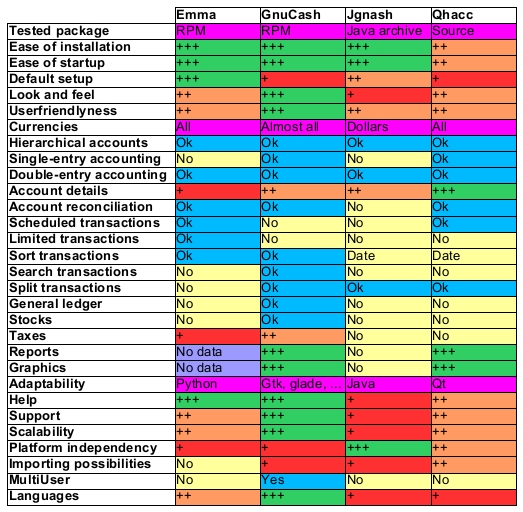
Figure 9. A Comparison of Emma, GnuCash, jGnash and QHacc
For personal use I will stick to GnuCash, with the account subdivisions like in Emma. GnuCash is best integrated with my other applications because I'm running a GNOME desktop environment. If I was running some other desktop platform, I'd probably opt for QHacc (out of laziness because I'd only have to install Qt). jGnash has a possible future because of its platform independence, but it doesn't meet my requirements (yet) for a personal/small-business/home-office bookkeeping package.
Emma: rainbow.mimuw.edu.pl/~la181249/emma/home.php3#downloading
GnuCash: www.gnucash.org
jGnash: sourceforge.net/projects/jgnash
QHacc: qhacc.sourceforge.net
Machtelt Garrels started out as an industrial engineer but soon became involved in internet business. With a couple of friends, she started an internet provider running Linux in 1995 and added a Cyberkafee, also running Linux, in 1996.
email: tille@soti.org

