
Bring an Atomic Clock to Your Home with Chrony
Here is a device that finally provides what generations of scientists have dreamed about: an ultra-precise time reference, a timekeeping piece of incredible accuracy. These are not simple gadgets; some physics experiments, such as the verification of gravitation theories, require measurement of very small time intervals.
The National Institute of Standards and Technology (NIST) has a lab in Boulder, Colorado, devoted to running atomic clocks and providing official US time. In this lab, the NIST-F1 cesium fountain atomic clock provides a time reference with a precision of 2 × 10-15 (two parts per millionth of a billionth) by counting the vibrations of cesium atoms at about 9GHz. An even better clock is in the works. It will measure the resonance of a single mercury ion at about 100,000 times that frequency, and it will provide a thousand-fold increase in precision.

Figure 1. Atomic Clock
The sacred duty of true precision-obsessed geeks is now clear. They simply have to synchronize the real-time clock of their Linux machine(s) with such an insanely precise clock.
Of course, you cannot simply go to a computer store and buy an atomic clock. (Not that I didn't try—sheesh, the brazen gall of that sales guy, trying to saddle me with a radium dial alarm clock.) The next best thing is a radio-synchronized clock, and a variety of models are available. They can be connected to the serial port of a PC and provide time signals synchronized on the NIST clock.
But why buy hardware when well-designed, free software would do the trick? The Network Time Protocol (NTP) has been created to synchronize computers and distribute time references across networks. An NTP server keeps time as close to the official reference as possible. Remote NTP clients query these servers and sync the local real-time clock (RTC) of the machine. This timekeeping is a complex problem due to the nature of distributed computing. Propagating packets between machines takes a nonzero, variable time. Various correction schemes are integrated in NTP to take variable latency into account.
There are several NTP clients and servers available for Linux. The simplest way of using NTP would be to fire up a program, such as xntpd, and point it to an NTP server. However, this program and most other NTP clients work best when they are connected to the Internet continuously. Unfortunately, an intermittent connection through a modem is still the way most homes access the Internet.
That's where chrony comes in. Chrony is a program that explicitly supports intermittent connections. It is comprehensive but a tad intimidating, so we'll walk through an installation and configuration for the most common case: a home user with a modem connection.
Chrony is composed of chronyc, a text-based client program; chronyd, an NTP server running as a dæmon in the background; and various configuration files. To interact with the chronyd dæmon (chronyd), you run the chronyc client and issue commands.
Some Linux distributions include a version of chrony. Chances are that this version is an older one, e.g., 1.15 or less. In that case, you can uninstall the chrony package before installing the new version.
First, download the chrony tarball from its home page (see Resources). At the time of this writing, the current version is 1.16.1. It is composed of the 1.16 version completed by a patch to 1.16.1. We extract the source from the tarball and apply the patch:
tar -zxvf chrony-1.16.tar.gz # extracts source
cd chrony-1.16  # dir created from tarball
gunzip < ../chrony-1.16-1.16.1-patch.gz | patch -p1
patching file NEWS
patching file configure
patching file rtc_linux.c
patching file version.txt
The program uses a configure script, which makes customization a snap. The only option that you need to specify manually is the installation directory, with the --prefix option. By default, chrony will install the client chronyc into /usr/local/bin and the dæmon chronyd into /usr/local/sbin. It is the equivalent of:
# In the same chrony-1.16 dir as before
./configure --prefix /usr/local
Once you have run configure, you might want to clean up the source a tad before running make. Why? Because the source comes with a few syntactic gotchas that make the GCC preprocessor complain. If you run make right away, you'll end up with plenty of warnings such as:
warning: extra tokens at end of #endif directiveNothing is broken, but it's easy to get it to compile cleanly. Edit the files regress.h, reports.h and rtc_linux.h. The last line is an #endif statement followed by a constant name. You need to comment out that name. For instance, in report.h, change:
#endif GOT_REPORTS_Hto:
#endif /* GOT_REPORTS_H */and chrony will compile like a charm.
Now, do:
# In the same chrony-1.16 dir as before
make
su root  # You need to be root to install
install
The next step is to make sure that chronyd starts up at boot time. If your distribution came with an older version of chrony, then you are all set; just make sure that the newer version was installed in the same location as the old one. Otherwise, there are several methods. The simplest is to add a paragraph supplied by the chrony doc in your /etc/rc.d/rc.local.
Now, it's time to configure chrony. Because you want to sync your machine's clock on an NTP server, you need to pick one. Actually, you'll need to pick a few different servers in case one of them is unreachable. See the URL for the list of NTP servers in Resources.
The list separates the NTP servers into several strata. Now, what's a stratum? We are not talking about a geological layer of rock here. Think onion rings instead. Stratum 1 is composed of servers that are directly synced with an atomic clock. Stratum 2 is a set of NTP servers that are fed timestamps by stratum 1 and so on. Keep away from stratum 1 unless you run a physics lab or your private network has hundreds of machines. Stratum 1 machines should be reserved for distributing time references to secondary servers or to machines that cannot settle for the few microseconds of imprecision incurred by using stratum 2. For our purpose, choosing servers in stratum 2 or even 3 will be perfectly fine.
Notice that the administrators of some NTP servers require you to e-mail them if you want to sync with their machine. Please do so. If a thousand home machines suddenly start requesting timestamps from a poor university NTP server, the administrators need to know that it's actually for syncing clocks and not some new form of flood attack.
Ideally, you should pick an NTP server that is not too far away from your machine (IP-wise). This is not always the same as geographically. A rule of thumb is to check the output of traceroute, which lists the systems traversed by packets between your machine and the destination. For instance, since I am a New York dweller, I picked the following machines: ntp.ctr.columbia.edu from Columbia University, clock.psu.edu from Pennsylvania State University and ntp0.cornell.edu from Cornell University (send an e-mail to pgp1@cornell.edu if you use this server).
Become root and edit your /etc/chrony.conf file to add these definitions:
server ntp.ctr.columbia.edu offline
server
server ntp0.cornell.edu offline
Of course, replace these server names with the names of NTP servers located close to you. Note that the servers are declared off-line. Most modem-connected machines do not start a connection at boot. So when chronyd starts up, it should not start querying servers. Also, note that the chrony doc insists that you should use the TCP/IP numerical address of the NTP servers to alleviate a dependency on DNS. Well, the administrators of most NTP servers want you to use only the DNS-declared names so that they retain the ability to move the servers around. Besides, your modem connection hopefully can reach your ISP's DNS, so I recommend that you use the NTP server names in the chrony.conf file.
The NTP protocol supports packet authentication. After all, if you run a company, you don't want wrongdoers to set your machines' clocks to an arbitrary time. Financial records with an incorrect timestamp can throw your auditors into a loop.
Chrony supports that authentication with a simple password scheme. You can define several chrony users identified by a number and give them different passwords. The relevant statements in the chrony.conf file are:
commandkey 9
keyfile /etc/chrony.keys
This specifies that this machine uses key number 9 to be read from the passwords stored in /etc/chrony.keys. The latter contains, for instance:
9 zack
Zack is the name of my cat. Before I started using chrony, the
beast was the closest thing to a precise clock I had in the house.
Every morning at 7:30, he meows pathetically until I feed
him—including weekends. He quickly became very good at ducking
pillows.
Also, chrony needs to store the rate at which your machine's clock deviates, or drifts, from the NTP server time. Specify a location for the drift file with:
driftfile /etc/chrony.drift
This way, chrony does not have to accumulate measurements and recalculate the drift every time you start it.
You might have several computers in your home. In that case, it's a good idea to sync their clocks, too. By default, chronyd acts strictly as an NTP client with respect to the servers you define in the server statements. But you can set chronyd to act like a server for your own subnetwork. Just add an allow statement to your chrony.conf, and specify either some machines or a subnetwork. For example, my home machines' Ethernet cards have addresses in the (nonroutable) 192.168 subnet, and the machine acting as a server has the statement:
allow 192.168
in its chrony.conf file. This way, other machines in my home can sync with my server (address 192.198.0.1) by running chronyd with this simple configuration file:
server 192.198.0.1
keyfile /etc/chrony.keys
commandkey 9
driftfile /etc/chrony.drift
To summarize, the chrony.conf file of your modem-connected machine is given below. Note: replace the NTP servers in this example with the ones that you pick in the list of NTP servers (see Resources):
server ntp.ctr.columbia.edu offline
server
server
commandkey 9
keyfile /etc/chrony.keys
driftfile /etc/chrony.drift
So now that chrony is installed, verify that chronyd runs in the background (start it if necessary). Remember that the configuration file specifies (with the offline keyword) that chronyd should not query the servers without your permission. Start your modem connection, verify that you are connected to your ISP and then start the chronyc client. Figure 2 shows a sample session.
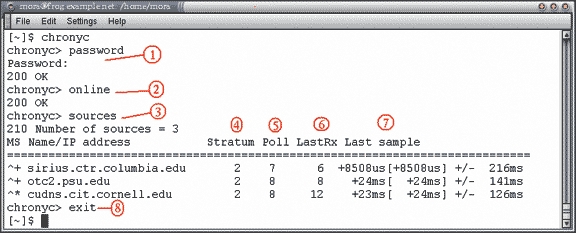
Figure 2. Sample chronyc Session:
Password command—notice that your password doesn't echo.
The online command tells chronyd to start using the NTP servers.
The source command lists the NTP servers known by chronyd: ^ means a server, * indicates the source to which chronyd is currently synchronized and + indicates other acceptable sources.
Stratum 2 is good enough.
The base-2 logarithm of the number of seconds between two polls of the server: 7 is 128 sec, 8 is 256.
Time since the lastsample was received from the source (in seconds unless you see m, h, d or y for minutes, hours, days or years).
Offset measurement from the last sample. First comes the original measurement, then the actual offset between brackets, then the margin of error.
The first command you enter in chronyc should be the password command. Then, order the dæmon to start talking to the NTP servers with the online command. List the NTP servers (sources -v, which is the verbose form of the sources command). See the tilde (~) in the second column? It says that the server cannot be used yet. It's too early; the dæmon needs a couple of minutes to accumulate timestamps and make sure the responses of the NTP servers aren't delirious. By some cosmic quirk, the difference between my machine's clock and the NTP timestamps happens to be 42 seconds (all hail Douglas Adams!).
Wait a moment and issue another sources command. After a while, you'll see that one of the servers has been selected by chronyd (a star appears in the second column) and that the offset of your machine is decreasing:
^* cudns.cit.cornell.edu
2    6     54  +2999ms[+2999ms] +/- 3653ms
Chrony slowly accelerates or slows your clock to make it reflect the NTP time. So over the course of a few minutes, by gradual correction, any offset will disappear.
Other useful commands include:
tracking: shows how your system clock is doing, that is, how fast or slow it is with respect to NTP sources.
sourcestats -v: shows what chronyd thinks of the sources from the measurements it has obtained so far.
makestep: immediately sets your system's clock to the NTP time instead of gradually skewing the clock. This is the equivalent of setting the time. Some versions of X11 can freeze if you set the time back brutally.
Finally, remember to issue an offline command in chronyc before you disconnect your modem. Otherwise, chrony will believe the source it has picked has become unreachable and frantically will try to pick a new one.
As you can guess, chronyc begs for automated operation. You can easily create two little scripts that will set chrony on-line and off-line. The on-line script:
#! /bin/sh
# This script is called after connect
/usr/local/bin/chronyc <<EOF
password  zack
online EOF
should be called after the modem connection has been established, and the off-line script:
#! /bin/sh
# This script is called before disconnect
/usr/local/bin/chronyc <<EOF
password zack
offline
EOF
should be called right before you disconnect.
If you use a special dialer, check if it has options to allow post-connect and pre-disconnect commands. I am using the ATT Global Network dialer, and it allows me to put such scripts in its /opt/attdial/bin. If you are using the plain vanilla PPP, you can insert the on-line script in the /etc/ppp/ip-up file and the off-line script in /etc/ppp/ip-down. Some distributions want you to leave ip-up and ip-down alone and modify only ip-up.local and ip-down.local (check to see if these files exist).
I found chrony the ideal tool for syncing my machine through a modem connection that is only up a few hours a week. I'd like to thank chrony's author, Richard Curnow, who sent me valuable tips and answered many questions quickly.

Fred Mora has been a UNIX system administrator and developer since 1990. He has published and coauthored several books and technical manuals. He is doing his best to lose the rest of his sanity by tinkering with Linux and writing more books, with the encouragement of his techie wife. He works at IBM.

