
Coyote Point Equalizer
Given the popularity of Linux with many ISPs, it behooves the Linux system administrator to be aware of load balancing since most ISPs use load balancers to add scalability and fault tolerance to the web servers they provide to their customers. Load balancers are devices that distribute client requests from the Internet to a virtual cluster of servers (often called web farms). With a virtual cluster, more requests can be handled than a single server could process, and any server in a cluster can fail without interrupting service because the load balancer will simply bypass the disabled server, and the other servers in the cluster will continue to operate.
A load balancer creates a virtual IP address. For example, if the address resolved by DNS for www.foo.com is 192.72.166.240, that address actually is the load balancer. Therefore, any traffic sent to www.foo.com actually is directed to the load balancer, which then directs requests to one of the servers in the web farm. In a typical scenario, the load balancer is connected to two networks. One Ethernet port is given the IP address of the web site, and the other port is connected to the network where the actual servers are connected.
In the same sense that multiple web servers can reside on a single physical server, load balancers can create many virtual clusters on the same group of servers, each with a different virtual IP address but directing requests to the same servers. This enables an ISP to replicate content to as many servers as necessary in a web farm, so that one URL might be spread across ten servers, while another URL served by the same load balancer would only reside on three of the ten servers.
Load balancers use different algorithms to distribute loads among the servers in a web farm. The earliest versions used a round-robin method, simply rotating through the list of servers, sending each successive request to the next server on the list. The problem that quickly became apparent was that different requests could produce vastly different loads on the server—running a CGI script used much more of the server's processing power than downloading a graphic, although the graphic may use a great deal more network bandwidth. Newer algorithms try to address this by sending the next request to the server that is responding the fastest or that has the least number of users connected to it.
There are several types of load balancers: switches, software-only products and appliances. Load-balancing switches are physically the same as the usual 10/100/1000 Ethernet switch, but with load-balancing functionality added. Software-only products require a PC with two Ethernet interfaces and usually take considerable expertise to set up. Appliances generally are based on a rackmount, Intel-based PC running UNIX, usually FreeBSD, preconfigured to run a load-balancing application.
The Coyote Point Equalizer E350 is a good example of the load-balancing appliance: a 2U (3.5") rackmount industrial PC chassis, with a Pentium III processor, 64MB RAM and two 10/100 Ethernet interfaces. It features a removable hard drive, which would allow for upgrades or repairs without having to swap the entire unit. By the time this article is published, the E350 will have been changed from a 2U chassis to a 1U (1.75") chassis.
The E350 can be administered through a Telnet session with ssh or via a web browser. The browser must support JavaScript. Before the device can be administered, an initial setup has to be completed in order to give the E350 a hostname, IP addresses, subnet masks for the two Ethernet interfaces and the default router for the external interface, plus the IP address of the DNS server, time and date, and the password for the administrator interface.
The Equalizer can be preconfigured by Coyote Point at no cost; the customer fills out a one-page form, and the Equalizer arrives with all the basics set up, eliminating the need for the initial setup via serial terminal. Since this one was not ordered with the configuration preset, I set up the serial connection and entered the basic configuration information, then logged in to the box from a browser to set up the virtual cluster. Both the initial configuration and the setup of the cluster went smoothly.
The management interface is straightforward and clear. While some network devices seem to have been designed to be administered only by a command-line interface, with the browser interface an afterthought, the Equalizer's browser interface is a strong application that clearly has been designed to be easy to use. It features strong reporting tools that provide a graphic display of loads on both the cluster and individual servers. It allows historical analysis, so the administrator can see trends and take action before loads become too high. The administrator can set up triggers that will run a script or send an e-mail, alerting the administrator if a site or server fails, for instance.
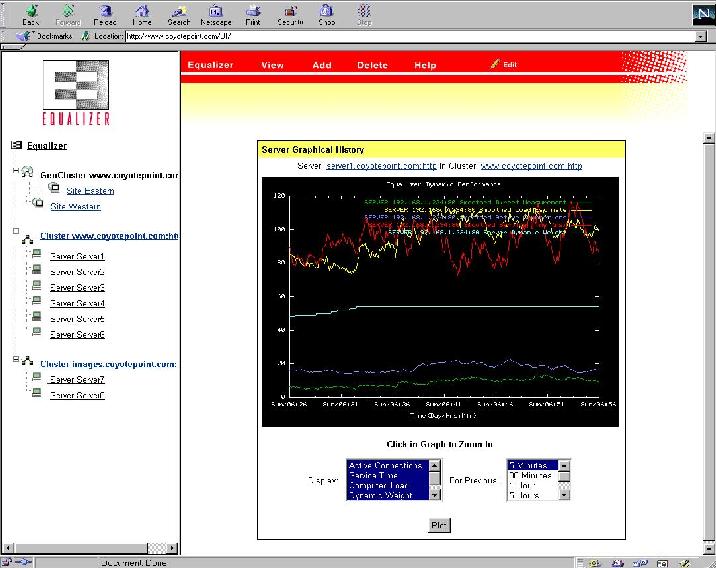
Screenshot of Equalizer's Server Graphical History Chart
The documentation is clearly written, in a single printed manual. This is a special advantage in Linux shops, since some competing products provide documentation only on CD and in PDF format, which can be problematic to read.
I set up a single cluster with three servers. The E350 allows the administrator to choose from a number of different load-balancing algorithms: fastest server response time, least number of requests, static weighted assigned values, round-robin or actual server load measured with optional server agents. Coyote Point offers sample C code for writing server agents but does not include agents.
I tried all of the algorithms, using RadView Software's WebLoad to generate traffic against the virtual cluster. All of the algorithms worked, providing good distribution of loads between the servers. The Equalizer also was able to detect a failed server immediately, based on either a ping failure or the failure of the web server to return a proper response to content verification. The Equalizer allows you to check a specific URL and verify the return string to ensure that content is available on a server, rather than just relying on the server responding to a ping or TCP port check, which could return a value even though the web server had hung up.
The E350 also is available with a geographic load-balancing option, which I did not test. This $2,995 option allows load balancing across multiple sites so that a user can be directed to the site that will provide the best performance (not necessarily the closest site physically).
Once a user has been directed to a particular server, it is sometimes desirable to ensure that they stay with that server throughout a session. For instance, during an e-commerce session, the user should remain connected to the same server, since another server would not have the information on the shopping cart for that user. Normally each request during a session is directed to the least-loaded server, which could change during a session. The way around this is to make sessions “sticky” by identifying the user in some way so that all requests from that client can be sent to a single server.
In this area, the Equalizer is somewhat less sophisticated than other devices: it provides sticky sessions based only on IP source address, and it doesn't support cookie, URL or secure socket layer (SSL) session ID-based persistence. With large numbers of users coming through AOL, which may change a user's IP address multiple times during a session as well as the growing use of network address translation (NAT) in most corporate internet gateways, this might be an issue for some users.
Tech support includes a business-hours, toll-free phone and e-mail support, and optional 24/7 phone and e-mail support with on-site hardware repair.
The Equalizer is available in three models: the E250, E350 and E450, as well as redundant versions that include two controllers with failover capability. The models vary in the number of servers and clusters they support: the E250 supports 64 virtual clusters of up to eight servers each, up to 64,000 simultaneous connections and is targeted at sites with T-1 access; the E350 supports an unlimited number of 16-server clusters, up to two million simultaneous connections and is targeted at sites with T-3 connections; and the E450 supports an unlimited number of 64-server clusters and up to four million simultaneous connections and is targeted at sites with up to 100Mbps connections.
While most load balancers are used to create web farms, they also can be used to scale or provide redundancy for other kinds of servers. The Equalizer supports UDP load balancing, which supports UDP protocols such as DNS, Radius and WAP, as well as network-attached storage devices.


