
VNC, Transparently
This two-part series presents a novel way to set up a VNC-based X Window System desktop for your Linux system. By the end of this two-part series, you'll have a configuration that allows users to log in to their X-Window desktop (running GNOME, KDE or other preferred window manager environment) via a display manager (like GDM, KDM or XDM). More importantly, the user will have secure access to the same desktop in the same state from the workstation console and anywhere else on a network.
Typically, a workstation system runs a display manager. In this article we refer to such applications as XDM, GDM (GNOME Display Manager) or KDM (KDE Display Manager) generically as display managers. A display manager provides a graphical login prompt for the user. When a user logs in, the display manager starts the appropriate window manager (such as fvwm2, GNOME or KDE). From the window manager, the user can run whichever applications he or she wishes. When the user logs out, applications are closed, the window manager exits and the display manager reappears, ready to allow another user to log in. If the same user logs in again, the display manager starts the window manager anew, and all the applications must be restarted. This is how traditional X Window System desktops work. We refer to such a desktop session as an X desktop. We also say that when a user is using the keyboard and monitor of the workstation, he or she is logging in to the console. This is as opposed to connecting via the network.
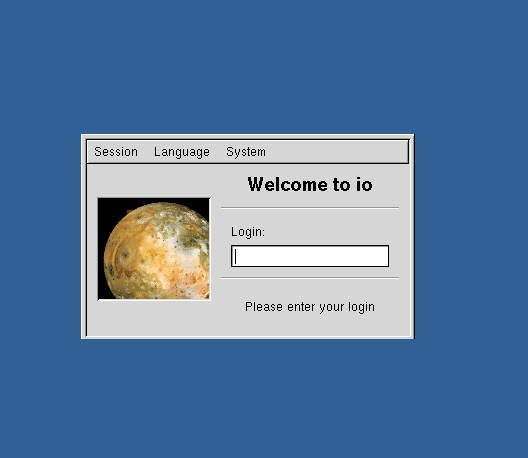
Figure 1. A Display Manager
In the Linux Journal article titled “Virtual Network Computing” by Choong Ng [available at www.linuxjournal.com ], we learned how to set up VNC in order to allow stateful access to a desktop from any computer on the network. By stateful, I mean that when a user is not connected to the desktop, the desktop does not terminate but remains waiting for a user to reconnect. When the user connects to the VNC server using a VNC client, every window is in the place where it was last left, every application is still in the same state as when last used, and every opened file remains opened in the same position. The nature of the VNC server, which controls the window manager and the applications, permits this.
Therefore, any computer on the network can run a VNC client (such as vncviewer) to connect to the workstation and display the desktop. We even could run the VNC client on the workstation on which the VNC server is running. We refer to such desktop sessions as VNC desktops, and we refer to the workstation where we run the VNC server (and its window manager) as the VNC workstation.
There is one problem with VNC desktops. Suppose you want to log in to the console of the VNC workstation. Your VNC desktop is running on this workstation as well, the same one you connect to from many different computers on the network. You want to continue to have access to the VNC desktop via the network. At the same time, when you log on to the console via a display manager, you want to see the same desktop you see when you connect via VNC. But if you log in to the workstation via the display manager, it will start a new window manager. Basically, you have started a new X desktop, one which is independent of the VNC desktop, already running on this workstation.
If you want to connect to the VNC desktop, you must run a VNC client, such as vncviewer. This is awkward due to the fact that one window of the X-based desktop is itself another desktop (the VNC desktop). Keeping track of the many levels of redirection can be troublesome. Besides being confusing, due to ambiguity as to what desktop the user is actually using, it also is inefficient as it requires two window managers to run concurrently, when only one is needed.

Figure 2. Screenshot of an X Desktop Running vncviewer, Displaying a VNC Desktop
This article explains how to configure an X server, display manager and a VNC server so that the desktop one sees when logging in to the display manager is the VNC desktop, with no second window manager and with all files and applications in the same state as they were last left.
The scheme we discuss can work on any Linux distribution. It requires a working X server, a display manager and VNC. I checked for these packages with this command:
rpm -q XFree86 vnc XFree86-xdm kdebase gdm
It is only necessary to have either XFree86-xdm kdebase or gdm installed. I should note that all the configuration file locations discussed in this article are as shipped with Red Hat 7.1. It is possible to configure any Linux system to allow transparent VNC desktops, but you may have to download software or locate configuration files if they are in different locations.
Whatever display manager you prefer, it should start at boot time. This is usually accomplished with a line in /etc/inittab similar to this:
x:5:respawn:/etc/X11/prefdm -nodaemon
prefdm is usually a copy of a link to whatever display manager you prefer. X and your preferred display manager must be up and running.
The VNC server also must be running, and it must be configured to run your preferred window manager. This is accomplished by editing the file $HOME/.vnc/xstartup to call your preferred window manager. Use startkde & for KDE, gnome-session & for GNOME or fvwm2 & for FVWM2. Also, make sure you have run vncpasswd in $HOME/.vnc/passwd to create the password file.
Red Hat 7.1 provides an easy way to start up the VNC desktop at boot time. Use linuxconf to set the vncserver boot script (in /etc/init.d/vncserver) to come up at boot. The default bootscript, however, doesn't quite give me the flexibility that I'd prefer. Edit /etc/init.d/vncserver, looking for the line that says
"su - ${display##*:} -c \"cd && [ -f .vnc/passwd ]
&& vncserver :${display%%:*}\""
Change it to look like this:
"su - ${display##*:} -c \"cd && [ -f .vnc/passwd ]
&& vncserver ${ARGS} :${display%%:*}\""
Then edit /etc/sysconfig/vncservers so that it looks like this:
# The VNCSERVERS variable is a list of
# display:user pairs.
#
# Uncomment the line below to start a VNC server on
# display :1 as my 'myusername' (adjust this to your
# own). You will also need to set a VNC password;
# run 'man vncpasswd' to see how to do that.
#
# DO NOT RUN THIS SERVICE if your local area network
# is untrusted! For a secure way of using VNC, see
# <URL:www.uk.research.att.com/vnc/sshvnc.html>.
VNCSERVERS="1:jdimpson"
ARGS="-geometry 1024x768 -alwaysshared "
Change the value “1024x768” in ARGS to represent the size of your actual X desktop. Add any other VNC server arguments that you wish to this ARGS variable. Change jdimpson in VNCSERVERS to whatever user you wish to run the VNC Desktop. The value “1” in VNCSERVERS makes the VNC server run as display 1. You can have additional desktops come up like this:
VNCSERVERS="1:jdimpson 2:phred 3:sysadmin"On a Red Hat system, make sure the VNC server is running by executing this:
/etc/init.d/vncserver startAt this point, you can connect to the VNC Desktop using any VNC client.
On my Red Hat 7.1 system, I created a file called $HOME/.xsession. This file says which program, usually a window manager, should be run when I log in through a display manager. When logging in, the display manager checks for the existence of this file. If it exists, the display manager will then run the program listed in the file. The display manager considers this file to contain the command to start the user's desired window manager. Instead of running a window manager like GNOME or KDE, however, we'll run the VNC client. Edit $HOME/.xsession so that it looks like this:
exec vncviewer -passwd $HOME/.vnc/passwd
-fullscreen localhost:1
If you are using another Linux distribution, it is highly likely that the same mechanism will work for you, but you should double-check. One quick way to check is to put the line
exec fvwm2in this file (assuming fvwm2 is loaded on your system). When logging in to the display manager, if fvwm2 starts up, then you have success. If not, you'll have to dive into the documentation for your system or the configuration file; try understanding what /etc/X11/xdm/Xsession does.
Log in to the display manager login window. You will be presented with your preferred desktop.
When you log in to the server using the display manager, it will be replaced by your chosen window manager running under the VNC server. If you have another computer on the same network, trying using the VNC client to connect to your server. You should see two copies of your desktop. When you move a window using one computer, you will see the window move on the other, too.
If, after logging into the display manager, the screen flickers and the display manager login banner returns, then something went wrong. Make sure vncserver is running, and make sure the .xsession file is correct.
Notice that in this setup you should not use any logout feature that may be part of your window manager. Doing so will end the VNC desktop, which is probably not what you want to do. Instead, just press Ctrl-Alt-Backspace to kill the X server. You'll see the display manager return to the screen. If you log back in, you'll be right where you left off. So you can turn the console over to someone else but not lose your desktop state.
When the server boots, it will run the VNC server for each user in the /etc/sysconfig/vncservers file. As it starts up, the VNC server reads the .xsession file in your home directory and will use it to run your preferred window manager. Then the VNC server will simply sit in RAM, waiting for a connection (either a local connection or one from over the network).
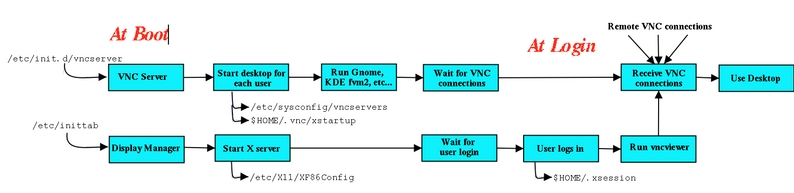
Figure 3. The Whole Process
The display manager also starts up at boot time, which presents you with a graphical login banner.
A user who does not have the VNC server configured, and who does not have the proper .xsession file in his or her home directory, will get a normal X desktop when logging in to the display manager. A user with all of these things configured will get the VNC desktop and also will be able to access the VNC desktop from anywhere on the network. Doing so securely, however, is a tale for the next article.
The setup I've described here has many advantages. For me, the primary advantage is the ability to access my desktop's state from any computer at work, which is nice if I'm on the other side of the site with a half hour between meetings, and I want to check my e-mail or my calendar.
A major drawback of using VNC as your default desktop is that you lose graphical performance. For example, playing movies on your VNC desktop is slow, due to long redraw delays. Most fast-action games are slow as well. Also, when the VNC server runs, it acts like an X server to all the applications that you run, but it is not accelerated in any way. Even if your true X server is accelerated, you won't be able to take advantage of it. (You can log out, log in as a different user, play the movie or the game, log out when finished, then log in again as your normal user. Your original desktop will be sitting there just like you left it.)
This configuration doesn't scale well for multiple users. You could define many VNC sessions in the /etc/sysconfig/vncservers file to start up at boot. But all of these VNC desktops will be idle until they are used. And for each VNC desktop, a VNC server is run, a window manager is run and, in the case of GNOME or KDE, many auxiliary applications are run. All of these take up RAM, and they may compete with each other for resources like the sound card. Similar commercial solutions like Citrix MetaFrame and Microsoft Terminal Server call for seriously powerful computers to support many users, and I'd guess this solution would work just as well on such hardware.
One alternative solution is to use XDMCP, which is how the traditional X world provides remote X access (à la X terminals). But in doing so you lose statefulness because the desktop is restarted every time a connection is made to the server, and you lose the ability to share the same desktop both remotely and locally. See the documentation for your display manager (xdm, gdm or kdm) or www.linuxdoc.org/HOWTO/XDMCP-HOWTO for more information.
Another solution is to run VNC out of inetd/xinetd, using the -inetd option. Doing so, however, causes the VNC server to start anew for every connection, disallows multiple connections to one desktop and shuts down after the original connection exits. So it loses statefulness and the ability to share the desktop both remotely and locally. See the VNC server documentation for more information.
Another option is x0rfbserver. This is an application that you run in your normal X desktop that will relay the contents of the desktop to a VNC client. It works well and will let you take full advantage of any accelerated video cards that your X server supports. It also is less RAM-demanding than running an X server plus a VNC server (it only requires an X server, besides the x0rfbserver itself, which is fairly small). But it requires that you always keep your X desktop running on the console, so it will not scale for multiple users. See www.hexonet.de/software.en for more information.

Jeremy D. Impson is a senior associate research scientist at Lockheed Martin Systems Integration in Owego, New York. There he's a member of The Center for Mobile Communications and Nomadic Computing, where he uses open-source software to develop mobile computing systems. He can be reached at jeremy.impson@lmco.com.

