syslog Configuration
Whatever else you do to secure a Linux system, it must have comprehensive, accurate and carefully watched logs. Logs serve several purposes. First, they help us troubleshoot virtually all kinds of system and application problems. Second, they provide valuable early warning signs of system abuse. And third, when all else fails (whether that means a system crash or a system compromise), logs provide us with crucial forensic data.
This article is about making sure your system processes and critical applications log the events and states you're interested in. The tried-and-true tool for achieving this is syslog. syslog accepts log data from the kernel (by way of klogd), from any and all local processes, and even from processes on remote systems. It's flexible as well, allowing you to determine what gets logged and where it gets logged. A preconfigured syslog installation is part of the base operating system in virtually all variants of UNIX and Linux.
This month, therefore, we discuss syslog configuration and use it in-depth, probably in much greater detail than you've previously considered. In my experience the vast majority of Linux users, and even administrators, tend to leave their syslog installations with default settings, tweaking them little if at all. This is seldom a good idea.
I should also mention that if you're really interested in granular, flexible logging, Balazs Scheidler's excellent syslog-ng (syslog, new generation) is well worth checking out. But it's still nowhere near as ubiquitous as syslog, so I won't do more than mention it this time. See the Resources section for more information on syslog-ng.
Whenever syslogd, the syslog dæmon, receives a log message, it acts based on the message's type (or facility) and its priority. syslog's mapping of actions to facilities and priorities is specified in /etc/syslog.conf. Each line in this file specifies one or more facility/priority selectors followed by an action. A selector consists of a facility or facilities and a (single) priority.
In the following syslog.conf line, mail.notice is the selector and /var/log/mail is the action (i.e., “write messages to /var/log/mail”):
mail.notice /var/log/mail
Within the selector, “mail” is the facility (message category) and “notice” is the level of priority.
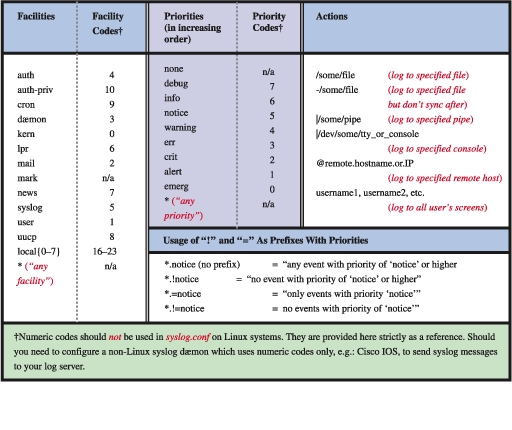
Facilities are simply categories. Supported facilities in Linux are auth, authpriv, cron, dæmon, kern, lpr, mail, mark, news, syslog, user, UUCP and local0 through local7. Some of these are self-explanatory, but of special note are:
auth: used for many security events.
authpriv: used for access-control-related messages.
dæmon: used by system processes and other dæmons.
kern: used for kernel messages.
mark: messages generated by syslogd itself that contain only a timestamp and the string “--MARK--”. To specify how many minutes should transpire between marks, invoke syslogd with the -m [minutes] flag.
user: the default facility when none is specified by an application or in a selector.
local7: boot messages.
*: wildcard signifying “any facility”.
none: wildcard signifying “no facility”.
Unlike facilities, which have no relationship to each other, priorities are hierarchical. Possible priorities in Linux are (in increasing order of urgency): debug, info, notice, warning, err, crit, alert and emerg. Note that the urgency of a given message is determined by the programmer who wrote it; facility and priority are set by the programs that generate messages, not by syslog.
As with facilities, the wildcards “*” and “none” also may be used. Only one priority or wildcard may be specified per selector. A priority may be preceded by either or both of the modifiers “=” and “!”.
If you specify a single priority in a selector (without modifiers), you're actually specifying that priority plus all higher priorities. Thus the selector mail.notice translates to “all mail-related messages having a priority of notice or higher”, i.e., having a priority of notice, warning, err, crit, alert or emerg.
This behavior can be canceled by prepending an = to the priority. The selector mail.=notice translates to “all mail-related messages having a priority of notice”. Priorities may also be negated: mail.!notice is equivalent to “all mail messages except those with priority of notice or higher”, and mail.!=notice corresponds to “all mail messages except those with the priority notice”.
In practice, most log messages are written to files. If you list the full path to a filename as a line's action in syslog.conf, messages that match that line will be appended to that file. (If the file doesn't exist, syslog will create it.) In the syslog.conf line above, we instructed syslog to send matched messages to the file /var/log/mail.
You can send messages other places too. An action can be a file, a named pipe, a device file, a remote host or a user's screen. Pipes usually are used for debugging. Device files people use tend to be TTYs, but some people also like to send security information to /dev/lp0, that is, to a local line printer. Logs that have been printed out can't be erased or altered by an intruder, and this is an excellent use for old dot-matrix printers.
Remote logging is one of the most useful features of syslog. If you specify a hostname or IP address preceded by an “@” sign as a line's action, messages that match that line will be sent to that remote host. For example, the line
*.emerg @mothership.mydomain.org
will tell syslogd to send all messages with emerg priority to the host named mothership.mydomain.org. Note that the remote host's (in this example, mothership's) syslogd process will need to have been started with the -r flag in order for it to accept your log messages. By default, syslogd does not accept messages from remote systems.
If you run a central logserver, which I highly recommend, you'll want to consider having some sort of access controls on it for incoming messages. At the very least you should consider TCPwrappers' hosts-access (source-IP-based) controls or maybe even local firewall rules (ipchains or iptables).
You can list multiple facilities separated by commas in a single syslog.conf selector. To extend our original syslog.conf line to include both mail and UUCP messages (still with priority notice or higher), you could use this line:
mail,uucp.notice /var/log/mail
The same is not true of priorities. Remember that only one priority or priority wildcard may be specified in a single selector.
You may, however, specify multiple selectors separated by semicolons. When a line contains multiple selectors, they're evaluated from left to right; you should list general selectors first, followed by more specific selectors. Think of selectors as filters: as a message is passed through the line from left to right, it passes first through coarse filters and then through more granular ones.
Continuing our one-line example, suppose we still want important mail and UUCP messages to be logged to /var/log/mail, but we'd like to exclude UUCP messages with priority alert. Our line then looks like this:
mail,uucp.notice;uucp.!=alert /var/log/mail
Actually, syslogd's behavior isn't as predictable as this may imply. Listing selectors that contradict each other or that go from specific to general, rather than the other way around, can yield unexpected results. Therefore, it's more accurate to say that for best results, list general selectors to the left and their exceptions (and/or more specific selectors) to the right.
Wherever possible, keep things simple. You can use the logger command to test your syslog.conf rules (see the “Testing System Logging with logger” section toward the end of this article).
Note that in the second selector (uucp.!=alert) we used the prefix “!=” before the priority to signify “not equal to”. If we wanted to exclude UUCP messages with priority alert and higher (i.e, alert and emerg), we could omit the “=”:
mail,uucp.notice;uucp.!alert /var/log/mail
You might wonder what will happen to a UUCP message of priority info; this matches the second selector, so it should be logged to /var/log/mail, right? Based on the above examples, it won't. Since the line's first selector matches only mail and UUCP messages of priority notice and higher, such a message wouldn't be evaluated against the second selector.
There's nothing to stop you from having a different line for dealing with info-level UUCP messages, however. You even can have more than one line deal with these if you want. Unlike a firewall rule-base, each log message is tested against all lines in /etc/syslog.conf and acted on as many times as it matches.
Suppose we want emergency messages broadcast to all logged-in users as well as being written to their respective application logs. We could use something like the sample shown in Listing 1 to achieve this. Note the “-” sign in front of the write-to-file actions. This tells syslogd not to synchronize the specified log file after writing a message that matches that line.
Listing 1. A Sample syslog.conf File
Skipping synchronization increases the chances of introducing inconsistencies such as missing or incomplete log messages into those files, but it decreases disk utilization and thus improves performance. Use the minus sign, therefore, in lines that you expect to result in frequent file writes.
In Listing 1 we see some useful redundancy. Kernel warnings plus all messages of error-and-higher priority, except authpriv messages, are printed to the X-console window. All messages having priority of emergency and higher are printed there too and are also written to the screens of all logged-in users.
Furthermore, all mail messages and kernel messages are written to their respective log files. All messages of all priorities (except mail messages of any priority) are written to /var/log/messages.
The previous examples were adapted from the default syslog.conf that SuSE 7.1 put on one of my systems. But why isn't such a default syslog.conf file fine the way it is? Why change it at all?
Maybe you needn't, but probably you should. In most cases default syslog.conf files either assign to important messages at least one action that won't bring those messages to your attention effectively (e.g., by sending messages to a TTY console on a system you only access via SSH), or they handle at least one type of message with too much or too little redundancy to meet your needs.
Table 1 summarizes syslog.conf syntax, facility values, severity values and action types. Note that the three main columns of this table are independent; there's no correlation between facilities, severities and actions, i.e., a message may be sent to any facility with any severity and have any allowed action performed on it. Note also that the numeric facility and severity codes are provided strictly for reference; you should not use these in syslog.conf, but you may come across them in source code or in a packet-dump of network traffic.
Just as the default syslog.conf may not meet your needs, the default startup mode of syslogd may need tweaking. Table 2 and subsequent paragraphs touch on some syslogd startup flags that are particularly relevant to security, but for a complete list you should refer to the man page sysklogd(8).
Table 2. syslogd Startup Flags
In addition, note that when you're changing and testing syslog's configuration and startup options, it usually makes sense to start and stop syslogd and klogd in tandem (see the Sidebar “What about klogd?” if you don't know what klogd is). Since it also makes sense to start and stop these the same way your system does, I recommend that you use your system's syslogd/klogd startup script.
On most Linux systems this startup script is either in /etc/init.d/syslog or /etc/init.d/sysklog (sysklog is shorthand for “syslog and klogd”).
The first syslogd flag we'll discuss is the only one used by default by Red Hat 7.x in its /etc/init.d/syslog script: -m 0, which disables mark messages. These messages contain only a timestamp and the string “--MARK--”, which some people find useful for navigating lengthy log files. Others find them distracting and redundant, given that each message has its own timestamp anyhow.
To turn mark messages on, specify a positive nonzero value after -m that tells syslogd how many minutes should pass before it sends itself a mark message. Remember that mark has its own facility called, predictably, mark, and you must specify at least one selector that matches mark messages (such as mark.*, which matches all messages sent to the mark facility, or *.*, which matches all messages in all facilities).
For example, to make syslogd generate mark messages every 30 minutes and record them in /var/log/messages, you first would add a line to /etc/syslog.conf similar to
mark.* -/var/log/messages
You would then need to start syslogd as shown here:
mylinuxbox:/etc/init.d# ./syslogd -m 30Another useful syslogd flag is -a [socket]. This allows you to specify one or more sockets in addition to /dev/log for syslogd to accept messages from.
If you've ever secured a nameserver running BIND, you may have used -a to allow a chroot-ed named process to bounce its messages from a dev/log device file in the chroot jail to the non-chroot-ed syslogd process. In such a case, since named can't access /dev/log, it has its own, for example, /var/named/dev/log. You therefore need a line in /etc/init.d/syslog like this:
daemon syslogd -m 0 -a /var/named/dev/log
Note that the dæmon function at the beginning of this line is unique to Red Hat's init script functions; the important part here is
syslogd -m 0 -a /var/named/dev/logMore than one -a flag may be specified, like this:
syslogd -a /var/named/dev/log -a /var/otherchroot/dev/log -a /additional/dev/logContinuing down the list of flags in Table 2, suppose you need to test a new syslog configuration file named syslog.conf.test but prefer not to overwrite /etc/syslog.conf, which is where syslogd looks for its configuration file by default. Use the -f flag to tell syslogd to use your new configuration file:
mylinuxbox:/etc/init.d# ./syslogd -f ./syslog.conf.testWe've already covered use of the -r flag, which tells syslogd to accept log messages from remote hosts, but we haven't talked about the security ramifications. On the one hand, security clearly is enhanced when you use a centralized logserver or do (almost) anything else that makes it easier for you to manage and monitor your logs.
On the other hand, you must take different threat models into account. Are your logs sensitive? If log messages traverse any untrusted network, and if the inner workings of the servers that send those messages are best kept secret, then in fact the risks may outweigh the benefit (at least, the specific benefit of syslogd's unauthenticated clear-text remote logging mechanism).
If this is the case for you, you definitely should consider using syslog-ng. syslog-ng can send remote messages via the TCP protocol and therefore can be used in conjunction with stunnel, ssh and other tools that greatly can enhance its security. Since syslog uses only the connectionless UDP protocol for remote logging and, therefore, can't tunnel its messages though stunnel or ssh, syslog is inherently less securable than syslog-ng.
If your log messages aren't sensitive (at least, the ones you send to a remote logger), then there's still the problem of denial-of-service and message-forgery attacks. If you invoke syslogd with the -r flag, it will accept all remote messages without performing any checks whatsoever on the validity of the messages themselves or on their senders. Again, this risk is most effectively mitigated by using syslog-ng.
One tool you can use with syslog to mitigate partially the risk of invalid remote messages is TCPwrappers. Specifically, TCPwrappers' hosts-access authentication mechanism provides a simple means of defining which hosts may connect, via which protocols, to your logserver. Hosts-access authentication is tricked easily by source-IP spoofing (especially since syslog transactions are strictly one-way), but it's better than nothing and is probably sufficient to prevent mischievous but lazy attackers from interfering with syslog.
If you're willing to bet that it is, obtain and install TCPwrappers (all modern Linux distributions have a binary package of it; some even install it by default), and refer to its hosts_access(5) man page for details. Note that despite its name, TCPwrappers' hosts access can be used to control UDP-based applications.
Before we leave the topic of system-logger configuration and use, we should cover a tool that can be used to test your new configurations regardless of which log dæmon you use. logger is a command-line application that sends messages to the system logger. Besides its relevance as a diagnostic tool, logger especially is useful for adding logging functionality to shell scripts.
The usage we're interested in here is diagnostics. (Although, come to think of it, you really should use this tool in any important scripts you routinely run, especially ones that run unattended via cron or at.) The easiest way to explain how to use logger in this regard is with an example.
Suppose you've reconfigured syslog to send all dæmon messages with priority “warn” to /var/log/warnings. To test the new syslog.conf file, you'd first restart syslogd and klogd, then you'd enter a command like this:
mylinuxbox:~# logger -p daemon.warn
"This is only a test."
As you can see, logger's syntax is simple. The -p parameter allows you to specify a facility/priority selector. Everything after this selector, and any other parameters or flags, is taken to be the message.
Because I'm a fast typist, I often use while-do loops in interactive bash sessions to run impromptu scripts (actually complex command lines). The following sequence of bash commands works either interactively or in a script:
mylinuxbox:~# for i in
> do
> logger -p daemon.$i "Test daemon message, level $i"
> done
This sends test messages to the dæmon facility for each of all eight priorities. Listing 2, presented in the form of an actual script, generates messages for all facilities at each priority level.
Listing 2. Generating Messages for All Facilities at Each Priority Level
Hopefully that's enough to get you started in building, testing and using custom syslog configurations. May your logs be detailed, plentiful, closely watched and uninteresting!
email: mick@visi.com
Mick Bauer (mick@visi.com) is a network security consultant in the Twin Cities area. He's been a Linux devotee since 1995 and an OpenBSD zealot since 1997, and enjoys getting these cutting-edge OSes to run on obsolete junk.