
The CodeWeavers CrossOver Plugin
Surfing multimedia web sites under Linux has been a somewhat frustrating experience. We do have support for RealPlayer and Flash, and we have some other fine streaming-media clients such as XMMS, but for various reasons we have been barred from watching most QuickTime movies or any Shockwave Director animations. Barred until now, that is; thanks to the programmers at CodeWeavers now we can enjoy those same movies and animations using their native Windows players running on web browsers under Linux.
On August 27, 2001, CodeWeavers announced the availability of their CrossOver Plugin in its 1.0 release. This software provides a translation layer that lets you download and install native Windows plugins as though they were being installed to a real Windows partition, making it possible for Linux web browsers to run multimedia content created for Apple's QuickTime 5 and Macromedia Shockwave. The 1.0 package also supports Microsoft's WordView and XLView browser plugins for viewing content created in Word 97 and Excel 97, and CodeWeavers has announced their intention to support all Windows browser plugins via CrossOver eventually.
The CrossOver Plugin is available from the CodeWeavers web site. You can purchase and download the plugin by itself, or you can buy the CodeWeavers Wine CD. The disk includes the plugin and printable documentation along with CodeWeavers Wine 1.0. Note, however, that the CrossOver Plugin is a standalone program that requires neither Wine nor Windows.
Installation is simple and well documented, and a series of helpful wizards will guide you through the process. After displaying the CodeWeavers license agreement, the installer sets up CrossOver itself (Figure 1). This part of the installation requires little intervention from the user beyond specifying the target directory ($HOME/crossover by default). CrossOver first installs a fake_windows and a set of DLLs (derived from CodeWeavers' work on the Wine Project) needed by the players and viewers. The package does not provide the supported players and viewers: once CrossOver has installed itself, you will see the Plugin Setup window (Figure 2) where you actually connect to the Apple, Macromedia and Microsoft download areas to retrieve the plugins. From this point you follow the course of downloading, installing and setting up the plugins exactly as though you were working in Windows itself. You simply can accept the default values throughout the installation and configuration for each plugin. Remember, CrossOver deceives the native Windows plugins into believing that they are installing themselves in a real Windows environment, so the default installation paths are the same as those expected in Windows.

Figure 1. CrossOver Begins Installing Itself

Figure 2. The Plugin Setup Window
When you have finished setting up the plugins you want CrossOver to manage, restart your browser and head over to Apple's QuickTime movie trailers site and catch the latest previews (Figure 3), or check out Director Web for some impressive Shockwave sites (Figure 4). I spent an evening wandering through sites from a Google search for QuickTime movies and Shockwave pages, testing the plugin's ability to play the various file versions and formats. I'm happy to report that the plugin had no trouble playing anything the Web threw at it.
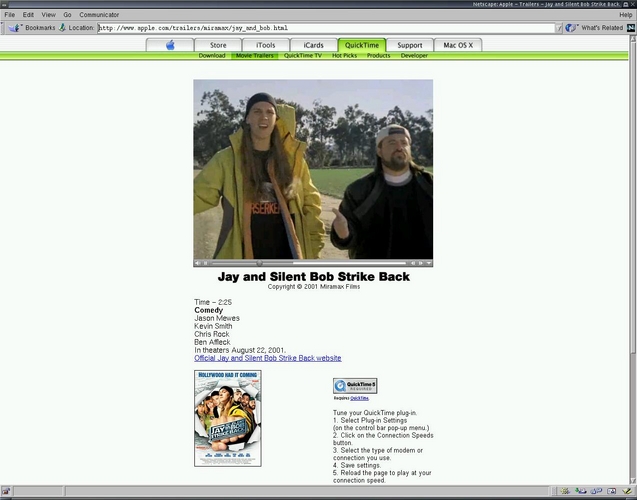
Figure 3. A QuickTime Movie Trailer in Linux Netscape
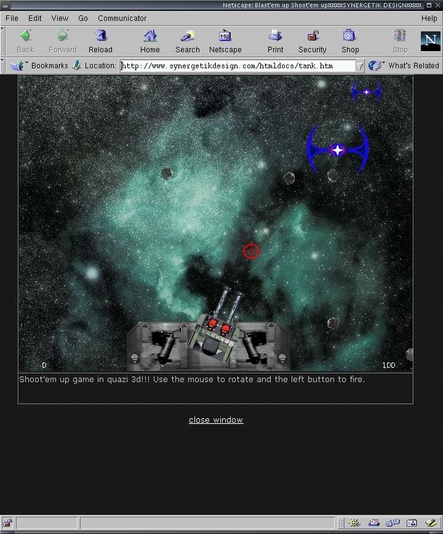
Figure 4. An Interactive Shockwave Game Running in Netscape
You also can choose to set up QuickTime as your default player and viewer for other media file types, including AVI and MPEG movies or JPEG and GIF images. The CrossOver documentation notes that you must disable your browser's existing file associations and manually reconfigure them for QuickTime.
The Plugin Setup window includes tabs for configuring your preferences in Netscape, Mozilla and Konqueror, the browsers currently supported by CrossOver. Netscape is the default browser, but the CrossOver package includes advice and instructions regarding setup for the other browsers. Incidentally, you don't have to install all your plugins at once. Running $HOME/crossover/bin/pluginsetup will bring up the Plugin Setup window for later addition or removal of CrossOver's supported plugins.
The only problem I had during the installation was resolved quickly with the help of the CodeWeavers team. My $HOME/.netscape/plugins directory was read-only, and the CrossOver Plugin could not install itself until I changed the directory's permissions to read/write for normal user. With that correction the installation proceeded smoothly.
The test system included a Sound Blaster Live! Value sound card driven by the ALSA 0.5.11 driver package and a Voodoo3 video card managed by XFree86 4.01, all running happily under a Linux 2.4.5 kernel patched for low latency. The internet hookup was a 768kbps DSL connection, and I used Netscape 4.76 for my browser. I was unable to compare performance with the same plugins employed in Windows itself, but I was quite satisfied with them running in Linux. Bear in mind that CrossOver is not an emulator; those are real native Windows plugins that believe they are working in Windows, so there should be little or no performance penalty usually associated with emulation environments.
Streaming QuickTime performance was generally excellent, though of course the reception speed depended on the transmission rate at the sending end. Video and audio synchronize well, and their quality is superb; my friends literally jumped back when they heard the sound from some of the movie trailers we watched, and they agreed that the streaming video in QuickTime was the best they've seen in a Linux browser.
Some Shockwave pages were problematic with fonts, and it seemed that any 3-D-enabled site failed to run. Fortunately, I can say that most Shockwave sites ran beautifully, including some very interesting interactive music and sound pages I found in the listings at Director Web. The CodeWeavers team is aware of the 3-D problem and may have a fix by the time you read this article.
I must use Word 97 occasionally, so I installed Microsoft's WordViewer plugin and clicked on some .doc files in my Windows Word directory (Figure 5). My files included not only standard text but also various notations and indicators added by the DOT template used by my editors. As you can see, apostrophes have been replaced by those boxes, but that was the only visual fault I found in the display.
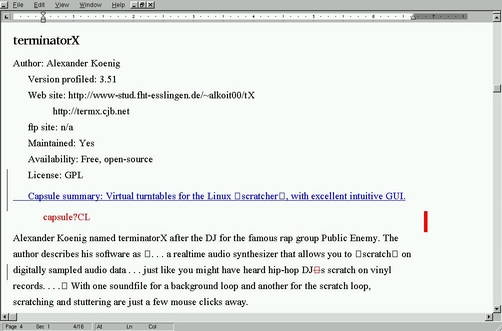
Figure 5. Viewing a Word 97 Document with WordView in Linux
The Excel Viewer installed and set up without a problem, but it would not view the Excel files found on some web pages (such as the Power Reporting site listed below). Thanks to CodeWeaver John Sturtz, I resolved the problem by adding this entry to my Netscape preferences:
Description: MS Excel Viewer MIMEType: application/xlsSuffixes: xlsApplication: /home/dlphilp/crossover/bin/wine.sh “C:/Program Files/XLView/xlview.exe” :switch:e “%s”
This entry is identical to the entry created by the Plugin Setup, except for the MIME type. After adding the entry to my preferences, I restarted Netscape, logged on to the Power Reporting site again, and voilà, I could view the sample spreadsheets while on-line (Figure 6).
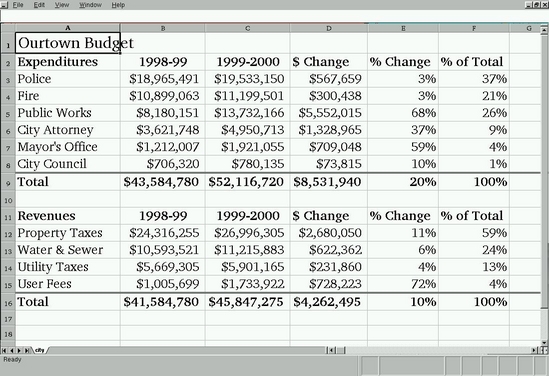
Figure 6. Viewing an Excel File with XLView
The various plugins also can be run as standalone applications. For instance, this command
$HOME/crossover/bin/wine.sh "c:/Program
Files/QuickTime/QuickTimePlayer.exe"
will start the QuickTime player from an xterm (Figure 7).

Figure 7. The QuickTime Player Running as a Standalone Application
As of January 2002, the CrossOver Plugin has evolved to version 1.01. Notable additions and changes include support for Microsoft's PowerPoint viewer (completing the CodeWeavers' Microsoft viewers' collection), a simplified printing procedure (just select the viewer's Print menu item) and support for more browsers (including Galeon and Opera). This release also includes bug fixes for some 24bpp display problems and improved handling of QuickTime channels. Last but not least, a demo version of CrossOver is also now available (see the CodeWeavers web site for details).
Version 1.02 should be available by the time this review is published. Thanks to CodeWeaver François Gouget, I learned that we can expect the following improvements (and more): expanded browser support (the SkipStone browser will accommodate the plugin, and remaining problems with Opera and Konqueror should be fixed); enhanced multi-user support; simplified installation for the iPIX, MGI and Chime viewers; improved plugin retrieval, installation and setup; and the usual bug fixes.
The programmers at CodeWeavers have done the Linux community a great service with this product. The CrossOver Plugin is a well-designed package that installs easily and performs flawlessly. At long last I can enjoy QuickTime and Shockwave content from Netscape, and I don't have to boot into Windows just to look at Word or Excel files. I realize that some members of the community will object to paying for this software, but the price is reasonable, and the CodeWeavers truly deserve the support. They are major contributors to the Wine Project, and your purchase of the CrossOver Plugin helps fund that work. If you need browser support for QuickTime or Shockwave under Linux, or if you'd like to view your Excel and Word files without rebooting, then you need the CrossOver Plugin. There's just nothing else quite like it.
I would like to thank CodeWeavers Jeremy Newman, Jeremy White and John Sturtz for their assistance and for making something like the CrossOver Plugin in the first place. Thanks, guys!

Dave Phillips is a musician, teacher and writer living in Findlay, Ohio. He has been an active member of the Linux audio community since his first contact with Linux in 1995. He is the author of The Book of Linux Music & Sound, as well as numerous articles for Linux Journal. His favorite activities are still Linux, playing the blues and spending any time with his beloved Ivy Maria (not necessarily in that order).
