Kylix: Rapid Application Development on Linux
If you believe the hype, a Rapid Application Development (RAD) tool means never having to write code again. Instead of all that tedious writing, you click here and there, drag a little, drop a little and-- Hey! Presto!--instant application. Real problems call for real code, and the true value of a RAD tool lies in how easily you can design, document, implement, test and maintain a project. This article takes a closer look at Borland Kylix, the facts, not the fiction.
There are three aspects to the rapidity of developing an application: design, development and debugging. Kylix is a development tool and offers no help at the design end. You can find third-party design tools (mostly using UML) that work with Delphi (Kylix's sibling for Windows). In time, they might be ported to Kylix. For now, you are on your own.
For the actual coding and debugging, Kylix offers the usual integrated development environment: source editor, syntax highlighting, class browser, a WYSIAWYG (What you see is almost what you get) GUI builder, integrated source-level debugger, additional assembler-level debugger, database field editor, menu editor, fast database access components, extensible, object-oriented component framework, Internet components--hmmm, maybe there's a little more than what you find in other RAD tools. Let's take a closer look at some of Kylix's features.
The source editor has several features that make the typing go a little faster:
<il>* Code templates let you define a large code fragment and insert the fragment by typing a short alias. Several templates are predefined, and you can freely create, modify and delete the templates to meet your needs.
<il>* Code insight pops up hints while you type. If you don't remember the parameters to a function, the editor pops up a hint window to remind you of the parameter names and types. If you can't remember how to spell a method, type or variable name, a different window pops up that shows you all the methods that are meaningful. If you remember the first few letters, the hint window shows only those methods with the same prefix. The hint window is also type-aware and shows only the methods that are type-compatible for the containing expression.
<il>* Cross references are available with a click of the mouse. If you want to see the definition of a function or other symbol, hold down the Control key and click on a reference to it.
The compiler runs in the background, feeding code insight with the types and functions that you have written so far. Even if you aren't finished and don't yet have code that will compile successfully, the code insight hints will work with what you have typed so far.
Editor enhancements are nice, but real programmers need real programming languages. The bad news is that Kylix uses Pascal. The good news is that Kylix uses a modern, object-oriented version of Pascal.
Kylix Pascal has a Java-like object model (single inheritance of classes, and a class can implement many interfaces), exception-handling, dynamically-resizable arrays, copy-on-write strings, custom Variant types for operator overloading, and a rich library of classes, components and reusable code.
Kylix Pascal is a clean, elegant language. Borland avoids cluttering the language with reserved keywords and special syntax by creating context-sensitive directives. The following example is a declaration for an external procedure in a shared object, using the C calling convention:
function strlen(Str: PChar): Integer; cdecl; external 'glibc.so';
The keyword "function" is part of standard Pascal. The directives "cdecl" and "external" are not reserved. Their special meaning applies only in the context of a procedure or function declaration. Borland has succeeded in creating a language that follows the spirit of the original Pascal, while adding features that we expect from a modern object-oriented language.
The compiler is also quite fast. The first time you try Kylix for yourself, and click the Compile button, don't blink. The cursor briefly changes to an hourglass and back to the normal arrow. Even a very large project usually compiles and links in seconds.
Kylix Pascal uses a mixed model for memory management. The programmer is responsible for most memory management (as in C++), but interfaces are automatically managed (using reference counting). Dynamic arrays and strings are also managed automatically. Visual forms and controls are implemented as ordinary objects, but unlike other objects, their lifetimes are managed automatically.
Although Kylix Pascal lacks garbage collection (as in Java) or smart pointers (such as the auto_ptr<<>> template in C++), in my experience, Kylix programs do not often exhibit the number or degree of pointer problems that plague many C and C++ programs.
Perhaps the most glaring omission is the lack of generic types, what C++ programmers call templates.
Having a good programming language is one piece of the RAD pie, but another important piece is the component framework, which must include a rich class library. In Kylix, the component framework is called CLX (pronounced "cliks"), which sort of stands for component library for cross-platform development.
CLX has several parts: BaseCLX is the core runtime library. It includes
<il>* I/O and stream classes<il>* string, date, and file manipulation routines<il>* standard exception classes<il>* rudimentary container classes<il>* multithreading classes and routines<il>* math and statistical functions<il>* runtime type information routines<il>* other core runtime utilities
VisualCLX is the visual library. It uses Qt for most of the widgets and user interaction. VisualCLX is not tied to any desktop, and you can run Kylix applications without a desktop. If you don't use VisualCLX, you don't need X. (On the other hand, doing anything with bitmaps requires Qt and therefore X. So you can't write a web server that, say, generates images on the fly unless the web server can talk to an X server.)
NetCLX is the network library. It includes a full suite of internet components and web server components. You can easily write CGI applications or Apache modules.
DataCLX is the database library and contains components that interface to dbExpress, Borland's portable database interface library. Out of the box, Kylix Server Developer supports Interbase, MySQL, DB/2 and Oracle.
CLX comes with most of the basic needs for many applications, but any large project will have specific needs. In that case, CLX is easily extended. You can derive a new class from any of the existing classes, or write a component class from scratch. In either case, it is a simple matter to add your component to Kylix's palette, letting programmers drag and drop your component just as they can do with any of the pre-installed components.
A quick web search reveals several sites with downloadable Kylix components, so many people are taking advantage of the extensibility of CLX.
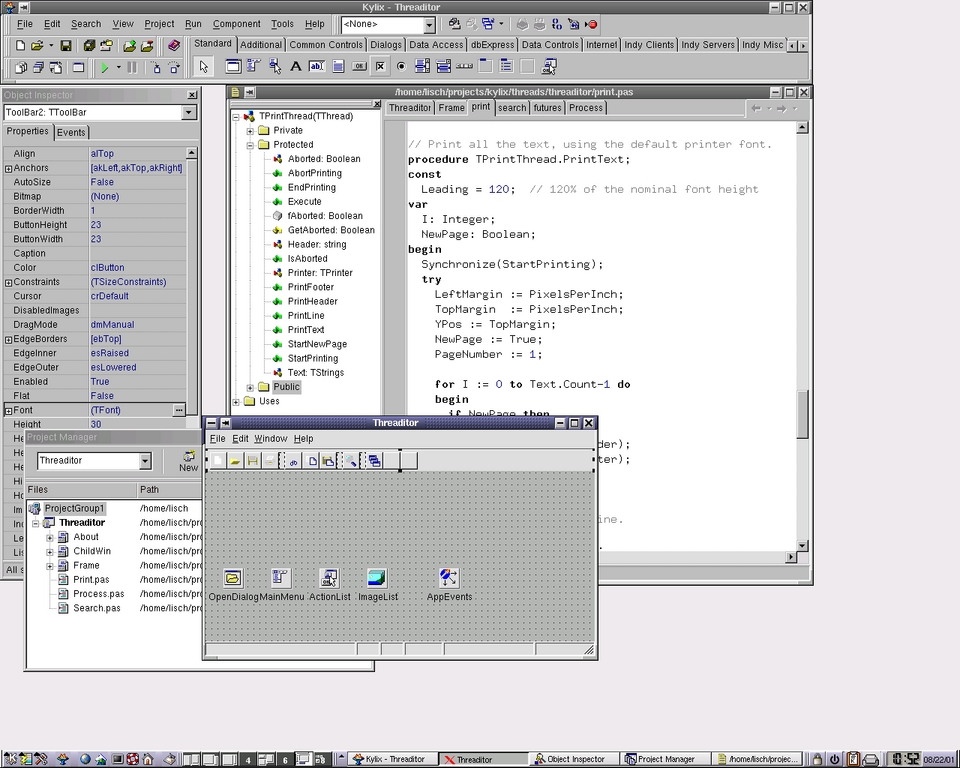
Figure 1 shows a screen snapshot of the Kylix desktop. Across the top is the menu bar, tool bars and component palette. The form editor is a WYSIAWYG GUI builder; select components from the palette and drop them on the form. Click and drag in the form editor to move and resize components. At the left is the object inspector, where you examine and change the properties of the component or components you select on the form.
A form is an object, an instance of a form class, which derives from TForm. Components are objects, so each component you drop on a form needs a field (data member) in the form class. Kylix adds the declaration automatically when you drop a component on the form. You can delete the component from the form or from the source code, and Kylix automatically keeps the two synchronized.
Components have events for user interactions (such as OnClick for a button or OnShow for the form) and for behind-the-scenes actions (such as BeforeInsert for a database record or OnTimer for a periodic timer event). An event handler is just a method, but one that the object inspector knows about. You can define an event handler in the object inspector, which tells Kylix to add an appropriate method to the form class, or you can declare the class in the source code, and then choose the method name from a drop-down list in the object inspector. If you change a method name in the Object Inspector, it automatically updates the source code. (The other way around works a little differently, though. If you edit the method name in the source code, the Object Inspector knows about the change, but it doesn't know whether you intend to change the existing event handler or create a new one. You can select the new name for the existing event handler, or create a new handler with the original name.)
Kylix produces native ELF executable programs and shared objects. Currently, the compiler produces x86 code only. Borland has not announced any specific plans for other platforms, but you can be sure they will support IA64 (Itanium) in a future release. I doubt Kylix will ever support as many platforms as gcc, but we can hope for more platforms as the product matures.
Kylix does not produce relocatable object (.o) files. You cannot link Kylix compiled units with a program written in any other language, but you can go the other way around. That is, you can link .o files to a Kylix project. You cannot write kernel modules in Kylix.
Because Kylix has an integrated debugger, which uses a Kylix-specific symbol table, the Kylix linker produces minimal debug information for use in gdb or other debuggers.
Although the IDE uses winelib, Kylix applications are not required to use winelib or wine. VisualCLX uses Qt, which is also used by KDE, but that doesn't mean you are tied to KDE. Kylix applications run under GNOME, too, and under any of the popular window managers.
Kylix currently comes in three editions. Server Developer is the full-featured edition, with native database drivers and web server support. Desktop developer lacks the expensive database driver and web server support, but has MySQL and Interbase support. Both editions let you write proprietary or open-source code. (Borland has negotiated a license with TrollTech that lets Kylix programmers deploy commercial applications that use Qt in a Kylix application. You do not need to pay any additional fees to TrollTech, even for a closed-source commercial application.)
Kylix also comes in the Open Edition. The Open Edition is available as a free download from Borland's web site. It lacks database and Internet components, but you can download the Indy Internet components for free. Free database components are also starting to appear on the Internet. Any application written with Kylix Open Edition must be released under the GPL. As a reminder, every application automatically displays a splash screen (or prints a splash message to the standard output) that reminds the user that the application is covered by the GPL. You can customize the splash screen with your own bitmaps, but you cannot remove it from the program.
Download Kylix Open Edition or the trial version of Kylix Server Developer from www.borland.com/kylix. If you download the Open Edition, you should also download the Indy Internet components from http://www.nevrona.com/indy/. Borland has released the source code to the BaseCLX and VisualCLX libraries under the GPL. Download the code from freeclx.sourceforge.net.
Ray Lischner is a professional goof-off. Having freed himself from the burden of a regular paycheck, he now spends his time writing books and articles, speaking at conferences and user group meetings, and sometimes teaching computer science at Oregon State University. You can reach him at linux@tempest-sw.com.
email: ljeditors@ssc.com