
More Than Word(s)
Ways to deal with MS Word documents using Linux and to create platform-independent documents.
by Jan Schaumann
We are told that Microsoft Word files can be viewed in any text editor, which probably is why so many people insist on sending even simple text documents as big Word attachments: “These download files are in Microsoft Word 6.0 format. After unzipping, these files can be viewed in any text editor, including all versions of Microsoft Word, WordPad and Microsoft Word Viewer” (from Microsoft's web site). How often do you receive an e-mail with a Word document attached because the sender simply assumes that everyone uses Microsoft Word (presuming they think about it at all)? Not only is it dangerous for anyone actually using Word to open attachments that might possibly contain macroviruses, but for anyone not using any of Microsoft's products, they have become a real nuisance. Actually, even people who do have MS Word need to make sure they have the latest version (and possibly buy an upgrade) because the discrepancies between the various versions are so large that sometimes Word can't read Word. This article tries to make your (office) life a bit easier by elaborating on the various possibilities of dealing with these dreaded documents.
Short of rejecting any documents not in standard format (more on this later), there is no optimal way of dealing with MS Word documents in Linux. As mentioned above, sometimes even Word can't read Word. There are, however, a number of approaches to opening most documents and even preserving the format.
There are the full-fledged word processors (very similar to Microsoft Word), a few file converters and some rather unconventional means of extracting the information out of a .doc file. Depending on your needs, you may choose different solutions in different situations.
If you need to do a lot of word processing and often exchange documents with coworkers, you most certainly will want to install a complete office suite. An office suite comes with, among other things, a word processor that lets you read (and sometimes write) various MS Word formats, even though they all have their own document formats as well. The most common office suites available for Linux are Applixware Office, Corel WordPerfect Office 2000, KOffice and StarOffice (OpenOffice).
Of all the above, Applixware Office is the only one not available at no cost. However, Applix was kind enough to provide me with a copy of their software for this article (retail price is $99 US). I received a few colorful boxes containing a copy of Applixware Office, Applixware Words (standalone) and Applixware Spreadsheets (standalone). The Office package came with a beautiful handbook, something that I would certainly appreciate, once I set it up.
Eager to test the new software, I attempted to install Applixware Words, following the instructions in the manual. As I run Debian, I do not mind the fact that the instructions to install per RPM are missing a step (you need to change the directories once more to find the RPM-install script, which was not mentioned), and I happily executed the setup binary.
At first, things seemed to go smoothly, but then closed-software practices took their toll. There appears to be a small bug in the install scripts that made it impossible for me to install the software. When I attempted to install into /opt/applix (as suggested by the program), the error log told me after the failed installation that it apparently tried to install to /optapplix, even though it created /opt/applix.
This would be just a minor nuisance if the user was able to edit the install script, but as this is closed software, there was nothing I could do. I tried /opt/applix and a few other tricks, but to no avail.
Due to unmet dependencies (on a Debian system, it appears as if I did not have any of the most basic RPMs installed) the RPM install fails as well, so that in my last attempt to install Applixware Words, I generated .deb packages from the RPMs using alien:
mkdir /tmp/applix
cp cdrom/RPMS/*.rpm /tmp/applix/
cd /tmp/applix/
alien *.rpm
...
dpkg -i --force-overwrite *.deb
This seemed to install the packages, but running the application led to several errors. I finally gave up and wrote an e-mail to Applix to inquire about these problems.
While word of mouth has it that this is a solid product—an advantage of this suite is that its native file format is plain ASCII text with the specifications freely available from the web site, which makes it easy to write import/export filters—these kinds of problems are rather frustrating.
The advantage of having a nice printed manual with a (supposedly) fine product is, in my opinion, outweighed by the fact that it's closed software. I can't go in and try to fix errors myself, which leaves me helpless.
Corel, best known by most for its Linux distribution (Corel Linux) and CorelDRAW, also developed a very powerful office suite. Corel WordPerfect Office 2000 includes the well-known WordPerfect word processor. WP offers anything one might wish for in a tool like this; it has been regarded as superior to MS Word by many people and is available for Windows and Linux. Curiously, it is not available for the Mac, even though Corel offers other software for this platform.
If you want to license WP Office 2000 for your entire office, you will find a hefty price tag attached; however, for personal use, you can download WordPerfect by itself for free. I found it a breeze to install and use; it easily opened all of the Word documents I found on my hard drive and was even able to display mathematical formulae properly.
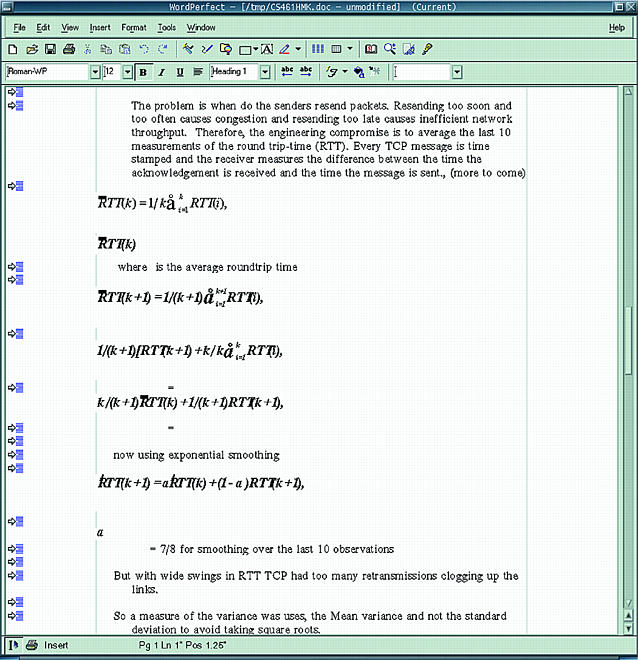
Figure 1. A Screenshot of WordPerfect 8
KOffice, brought to you by the friendly people of KDE, was released together with KDE 2.0 in October 2000, as beta software. Nonetheless, the word processor KWord looks impressive. It integrates nicely with all the other KDE applications and neatly imported most of the MS Word documents I fed it.
Problems arose when I tried to open a document containing mathematical formulae, but since I have been assured that these formulae bring down every version of Word itself but the latest (no surprise there), I would still recommend it. By the time KOffice 1.1 will be released, I'm sure KWord will easily suffice for most needs.
This office suite is, of course, licensed under the GPL and available for free download from your favorite mirror. Debian's apt-get install, kword, took care of all dependencies for me, but since KOffice relies on KDE 2.0 and Qt 2.2, you might find yourself upgrading a lot of packages before you can use this program.
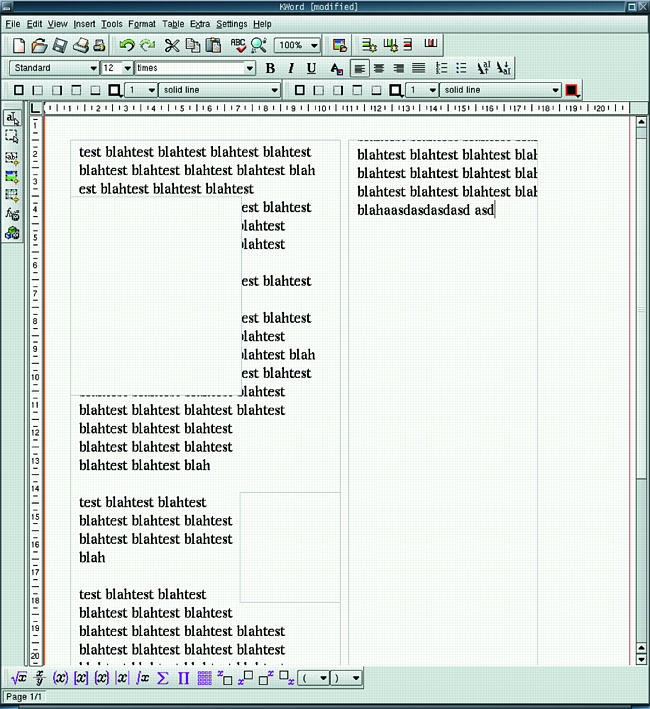
Figure 2. A Screenshot of KWord
Some time ago, Sun Microsystems acquired StarOffice, an office suite available for many operating systems. StarOffice was one of the first office suites able to compete with Microsoft's Office. While Sun always offered StarOffice for free download, only fairly recently did they announce the release of the source code to the Open Source community, which ultimately led to the OpenOffice Project. So, this is another GPLed Project.
StarOffice/OpenOffice includes a very powerful word processor, which can read most Word Documents and can even write to .doc format. However, it has a drawback: it's a memory hog. Not only does it require a significant amount of disk space for the complete installation, it also takes awhile until all the components are started. If you have a slow machine, this might not be your first choice. On the other hand, if you have enough space and memory, I'm sure you'll find that StarOffice/OpenOffice is able to meet all of your word processing needs.
All of the aforementioned applications are full office suites, rather hefty packages more suited to people who actually do perform a lot of word processing and who, at the same time, need to have applications for spreadsheets and presentations, etc.
For those of you who just want a word processor for the occasional letter of complaint to your landlord, there are some lighter approaches. The most common lightweight word processor is AbiWord. AbiWord, designed to be “full-featured and remain lean”, seems to live up to its goal. It's fast, available for a large variety of platforms, free (as in beer and as in speech) and under heavy development. However, I do have to admit that it chokes on some documents or opens them without preserving the original format. In particular, MS Word's way of dealing with tables seems to confuse AbiWord.
Another very small and light word processor is Pathetic Writer (pw), which is part of the Siag Office Suite. The reason I mention pw here and did not include it with the full-fledged office suites is that it seems rather thin. pw will not open Microsoft's .docs, but it will happily perform your everyday word processing and can import and export most common formats. Siag Office, just as AbiWord, is published under the GPL and is available for free download.
All of the above-mentioned applications have various requirements: some rely heavily on pre-installed libraries (such as KWord), some are rather resource hungry (StarOffice/OpenOffice), others are expensive and/or not open sourced. However, all of them try to preserve a certain style or a certain way of formatting a document.
While this is certainly useful and important, I have found that I have no use whatsoever for a word processor, no matter which one. In 90% of the cases where some thoughtless person sends me a .doc file, the information contained within the document could have been communicated easily in plain text in a fraction of the file size.
So let's talk business now and see how we can extract the necessary information from proprietary file formats. There are a few tools worth mentioning, and their beauty lies in the fact that we do not even need X because they are all command-line tools.
antiword takes a Word document as input and extracts the information contained in it, converting it to plain ASCII text or to PostScript. It tries to maintain the formatting as much as possible, and it does a fairly decent job of it.
It's quick, and because it is a command-line tool, we can redirect the output to another process or file for further modification. To take a quick glance at the content of the file, you could pipe the output to less:
antiword HUGE.DOC | less
Or, if you'd rather have a hard copy:
antiword -p letter HUGE.DOC | lprI found antiword so useful that I replaced my previous mailcap-entry for handling of MS Word files (which I used to call abiword) with the following line:
application/msword;antiword %s | vim -This allows me to read through .doc attachments from my mail reader (mutt), and since I pipe the output right into my favorite editor, I even can make modifications and save it to another file. Note that by placing this entry into my ~/.mailcap, all applications respecting this file will use antiword and vim to display .docs. If you are using a graphical browser such as Netscape, you might want to use a different editor or use the -g switch for vim to spawn a GUI front end.
If you are a hardcore minimalist, you will find that the command strings, part of the GNU binutils package, is often sufficient to extract the plain text information from a .doc file. However, antiword has the significant advantage over strings in that it can also extract images in addition to text.
For details on the use of the various options and on how to extract images from a Word file, see antiword at www.winfield.demon.nl/index.html.
The other application, formerly known as mswordview and now available as wv, has been around for quite some time. When I first installed Red Hat 5.2 a few years ago, the Netscape browser used mswordview as the standard application to handle .doc files, as it converted them quite reliably into nice HTML. Note that I'm not talking about wordview, a Microsoft product. The similarity in the name caused the author to rename his tool.
While it certainly is great for a browser to use an application that turns Word files into HTML, this is not always the ideal output format. Therefore, wv now includes a whole set of tools to convert Word documents into a large variety of formats, including, but not limited to, ASCII text, HTML, LaTeX, PostScript and PDF. wv is published under the GPL and is available for free download.
So far we've seen how we can read Word documents and even what options there are to write documents that, in Winworld, would most likely be done in Word. But I can't help concluding that the word processor itself, as an application, is not required or is useless in the vast majority of cases.
The typical user trying to write a simple progress report, for example, usually follows a certain scheme: writes something, uses mouse to highlight the text, uses mouse to point and click and select bold, presses Return a number of times, presses Space a number of times, decides he/she doesn't like it, presses Delete a number of times, uses mouse to point and click and select italics, repeats.
I am fully aware that this is not the proper way to utilize a powerful word processor, but let's face it, that's exactly how the majority of users (those for whom these “user-friendly” applications are designed) work. The efforts required to enter a table of contents, a bibliography, cross-references, etc., can only be imagined.
Eventually, the outcome is a document that takes hours to prepare and that looks only the way it should on this platform using a particular version of this word processor. To avoid such bad practices, let's investigate some alternative methods for preparing platform-independent documents.
As I have mentioned repeatedly, the information contained within the majority of documents is plain text. At times some fancy formatting may be nice, but it's optional. The main interest of the person writing the document should be to communicate the information.
Simple, plain ASCII text is usually sufficient to send information from one person to another—that's exactly why e-mail, for example, is still a text medium. HTML in e-mails does not add anything to the content. ASCII text can be read from anywhere with any editor (and not just with “any editor, including Microsoft Word...”). By structuring the text clearly, by using paragraphs and horizontal lines constructed out of hyphens, maybe even by using *bold*, /italics/ and _underlined_ text as used on Usenet, one can write clear, easy-to-read and understand and, most importantly, portable documents.
While plain ASCII text should be the choice for most cases, it cannot be denied that occasionally one might need or want more formatting. Well, no need to dig out the old word processor again. Just use LyX, the graphical front end to LaTeX.
LaTeX is an astounding typesetting engine derived from TeX. It takes a .tex file as input and typesets it, generating a .dvi file. It is available for a large variety of platforms, and documents typeset with LaTeX look incredibly professional. Yet, you can use your favorite editor to create the input files because LaTeX is a command-line tool.
When using LaTeX, one can concentrate on the content of the document instead of the way it looks because the typesetting engine will take care of the layout. A .tex file contains a few tags (which may remind you of HTML) to determine the way the text will be displayed.
This is a completely different way of writing a document from word processors; no more pointing and clicking and highlighting and reconsidering and so on. But, it may be daunting to someone who is used to using a GUI.
Now this is where the good guys from LyX come into play. They developed a GUI for LaTeX, enabling the inexperienced user to take advantage of the power of TeX without having to learn it from scratch (yet).
Upon first glance, LyX may look similar to your average word processor, but if you follow the tutorial, you will quickly see the difference and how you can increase productivity by concentrating on your work and material, rather than on the visual representation.
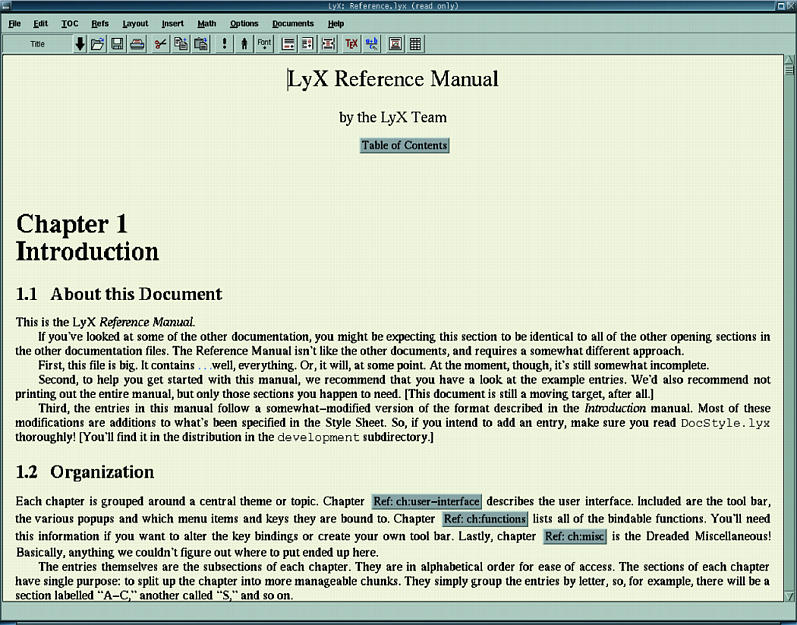
Figure 3. A Screenshot of LyX
If you often connect to your machine remotely to get work done, you don't always have the ability to export your display or to forward X. This is when you learn to appreciate the power of the command line—you find that everything you will ever need is right there at your fingertips. By using your favorite editor (vim, in my case) and LaTeX, you can get all your work done easily through a single terminal to your machine.
Another advantage of LyX and LaTeX is that you can easily export your files into platform-independent formats such as PostScript or PDF. By combining the power of make with the power of LaTeX, this can be done with just a few commands. Take, for example, this document—I turned the input file into a beautiful PDF (Figure 4) simply by using the command make pdf.
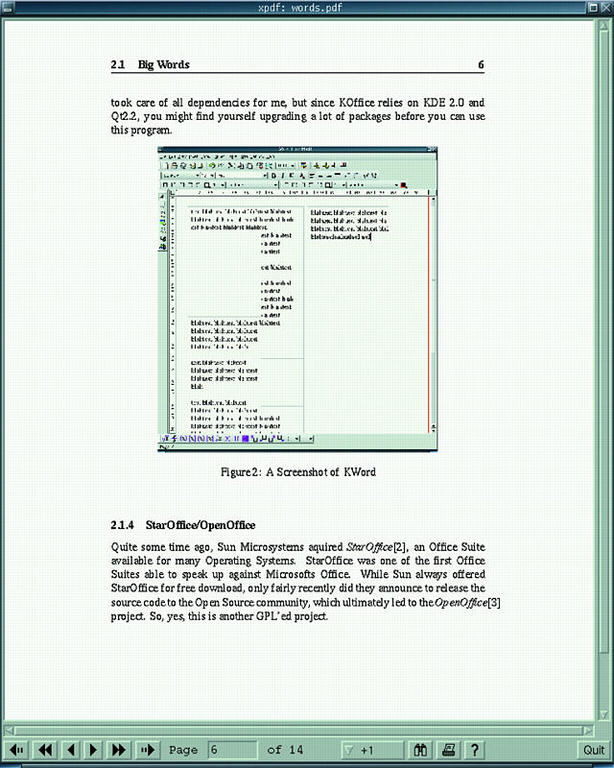
Figure 4. This Document in Source and in PDF Format
Even though the Makefile itself (see Listing 1) is simple, it allows me to convert my document easily into a large variety of output formats using several different command-line tools, such as ps2pdf and latex2html.
Listing 1. The Makefile for This Document
Finally, LaTeX is extensible—you can write your own styles to achieve different results depending on the kind of document you are writing. But most likely, someone else has already done so and uploaded it to the Comprehensive Tex Archive Network (CTAN, TeX's equivalent to Perl's CPAN).
In brief, whichever way you choose to handle your word processing, the importance of conveying the information in a portable document format needs to be expressed. Just try to make it clear to the people with whom you correspond, to the people who continually send you MS Word documents and then insist that you “fix your computer” when you tell them that you can't open them or that some formatting got lost. I have found that if one explains in a friendly way how a PDF or a PS, for example, can be read by anyone on almost every platform, occasionally one can educate all but the most stubborn citizens of Winworld.
Personally, I'm sure you will find that LaTeX is far superior even for these little everyday tasks when it comes to creating professional (looking) documents. In order to take advantage of LaTeX, however, it is necessary to free your mind from what you may be used to. This may take awhile, but don't be afraid, there is a lot of helpful documentation out there. Maybe the most important document for a LaTeX beginner might be “The Not So Short Introduction to LaTeX2”, available from Comprehensive TeX Archive Network (www.ctan.org).
After a short time of going through a tutorial and, most importantly, giving it a try and taking a look at some examples, you will never want to go back. You can take my Word for it.
email: jschauman@netmeister.org
Jan Schaumann (jschauma@netmeister.org) was born in Iserlohn, Germany. He grew up in Altena, Germany and studied for two years toward a Master's in Modern German Literature and Media and American Studies in Marburg, Germany. He moved to New York City in 1998.
