
Integrating a Linux Cluster into a Production High-Performance Computing Environment
In August 1999, the Ohio Supercomputer Center (OSC) entered into an agreement with SGI, in which OSC would purchase a cluster of 33 SGI 1400L systems (running Linux). These systems were to be connected with Myricom's Myrinet high-speed network and used as a “Beowulf cluster on steroids”. The plan was to make this cluster system eventually a production quality high-performance computing (HPC) system, as well as a testbed for cluster software development by researchers at OSC, SGI, Myricom and elsewhere.
OSC was no stranger to clustering, having built its first workstation cluster (the Beakers, eight DEC Alpha workstations running OSF/1 and connected by FDDI) in 1995. Also, the LAM implementation of MPI started at OSC and was housed there for a number of years. This was not even OSC's first Linux cluster; Pinky, a small cluster of five dual-processor Pentium II systems connected with Myrinet, had been built in early 1999 and was made available to OSC users on a limited basis. However, this new cluster system was different in that it would be expected to be a production HPC system, just as OSC's Cray and SGI systems were.
The new cluster, nicknamed the Brain (after Pinky's smarter half on Animaniacs), consisted of 33 SGI 1400L systems, each with four Pentium III Xeon processors at 550MHz, 2GB of memory, a 10/100Mbps Ethernet interface and an 18GB UW-SCSI system disk. One system was configured as a front end or interactive node with more disks, a second Ethernet interface and an 800Mbps high-performance parallel interface (HIPPI) network interface. The other 32 systems were configured as compute nodes, with two 1.28Gbps Myrinet interfaces each. The reason for putting two Myrinet cards in each system was to increase the available network bandwidth between the nodes; the SGI 1400 systems have two 33MHz 32-bit PCI buses, so one Myrinet card was installed in each PCI bus (a single Myrinet card can easily saturate a 33MHz 32-bit PCI bus, so installing two in a single PCI bus is not a good idea). The 64 Myrinet cards were initially connected to a complex arrangement of eight 16-port Myrinet switches designed to maximize bisection bandwidth (the amount of bandwidth available if half of the network ports simultaneously attempt to communicate with the other half), but in the final installation these were replaced with a single 64-port Myrinet CLOS-64 switch. A 48-port Cisco Ethernet switch was also purchased to connect to the Ethernet cards in each system. This Ethernet network is private; the only network interface to the cluster accessible from the outside is the second Ethernet interface on the front-end node.
It may seem like overkill to have three separate types of networks (Ethernet, Myrinet and HIPPI) in the cluster, but there is actually a good reason for each. Ethernet is used mainly for system management tasks using TCP/IP protocols. HIPPI is used on the front end for high-bandwidth access to mass storage (more on this later). Myrinet, on the other hand, is intended for use by parallel applications using the MPI message-passing library. For the Brain cluster (as well as its predecessor, Pinky), the MPI implementation used was MPICH, from Argonne National Laboratory. The reason for selecting MPICH over LAM was that the developers at Myricom had developed a ch_gm driver for MPICH that talked directly to the GM kernel driver for the Myrinet cards, bypassing the Linux TCP/IP stack entirely and allowing for much higher bandwidth and lower latency than would be possible over TCP/IP. There have been several other MPI implementations for Myrinet, such as FM (fast messaging) and AM (active messaging), but these did not appear to be as robust or well supported as MPICH/ch_gm.
The system was initially assembled and tested in one of SGI's HPC systems labs in Mountain View, California during October 1999. It was then shipped to Portland, Oregon where it was featured and demoed prominently in SGI's booth at the Supercomputing '99 conference. After SC99, the cluster was dismantled and shipped to OSC's facility in Columbus, Ohio where it was permanently installed.
The final installation bears some discussion with respect to floor space, power and cooling. As finally installed, the cluster was comprised of seven racks, six with five 1400 nodes each and one with three 1400 nodes, the Myrinet CLOS-64 switch, the Ethernet switch and a console server (see Figure 1). One of SGI's on-site computer engineers (CEs) estimates that each rack weighs something on the order of 700 pounds, and he insisted on having the raised floor in the area where the cluster was installed reinforced (to put this in perspective, the only other OSC system that required floor reinforcement was a Cray T94, which weighs about 3,800 pounds). Each SGI 1400 unit has three redundant power supplies rated at 400 watts, requiring a total of twenty 20-amp circuits to be installed to supply electrical power. The front-end node was placed on UPS, while the compute nodes were placed on building power. Cooling for the room was found to be adequate; the heat load generated by 33 1400Ls ended up being inconsequential next to the cooling requirements for OSC's Cray systems and the Ohio State University's mainframes, all of which are housed in the same facility.
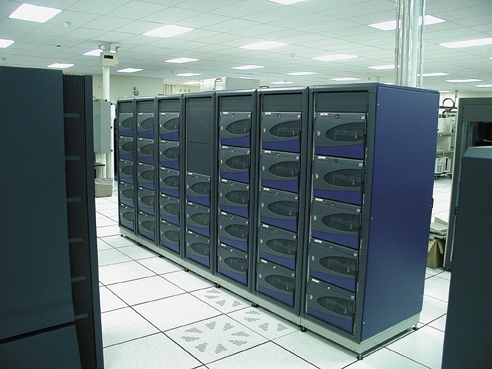
Figure 1. The Cluster as Finally Installed
OSC's other HPC systems at the time of the Brain cluster's installation consisted of the following:
mss: an SGI Origin 2000 with eight MIPS R12000 processors at 300MHz, 4GB of memory, 1TB of Fibre Channel RAID, and approximately 60TB of tapes in an IBM 3494 tape robot with four tape drives
origin: an SGI Origin 2000 with 32 MIPS R12000 processors at 300MHz and 16GB of memory
osca: a Cray T94 with four custom vector processors at 450MHz and 1GB of memory
oscb: a Cray SV1 with 16 custom vector processors at 300MHz and 16GB of memory
t3e: a Cray T3E-600/LC with 136 Alpha EV5 processors at 300MHz and 16GB of memory
The latter four systems all mounted their user home directories from mss using NFS over a HIPPI network. When the cluster was installed, its front-end node, known as oscbw or node00, was added to the HIPPI network (see Figure 2). In addition, to make staging files into the compute nodes easier for end users, the compute nodes were configured to mount the user home directories over the private Ethernet, using a previously unused Ethernet port on mss (see Figure 3).
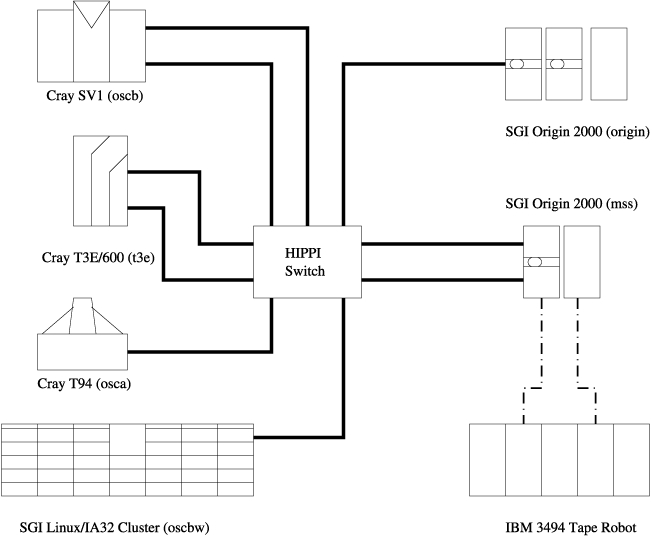
Figure 2. HIPPI Network
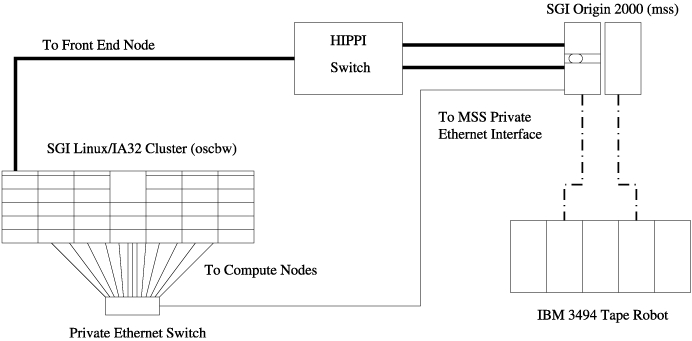
Figure 3. Compute Nodes Networked with mss via Private Ethernet
One difficulty encountered with this arrangement involved an interaction between the Linux NFS client implementation and hierarchical storage management (HSM). The mss system runs an HSM product from SGI called Tape Migration Facility (TMF). TMF periodically scans though all the files stored on selected filesystems (in this case the users' home directories) looking for large files that have not been accessed in some time and thus can be migrated off to a tape in the 3494 robot. When a user attempts to read a file that has been migrated to tape, the initial read() system call blocks until TMF is able to migrate the contents of the file back to disk. Unfortunately, the Linux 2.2 NFS client implementation queued NFS file reads by NFS server rather than by filesystem, and so trying to read a migrated file often caused the front-end node to lock up while the file was retrieved from disk.
As with OSC's other HPC systems, the Brain cluster represents a shared resource for researchers at various academic and industrial institutions in Ohio. The Portable Batch System (PBS) version 2.2 was selected to handle resource management and job scheduling on the cluster. This choice was based on several factors:
Previous experience: PBS version 2.0 had been used on the Pinky cluster, after an extensive comparison with Platform Computing's LSF suite.
Use at large sites: many large Linux cluster sites used PBS as their scheduling software, including the National Aerodynamic Simulation (NAS) facility at NASA Ames where PBS had been developed.
Source availability: PBS was an open-source product with considerable Linux support, whereas LSF was closed source and Platform showed little interest at the time in making all of LSF's features available under Linux.
Cost: PBS was freely available (although support contracts were available from MRJ), while LSF incurred a significant per-processor licensing cost for production use.
Version 2.2 of PBS had another feature that was a significant improvement over version 2.0: per-processor allocation of cluster nodes. In version 2.0, PBS classified a system as either a time-shared host (e.g., a Cray vector system or large SMP) that could multitask several jobs or a space-shared cluster node (e.g., a uniprocessor node in a Beowulf cluster or IBM SP) that could be allocated to only a single job. PBS 2.2 extended the cluster node concept with a “virtual processor” attribute; a cluster node with multiple virtual processors can have multiple jobs assigned to it, and a user can specifically request nodes with multiple virtual processors per node.
However, PBS required some tinkering to make it work the way OSC's administrators and users had come to expect from a batch system after ten years of using NQE on Cray system. First, each job was assigned a unique working directory (accessed through the $TMPDIR environment variable). PBS job prologue and epilogue scripts were written to create these directories at the start of the job and delete them at the end of the job (see Listings 1 and 2). Scripts were also added to the /etc/profile.d directory on each compute node to set $TMPDIR inside batch jobs (see Listings 3 and 4). A distributed copy command, pbsdcp, was developed to allow users to copy files to $TMPDIR on each of the nodes allocated to their job without needing to know a priori which nodes they would be given (see Listing 5).
Listing 1. PBS Job Prologue Script
Listing 2. PBS Job Epilogue Script
Listing 3. Script to Set $TMPDIR Inside Batch Jobs
Listing 4. Script to Set $TMPDIR Inside Batch Jobs
To facilitate the use of graphical programs such as the Totalview parallel debugger, a mechanism for doing remote X display from within the cluster's private network was developed. This mechanism relied on the X display port forwarding feature of ssh, as well as the interactive batch job feature of PBS. An interactive job in PBS is just like a normal batch job, except that it runs an interactive shell instead of a shell script. With an X pseudo-display on the front-end node courtesy of ssh, it was possible to make X programs run on the cluster's private network using some unorthodox xauth manipulations (see Listings 6 and 7).
Listing 6. Manipulating xauth to Display X Programs on the Private Network
Listing 7. Manipulating xauth to Display X Programs on the Private Network
The target applications for the Brain cluster were MPI-based parallel programs. To improve the startup time of these programs and make their CPU time accounting accurate, the rsh-based mpirun shell script from MPICH was replaced with a C program called mpiexec, which uses the task management API in PBS to start the MPI processes on individual nodes. This program also allowed a user to specify the number of MPI processes with which their job was run as one per virtual processor, one per Myrinet interface or one per node (see Listing 8 for examples). The OSC mpiexec program is available under the GNU GPL (see Resources for details).
Listing 8. Manipulating mpiexec
Users are charged against their time allocations based on the number of processors used and the duration of use. In the case of the Brain cluster where resources are space-shared, charging is done by multiplying the wall clock time used by a job times the number of processors requested. PBS supplied accounting logs with records of wall clock time and processors used, which were processed by a short Perl program and inserted into OSC's user accounting database. (The reader should keep in mind that no money changes hands for academic use of OSC's systems; researchers are simply granted time based on peer review of their research proposals.)
Great care was taken to make sure that the interactive environment on the cluster was as friendly and as similar to the other OSC systems as possible. The nodes of the cluster mount their home directories from mss, just as the other systems do. OSC's Cray systems use a modules facility for dynamically modifying environment variables to point to different versions of compilers, libraries and other software; the cluster nodes were given a workalike facility, originally developed at Los Alamos National Laboratory. Also, a complete suite of compilers for C, C++, Fortran 77 and Fortran 90, as well as a debugger and profiling tool, were purchased from the Portland Group. These compilers were selected based on their excellent optimizer, which was originally developed for the Pentium Pro-based ASCI Red TFLOPS system at Sandia National Laboratory. A variety of numerical libraries were made available on the cluster, including both open source (FFTw, PETSc and ScaLAPACK) and closed source (NAG Fortran and C).
One area in which the Brain cluster is rather unique is parallel performance analysis. Performance analysis tools under Linux have historically been rather primitive compared to those available on real supercomputers such as the Cray T3E. However, OSC staff were able either to acquire or develop a respectable collection of performance analysis tools for the Brain cluster. For profiling of serial (i.e., nonparallel) code, both the GNU gprof command-line profiler and the Portland Group's pgprof graphical profiler were installed. For profiling of MPI-based parallel code, the MPICH distribution supplied a profile logging facility and a Java-based graphical analysis tool called jumpshot. Finally, for truly in-depth performance analysis, the author developed an analysis program for hardware performance counter data called lperfex.
Hardware performance counters are a feature built into most modern microprocessors, and Intel processors based on the P6 core (i.e., Pentium Pro, Pentium II, Pentium III, Celeron and Xeon processors) have them as part of the model-specific registers. Erik Hendriks, one of the original Beowulf programmers and now at Scyld Computing, developed a kernel patch and user-space library for accessing these counters. The lperfex used this library to make a command-line performance counter interface, based on the example of the perfex utility found on SGI Origin 2000 systems. The beauty of this tool is that it requires no special compilation; it simply runs another program and records performance counter data (see Listing 9 for an example). It can also be used with MPI parallel applications (see Listing 10 at ftp://ftp.linuxjournal.com/pub/lj/listings/issue87/). As with the OSC mpiexec program, lperfex is available under the GNU GPL. Recent versions of the PAPI instrumentation library from the Parallel Tools Consortium have also been shipped with lperfex as part of the distribution.
The Brain cluster was opened to friendly users in February 2000 and quickly gained a small but loyal following in the OSC user community. Somewhat to the chagrin of the OSC staff, not all of these users were interested in running parallel MPI applications. Many were interested in running older computational chemistry codes such as Amber and Gaussian 98, neither of which support MPI over Myrinet. Another rather novel application run on the cluster was a gene sequence analysis tool called NCBI BLAST, which Dr. Bo Yuan (a researcher in the Human Cancer Genomics Program at Ohio State University's college of medicine) used to annotate about sixty thousand genes from the draft version of the human genome data set in about one week's time. While not written with MPI, BLAST did run in parallel with four processors on a node by using pthreads and shared memory, and further concurrency was achieved by running multiple simultaneous jobs with each analyzing a different sequence. The pattern-matching algorithm used by BLAST is primarily integer arithmetic, and the Intel processors in the Brain cluster's nodes were found to outperform the MIPS processors in OSC's Origin 2000 systems significantly (see Figure 4).

Figure 4. BLAST Performance
One user application that did use MPI over the Brain cluster's Myrinet network was a quantum chromodynamics (QCD) code written by Dr. Greg Kilcup from Ohio State's physics department. This code simulates the interaction of quarks in subatomic particles and is very communication-intensive, with each process sending a small message approximately every 200 floating point operations. This application is very sensitive to MPI latency and available memory bandwidth. On the Brain cluster, MPI latency was quite acceptable (on the order of 13 microseconds), and memory bandwidth became the main performance bottleneck. With four processors sharing an 800MB/s peak pipe to memory, each processor was limited to about 150MB/s sustained memory bandwidth. This limited each processor's floating point performance to about 60 MFLOPS. Using two processors per node improved both the sustained memory bandwidth and the floating point performance per processor (see Figure 5), while allowing higher processor-count runs than using only one processor per node.

Figure 5. Performance Using Two Processors per Node
Another user code that used MPI over Myrinet on the Brain cluster was a Monte Carlo simulation of condensed matter physics, written by Dr. Mark Jarrell from the University of Cincinnati's physics department. This application is “pleasantly” (also known as “embarrassingly”) parallel, meaning that it performs very little communication. However, like the QCD code described above, this code was very sensitive to memory bandwidth. The innermost loop of this application performed an outer product of two large (1,000+ element) arrays. This tended to cause low L2 cache reuse, which increased pressure on the already limited saturated memory bus (see Figure 6). As with the QCD code, this application has a sweet spot of two processors per node. Work is ongoing at OSC to try to improve the performance of this application.

Figure 6. Jarrell Code Performance
Overall, OSC has been quite pleased with the two Linux clusters it has had so far, and Linux clusters are seen at the center as one of the main directions in the future of high-performance computing. However, there are numerous areas in which Linux could be improved to support high-performance computing. Probably the most critical of these from OSC's perspective is a parallel filesystem with better parallel performance than NFS. The main use for this would be temporary storage for jobs; this is currently handled on the Brain cluster by having a $TMPDIR directory on each node, but a globally accessible scratch area would be much easier on users. There are currently two potential open-source candidates for a cluster parallel filesystem under Linux: GFS, from the University of Minnesota and PVFS, from Clemson University (see “A Parallel Virtual Filesystem for Linux Clusters”, LJ December 2000). GFS is a journaled, serverless storage-area network (SAN) filesystem over Fibre Channel. It promises to be an excellent performer, and its serverless aspect is quite attractive. However, as of this writing, the GFS code is in a state of flux following a redesign of its locking mechanisms, and the Fibre Channel switches needed for large topologies remain relatively expensive. PVFS, on the other hand, requires no special hardware; it, in effect, implements RAID-0 (striping) across multiple I/O node systems. PVFS's main downside is that it currently has no support for data redudancy, such that if an I/O node fails the parallel filesystem may be corrupted.
Another area where open-source solutions for high-performance computing clusters may be improved is job scheduling and resource management. While PBS has proven to be an adequate framework for resource management, its default scheduling algorithm leaves much to be desired. Luckily PBS was designed to allow third-party schedulers to be plugged into PBS to allow sites to implement their own scheduling policies. One such third-party scheduler is the Maui Scheduler from the Maui High Performance Computing Center. OSC has recently implemented Maui Scheduler on top of PBS and found it to be a dramatic improvement over the default PBS scheduler in terms of job turnaround time and system utilization. However, the documentation for Maui Scheduler is currently a little rough, although Dave Jackson, Maui's principal author, has been quite responsive with our questions.
A third area for work on Linux for high-performance computing is process checkpoint and restart. On Cray systems, the state of a running process can be written to disk and then used to restart the process after a reboot. A similar facility for Linux clusters would be a godsend to cluster administrators; however, for cluster systems using a network like Myrinet, it is quite difficult to implement due to the amount of state information stored in both the MPI implementation and the network hardware itself. Process checkpointing and migration for Linux is supported by a number of software packages such as Condor, from the University of Wisconsin, and MOSIX, from the Hebrew University of Jerusalem (see “MOSIX: a Cluster Load-Balancing Solution for Linux”, LJ May 2001); however, neither of these currently support the checkpointing of an arbitrary MPI process that uses a Myrinet network.
The major question for the future of clustering at OSC is what hardware platform will be used. To date Intel IA32-based systems have been used, primarily due to the wealth of software available. However, both Intel's IA64 and Compaq's Alpha 21264 promise greatly improved floating point performance over IA32. OSC has been experimenting with both IA64 and Alpha hardware, and the current plan is to install a cluster of dual processor SGI Itanium/IA64 systems connected with Myrinet 2000 some time in early 2001. This leads to another question: what do you do with old cluster hardware when they are retired? In the case of the Brain cluster, the plan is to hold a grant competition among research faculty in Ohio to select a number of labs that will receive smaller clusters of nodes from Brain. This would include both the hardware and the software environment, on the condition that idle cycles be usable by other researchers. OSC is also developing a statewide licensing program for commercial clustering software such as Totalview and the Portland Group compilers, to make cluster computing more ubiquitous in the state of Ohio.
This article would not have been possible without help from the author's coworkers who have worked on the OSC Linux clustering project, both past and present: Jim Giuliani, Dave Heisterberg, Doug Johnson and Pete Wyckoff. Doug deserves special mention, as both Pinky and Brain have been his babies in terms of both architecture and administration.


