
Coding between Mouse and Keyboard, Part II
In Part I of this series [LJ, September 2002] we created the GUI of a tiny text editor using Qt Designer. Now, we add missing functionality and translate the application into other languages by using our favourite editor along with make and the g++ C++ compiler, and use Qt Linguist as an attractive working environment during translation.
We use the new qmake utility to write the Makefile for our Qt application; qmake outdates tmake, a Perl tool widely used with older Qt versions.
Our editor GUI already closes windows and the entire application, but we still lack a user dialog that asks whether the old data should be saved or discarded or whether the user wants to stay with the old file. The New, Save and Save As actions do nothing right now, but everything else was completed. The GUI already supports copy, cut and paste, undo and redo. It can switch font characteristics to italic, bold, underlined and any combination of the three. These QTextEdit actions already can be tested in the Qt Designer preview. The About entry in the Help menu will be fully functional as soon as we compile the GUI into a C++ program.
We could write the remaining functions using Qt Designer's built-in code editor. As there are no means to compile the project within the Designer, however, using one's favourite text editor is faster.
Now that we have the user interface ready in a ui file for the interface description, and a ui.h file containing the code already written, it's time to implement the remaining functionality. First we have to convert the XML to C++ with the User Interface Compiler, uic, but using qmake we don't need to worry about this detail. Let's feed it the project file generated by the Designer:
qmake -o Makefile lj-article.pro
A Makefile is created with a subdirectory named .ui that is supposed to store the C++ code generated from the ljeditor.ui and ljeditor.ui.h files. If this fails and you are asked to set the QMAKEPATH, set this variable to the mkspecs subdirectory of your Qt installation, which describes your operating system and compiler. For example:
QMAKEPATH=$QTDIR/mkspecs/linux-g++
export QMAKEPATH
Depending on where you have installed Qt, make sure that the search path contains the $QTDIR/bin directory of the used Qt version.
To generate the C++ files simply type:
make .ui/ljeditor.h
make .ui/ljeditor.cpp
If problems arise, check the environment variables QTDIR, PATH and LD_LIBRARY_PATH. The first one should point to the directory parenting the Qt 3.0 subdirectories lib and include. The directories where uic, qmake and designer live should be included in the path, and $QTDIR/lib should be added to the linker path.
Editing the two generated files means the changes are lost when the ui file is moved to the Designer and a new conversion round becomes necessary. So, we derive a subclass from ljeditor and add our changes to it instead of to ljeditor.
uic offers the command-line switches -subdecl classname and -subimpl classname to build the appropriate code skeletons. With
uic -o editor.h -subdecl Editor .ui/ljeditor.h \
ljeditor.ui
we obtain editor.h, the header file for the new Editor subclass. On the other hand (mind the argument header file), the following line creates the implementation skeleton in editor.cpp:
uic -o editor.cpp -subimpl Editor editor.h \
ljeditor.ui
These new files need to be added to the project file by adding two lines:
HEADERS += editor.h
SOURCES += editor.cpp
to lj-article.pro. Or you could start Qt Designer, open the project file and add them via Project®Add File. Remember to set the File type to C++ Files, otherwise the file dialog won't find them). If you like the text editor included in the Designer, you even might edit them there.
The subclass code generated by uic always includes skeletons for all functions present in the parent class. Thus, it's a good idea to delete the declarations and function skeletons of all functions that you don't plan to re-implement in the subclass. Remove the lines:
void fileExit();
void helpAbout();
void fileClose();
from editor.h and the relevant code skeletons from editor.cpp, which look like:
void Editor::fileExit()
{
   qWarning( "Editor::fileExit() "
             "not yet implemented!" );
}
For a complete program we still need a main() function. We may
write it by hand, but Qt Designer can help you a little. Choose
File®New®C++ Main-File (main.cpp) from the menu and the
subsequent dialog.
The dialog shown in Figure 1 asks us to name the main file (we choose ljedit.cpp) and the main widget. Designer does not provide the Editor subclass here; thus we don't really have a choice and choose ljeditor.

Figure 1. Configuring the main File
Choosing this name means we have to correct the generated code. Instead of ljeditor.h, we include editor.h, and instead of creating a new object of the ljeditor class, we need an Editor one. Now our ljedit.cpp should look like this:
#include <qapplication.h>
#include "editor.h"
int main( int argc, char ** argv )
{
    QApplication a( argc, argv );
    Editor *w = new Editor;
    w->show();
    a.connect( &a, SIGNAL( lastWindowClosed() ),
               &a, SLOT( quit() ) );
    return a.exec();
}
As in every usual Qt main(), we create a QApplication object, hand it possible command-line arguments (argv) and create the Editor widget w. Then we show it to the world and enter the application loop with a.exec().
You may notice that a a.setMainWidget( w ); line is missing that defines the main widget of the application (we'll explain this later). However, without a main widget, the application will not quit when the last window is closed. So, we have to connect the application object's signal, lastWindowClosed(), to its quit() slot.
make and a subsequent ./lj-article in the project directory should result in a running, yet not fully functional text editor. If you wish to call the binary by something other than the project file's base name, add the line TARGET = ljedit to lj-article.pro.
Basically, we won't do much more than substitute the qWarning()'s saying “not yet implemented” in editor.cpp with reasonable functionality, using our favourite text editor. If the Designer's built-in code editor suits your needs, you don't have to worry about subclassing, but compiling and debugging becomes more painful, so we decided against it.
Listing 1 shows all of editor.h; Listing 2 is an excerpt from editor.cpp. All listings are available from the Linux Journal FTP site [ftp.linuxjournal.com/pub/lj/listings/issue102/4722.tgz].
Apart from the four slots left to implement, we re-implement the closeEvent(), a function that's called when a widget is closed, because we want the user to confirm the closing of an editor window so as not to unexpectedly lose data. For clarity reasons, the relevant user dialog is implemented in a separate function, saveAndContinue().
Also, we introduce two class variables: fileName, to store the filename of the currently edited file, and editField, to hold a copy of the QTextEdit widget. Providing these variables with initial values is the only task for the Editor constructor.
Another easy task is to implement the fileNew() slot. It creates a new Editor window and shows it. This is why we don't make the first editor window the application's main widget: if we did, closing the first editor window would make all other windows close too.
But what happens when the user closes a window or the entire application? The re-implemented closeEvent() calls saveAndContinue() with one argument: the message that should be displayed to users when they decide to abort the closing process (line 159). As with all text strings, we embrace it with tr() to make localization possible. If saveAndContinue() returns a “yes, continue”, the close event is accepted; otherwise the event is dismissed.
If the user has chosen a filename for the editor content or entered some text into the QTextEdit widget, it is safe to assume that he or she might want to keep the work. In this case saveAndContinue() brings up a message box using the filename as the window caption that asks: Save filename? Three reply buttons are provided: Yes, No and Cancel. The slightly copious notation with the %1 placeholder for the content of fileName is important for internationalization: other languages order words differently, and the translator must have a chance to place the filename elsewhere, say the beginning of the phrase.
If the Yes button was pressed (line 181) the editor content is saved under the given name. If no filename has been set, fileSaveAs() asks for a filename before storing. If the answer is No, all unsaved changes are lost. The user is informed about this in the status bar for 2,000 milliseconds (line 187). The Cancel button shows the abort message in the status bar, and saveAndContinue() returns a “no, don't continue” (line 194). In the case where no filename and no editor content are present, no message box appears. The return value then is a TRUE, “do continue anyway” (line 201).
saveAndContinue also is called from the fileOpen() slot. If the editor window contains text or if a filename was defined previously, the user has the chance to save it prior to opening another file in this window.
Whether saved or not, clearing the editor content and resetting the window caption makes the user aware that the old editor content is gone. With the help of a file dialog presenting the content of the current (.) directory, the user gets the chance to choose a new file.
With the tr() functions around each text string, we're able to release the program in other languages. All this step requires are some modifications of the main() function and the actual translation. The latter is easily accomplished using Qt Linguist (Figure 2). But before you or another translator gets started, we have to obtain the text strings to be translated.
First we add another variable, TRANSLATIONS, to the *.pro file:
TRANSLATIONS = ljedit_de.ts \
               ljedit_no.ts
This example states that the application is bound for translation into German (ljedit_de.ts) and Norwegian (ljedit_no.ts). It is quite important that the base name of the file containing the translation ends with a locale abbreviation like “de” or “no”.
Once you have selected the desired translation language(s) for the application, typing lupdate lj-article.pro creates two XML files that can be loaded into linguist. The translator now translates each string and switches the yellow question mark to a green tick when completed. The task has been fulfilled as soon as the Scope window (on the left-hand side of Figure 2) reveals that all of the classes have been translated fully.
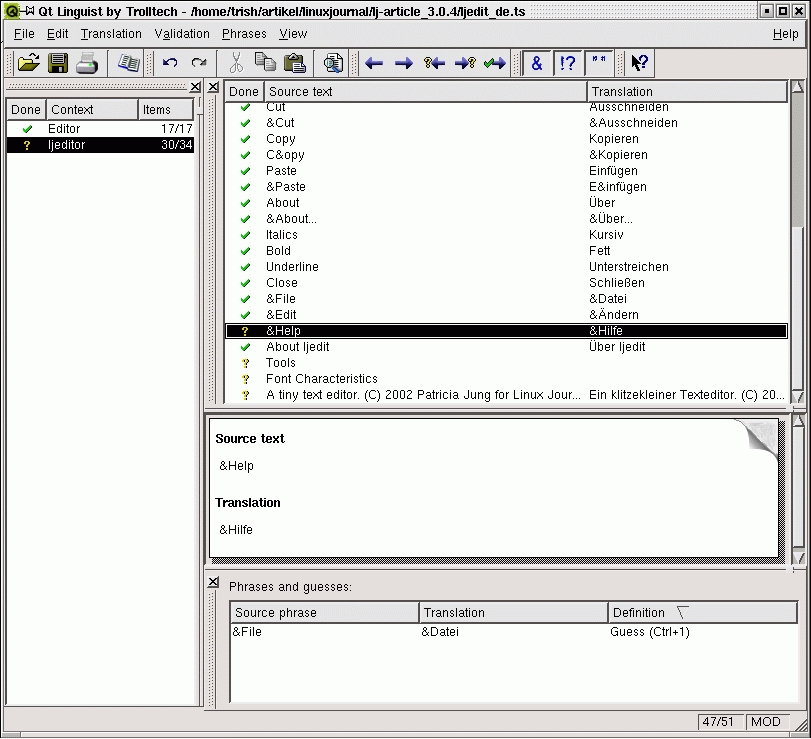
Figure 2. Translator's Friend: Qt Linguist
A professional translator will compile phrase books of common phrase-translation pairs before actually starting with the translation of a program. As Linguist currently doesn't let users copy translated strings from a program directly into phrase books, the effort of compiling a phrase book is too high for those who do not translate frequently. This is a pity because phrase books support consistent usage of phrases within an application or even throughout an entire range of programs. However, even without phrase books, Linguist offers quality control switches. Validation®Accelerators—if on—ensures that accelerator keys (marked with an &) are not forgotten under translation. Validation®Ending Punctuation, on the other hand, checks whether the translated string ends with the same punctuation mark as the original.
When the last translated phrase is saved, File®Release... compiles the translations into a *.qm binary file that can be used by the program. To release an entire set of translated *.ts files, lrelease lj-article.pro can be used instead. If the code is changed afterward, a fresh lupdate run integrates the relevant changes with the *.ts files listed in the project file, and lrelease updates the binary version.
Listing 3 shows the internationalized main(). New is the inclusion of qtranslator.h and qtextcodec.h. Depending on the locale used (as defined by the environment variable LANG), the base name of the translation file is compiled (line 13). If LANG is set to, for example, de or de_DE, the application looks for a file named ljedit_de or ljedit_de.qm in /local/lib. If it can't be found there, the original language version is used. Unfortunately, there is no simple way to search multiple directories and/or avoid hard-coded directory names.
Listing 3. ljedit.cpp (Internationalized Version)
If a translation file is found, the QTranslator object loads it, and it is installed to serve the application (line 15). A German version of ljedit is shown in Figure 3.
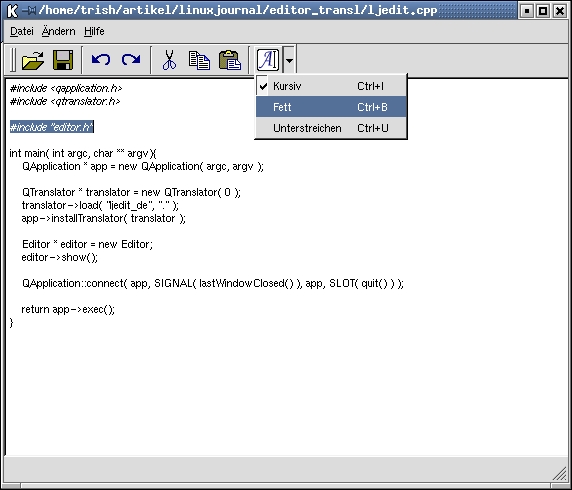
Figure 3. ljedit.cpp (Internationalized Version—German)

Patricia Jung (trish@trish.de) has been a system administrator, technical writer and editor, and as such, is happy to have the privilege of dealing with Linux/UNIX exclusively.


