
Create User Interfaces with Glade
Glade is a GUI builder for the Gtk+ toolkit. Glade makes it easy to create user interfaces interactively, and it can generate source code for those interfaces as well as stubs for user interface callbacks.
The libglade library allows programs to instantiate widget hierarchies defined in Glade project files easily. It includes a way to bind callbacks named in the project file to program-supplied callback routines.
James Henstridge maintains both libglade and the gnome-python package, which is a Python binding to the Gtk+ toolkit, the GNOME user interface libraries and libglade itself. Using libglade binding to build Python-based GUI applications can provide significant savings in development and maintenance costs.
All code examples in this article have been developed using Glade 0.5.11, gnome-python 1.0.53 and Python 2.1b1 running on Mandrake Linux 7.2.
When launched, Glade displays three top-level windows (see Figure 1). The application main window shows the contents of the current Glade project file as a list of top-level windows and dialogs defined in the project file. The Palette window shows the Gtk+ and GNOME widgets supported by Glade. When a widget is selected for editing, the Properties window displays the current values of that widget's properties.
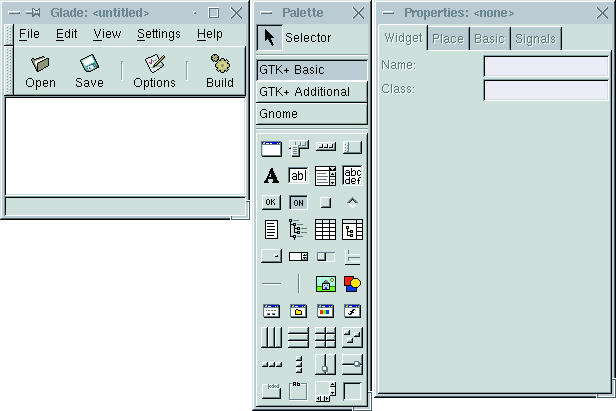
Figure 1. Launching Glade
The Palette window partitions Glade's supported widgets into three groups. “GTK+ Basic” widgets are the most commonly used Gtk+ widgets. “GTK+ Additional” are less frequently used widgets such as rulers and calendars. “Gnome” widgets are taken from the GNOME UI library.
The Properties window displays widget properties in a four-page notebook. The Widget page displays the widget's name along with any properties that are specific to the widget's class. When the widget is placed inside a constraint-based container such as a GtkTable or GtkVBox, the Place page shows the properties that control the widget's placement within its container; otherwise the Place page is empty. The Basic page displays basic properties, such as width and height, possessed by all kinds of widgets. Finally, the Signals page lets you browse the set of Gtk+ signals that the selected widget can emit and lets you bind signal handler functions to those signals.
The process of laying out a widget hierarchy within Glade is similar to that in environments such as Visual Basic. The root of every hierarchy is a top-level window or a dialog. Widgets can be placed within these top-level containers by first selecting, in the Glade Palette window, the type of widget to be created, then clicking on any cross-hatched region within the containers.
The Signals page of the Glade Properties window lets you add application-specific behavior to your application. The top part of the page lists the signal handlers defined for the current widget. The controls in the bottom part of the page let you select one of the signals emitted by the widget and create a new handler for it.
To define a new signal handler, click on the ellipsis button to the right of the Signal entry field. A Select Signal dialog appears, listing all of the signals that this widget can emit. The signals are grouped by the Gtk+ widget class in which they are defined (see Figure 2).
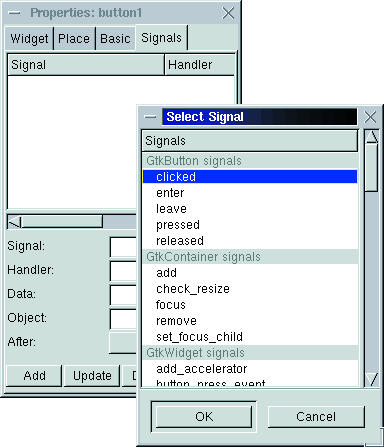
Figure 2. Select Signal Dialog
Once you have selected a signal, click OK in the Select Signal dialog. The name of the selected signal appears in the Signal entry field of the Signals page. Glade also automatically fills in the Handler field, using the naming convention of “on_<widget>_<signal>”. You can change the name manually if Glade's naming conventions don't suit your needs.
The bottom portion of the Signals page provides additional entry fields where you can supply application-specific data, specify an object to receive the signal, and so on. I always leave these fields empty because they aren't needed when working with gnome-python.
Glade saves information about a project in an XML-formatted project file having a filename extension of .glade. Glade's use of XML makes it easy to build separate add-on tools that operate on project files, such as code generators for new programming languages.
The first time you save a new project, Glade presents you with a Project Options dialog. Most of the settings in the Project Options dialog matter only when you are using Glade to generate source code for your project. However, some settings, such as the project directory, are important even when you are just using Glade as a layout tool.
By default Glade assumes you want to save your new project under your login directory, in a subdirectory named Projects/project1. This is probably not what you want. I usually save the project in the directory in which Glade was started.
Fortunately, it's easy to reset the project directory. Just click the Browse... button to the right of the Project Directory entry field, and a dialog entitled Select the Project Directory appears. This dialog selects Glade's current working directory by default, so you can just click its OK button.
When you do so the Project Directory field in the Project Options dialog changes to the current working directory, and the Project Name field goes blank. Type in a new project name, and the Program Name and Project File fields update accordingly (see Figure 3). When you click OK, your project will be saved to the specified project file.
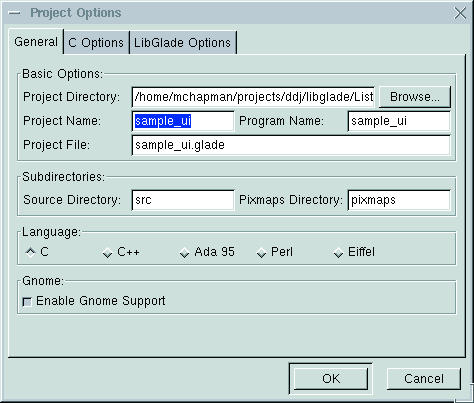
Figure 3. Project Options Dialog
Once you have created a Glade project file, you can use gnome-python's libglade module to create the visual hierarchy described in the project file and to gain programmatic access to the widgets in the hierarchy:
import libglade
loader = libglade.GladeXML ("helloworld.glade", "window1")
The libglade library defines a class, GladeXML, which does most of the work. To load a widget hierarchy, instantiate GladeXML and pass it the name of the Glade project file, along with the name of the topmost widget that you want to load from the file.
Note that you can supply the name of any widget in the hierarchy, even if it's buried deeply within a top-level window. This makes it possible to partition complex visual hierarchies—for example, the pages of a complex notebook-based interface—across multiple Glade project files. It also makes it easy to handle projects with dynamic visual content, loading only the components that are appropriate at any given time.
Once you have loaded a widget hierarchy, GladeXML lets you look up specific widgets by name via the get_widget method. get_widget returns the widget you requested or “None” if the widget cannot be found:
window1 = loader.get_widget("window1")
if window1:
    window1.set_title("Hello, World!")
One of the most powerful features of GladeXML is that it can bind Python callable objects (methods, functions, etc.) to signal handlers named in a Glade project file. The signal_autoconnect method makes this possible.
signal_autoconnect takes one argument: a dictionary mapping signal handler names to Python callables. For each of the signal handlers you've defined in your Glade project file, signal_autoconnect looks up the corresponding Python callable in the supplied dictionary. If a matching entry is found it is bound to the signal. In other words, your Python callable gets installed as the signal handler:
def button1_click_handler(*args):
    print "Don't push that button!"
signal_handlers = {
    # Exit the main event loop when the user closes
      the main window.
    'on_window1_delete_event': gtk.mainquit,
    # Call button1_click_handler when the user clicks
      button1.
    'on_button1_clicked': button1_click_handler
    }
loader.signal_autoconnect(signal_handlers)
By itself, libglade greatly reduces the manual coding needed for a gnome-python application. Widget hierarchies can be laid out using Glade and loaded with just two or three lines of code, as opposed to the hundreds that would be needed to create them using direct pygtk calls. What's more, behaviors can be added simply by assembling a dictionary of Python callables and passing it to GladeXML.signal_autoconnect instead of repeatedly invoking widget connect methods.
libglade saves a lot of effort, but it could do more. For instance, large Python applications are often structured as a small main program and an associated collection of Python packages installed somewhere on the Python path. Maintenance costs would be reduced if the application's Glade project files could be stored together with its Python packages and “imported” at runtime via relative pathnames.
It would also be helpful if widgets could be accessed directly as instance variables of some sort of UI hierarchy object without having to be located via GladeXML.get_widget.
Finally, it should be possible to automate building a dictionary of the callables in an object's namespace and passing that dictionary to signal_autoconnect. This would allow clients to define signal handlers as object methods and avoid explicitly registering the handlers.
The following sections describe a module, GladeBase, that provides these features. GladeBase also recasts the services of libglade to fit the MVC (model view controller) design pattern (see Listing 1 at ftp://ftp.linuxjournal.com/pub/lj/listings/issue87/). GladeBase has two principal exports: class UI and class Controller.
GladeBase.UI corresponds to the View component of the MVC design pattern. It is responsible for creating a widget hierarchy from a Glade project file and for updating the visual content of an application under direction of an associated controller. GladeBase.UI is derived from libglade's GladeXML class, so it inherits all of the methods discussed earlier.
The GladeBase.UI constructor takes three arguments: the filename of the Glade project file from which it will load its widget hierarchy, the name of the widget that serves as the root of the hierarchy and an optional keyword argument, gladeDir, which is the relative pathname of a directory in which to look for Glade project files.
The gladeDir keyword argument defaults to the current working directory. It is joined with the filename argument to form the relative pathname of the Glade project file.
It may seem odd to use both gladeDir and filename parameters instead of specifying the location of the Glade project file with a single relative pathname. But this separation can reduce maintenance costs for any application that stores its Glade project files in a single subpackage.
Such an application can define a subclass of GladeBase.UI, which provides a hardwired value for gladeDir:
import GladeBase
class UIBase(GladeBase.UI):
  def __init__(self, filename, rootname):
    GladeBase.UI.__init__(self, filename, rootname,
                          gladeDir="MyApp/GladeFiles")
class MainWinUI(UIBase):
  def __init__(self):
    UIBase.__init__(self, "main_win.glade", "window1")
Then the application can derive all of its UI classes from this subclass. In this way the application can specify in one place the relative pathname of the directory containing all of its Glade project files.
A helper module, PathFinder.py, enables GladeBase.UI to search the Python path for files. The PathFinder.find function takes a pathname as its sole argument. If the pathname is absolute, it is returned without further processing. If it is a relative pathname, the find function joins it with each Python path entry in turn to create a candidate pathname. If the candidate pathname exists, it is returned. If no candidate pathname matches, find raises a PathFinder.Error exception (see Listing 2).
The GladeBase.UI.__getattr__ method makes it possible for clients to access the widgets in a GladeBase.UI hierarchy as though they were attributes of the instance. The __getattr__ method assumes that the attribute name provided by the caller is the name of a widget and looks up the widget using GladeXML.get_widget. Once the widget is found, it is cached as a new instance variable to speed up future access. If the requested widget can't be found, __getattr__ raises an AttributeError.
If a widget hierarchy contains more than one widget with the same name, there's no telling which one will be returned by GladeBase.UI. When you're using GladeBase.UI it's a good idea to name widgets the same way you would name Python instance attributes: each name should be unique to the object and should be a valid Python identifier.
Application-specific UI classes usually extend GladeBase.UI with methods to perform complex user interface updates.
GladeBase.Controller corresponds to the Controller component of MVC. A Controller responds to user input events by translating them into changes in the state of the application data model. Similarly, it responds to changes in the data model by translating them into UI updates.
GladeBase.Controller doesn't help you respond to changes in your application's data model, but it does automatically wire up signal handler methods to the signal handlers defined in a Glade project file.
The GladeBase.Controller constructor takes one argument: an instance of GladeBase.UI that is the UI to be controlled. During initialization, a new GladeBase.Controller instance traverses its class hierarchy, building up a dictionary of all callable objects in the instance's namespace (the traversal starts with the instance dictionary in case any callables have been defined as instance attributes). GladeBase.Controller then passes this dictionary to the signal_autoconnect method of the supplied GladeBase.UI instance.
Application-specific controller classes extend GladeBase.Controller simply by defining signal handler methods:
class Controller(GladeBase.Controller):
    def __init__(self, ui):
        ...
        GladeBase.Controller.__init__(self, ui)
    def on_window1_delete_event(self, *args):
        gtk.mainquit()
    def on_button1_clicked(self, *args):
        print "Button 1 clicked."
GladeBase automates the conversion of Gtk+ widget hierarchies to Python object hierarchies and automatically connects Python-based signal handlers, but it still requires you to identify and implement all of the signal handlers defined in a Glade project file. For pure Gtk+ projects this is no problem because the only signal handlers are the ones you explicitly define.
However, when you use Glade to build a GNOME application, many signal handlers are defined automatically. For example, a new Gnome Application window is created with a standard menubar whose menu items all have predefined activate signal handlers. It can be tedious to browse through GNOME-based projects, manually locating predefined signal handlers and adding them to your application controllers.
As noted earlier, Glade project files are stored in an XML format (as of yet there is no DTD describing the structure of a project file, but it is easy to understand by inspection). Python 2.0 includes an XML library, layered atop James Clark's Expat library. So it's fairly easy to build a Python application that rummages through a Glade project file, identifies all of the signal handlers declared in a given widget hierarchy and generates a stubbed Controller module for that hierarchy.
GladeProjectSignals.py (see Listing 3 at ftp://ftp.linuxjournal.com/pub/lj/listings/issue87/) extracts signal-handler information from a Glade project file. The module has two main abstractions. Class WidgetTreeSignals traverses an XML DOM (document object model) tree representing a widget hierarchy and records all of the signal handler declarations it finds. Class GladeProjectSignals loads a Glade project file and builds up a dictionary of WidgetTreeSignal instances, one for each top-level widget defined in the project file.
The constructor for WidgetTreeSignals takes a DOM node as argument. It assumes this node describes a widget and expects it to contain a name node defining the widget's name. Having recorded the widget's name, WidgetTreeSignals walks the DOM tree. It checks each visited node to see if it is a signal node. If it is, WidgetTreeSignals records the value of the node's handler child, which should be the name of a signal handler. Otherwise, WidgetTreeSignals assumes the node contains child nodes and continues traversing those.
GladeProjectSignals is comparatively simple. It uses Python's xml.dom.minidom package to load a Glade project file as a DOM tree. Then it searches the tree for top-level widget nodes (a Glade design file contains other top-level nodes such as the GTK-Interface and project nodes). For every widget node found, GladeProjectSignals creates a new WidgetTreeSignals instance, which in turn lists the signal handlers defined by that widget and its descendants. Each WidgetTreeSignal instance is stored in a dictionary, self.widgets, keyed by top-level widget name.
ControllerGenerator.py (see Listing 4 at ftp://ftp.linuxjournal.com/pub/lj/listings/issue87/), when invoked with a Glade project filename and the name of a top-level widget defined in that file, prints out a stubbed Controller for that widget and its children.
Most of the module's work is done by class ControllerGenerator. This class defines a generate method that takes a Glade project filename and top-level widget name as arguments. The generate method uses an instance of GladeProjectSignals to find the handlers for the named widget. Then it creates a list of stubs for those handlers. Using a template string and Python's string formatting operators, generate produces a string containing the body of the stubbed Controller module and returns that to its caller.
Glade, libglade and gnome-python can greatly reduce the effort of building Gtk+ and GNOME applications in Python. The tools presented in this article reduce maintenance costs even further by automating the conversion of Glade widget hierarchies to Python object hierarchies, automatically connecting signal handlers defined in Controllers and generating stubbed Controllers.

