
Microlite BackupEDGE Version 01.01.08
BackupEDGE from Microlite is an excellent backup product. It has a flexible command-line and menu interface, will back up over networks and can be used for disaster recovery. Documentation is extensive and readily available. It is a proprietary product, priced competitively. BackupEDGE uses existing utilities in Linux, such as rsh or ssh and crontab for its operations, making it easier to adjust BackupEDGE to live with other programs.
The product is delivered on CD-ROM. If your target computer does not have a CD-ROM drive, you can make installation floppies on another computer from the CD-ROM. You can even make floppies using that other operating system from Redmond, and you can get a 60-day evaluation copy via FTP. If you decide to buy, Microlite will send you a key that makes your evaluation copy permanent.
The installation script is easy to use. It is a command-line script with character graphics (see Figure 1), similar to the main program. Arrow keys move the cursor from field to field, but the tab key may not. I found the inconsistent responses to the Tab key to be disconcerting. For text entry, you can toggle between insert and overwrite modes using the Insert key on a standard PC keyboard, which is very nice. I used that capability to prepend the type of drive to the description of each tape drive. On-line help is readily available during both installation and normal usage (see Figure 2).
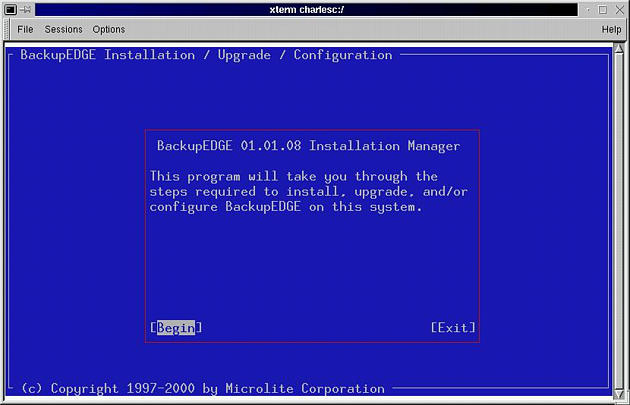
Figure 1. Installation Script Welcome Screen
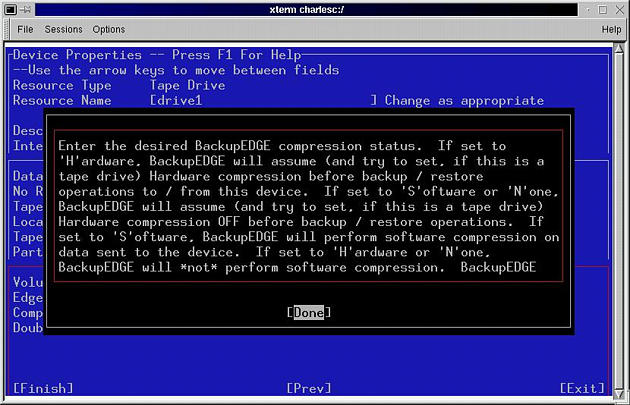
Figure 2. Installation Script with On-Line Help
The installation does an excellent job of determining what tape drives you have. It correctly identified both of my SCSI tape drives, probably by reading the /proc filesystem. The installation script also will detect whether your tape drive will do fast seeks and what the threshold for changing to a fast seek might be (see Figure 3). Fast seeks are great for restoring one or just a few files, a common restoration scenario. The installation is the best tape-drive characterization process I've seen on Linux so far.
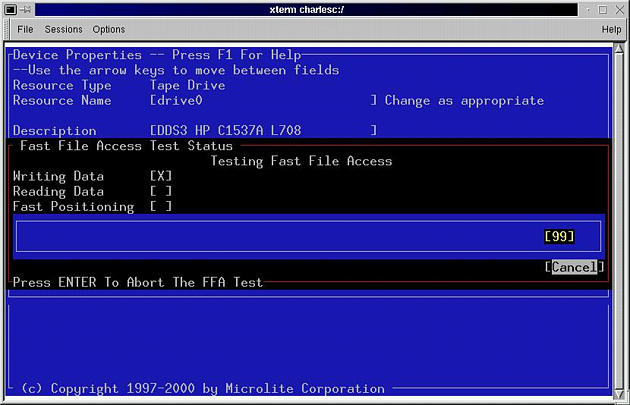
Figure 3. Installation Script Determining Fast Forward Threshold
The installation script will even set up a background task to check for sparse files (Microlite calls them “virtual files”). Correct handling of sparse files can save vast amounts of media on backup and even greater amounts on restore. For those systems that have sparse files, lack of proper sparse-file handling can rule out a backup product. Unfortunately, on both of my testbed computers, the search program failed with an error number but no real explanation why. Fortunately, there is a text file of sparse files you can hack, and Microlite documented doing so. BackupEDGE also supports raw filesystem partitions, useful for database servers.
The installation even put an icon on my KDE desktop. A simple hack to the shell script launched by the icon allowed me to fix the font size, a necessity for us geriatric penguinistas.
The first thing I did after installation was fire up the program, edgemenu, from the command line (see Figure 4). The program's color scheme, a blue background with gray characters, reminded me of Colorado Memory Systems DOS-based menus of ancient history. Your choices for color schemes appears to be gray on light blue or monochrome. Sometimes when exiting edgemenu, it leaves its color scheme on both the KDE konsole and xterm. Big deal, I can live with this for reliable backups.
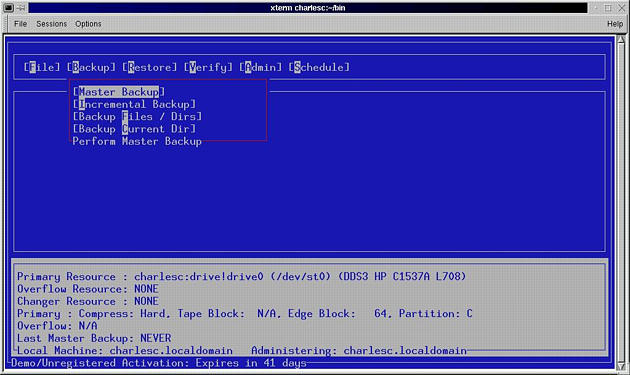
Figure 4. edgemenu
There is a full command-line capability, rather like tar, and “man edge” lists all the options available. Also, since the console-mode menu program is a front end for the command-line programs, you can study the commands it produces.
You can easily schedule automatic backups with the edgemenu program. It installs the backups into root's crontab, making it easy for you to adjust the backup in order to play with other cron jobs.
Naturally, the first thing I tried to do was a small test backup of about 9MB using my /etc directory. When I first tried this, the backup failed. Possibly the scan for sparse files affected the SCSI host adaptor. In any case, once I rebooted my system, I got successful backups on both of my tape drives.
The reason for the reboot was that I used another computer to test backups over the network, a process Microlite calls “remote backups”. I reconfigured BackupEDGE to use ssh because I already have ssh working with public key authentication, thus allowing secure transfers of data without passwords. I was able to configure the client machine and start a backup, but it locked up the server. Oops. After rebooting the server, I was able to back up on the server, but not on the client. My second attempt did not crash the server, which was an improvement. You also can use any host to administer another host. Apparently, the rsh or ssh connection is made and broken over the course of a session, so you may have waits while hosts authenticate.
Verifications can be done against the original file or by checking the CRC checksums stored with the data. The latter is useful for verifying a file after the original has changed. It is also a quick-and-dirty acceptance test of tape-drive head alignment, which is useful for less expensive tape drives, like some of the QIC offerings. Verification can be done as a routine part of the backup process, which is great.
Restoration is easily done from the edgemenu program. You can restore redirected files to another location via any of the three interfaces. For the GUI addicts, there is an X-based restore tool, edge.emx (see Figure 5), that you may launch from edgemenu. It is suited for restoring individual files. Selecting a directory also selects the files and directories under it, if the directory is not expanded. The process is simple enough: select a database and click on it. Click your way down the tree until you select all the files you want. Click on Transfer to add the selected files to the restore window. Then click on Restore to restore the data.

Figure 5. edge.emx
The manual is large, over 270 pages. With reasonably large type and a fair amount of white space, it is easy to read. Seventy pages of the manual duplicates the man pages, and some of that is for operating systems other than Linux. Then there is another 130 pages of documentation on the crash recovery software. A good contents page is provided in each volume, but the index is a bit sparse. For example, there is no entry for sparse files, and you have to already know that Microlite calls them “virtual files”. Overall, the documentation is plentiful, extensive, conversational and easy to read. Microlite gets an “A” here.
Part of the documentation expands on error messages. When a program produces a terse error message, you can look it up in the documentation and get a more detailed explanation. Other software vendors should learn to do this.
The documentation even tells you how to customize some aspects of BackupEDGE. For example, remote backups are done using rsh. However, the exact steps you need to take in order to use ssh are documented.
Customer support is provided via e-mail, phone, fax or web site. There is no e-mail list that allows customers to exchange experiences directly. I did run into one problem that led me to customer support: I tried to substitute ssh for rsh. We never did get that to work, possibly because I took sick while trying to debug this problem. The support I got was polite but appeared to be perfunctory. E-mail responses were timely and had I not gotten sick, we probably would have gotten ssh working in time for this review.
Disaster recovery should be very easy to do with RecoverEDGE, BackupEDGE's disaster recovery software, once you have it set up. I say “should be” only because I actually have not tested the restore process. Using HP's OBDR (basically a bootable tape drive) or a floppy disk set you build with BackupEDGE, you can make a backup tape for disaster recovery. When you need it, boot to the floppy or tape drive and away you go. The Microlite RecoverEDGE software will also adjust your partition sizes as needed in case you are restoring to a larger hard drive. Even machines that back up over the Net can use RecoverEDGE, which is more than you can do with OBDR.
Please note: the current version of this product was not available at the time of this writing.
Charles Curley (w3.trib.com/~ccurley“) is a freelance software engineer, writer and occasional cowpoke in the wilds of Wyoming.
