
The Linux Socket Filter: Sniffing Bytes over the Network
If you deal with network administration or security management, or if you are merely curious about what is passing by over your local network, grabbing some packets off the network card can be a useful exercise. With a little bit of C coding and a basic knowledge of networking, you will be able to capture data even if it is not addressed to your machine. In this article, we will refer to Ethernet networks, by far the most widespread LAN technology. Also, for reasons that will be explained later, we will assume that source and destination hosts belong to the same LAN.
First off, we will briefly recall how a common Ethernet network card works. Those of you who are already skilled in this field may safely skip to the next paragraph. IP packets sourced from users' applications are encapsulated into Ethernet frames (this is the name given to packets when sent over an Ethernet segment), which are just bigger lower-level packets containing the original IP packet and some information needed to carry it to its destination (see Figure 1). In particular, the destination IP address is mapped to a 6-byte destination Ethernet address (often called MAC address) through a mechanism called ARP. Thus, the frame containing the packet travels from the source host to the destination host over the cable that connects them. It is likely that the frame will go through network devices such as hubs and switches, but since we assumed no LAN borders are crossed, no routers or gateways will be involved.
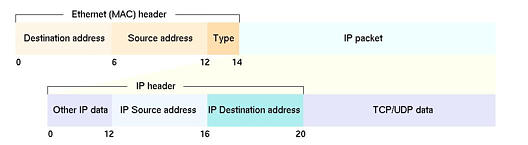
Figure 1. IP Packets as Ethernet Frames
No routing process happens at the Ethernet level. In other words, the frame sent by the source host will not be headed directly toward the destination host; instead, the frame will be copied over all the cables that make up the LAN, and all the network cards will see it passing (see Figure 2). Each network card will start reading the first six bytes of the frame (which happen to contain the above-mentioned destination MAC addresses), but only one card will recognize its own address in the destination field and will pick up the frame. At this point, the frame will be taken apart by the network driver and the original IP packet will be recovered and passed up to the receiving application through the network protocol stack.

Figure 2. Sending Ethernet Frames over the LAN
More precisely, the network driver will have a look at the Protocol Type field inside the Ethernet frame header (see Figure 1) and, based on that value, forward the packet to the appropriate protocol receiving function. Most of the time the protocol will be IP, and the receiving function will take off the IP header and pass the payload up to the UDP- or TCP-receiving functions. These protocols, in turn, will pass it to the socket-handling functions, which will eventually deliver packet data to the receiving application in userland. During this trip, the packet loses all network information related to it, such as the source addresses (IP and MAC) and port, IP options, TCP parameters and so on. Furthermore, if the destination host does not have an open socket with the correct parameters, the packet will be discarded and never make it to the application level.
As a consequence, we have two distinct issues in sniffing packets over the network. One is related to Ethernet addressing—we cannot read packets that are not destined to our host; the other is related to protocol stack processing—in order for the packet not to be discarded, we should have a listening socket for each and every port. Furthermore, part of the packet information is lost during protocol stack processing.
The first issue is not fundamental, since we may not be interested in other hosts' packets and may tend to sniff all the packets directed to our machine. The second one, however, must be solved. We will see how to address these issues separately, starting with the latter.
When you open a socket with the standard call sock = socket(domain, type, protocol) you have to specify which domain (or protocol family) you are going to use with that socket. Commonly used families are PF_UNIX, for communications bounded on the local machine, and PF_INET, for communications based on IPv4 protocols. Furthermore, you have to specify a type for your socket and possible values depend on the family you specified. Common values for type, when dealing with the PF_INET family, include SOCK_STREAM (typically associated with TCP) and SOCK_DGRAM (associated with UDP). Socket types influence how packets are handled by the kernel before being passed up to the application. Finally, you specify the protocol that will handle the packets flowing through the socket (more details on this can be found on the socket(3) man page).
In recent versions of the Linux kernel (post-2.0 releases) a new protocol family has been introduced, named PF_PACKET. This family allows an application to send and receive packets dealing directly with the network card driver, thus avoiding the usual protocol stack-handling (e.g., IP/TCP or IP/UDP processing). That is, any packet sent through the socket will be directly passed to the Ethernet interface, and any packet received through the interface will be directly passed to the application.
The PF_PACKET family supports two slightly different socket types, SOCK_DGRAM and SOCK_RAW. The former leaves to the kernel the burden of adding and removing Ethernet level headers. The latter gives the application complete control over the Ethernet header. The protocol field in the socket() call must match one of the Ethernet IDs defined in /usr/include/linux/if_ether.h, which represents the registered protocols that can be shipped in an Ethernet frame. Unless dealing with very specific protocols, you typically use ETH_P_IP, which encompasses all of the IP-suite protocols (e.g., TCP, UDP, ICMP, raw IP and so on).
Since they have pretty serious security implications (for example, you may forge a frame with a spoofed MAC address), PF_PACKET-family sockets may only be used by root.
The PF_PACKET family easily solves the problem associated with protocol stack-handling of our sniffed packets. Let's see it do so with the example in Listing 1. We open a socket belonging to the PF_PACKET family, specifying a SOCK_RAW socket type and IP-related protocol type. Then we start reading from the socket and, after a few sanity checks, we print out some information extracted from the Ethernet level and IP level headers. By cross-checking the printed addresses with the offsets in Figure 1, you will see how easy it is for the application to get access to network level data.
Listing 1. Protocol Stack-Handling Sniffed Packets
Assuming that your machine is connected to an Ethernet LAN, you can experiment with our short example by running it while generating packets directed to your host from another machine (you can ping or Telnet to your host). You will be able to see all the packets directed to you, but you will not see any packet headed toward other hosts.
The PF_PACKET family allows an application to retrieve data packets as they are received at the network card level, but still does not allow it to read packets that are not addressed to its host. As we have seen before, this is due to the network card discarding all the packets that do not contain its own MAC address—an operation mode called nonpromiscuous, which basically means that each network card is minding its own business and reading only the frames directed to it. There are three exceptions to this rule: a frame whose destination MAC address is the special broadcast address (FF:FF:FF:FF:FF:FF) will be picked up by any card; a frame whose destination MAC address is a multicast address will be picked up by cards that have multicast reception enabled and a card that has been set in promiscuous mode will pick up all the packets it sees.
The last case is, of course, the most interesting one for our purposes. To set a network card to promiscuous mode, all we have to do is issue a particular ioctl() call to an open socket on that card. Since this is a potentially security-threatening operation, the call is only allowed for the root user. Supposing that “sock” contains an already open socket, the following instructions will do the trick:
strncpy(ethreq.ifr_name,"eth0",IFNAMSIZ); ioctl(sock, SIOCGIFFLAGS, ðreq); ethreq.ifr_flags |= IFF_PROMISC; ioctl(sock, SIOCSIFFLAGS, ðreq);
(where ethreq is an ifreq structure, defined in /usr/include/net/if.h). The first ioctl reads the current value of the Ethernet card flags; the flags are then ORed with IFF_PROMISC, which enables promiscuous mode and are written back to the card with the second ioctl.
Let's see it in a more complete example (see Listing 2 at ftp://ftp.linuxjournal.com/pub/lj/listings/issue86/). If you compile and run it as root on a machine connected to a LAN, you will be able to see all the packets flowing on the cable, even if they are not for your host. This is because your network card is now working in promiscuous mode. You can easily check it out by giving the ifconfig command and observing the third line in the output.
Note that if your LAN uses Ethernet switches instead of hubs, you will see only packets flowing in the switch's branch you belong to. This is due to the way switches work, and there is very little you can do about it (except for deceiving the switch with MAC address-spoofing, which is outside the scope of this article). For more information on hubs and switches, please have a look at the articles cited in the Resources section.
All our sniffing problems seem to be solved right now, but there is still one important thing to consider: if you actually tried the example in Listing 2, and if your LAN serves even a modest amount of traffic (a couple of Windows hosts will be enough to waste some bandwidth with a good number of NETBIOS packets), you will have noticed our sniffer prints out too much data. As network traffic increases, the sniffer will start losing packets since the PC will not be able to process them quickly enough.
The solution to this problem is to filter the packets you receive, and print out information only on those you are interested in. One idea would be to insert an “if statement” in the sniffer's source; this would help polish the output of the sniffer, but it would not be very efficient in terms of performance. The kernel would still pull up all the packets flowing on the network, thus wasting processing time, and the sniffer would still examine each packet header to decide whether to print out the related data or not.
The optimal solution to this problem is to put the filter as early as possible in the packet-processing chain (it starts at the network driver level and ends at the application level, see Figure 3). The Linux kernel allows us to put a filter, called an LPF, directly inside the PF_PACKET protocol-processing routines, which are run shortly after the network card reception interrupt has been served. The filter decides which packets shall be relayed to the application and which ones should be discarded.

Figure 3. Packet-Processing Chain
In order to be as flexible as possible, and not to limit the programmer to a set of predefined conditions, the packet-filtering engine is actually implemented as a state machine running a user-defined program. The program is written in a specific pseudo-machine code language called BPF (for Berkeley packet filter), inspired by an old paper written by Steve McCanne and Van Jacobson (see Resources). BPF actually looks like a real assembly language with a couple of registers and a few instructions to load and store values, perform arithmetic operations and conditionally branch.
The filter code is run on each packet to be examined, and the memory space into which the BPF processor operates are the bytes containing the packet data. The result of the filter is an integer number that specifies how many bytes of the packet (if any) the socket should pass to the application level. This is a further advantage, since often you are interested in just the first few bytes of a packet, and you can spare processing time by avoiding copying the excess ones.
Even if the BPF language is pretty simple and easy to learn, most of us would probably be more comfortable with filters written in human-readable expressions. So, instead of presenting the details and instructions of the BPF language (which you can find in the above-mentioned paper), we will discuss how to obtain the code for a working filter starting from a logic expression.
First, you will need to install the tcpdump program from LBL (see Resources). But, if you are reading this article, it is likely that you already know and use tcpdump. The first versions were written by the same people who wrote the BPF paper and its first implementation. In fact, tcpdump uses BPF, in the form of a library called libpcap, to capture and filter packets. The library is an OS-independent wrapper for the BPF engine. When used on Linux machines, BPF functions are carried out by the Linux packet filter.
One of the most useful functions provided by the libpcap is pcap_compile(), which takes a string containing a logic expression as input and outputs the BPF filter code. tcpdump uses this function to translate the command-line expression passed by the user into a working BPF filter. What is interesting for our purposes is that tcpdump has a seldomly used switch, -d, which prints the code of the filter.
For example, typing tcpdump host 192.168.9.10 will start sniffing and grab only those packets whose source or destination IP address matches 192.168.9.10. Typing tcpdump -d host 192.168.9.10 will print the BPF code that recognizes the filter, as shown in Listing 3.
Let's briefly comment on this code; lines 0-1 and 6-7 verify that the captured frame is actually transporting IP, ARP or RARP protocols by comparing their protocol IDs (see /usr/include/linux/if_ether.h) with the value found at offset 12 in the frame (see Figure 1). If the test fails, the packet is discarded (line 13).
Lines 2-5 and 8-11 compare the source and destination IP addresses with 192.168.9.10. Note that, depending on the protocol, the offsets of these addresses are different; if the protocol is IP, they are 26 and 30, otherwise they are 28 and 38. If one of the addresses matches, the packet is accepted by the filter, and the first 68 bytes are passed to the application (line 12).
The filter code is not always optimized, since it is generated for a generic BPF machine and not tailored to the specific architecture that runs the filter engine. In the particular case of the LPF, the filter is run by the PF_PACKET processing routines, which may have already checked the Ethernet protocol. This depends on the protocol field you specified in the initial socket() call: if it is not ETH_P_ALL (which means that every Ethernet frame shall be captured), then only frames having the specified Ethernet protocol will arrive at the filter. For example, in the case of an ETH_P_IP socket, we could rewrite a faster and more compact filter as follows:
(000) ld       [26]
(001) jeq      #0xc0a8090a      jt 4    jf 2
(002) ld       [30]
(003) jeq      #0xc0a8090a      jt 4    jf 5
(004) ret      #68
(005) ret      #0
Installing an LPF is a straightforward operation: all you have to do is create a sock_filter structure containing the filter and attach it to an open socket.
The filter structure is easily obtained by substituting the -d switch to tcpdump with -dd. The filter will be printed as a C array that you can copy and paste into your code, as shown in Listing 4. Afterward, you attach the filter to the socket by simply issuing a setsockopt() call.
We will conclude this article with a complete example (see Listing 5 at ftp://ftp.linuxjournal.com/pub/lj/listings/issue86/). It is exactly like the first two examples, with the addition of the LSF code and the setsockopt() call. The filter has been configured to select only UDP packets, having either source or destination IP address 192.168.9.10 and source UDP port equal to 5000.
In order to test this listing, you will need a simple way to generate arbitrary UDP packets (such as sendip or apsend, found on http://freshmeat.net/). Also, you may want to adapt the IP address to match the ones used in your own LAN. To accomplish this, just substitute 0xc0a8090a in the filter code with the IP address of your choice in hex notation.
A final remark concerns the status of the Ethernet card when you exit the program. Since we did not reset the Ethernet flags, the card will remain in promiscuous mode. To solve this problem, all you need to do is install a Control-C (SIGINT) signal handler that resets the Ethernet flags to their previous value (which you will have saved just before ORing with IFF_PROMISC) before exiting the program.
Sniffing packets over your LAN is an invaluable tool for debugging network problems or collecting measurements. Sometimes the commonly available tools, such as tcpdump or ethereal, will not exactly fit your needs and writing your own sniffer can be of great help. Thanks to the LPF, you can do this in a simple and efficient way.


