
Web Click Stream Analysis Using Linux Clusters
A wealth of information is gathered by the web server (httpd) and stored in the log file. Unfortunately, many sites just archive or delete the logs. In this article we'll look at how to use logs to improve the performance and usability of a web site. We'll also look at how to load the logs into a database, and then query the database to see how people navigate the site and how site performance can be improved.
I chose a Linux clustered database as a proof point of Linux scalability and also to show that all the old Pentium machines in the office could be put to good use. The idea here is to make a pile of old hardware thrash a newer, faster machine. A database server that runs on a cluster addresses one aspect of clustered computing. Most of the Linux supercomputer clusters focus on numeric problems. The cluster in this article addresses the commercial requirements of data storage and manipulation. In a cluster all the computers work on the same query at the same time. The key question is: as you add more computers, how much faster do you get the answer? Inter-node communication, data distribution and load balancing are critical to cluster performance. To demonstrate the load balancing issue I used the Parallel Virtual Machine (PVM) software common to Beowulf clusters. I used the Informix XPS database for testing the cluster database scalability.
Let's tackle the following:
Understanding the web logs and loading them into the database
Using Structured Query Language (SQL) to answer questions about the web site
Measuring the database cluster performance as more hardware is added
The log files for the Apache web server are found in the /var/log/httpd directory (all file names and locations are based on Red Hat 6.2). You'll find a number of logs, the most current one being access_log. The default format of the file is :
192.168.1.142 - - [14/Nov/2000:16:27:21 -0500] "GET /time.html HTTP/1.1" 304 -
The first field is the IP address of the client. The - that comes next is usually the rfc1413 identity check. The default is off due to the overhead associated with using the IdentityCheck capability. Next is any active .htaccess user id authentication. Enclosed in [] is a timestamp of the access. The request Method, in this case a GET, was for the URL /time.html using HTTP/1.1. The 304 is the Status Code for the access (see http://www.w3.org/Protocols/rfc2616/rfc2616.txt for all the codes, plus more info on HTTP than you ever imagined). The final - is the number of bytes sent, none in this case. The 304 return code says the object has not been modified, so no bytes are sent. More information on the log file may be found in the Apache documents: httpd.apache.org/docs/mod/mod_log_config.html.
The default web server log provides lots of information, but it can mask many individual browsers operating from within the same internet service provider (ISP). Cookies are the solution.
Consider the following three lines from an access_log file
206.175.175.226 - - [15/Nov/2000:12:23:36 -0500] "GET / HTTP/1.0" 200 1233
206.175.175.226 - - [15/Nov/2000:12:24:15 -0500] "GET / HTTP/1.0" 200 1233
206.175.175.226 - - [15/Nov/2000:12:25:27 -0500] "GET / HTTP/1.0" 200 1233
It looks like one browser, identified by a single IP address, has accessed the /, or root index, page three times. If logging is enabled with the following:
 # add user tracking
CookieTracking on
CustomLog logs/clickstream "%{cookie}n %r %t"
in the httpd.conf configuration file, the above hits tell a very different story. Look in the file called clickstream (as configured above) for the following log information:
206.175.175.226.1017974309016881 GET / HTTP/1.0 [15/Nov/2000:12:23:36 -0500]
206.175.175.226.1028974309055577 GET / HTTP/1.0 [15/Nov/2000:12:24:15 -0500]
206.175.175.226.1017974309127275 GET / HTTP/1.0 [15/Nov/2000:12:25:27 -0500]
There were three completely different browsers accessing the site. This tracking is accomplished using a unique identifier (non-persistent cookie) for each browser. The number following the IP address is a user-tracking cookie sent by the server to the browser. Each time the browser makes a request, the cookie is sent back to the server by the browser.
Since the default installation doesn't have user tracking enabled, the examples in this article don't use CookieTracking. You can jump in with your current logs and do this analysis. You will want to turn on CookieTracking, so all those clicks from "that large ISP" will become individual streams instead of one very busy user.
A note on privacy. A number of companies have been caught with their hand in the cookie jar. A quick internet search yields 124,000 pages that contain the string "privacy" that also contain the string "cookies". This seems to be a topic that has attracted some attention. Develop a privacy policy, post it to your site and live by it.
Now that we have a handle on the log file we need to load it into a database to run queries against the data. The log file strings are not friendly to a database high speed loader, so we will massage them into a delimited string. Dust off your favorite Practical Extraction and Report Language; the code you can download for this is in Perl. A quick disclaimer--my Perl code is not good Perl style. The distinguishing features are it works, and it has at least one comment line.
For the following input:
158.58.240.58 - - [04/Jul/2000:23:59:42 -0500] "GET / HTTP/1.1" 200 47507
203.127.32.40 - - [04/Jul/2000:23:59:25 -0500] "GET /jp/product/images/prod_top.gif HTTP/1.0" 304 -
203.127.32.40 - - [04/Jul/2000:23:59:24 -0500] "GET /jp/product/down.html HTTP/1.0" 200 12390
192.147.84.235 - - [04/Jul/2000:23:59:22 -0500] "GET /idn-secure/Visionary/WebPages/visframe.htm HTTP/1.1" 401 -
211.45.44.33 - - [04/Jul/2000:23:59:19 -0500] "GET /kr/images/top_banner.gif HTTP/1.1" 200 6719
211.45.44.33 - - [04/Jul/2000:23:59:24 -0500] "GET /kr/images/waytowin.gif HTTP/1.1" 200 71488
211.45.44.33 - - [04/Jul/2000:23:59:25 -0500] "GET /kr/train/new.gif HTTP/1.1" 200 416
The output from the Perl program looks like this:
158.58.240.58|-|-|2000-07-04 23:59:42||/|200|47507|-|1|
203.127.32.40|-|-|2000-07-04 23:59:25|jp|/jp/product/images/prod_top.gif|304||gif|4|
203.127.32.40|-|-|2000-07-04 23:59:24|jp|/jp/product/down.html|200|12390|html|3|
192.147.84.235|-|-|2000-07-04 23:59:22|idn|/idn-secure/Visionary/WebPages/visframe.htm|401||htm|4|
211.45.44.33|-|-|2000-07-04 23:59:19|kr|/kr/images/top_banner.gif|200|6719|gif|3|
211.45.44.33|-|-|2000-07-04 23:59:24|kr|/kr/images/waytowin.gif|200|71488|gif|3|
211.45.44.33|-|-|2000-07-04 23:59:25|kr|/kr/train/new.gif|200|416|gif|3|
The last two fields, added by the Perl script are the object type, stripped from the end of the requested URL, and the the link depth, the number of / characters in the URL.
To perform the analysis we'll use a relational database running on a cluster. Relational databases are the most prevalent database architecture. Data is presented to the user in table format. There are a number of relational databases available for Linux, but Informix XPS provides a clustered shared nothing implementation for Linux. My examples use XPS. XPS has implemented it's own message-passing layer rather than using the more typical Beowulf implementations (e.g., PVM, MPI). Feel free to use the database of your choice. To test a cluster you will need to download XPS.
To get the Informix XPS Developers Kit binaries, go to www.informix.com/idn/linux. You will need to register to gain access.
The installation procedure is well documented in www.informix.com/answers/english/docs/83eds/6828.pdf and the release notes/README file. To make life easier download the easyinstall.tar file, which automates the install. By reading the shell script you'll see the exact steps to run to do the install. By reading the install doc you'll understand why the steps are needed. There is also a script file called go.bash that runs all the samples in the article on a subset of the data.
Relational databases use Structured Query Language (SQL) to work with the data. A tutorial on SQL is available at www.informix.com/answers/english/docs/gn8392/6530.pdf. An internet search for +sql +tutorial yields 90,000+ hits from Google, so there are lots of alternatives. The SQL we need falls into two categories, Data Definition Language (DDL) and Data Manipulation Language (DML).The DDL will create tables to store the data, the DML will load and query the tables.
First let's create a table to store the data. I assume you set up the server with the easyinstall script; if not, please be sure that the dbslice "workslice" exists. The SQL to do this looks like:
-- comment lines explain the code and any unique XPSisms
-- create a database called weblog
-- the "in workslice.1" specifies the storage for the database
create database weblog in workslice.1;
-- a raw table is a non-logging table used for datawarehousing
create raw table webfact (
        ip char(15) ,
        foo char(1) ,
        bar char(1) ,
        timestamp datetime year to second,
        location char(16) ,
        url varchar(255) ,
        http_code char(3) ,
        bytecount int,
        objtype char(6),
        linkdepth       int
        )
-- the "fragment" clause specifies where to
-- put the data. In our case the "workslice"
-- is a disk set across the cluster
fragment by hash(ip) in workslice;
To run this SQL from a file, type
dbaccess -e - weblogDDL.sql
Data loaders come in many different flavors. The XPS loader takes the relational table concept and maps it to Linux files and pipes. Once the mapping has been defined with an external table you have SQL access to load, query and unload data. The DDL for the external table is:
create external table e_webfact
-- the "sameas" saves re-typing the above DDL
sameas webfact
using (format "delimited",
REJECTFILE "/tmp/webfact.barf",
MAXERRORS 50000,
datafiles ("disk:1:/home/informix/work/dat/weblog.unl"));
Loading from the flat file of data defined in the "datafiles" clause is as simple as an insert-select. This is our first example of a DML statement.
-- now load
insert into webfact select e_webfact.*   from e_webfact;
With data in the database we can now run queries (DML) to answer questions about the web site.
Let's answer the following questions about the web site with SQL:
1) What are the most popular objects?2) Which objects consume the greatest site bandwidth?3) How many errors are generated, and what is their nature?4) What is the distribution of activity vs. time?5) What links are bookmarked--bypassing the home page?
This is only a sample of the questions that can be answered. The logs used for the examples are from www.informix.com before the latest urban (or is that weban?) renewal.
1) The most popular objects belong on the home page, or a link to them belongs on the home page, to make navigation and access easier. The query is an easy one:
select
        url,
        count(*) hits
from webfact
group by 1
order by 2 desc;
What is the most popular link at Informix? The envelope please:
url /hits 242
url /informix/images/dot_clr.gifhits 208
url /informix/images/blackbar.gifhits 181
url /informix/absolut.csshits 170
2) The objects with the largest value of hits*object size consume the most site bandwidth. Why do we care? If a large 24bit color image is eating most of the bandwidth, you may want to reduce the size or quality of the image to improve performance. This query is more complex and creates a temporary table on the fly. It looks like:
-- use the maximum memory available
set pdqpriority 100;
-- if another query is updating the table don't block
set isolation to dirty read;
-- drop the temporary table if it exists
drop table foo;
select
        url,
        max( bytecount) mbytes,
        count(*) hits
from webfact
group by 1
-- create a temporary table, called foo, on the fly to store the query output
into temp foo;
select
        url,
        mbytes * hits totalbytes
from foo
order by 2 desc;
A sample from the Informix site yields:
url /answers/english/docs/220sdk/5194.pdftotalbytes 186935606
url /answers/english/docs/912ius/4818.pdftotalbytes 144750480
url /answers/english/docs/gn7382/4372.pdftotalbytes 106828470
url /answers/english/docs/73ids/4354.pdftotalbytes 56389410
3)The first query is a good quality check of the site. The second query provides a list of URL's and their errors in descending order, which gives a prioritized list of what to fix.
-- show summary of errors
select
        http_code,
        count(*) hits
from webfact
group by 1
order by 2 desc;
***output here **
-- now look at the detail
select
        url,
        http_code,
        count(*) hits
from webfact
group by 1,2
order by 3 desc;
4)The international community makes this site 24x7. The distribution of hits vs. time illustrates the demand for high availability in the web environment.
select
        -- get the hour of the access
        extend ( timestamp , hour to hour ) hour_x_hit,
        count(*) hits
from webfact
group by 1
order by 1 asc;
5)If you build it they will come--and maybe even return for another visit. Browser bookmarks (or "favorites" if you use that browser) are your visitors votes about the best content on the site. This content should be easily accessible. Putting links to the best content on the home page makes the home page more of a portal than an annoyance to avoid. Any customization or new information that is presented on the home page should be propagated to the popular pages to reach the returning bookmark audience.
The bookmark SQL is more complicated. We want the first object selected for a unique session. The UserTrack directive would be very helpful, but since this isn't available in the data, we'll do the best we can. The comments in the code explain the stages of the query.
set isolation to dirty read;
set pdqpriority 90;
set explain on;
-- table to store bookmark results
--drop table bkmarks;
create raw table bkmarks (
                ip char (15),
                tstamp datetime year to second,
                linkdepth int,
                url varchar(255)
                )
        fragment by hash ( url ) in workslice;
select
        distinct ip,
        min( timestamp) tstamp
from webfact
-- filter for html pages, not .gif, .jpg ...
where objtype matches 'ht*'
group by 1
-- create a temporary table for the results
into temp foo;
-- now put a summary into the bookmarks table
insert into bkmarks
select
        w.ip,
        w.timestamp,
        w.linkdepth,
        w.url
-- notice that two tables are combined in the query
from
        webfact w,
        foo f
-- the where clause allows the specification of how to
-- match up the two tables and to do any desired filtering
where
         w.ip = f.ip
        and w.timestamp = f.tstamp
        and objtype matches 'ht*'
          ;
select  url, count(*) bookmark_count from bkmarks
group by 1
order by 2 desc
All the analysis so far can be performed on any database. Now we'll look at the server used for these examples and how it can be clustered.
Computer clusters use multiple computers to work on the same problem. There are two main reasons to cluster computers, performance and availability. Correspondingly there are two dominant architectures for clusters, "shared nothing" architecture or "shared lock" architecture. A shared nothing architecture is well suited to both tasks of performance and availability, a shared lock architecture lends itself more to addressing availability issues with limited scalability.
Shared huh? you ask. The "sharing" refers to how the CPU and disk are allocated among the computers. To understand this concept let's consider an analogy and then a more detailed explanation.
Why do the computers in a cluster need their own resources? The analogy: When you go on a business trip you always bring home N gifts where N is an even multiple of the number of children in your household. If you don't know why this is true, ask any parent or try to remember back to when you were a child. The issue is sharing. Computers are much like children. If one disk (gift) is offered to N computers (children), there will be significant resource contention (My toy! No I won't share!).
Apply this concept to a computer cluster: the cluster of computers must define how they will work on the same task at the same time. In a shared nothing architecture the computers all are assigned the problem to be solved and then work individually on data they control until they can return a result set to the user who launched the query. Each computer operates on the disk, memory, CPU and data assigned to them. Conversely a shared lock (or distributed lock manager) cluster uses a lock mechanism to arbitrate the cluster computers requests to a common disk repository of data. An example of a shared nothing supercomputer is the Search for Extraterrestrial Intelligence, SETI@home. Shared nothing databases are commercially available from Informix, IBM and Teradata for various hardware/operating system platforms. A distributed lock manager database (Cache Fusion/OPS) is available from Oracle.
Many Linux clusters are called Beowulf clusters. Rather than attempt a definition, I offer you a quote from the FAQ (lots more info at www.beowulf.org):
1. What's a Beowulf? [1999-05-13]
It's a kind of high-performance massively parallel computer built primarily out of commodity hardware components, running a free-software operating system like Linux or FreeBSD, interconnected by a private high-speed network...
2. Where can I get the Beowulf software? [1999-05-13]
There isn't a software package called "Beowulf". There are, however, several pieces of software many people have found useful for building Beowulfs. None of them are essential. They include MPICH, LAM, PVM, the Linux kernel, the channel-bonding patch to the Linux kernel...
Clusters can provide incredible compute power. The current ranking of cluster performance may be found at www.topclusters.org.
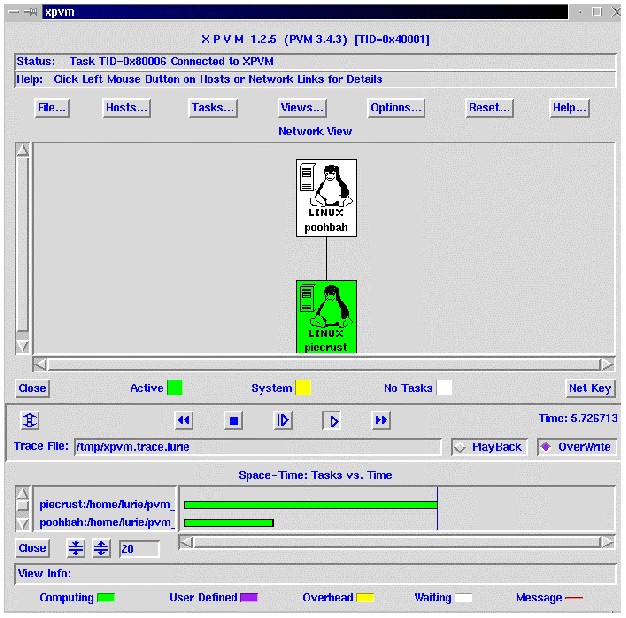
Before we jump into a database cluster, let's take a look at a simple two node Beowulf cluster using Parallel Virtual Machine (PVM) with an X interface (XPVM). The two nodes are asymmetric, one is a 133 MHz Pentium, the second is a 500 MHz Pentium III. The compute task is trivial: <bd>gzcat a compressed file and direct the output to /dev/null. The display shows an interesting facet of cluster computing. There is no load balancing inherent in the cluster.
The barchart in the XPVM display shows the piecrust computer (133 MHz) still working with an elapsed time of 5.7 seconds, while the poobah server (500 MHz) has already finished. If the final result is dependent on the result set from each node, the throughput is throttled by the slowest computer. The same issue arises if the amount of work assigned to a symmetrical cluster is skewed towards a subset of the nodes.
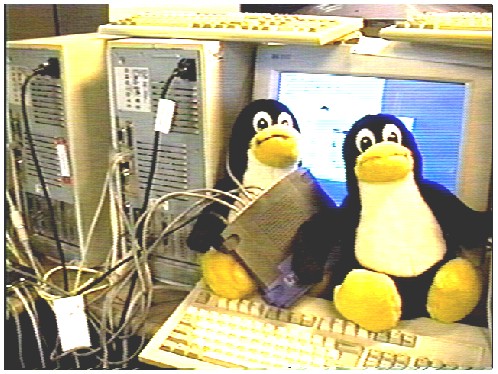
My cluster for the click stream analysis was a very low budget affair. I used all the old Pentium 233MHz machines in the office I could scrounge, Informix XPS for Linux, and a 100 Mb Ethernet switch. I purloined one 366 MHz machine, but as explained above, it was limited by the rest of the herd. The illustration shows two of the machines, the monitor and the Ethernet switch.
Does it Scale?
I focused the cluster testing on performance scalability. How much additional performance is achieved by adding additional processors? The perfect case is linear (100%) scalability. There are some confounding variables. Moving from one to two processors introduces the communications layer between the nodes, sending the queries to the nodes (function shipping), and consolidating the result set to the requester node. This tends to reduce scalability. This is a one time penalty when moving from a single node to multiple nodes. Working to increase scalability is "super-linear speedup".
As nodes are added more Random Access Memory (RAM) is available for in-memory data structures. RAM is so much faster than disk that doubling the number of nodes may result in better than double the performance. Why? When the total data is much larger than the available RAM, the database will use disk space to store temporary results, much like virtual memory paging in an operating system. As nodes are added to the cluster their RAM becomes available to process the query. If enough nodes are added to allow all the data structures to reside in the RAM of all the machines, the swapping is avoided. Things speed up quite a bit when this happens.
The graph below shows run times for one, two, three and four processors. The results are near linear. True 100% scalability would produce straight lines with constant slope. There is a mixed query workload and not all queries provide the same scalability. These tests were performed with a 100 Mb switch. I have normalized the execution times based on the single node performance.
#coserverselfjointop10   largest errorreperrorsbyhours   bookmark
# NORMALIZED
       1    1.00    1.00    1.00    1.00    1.00    1.00    1.00
       2    0.38    0.77    0.82    0.50    0.54    0.50    0.55
       3    0.29    0.48    0.54    0.32    0.35    0.31    0.37
       4    0.20    0.42    0.41    0.28    0.32    0.26    0.34
For testing a single node I used the fastest machine with a 366MHz. Even with this advantage there was still significant speed-up when going from one node to two nodes.
It is easy to test the impact of network speed on cluster performance. I substituted a 10Mb hub for the switch and re-ran the same suite of tests. The results showed Ethernet at it's worst; there was near linear slowdown instead of speed-up. The more packets flying around the wire, the more collisions and the slower we go. The Beowulf FAQ refers to a channel bonding patch to make multiple Network Interface Cards (NICs) function as a single high-speed interface.
Web log analysis can make significant performance and usability improvements to your web site. Linux database clusters have tremendous potential. Please do try this at home--your mileage will vary.
Please download and install XPS on one or more Linux PCs. As you tune for performance (see www.informix.com/answers/english/docs/83eds/6543.pdf) remember there is now an additional major resource to measure and optimize: the normal CPU, Disk, Memory and now Interconnect. An easy way to get going on a two node system without the expense of a 100Mb switch (about $100) is a crossover cable (about $10). The cable will connect two machines to each other without a hub/switch.
Please let me know about your Linux database cluster experiences; I can be reached at lurie@computer.org. (This is not a tech support e-mail.)
A later, enhanced version of this article can be found at IBM's DB2 developer web site.
Marty Lurie started his computer career generating chads while attempting to write Fortran. His day job is Systems Engineering at Informix, but when pressed he will admit he mostly plays with computers. His favorite program is the one he wrote to connect his Nordic Track to his laptop.
email: lurie@computer.org

