
KDevelop 1.4
Manufacturer: Open Source Contributors
Price: Free Download
Author: Petr Sorfa
The one development tool that has been lacking in the Open Source community is a professional-level IDE (integrated development environment). KDevelop thankfully provides such a tool that combines the resources of contributors and existing open-source products. However, does KDevelop match the expectations of a commercial IDE usually based on a non-UNIX platform?
An IDE is an environment, preferably graphical, that is used for the creation, debugging and maintenance of programs. The three core components of this environment are a programmer's editor that is context-sensitive to the programming language, a GUI (graphical user interface) builder that is used to construct the graphical front end of the application and a debugger to detect bugs in the code.
These are the basic requirements of an IDE. However, there really needs to be more than these three components to make an IDE a useful tool.
Because open-source programs tend to concentrate on completing the task, rather than being user friendly, installation sometimes tends to be difficult and frustrating, particularly considering all the different versions of Linux and the constantly changing libraries and tools.
The KDevelop RPM binary can be downloaded by either following the links off KDevelop's web site or by using a site such as http://www.rpmfind.net/ to locate it.
For this review, I installed a brand new Linux installation and made sure it included every single package and feature that the distribution allowed.
Alas, I ran into installation problems when I found certain dependencies for various libraries that did not exist in my Linux installation. A quick diversion to the Internet to download the missing libraries solved the problem.
Total installation time took about 30 minutes with a fast internet connection and a little bit of technical knowledge. This installation method is ideal for users with some Linux administration skills.
Sometimes, building from source is recommended for programmers that have non-Linux/UNIX operating systems, for customized Linux distributions and for potential KDevelop contributors. Only experienced or very determined developers should attempt building KDevelop from source code.
All the development versions of the required libraries must be installed. Because there is no easy way of determining these dependencies, building from source tends to be a process of trial and error.
A feature of KDevelop is its ability to use many existing open-source tools. Not all of these tools are required, but they are necessary to ensure that KDevelop performs as expected. When KDevelop is started for the very first time, a list of associated tools are given and are marked as either present or missing (see Figure 1). Once this list is available, the missing tools can be installed later.
Required tools utilized by KDevelop are g++2.7.2, g++2.8.1 or egcs 1.1 (I recommend g++2.9.2); make; perl 5.004; autoconf 2.12; automake 1.2; flex 2.5.4; gettext; Qt 2.2.X (which includes Qt designer and uic); and KDE 2.X.
Optional tools include enscript, Ghostview or KGhostview, Glimpse 4.0, htdig, sgmltools 1.0, KDE-SDK (KDE software development kit), KTranslator, KDbg, KIconedit and Qt Linguist. Although optional, it is best that all of these tools are available.
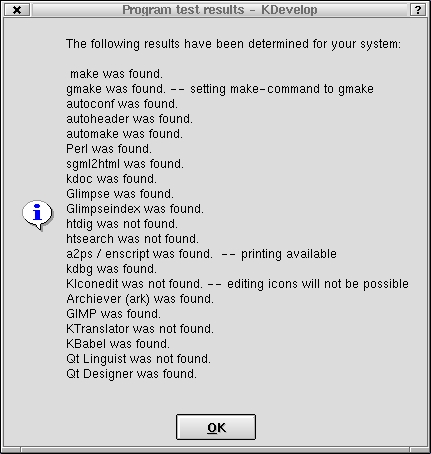
Figure 1. Initial KDevelop Startup Detecting Installed Tools
Although KDevelop provides the three core requirements of an IDE (editor, GUI builder and debugger—see Figure 2), it has several other features that make it a robust and reliable tool, suitable even for commercial projects.
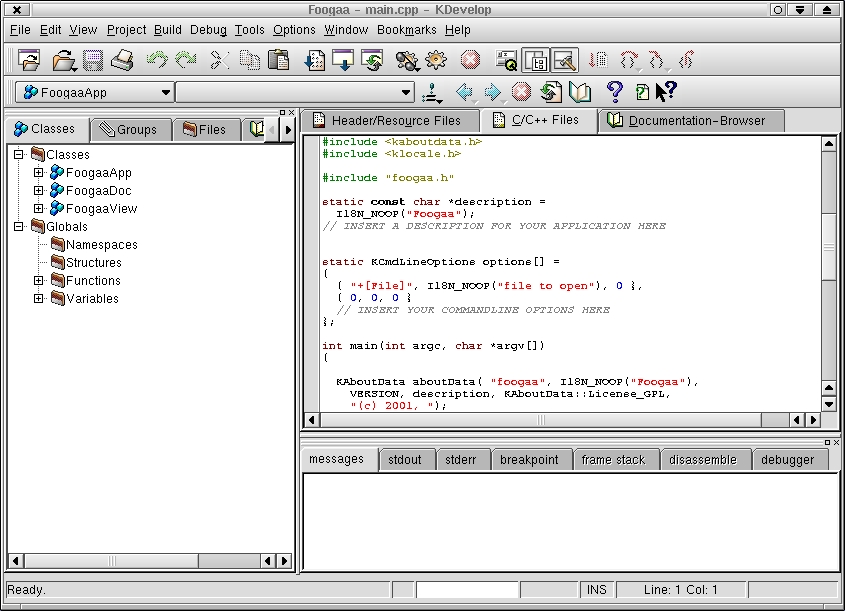
Figure 2. KDevelop 1.4 in Action
A complex program can be daunting for both beginners and experts alike; so program documentation is critical. The documentation for KDevelop provides a good source of on-line help, although it does lack screenshots and visual content. Context-sensitive help is available through tool tips and the “What's this?” cursor mode.
KDevelop also indexes the KDE Lib and Qt documentation. The ability to set bookmarks is present, which makes it easy to return to relevant documentation. Other tutorials and documentation are also available at the KDevelop's web site.
KDevelop has a built-in HTML browser that makes documentation access effortless and removes the need for an external browser.
Here are the basic interface components: Tree View, which consists of a class, groups, file, books and watch views; Output View, which provides output for messages, stdout, stderr, debugger breakpoints, debugger frame stack, debugger disassembly and debugger messages; Editor and Documentation, which includes Header/Resources editor, C/C++ files editor and documentation browser; and Tool Bar, an iconic representation of the main menu options.
KDevelop's project creation process is one of the easiest to execute using the Application Wizard, which goes through the following steps:
Application Type (see Figure 3)--this step allows the user to select a template for creating a program using KDE 2 Mini; KDE 2 Normal; KDE 2 MDI GNOME (Normal); Qt (Normal, Qt 2.2 SDI, Qt 2.2 MDI, QextMDI); Terminal, i.e., text (C, C++); and others (custom).

Figure 3. Application Wizard
Generate Settings (see Figure 4)--this is the step to enter the project name, location, initial version number, author's name and e-mail. There are also options to generate various project-associated files, such as sources, headers, GNU standard files, icons and project-associated documentation.
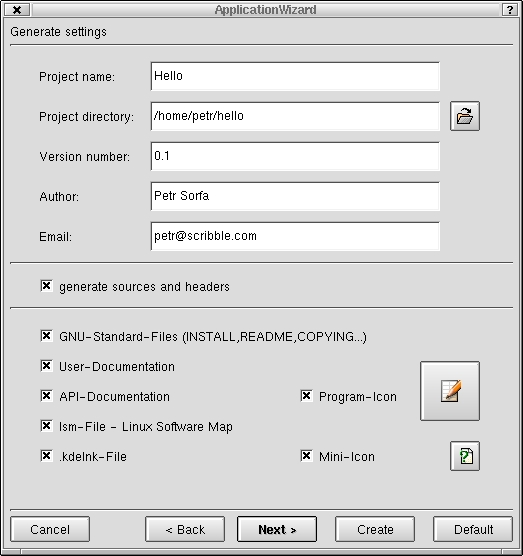
Figure 4. Entering the Project Settings
Version Control System (see Figure 5)--the version control system dialog allows you to set the parameters of the source control system. This is dependent on the Linux distribution. In general, this is the CVS tool.
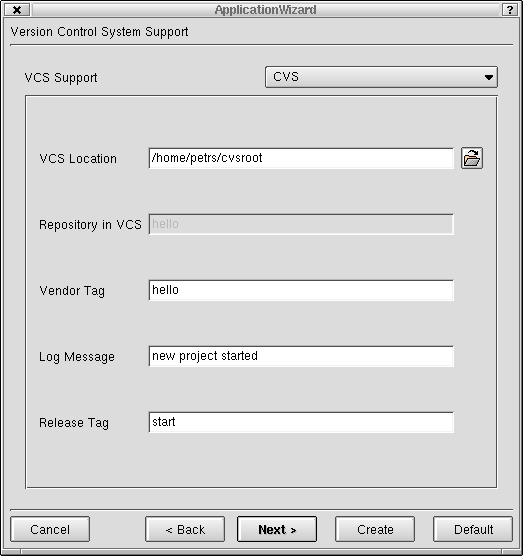
Figure 5. Selecting the Version Control System
Header Templates for header and code files (see Figure 6)--this allows the developer to select automatically generated headers for program headers and source files. These headers are fully customizable with tag expansions, which fill in various bits of information, such as the author, filename and date.

Figure 6. Header Template Setup for Header Files
Project Creation (see Figure 7)--in the final stage of project creation, the related project's files and directories are created, using the automake and configure tools. Note that if some of the required tools are missing in the Linux distribution, this creation process might fail. If failure does occur, it is best to install the missing components and then recreate the project. It is extremely difficult to recover from a project-creation failure.
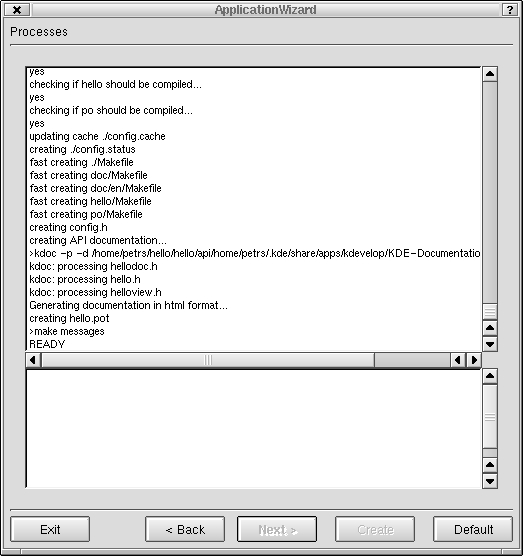
Figure 7. Initial Project Creation
Once the project has been created, development can begin. I strongly suggest that at this point the project be built and executed to detect any build problems.
KDevelop 1.4 uses Trolltech's Qt Designer. Qt Designer provides a professional interface, allows GUI building with most of the Qt widgets and is a very useful tool for relating GUI widgets and components with each other (best thought of as visual programming).
Here is a synopsis of the process to create GUI components with Qt Designer under KDevelop 1.4 (see Figure 8).
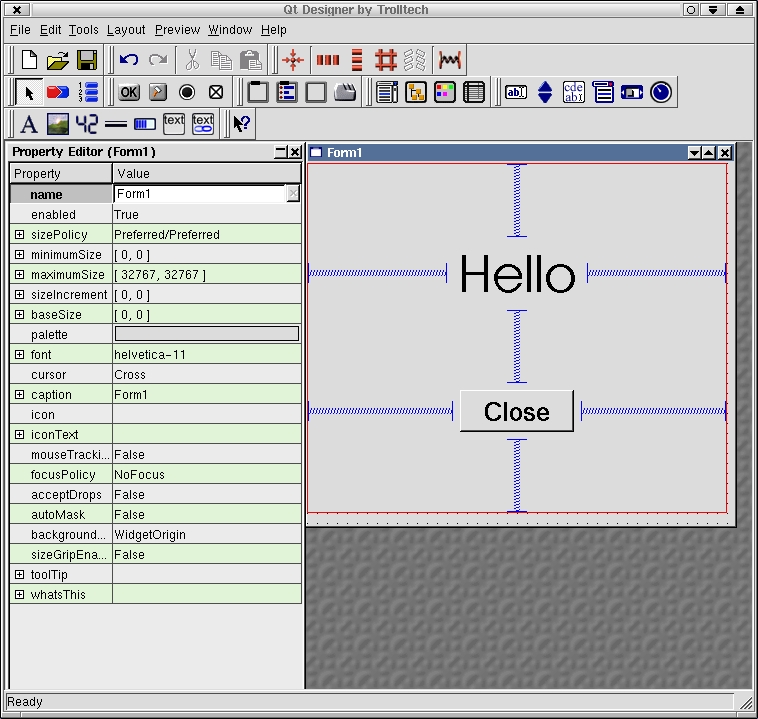
Figure 8. The KDevelop 1.4 GUI Builder, Trolltech's Qt Designer
Qt Designer is a major product itself and requires a separate article to fully describe its capabilities and usage. In this article, its relevance to KDevelop will be covered.
Qt Designer allows the use of layout tools and access to all widget properties. It has the ability to create relationships between widgets, such as the click on a push button with the closing of a window.
Qt Designer only generates an intermediate XML .ui file describing the dialog. Another Qt utility, uic, is used to generate the actual source code files from the .ui file. KDevelop 1.4 supports the .ui files, but the user needs to add the .ui file to the project. When the user initiates a make or rebuild, KDevelop automatically calls uic to generate the relevant associated code.
Unfortunately, uic rewrites all the generated code files whenever the user changes the .ui file with Qt Designer. This implies that the user cannot edit these generated source files. To use the code generated by the uic tool the user needs to inherit the generated code classes before implementing the user-defined functionality.
KDevelop harnesses gdb in order to provide debugging facilities (see Figure 9). Clicking in the left-hand column of the editing windows sets a breakpoint in existing code. The breakpoints can even be set when the program is not running or is in a noncompilable state, which are known as lazy breakpoints. KDevelop displays lazy breakpoints in blue and active breakpoints in red. A little green arrow next to the corresponding line of source indicates the current point of execution.
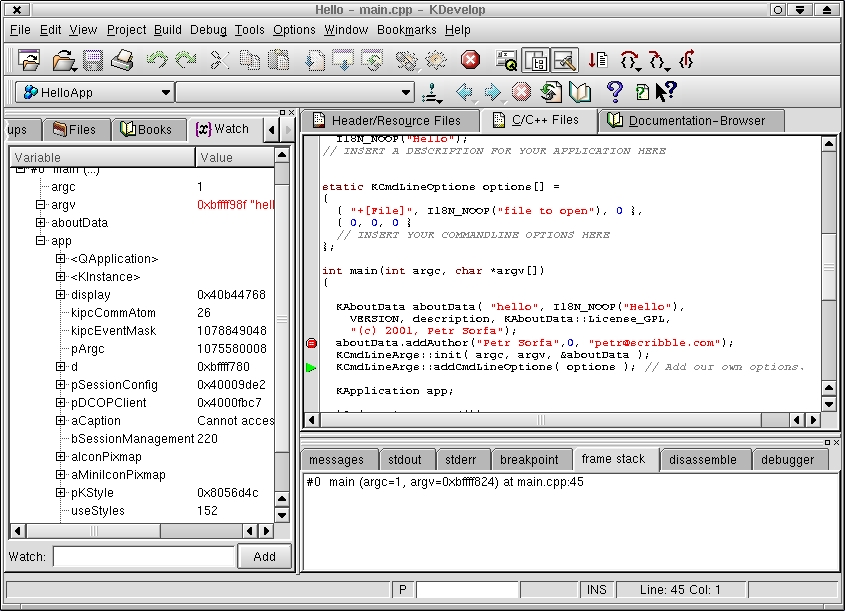
Figure 9. Debugging the Project
KDevelop provides most of the required basic debugging functionality, such as basic execution, next line and program interruption. The user can activate a floating debugging toolbar for easier debugging command access (see Figure 10). In the tree views, the variable tree tab displays the currently available variables.

Figure 10. The Floating Debugger Toolbar
Debugger-related information is displayed in the debugger, assembly, frame stack and breakpoint output windows.
The problem with the default debugger support is that users wishing to do finer-level debugging cannot access gdb directly. Another problem is that the user can alter variable values only in a non-intuitive way via the Watch input line. However, KDevelop can be configured to use an external debugger, such as the ever-popular DDD, kdbg and xxgdb.
KDevelop allows the executions of KDE applications within its framework. Applications such as the GIMP, Ark and KBabel are set up by default. Users can add their own via the options->tools menu.
Compilation and building of the project can be done through various menu options, such as make, clean, rebuild, clean for distribution and auto configuration. KDevelop is intelligent and will prompt you, if necessary, to rebuild the project before program execution.
The Project->Make Distribution->Source.tgz menu item allows the creation of the source for distribution. Unfortunately, there does not seem to be a way of automatically generating RPMs or RPM spec files for more useful packaging.
If version control system was chosen during the project's creation, designated files can be added to source control system (see Figure 11). This can be done by selecting the file's Add to Repository pop-up menu option in the Group or File view. Changes can be committed via the Commit option and other developer changes retrieved with the Update option.

Figure 11. Using the Source Control System
Because CVS supports remote repositories, it is possible to have multiple developer projects using KDevelop. However, KDevelop does not provide the full functionality associated with CVS, such as file watching and editing privileges.
KDevelop has hooks for generating program API documentation via kdoc and doxygen. When generated, the user can browse the user API documentation with KDevelop. This is very handy for large projects with several developers.
If user documentation was selected during the creation of the project, a user manual HTML template is automatically generated. It is up to the user whether to use an HTML editor to fill out this information.
One of the possible disadvantages of open-source projects is support. Occasionally a project goes into hiatus, and it might be virtually impossible to contact someone concerning problems, help or bugs. However, KDevelop has a very active mailing list, which is continually monitored by the several maintainers of KDevelop. KDevelop itself provides a bug-reporting tool that allows users to send problem descriptions to the KDevelop folks.
Therefore, support is not a problem, and coupled with a good range of on-line documents, KDevelop provides a level of support that most commercial products cannot match.
Although KDevelop is a robust and useful tool, several functional areas are missing or still need to be improved:
A smart editor would be handy that would automatically complete your code, like the parameters for the current function.
KDevelop 1.4 language support is limited mainly to C++ and C applications using the gcc/g++ compiler.
There could be better support for integrating with other GUI builders, such as the GNOME GUI builder, glade.
Incorporating an existing project into KDevelop is not easy.
Rapid application development (RAD) components that provide database connectivity and a base for enterprise level development are not present.
Because KDevelop is an open-source program, these missing or incomplete features may not be such problems after all. The KDevelop team is continually striving to improve the IDE, and if a feature is really wanted, implement it yourself and be part of the KDevelop team.
KDevelop has the capabilities equivalent to an intermediate level commercial IDE. It integrates well with the Linux platform, makes use of many open-source tools and provides a level of support that is hard to beat. Although there is still room for improvement, KDevelop fulfills the functions of a development environment suitable for small to intermediate projects and development teams.


