
Apache Toolbox
The Apache web server is one of the most common applications run on Linux systems. Although it comes with most distributions there will be times when you want to run the latest version along with all of its modules. Getting all the source code and then configuring, compiling and installing each piece by hand can be a daunting task. The Apache Toolbox provides an easier way to do all of this.
The Apache Toolbox, written by Bryan Andrews, provides a convenient front end for configuring and compiling Apache, as well as obtaining any needed source code. In addition to the modules included with Apache, the Toolbox can also configure and compile programs such as PHP and MySQL (See Table 1 for a complete list of software). It also compiles and installs the latest gd libraries for the creation of JPEG and PNG files.
The Apache Toolbox comes in two forms: a large (approximately 12MB) file and a small file. The large file contains the Toolbox script along with source code for Apache and most of the modules; the small file contains only the Apache Toolbox script. Since the Apache Toolbox tries to download any missing source code, it makes sense to use the smaller file if you have a recent Linux distribution or a fast internet connection.
If you download the large Apache Toolbox tarball it will untar into a directory called www-src. This directory contains zipped tarballs of the source code for Apache and all the modules. The Apache Toolbox script, called install.sh, is also in this directory.
To start the Apache Toolbox, switch to root and run the install.sh script. This presents a menu of programs and modules that can be selected (see Figure 1). A selection is made by typing the number or letter next to an item. The program performs sanity checks, depending upon your selection. It ensures, for example, that Python is installed on the system when the mod_python module is selected. The program also displays descriptions of the modules when “99” is entered. There are two pages of modules, and the 99 command only displays descriptions for the current page.
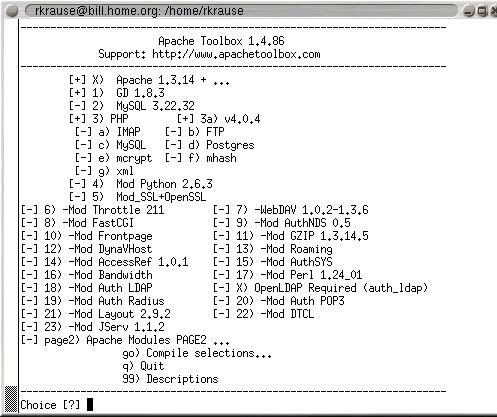
Figure 1. The Apache Toolbox's Configure Script Menu
Once you have made all of your selections, type go to start the build process. The first thing that the Toolbox does is warn you about any installed RPMs that conflict with the software it will install. You are given the option to continue the compilation process or to quit to remove the offending packages. If you quit to remove the offending RPMs, the Apache Toolbox remembers your settings when you restart it.
The Apache Toolbox uses wget to download any packages that it needs. If wget isn't installed on your machine, the Toolbox can download it, using Lynx, and install it for you. The FTP locations for all the modules are hard-coded in the install.sh script so you can verify them to ensure that you're getting legitimate files.
After the wget checks are performed, you are asked if you want to change Apache's default installation path. Following this question, the Apache tarball is uncompressed. If the program finds existing Apache source code in the www-src directory, you are given the option to back it up. Next, Apache is preconfigured based upon the selections that you have made.
Once that is done the selected modules are untarred, built and installed. If the script can't locate source code for a module, you are asked if it should be downloaded. The Apache Toolbox uses the installwatch library to log the results of the compile and the install process for each module to the logs directory.
If you have elected to install PHP, you are given the option of editing its configuration script. You can use the editor of your choice to edit the file, and the PHP build process continues when you are done.
Once all the modules have been compiled, you are given the option to modify the Apache configuration script. After that the Toolbox tailors the Apache Makefile for your module selections. Then you have to compile and install Apache by changing to the Apache source directory and typing make. If Apache compiles without error, then type make install to install it.
Because the Apache Toolbox uses the latest versions of Apache, PHP, etc., it is important to have a fairly recent Linux distribution. The first machine I attempted to use the Apache Toolbox on was an older one running SuSE 6.1 and the installwatch library and PHP wouldn't compile on it. I moved to a machine running Red Hat 6.2, and everything compiled without incident.
I had originally downloaded the large Apache Toolbox tarball complete with source code. When a newer version came out I just downloaded the small Apache Toolbox file and put the newer install.sh script in my existing www-src directory. Even though the newer script was supposed to use an updated version of PHP, it kept using the one installed by the older Apache Toolbox. Once I deleted the configuration file (config.cache) created by the earlier version of the Apache Toolbox the newer version of PHP was used.
While the Apache Toolbox automates the configure, compile and install process, you might have to do a few things by hand. Examples of this include modifying your configuration files to start Apache or changing the default MySQL password.
The Apache Toolbox menu and description pages are a few lines longer than what fits on a normal display, so you might have to scroll a bit to read everything. I also noticed that descriptions for some of the modules, such as mod_auth_radius and mod_auth_POP3, were missing from the descriptions page.
The Apache Toolbox automates the process of obtaining and compiling Apache and Apache modules. It verifies that your system has the prerequisites for running modules and warns about installed RPMs that conflict with the software that it is installing. Its simple menu interface makes it easy to configure Apache to use a wide variety of modules in different combinations. While it doesn't automate the entire process, it does take care of the most tedious tasks.


