PowerWindows for Linux
AppGen PowerWindows for Linux is an integrated suite of business applications for small to mid-sized Linux-based businesses. If you purchased their $9.95 US demo advertised in Linux Journal and elsewhere a while back, you may want to give it another look, as AppGen has significantly improved the Java runtime client. In this review I'm going to cover the installation of the provided demo application and discuss the potential advantages PowerWindows could provide you as an established or aspiring Linux consultant/VAR.
AppGen PowerWindows for Linux includes a CD-ROM, a one-page install sheet and three manuals: Installing and Configuring the Applications, Operator Orientation and Using the Applications.
My package was missing the first manual, so I contacted AppGen by e-mail, and they shipped out both this manual and an additional manual on open database connectivity (ODBC).
Installing and Configuring the Applications covers installation of the client/server installations for UNIX, Windows NT and Windows PC+.
The PC+ version of the software is a Microsoft Windows-based version that can run as standalone, peer-to-peer or client/server.
Installation instructions are fairly brief, particularly the set on UNIX installation. The demo version I'm using is slightly different than the full package, so I couldn't really tell if the install routine for the full package went as smoothly as the instructions imply. I'll detail the demo install below.
After installing the software, you will need to create a company. A demo company and data are provided, but you will need to go through and set things up for your, or your client's, company. Make no mistake, this is a big project. You need to make a lot of decisions on how you want things set up, and it's much easier and better to do this work up front than to go back and try to make changes once you're already using the system. The second chapter of the manual provides about 35 pages of instructions detailing the necessary steps to set up each module and how the respective modules will interface with each other. If you are setting up the package for a client, you should get all the affected departments involved in the process so the system can be set up in a manner most useful for everyone.
The third chapter provides technical information for system administrators. This information includes the AppGen data files structures, environment variables that effect the display of currency as well as date/time and database utilities for maintaining and repairing database files.
Operator Orientation takes you through the three different interfaces available: character-based GUI, client/server GUI and PC+. The PC+ interface instruction is only available with the PC+, peer-to-peer product.
For both of the GUI interfaces, all the instructional material assumes you are running a Microsoft Windows product. There is no mention of the Linux Java GUI or screenshots. The character-based interface is targeted for use with what they refer to as "low-cost" dumb terminals, but it can be used at the Linux console or in an xterm. (I don't know if you've priced dumb terminals lately, but with the plummeting price of PCs and with thin-client machines, these things aren't so cheap anymore.) I think I'd prefer to go with a diskless GUI client machine, like the one the LTSP project allows you to set up (www.ltsp.org).
Using the Applications gives an overview of the features for each application of the program, a few pages on the concepts involved, a flow diagram and text of how the application is tied together, as well as describes how it interconnects with the other package applications. Finally, it includes a few pages on typical schedules and procedures for the application you would modify based on your business practices. The applications include accounts receivable, accounts payable, general ledger, payroll processing, billing, bank reconciliation, sales order processing, inventory control, purchase order processing, job cost tracking and bill of materials (BOM).
The manual warns you it does not intend to teach accounting, manufacturing or distribution concepts, and this information is best learned elsewhere.
The ODBC manual describes the theory and installation of the AppGen ODBC server/driver. AppGen uses a two-tier setup with the UNIX-side ODBC server running on the AppGen server machine and a client-side ODBC driver that works in conjunction with the Microsoft ODBC driver manager to interface with any ODBC-aware Windows client software, such as Microsoft Access or Microsoft Query. If you are setting up the system for a client using primarily Microsoft-based desktop machines, this may be a good option to enhance the functionality of the product by allowing common desktop applications to pull up custom reports or spreadsheets for data analysis. I've used a similar approach in our material requirements planning (MRP) system at work, which is driven by OpenIngres, and it has eliminated a lot of manual data entry for folks wanting to manipulate or analyze system data outside of the system.
As root I mounted /dev/cdrom, and as the "Quick Start" sheet instructed I ran the setup program on the CD (Setup.sh). I was then asked for my initials, my desktop environment (GNOME or KDE) and the install directory. I opted for /opt/appgen rather than the default /usr/appgen. The CD has GNOME and KDE desktop links that point to a Java-based install (gojava), but that install fails on my system (Mandrake 6.0--more on this later).
The install failed upon creating the KDE link:
Setting up KDE ...
ln: cannot create symbolic link
´/opt/kde/share/applnk/Applications´
to ´/root/Desktop/PowerWindows.kdelnk´:
No such file or directory sh:
/opt/kde/bin/kfmclient: No such file or
directory Refresh Desktop
failed. You can do it manually later.
You can remove the cdrom now.
/mnt/cdrom/Setup.sh: line 1:  893 Broken pipe   dd
if=/mnt/cdrom/zAG_INIT        894 Done          | sh
I got around this by looking at /root/Desktop/PowerWindows.kdelink and seeing it was just a call to /opt/appgen/autoag:
[root@moe /root]# /opt/appgen/autoag
[root@moe /root]#
/opt/appgen/java/jre1.3/bin/i386/native_threads/java:
error in loading shared libraries:
/opt/appgen/java/jre1.3/lib/i386/native_threads/libhpi.so: symbol
sem_init, version GLIBC_2.1 not defined in file
libpthread.so.0 with link time reference
Hmm--not off to a good start. The README on the CD mentions the installation has been tested on Caldera eDesktop 2.4, Caldera eServer 2.3 and Red Hat 6.2 with the GNOME Desktop, and it should work equally well with other "brands" of Linux. I do have the required glibc v2.1 on my Mandrake system, but it doesn't seem that the included Java Runtime Environment (JRE) wants to work for me.
I did some more looking around and saw the AppGen executable in /opt/appgen/bin, so I modified autoag to call it instead of the Java client:
. /opt/appgen/.profile
#appgenjava
appgen
This at least got me into the text-based interface (see Figure 1).
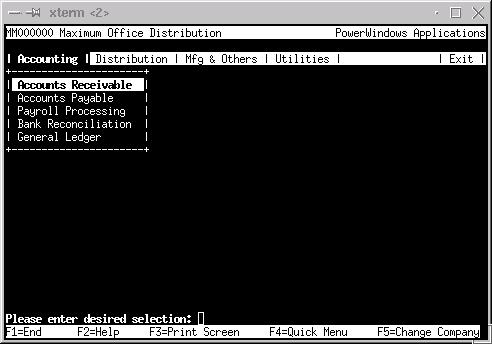
Figure 1. The PowerWindows Text-Based Interface
Determined to get the GUI working, I decided to try installation on SuSE 7.0. The README warned that the install expects the CD to be mounted in /mnt/cdrom, and since SuSE puts it in /cdrom, I made a symlink:
cd /mnt/cdrom
ln -s /cdrom cdrom
As root running X, I mounted the CD and clicked on the setup program. This time the GUI install worked (see Figure 2). I again chose /opt/appgen and proceeded with the install. When the install was finished, an AppGen icon was placed on the desktop, and I was informed the application was ready to run. I shut down X as root, then ran X as user "stew", and PowerWindows showed up as an application on my KDE menus (see Figure 3).

Figure 2. Success with the GUI Install!
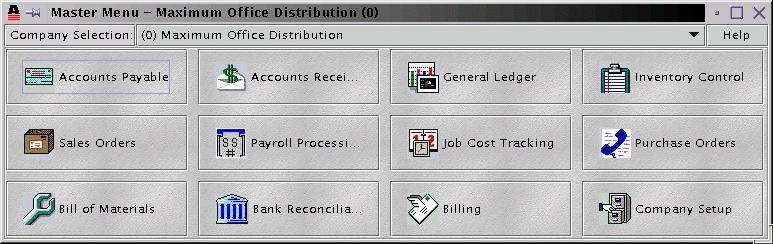
Figure 3. The PowerWindows Master Menu
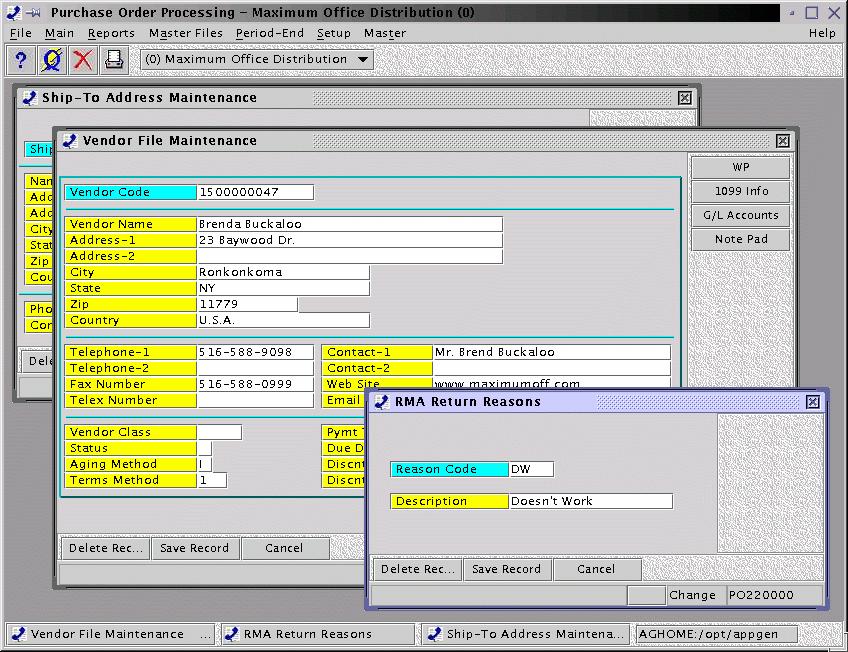
The GUI has a modern feel to it. It allows you to open separate windows for the various applications, so you can look at a financial at the same time you are reviewing a BOM, for instance. This has been an issue at times with our text-based system at work, as it requires opening another xterm and session, consuming another license for the software which may block another user from accessing the system. One minor annoyance: if you resize the window, the child windows that may open within it do not track with the parent window, and you may find you have information outside of scrollable reach. Your best bet is probably to leave the windows at their default size. I was running a 1024 x 768 desktop on SuSE, and there was not enough room to have two windows fully visible at one time, although they could be quickly accessed with Alt-Tab. It should be noted that within each application window you also have the ability to open multiple child windows. In addition to the application window, they are displayed on a bottom taskbar, as in Win9X (see Figure 4). If you try to exit the application without closing the child windows, you are warned that you must close them prior to exiting. Responsiveness of the GUI is a little slow on a P166 machine with 80MB RAM running X and KDE. The README recommends 128MB of RAM. I also found performance to be less than optimal displaying the GUI client on another machine running X from a Telnet session on the host machine. Perhaps that will improve as the Linux GUI matures.
Figure 4. PowerWindows Parent and Child Windows with Taskbar
PowerWindows has most of the typical reports you would want to see from this type of application, aging reports, BOM, vendor lists, payroll reports, etc. The reports are nothing fancy, but they do display the data nicely. The demo version I had for review did not allow actual printing, so I was unable to see how they looked on paper.
The help system uses HTML, a plus in my book. I did have to add an environment variable, AGBROWSER, to /opt/appgen/.profile:
AGBROWSER=/usr/X11R6/bin/netscape;export AGBROWSER
Once this was done, the on-line help came up in Netscape as expected. This should probably be wrapped in one of the Netscape wrapper scripts; otherwise it tries to launch another instance of Netscape when one is already running, instead of opening another window. Again, the demo version does not have extensive on-line help. There is also context-sensitive help when you are in a field on a data screen. Clicking on the "?" icon opens another window with a description of the field in question and possible options.
PowerWindows is much like the MRP system we use at work, although not quite as full featured. You do have the basic things needed to run a business: accounting, payroll, inventory control, job cost tracking and BOM. In the text-based client, you maneuver with the arrow keys, Tab, function keys, and the Return or Enter key. F1 or the word "End" backs you out of menus and screens (it would be nice to map this to the "End" key).
There were a couple of occasions where I got into a screen and was unable to get back out, and in one case I had to kill the session from another terminal. I can envision having to do this a lot in a manufacturing environment. The GUI client responds to the same keystrokes, as well as to the mouse, and it has icons to pull up Help, the Quick Menu and a screen dump.
As you would expect from this type of product, PowerWindows keeps track of who is accessing/modifying records and prevents two people from making changes at the same time. The second user trying to access the data is informed the record has already been opened by the first user. The second user is then offered the opportunity to open the record as read-only. The system does not notify you when the record again becomes available for editing.
PowerWindows uses a feature it calls Cross-Reference. In any screen dealing with codes (customer code, job code, etc.), you can type the first three letters of any word in the name and a pop-up will appear with the possible choices. You can also press F8 to get a list of choices.
AppGen PowerWindows is not a package you'll have up and running in an afternoon. It's a serious business-class package, and as such you will need to do some planning and involve the whole organization to get it set up and running. If you're a Linux consultant or VAR, PowerWindows may be a great avenue to expanding your business base. I chatted by e-mail with an AppGen VAR who told me AppGen requires all of their VARs to attend training courses on the software, and they also release source to their VARs. Consequently, there are a lot of custom add-ons and modifications in circulation within the AppGen VAR community. Some of these add-ons have expanded the package into areas such as MRP, POS and medical records, as well as native-language versions for those of you working with languages other than English. A single-user installation can run $1,500--2,500 US, while a 16-seat license can go for as much as $15,000 US. Retail pricing is set by the VARs. While this may sound like a lot of money to us free-software folks, it is pretty much in line with other applications of its class.
AppGen also provides multiple levels of VAR support, including training, help desk support, custom programming and sales support materials for advertising and trade shows. For those of you looking at getting started with AppGen development in Linux without dropping a lot of money, AppGen offers the Linux BAG (Business Applications Generator), a subset of their development package, at $99 US or $39 US for students.
As mentioned, I had a little trouble with the demo install on my older Mandrake distribution. It would have been nice if AppGen had included instructions or had enhanced the autoag script to fall back to text-based operation if the Java runtime failed. In addition, I'd like to see the documentation focus a little more on the Linux/UNIX side of things, or give equal coverage, at least. Those complaints aside, AppGen PowerWindows looks to be a solid offering and a welcome addition to the Linux application base. If you're looking for a Linux-based business solution or are interested in exploring opportunities in the VAR channel, it may pay to give PowerWindows a look.
Stew Benedict is a systems administrator for an automotive manufacturer in Cleveland, Ohio. He also is a freelance consultant, running AYS Enterprises and specializing in printed circuit design, database solutions and utilizing Linux as a low-cost alternative to commercial operating systems and software. Stew enjoys time with his wife, daughter and two dogs at his future (not too much longer) retirement home overlooking Norris Lake in the foothills of the Smokies in Tennessee.
email: ljeditors@ssc.com