
Checking Your Work with Scanners, Part I (of II): nmap
You may have heard horror stories about how easy it is for evil system crackers to probe potential victims' systems for vulnerabilities using software tools readily available on the Internet. The bad news is, these stories are generally true. The good news is, many of these tools are extremely useful (and even designed) for the legitimate purpose of scanning your own system for weaknesses.
This and next month's column will explore some of the ways ordinary system administrators and high-powered security professionals alike can use nmap and nessus, two outstanding open-source packages, to improve system security. But remember, knowledge is power, and it's up to you to use it responsibly (and in ways that won't compel any men in black to confiscate your beloved Red Hat boxen).
Why scan? If you're a system cracker, you scan to determine what services a system is running and to which well-known vulnerabilities those services appear to be subject. If you're a system administrator you scan for essentially the same reasons but in the interest of fixing (or at least understanding) your systems, not breaking into them.
It may sound odd for good guys to use the same tools as the bad guys they're trying to thwart. After all, we don't test our door locks by trying to kick in our own doors. But system security is exponentially more complicated than physical security. It's nowhere near as easy to gauge the relative security of a networked computer system as it is the door to your house. While ideally we should always know which network processes are active on every host we administer, the fact is that in this age of hyper-connectedness it's difficult to keep track of this information.
Therefore, we security-conscious geeks are obliged to take seriously any tool that can provide some sort of sanity check, even an incomplete and imperfect one (as is anything that tries to measure a moving target like system security), despite or even because of that tool's usefulness to the bad guys. However, we also need to remember that neither a security scanner nor any other single tool or technique will magically grant total security. Repeat after me: security is a process, not a product.
Having said all that, there's one more reason we dig security scanners: notoriety. It's fun to pretend to be a s00p3r 3L33T HaX0r. Using tools like nmap and nessus while saying with a straight face that we're “working” is priceless!
There are basically two types of system scans. Port scans look for open TCP and UDP ports, for “listening services”. Security scans go a step further and probe identified services for known weaknesses. In terms of sophistication, doing a port scan is like counting how many doors and windows a house has; running a security scan is more like rattling all the doorknobs and checking the windows for alarm-sensors.
Oh, I almost forgot ping sweeps, arguably a third kind of scan. These are done to identify which IPs in a given range or network are active (i.e., which hosts respond to pinging). While this can be useful depending on the task at hand, in the interests of keeping this month's column to a manageable level, I'll focus on single-system port and security scanning. Everything we discuss here applies whether you're scanning five hosts or 65,500.
The basic premise of port scanning is simple: if you try to connect to a given port, you can determine whether that port is closed/inactive or whether an application (i.e., web server, FTP dæmon, etc.) is accepting connections there. As it happens, it is easy to write a simple port-scanner that uses the local connect( ) system call to TCP connections on various ports; with the right modules, you can even do this with Perl. However, this method also happens to be the most obtrusive and obvious way to scan, and it tends to result in numerous log entries on one's target systems.
Enter nmap, by Fyodor. nmap can do simple connect( ) scans if you like, but its real thing is “stealth scanning”. Stealth scanning involves the use of ersatz TCP packets designed to trigger a response from each target system without actually completing a TCP connection.
nmap supports not one, but four different kinds of stealth scans in addition to TCP Connect scanning, UDP scanning, RPC scanning, ping sweeps and even operating system fingerprinting. It also boasts a number of features more useful to black-hat than white-hat hackers, such as FTP-bounce scanning, ACK scanning and Window firewall scanning, but those are of little interest to Linux Journal's highly ethical readers. In short, nmap is by far the most feature-rich and versatile port-scanner available today.
Here, then, is a summary of the most important types of scans nmap can do:
TCP Connect Scan—uses the OS's native connect( ) system call to attempt a full three-way TCP handshake (SYN, ACK-SYN, ACK) on each probed port. A failed connection (i.e., if the server replies to your SYN packet with an ACK-RST packet) indicates a closed port. It doesn't require root privileges and is one of the faster scanning methods. Not surprisingly, however, most server applications will log connections that are closed immediately after they're open, so this is a fairly “noisy” scan.
TCP SYN Scan—two-thirds of a TCP Connect scan; if the target returns an ACK-SYN packet, nmap immediately sends an RST packet rather than completing the handshake with an ACK packet. “Half-open” connections such as these are far less likely to be logged, so SYN scanning is much less perceptible than TCP Connect scanning. The trade-off is that since nmap, rather than the kernel, builds these packets, you must be root to run nmap in this mode.
TCP FIN Scan—rather than even pretending to initiate a standard TCP connection, nmap sends a single FIN (final) packet. If the target's TCP/IP stack is RFC-793-compliant (MS-anything, HP-UX, IRIX, MVS and Cisco IOS are not) then open ports will drop the packet and closed ports will send an RST.
TCP NULL Scan—similar to a FIN scan but instead a TCP-flagless packet (i.e., a null packet) is sent. Also relies on the RFC-793-compliant behavior described above.
TCP Xmas Tree Scan—similar to a FIN scan but instead sends a packet with its FIN, PSH and URG flags (final, push data and urgent, respectively) set. It also relies on the RFC-793-compliant behavior described above.
UDP Scan—because UDP is a connectionless protocol, i.e., there's no protocol-defined relationship between packets in either direction, UDP has no handshake to play with as in the TCP scans described above. However, most OS' TCP/IP stacks will return an ICMP “Port Unreachable” packet if a UDP packet is sent to a closed UDP port. Thus, a port that doesn't return an ICMP packet can be assumed open. Since neither the probe-packet nor its potential ICMP packet are guaranteed to arrive (remember, UDP is connectionless and so is ICMP) nmap will typically send several UDP packets per UDP probed port to reduce false positives. In my experience the accuracy of nmap's UDP scanning varies among target OSes, but it's better than nothing.
RPC Scan—used in conjunction with other scan types, this feature will cause nmap to attempt to determine which of the ports identified as open are hosting RPC (remote procedure call) services, and what those services and version numbers are.
Ping Scan (Sweep)—see “Types of Scans and Their Uses” above.
Whew! Quite a list of scanning methods—and I've left out ACK scans and Window scans (see the man page on nmap(1) if you're interested). nmap has another very useful feature, OS fingerprinting. Based on characteristics of a target's responses to various arcane packets that nmap sends, nmap can make an educated guess as to which operating system each target host is running.
So useful and popular is nmap that it is now included in most Linux distributions. Red Hat 7.0 and Debian 2.2, my two current flavors of choice, both come with nmap (under Applications/System and Extra/Net, respectively). Therefore, the easiest way for most Linux users to install nmap is via their system's package-manager (e.g., RPM, dselect, YAST) and preferred OS installation-medium (CD-ROM, FTP, etc.).
If, however, you want the very latest version of nmap and/or its source code, both are available from http://www.insecure.org/ (Fyodor's web site) in RPM and TGZ formats. Should you wish to compile nmap from source, simply download and expand the tarball, then enter these commands (allowing for any difference in the expanded source code's directory-name; nmap v2.53 may be obsolete by the time you read this):
cd nmap-2.53
./configure
make
make install
There are two different ways to run nmap. The most powerful and flexible way is via the command prompt. There is also a GUI called nmapfe, which constructs and executes an nmap for you (see Figure 1).
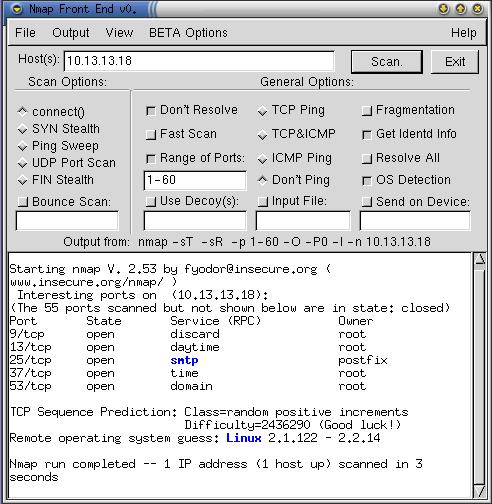
Figure 1. Sample nmapfe Session
This GUI is useful for quick-and-dirty scans or as an aid to learning nmap's command-line syntax. However, I strongly recommend learning nmap proper since the GUI presents only a subset of nmap's features. Besides, it's overkill to fire up X for little old nmap.
The nmap commands are easy to learn. The basic syntax for simple scans is: nmap -s (scan-type) -p (port-range options) (target). The -s flag is immediately followed by one of the following:
T: TCP Connect Scan
S: TCP SYN Scan
F: TCP FIN Scan
N: TCP NULL Scan
X: TCP Xmas Tree Scan
U: UDP Scan (can be combined with above)
R: RPC Scan (can be combined with above)
The -s flag, which specifies which type or types of scan to run, can be followed by any of the TCP scan-types, U for UDP scanning, R for RPC scanning/identification or any combination of these three groups of flags. Only one TCP scan-type may be specified in a given session, however. If the -s flag is omitted altogether, the default scan-type is TCP Connect.
For example, -sSUR tells nmap to perform a SYN scan, a UDP scan and finally an RPC scan/identification on the specified target(s). -sTSR would fail, however, since TCP Connect and TCP SYN are both TCP scans.
If you state a port range using the -p flag, you can combine commas and dashes to create a very specific group of ports to be scanned. For example, typing -p 20-23,80,53,600-1024 tells nmap to scan the ports 20 through 23, 80, 53 and 600-1024. Don't use any spaces in your port range, however.
Similarly, the “target” expression can be a hostname, a host IP address, a network IP address or a range of IP addresses. For example typing 192.168.17.* expands to all 255 IP addresses in the network—192.168.17.0/24 (in fact, you could use 192.168.17. 0/24 instead); 10.13.[1,2,4].* expands to 10.13.1.0/24, 10.13.2.0/24, and 10.13.4.0/24. As you can see, nmap is very flexible in the types of target expressions it can understand.
Before we go any further, let's examine some basic scans that use the flags we've discussed so far. The examples in this section all use nmap version 2.53 (the most current as of this writing) running on Red Hat 7.0. The target system in these examples is running Windows98 with Sambar web server installed and active for good measure.
First, suppose we want nmap to perform an “all-default” scan. We're not required to provide any flags if we don't want to; given nothing more than a target IP or IP expression, nmap will ping each target host and then scan it using the TCP Connect method on (destination) ports 0-1024 plus all other ports listed in /usr/share/nmap/nmap-services (your path to this file may vary), for a total of 1,523 TCP ports. Listing 1 shows what such an all-default scan looks like when run against a Windows98 system.
Listing 1. An “All-Defaults” nmap Scan
Note that it took only two seconds to query 1,523 ports. When I said the TCP Connect method is fast, I wasn't just whistling “Dixie”.
For our next example scan, suppose we want to add UDP to the mix, and while we're at it, we want to see if any of the open ports we find are running RPC applications. Since we want to do UDP port scanning in addition to, and not instead of, TCP Connect scanning, we'll need to say so explicitly. Our command and its input will look like Listing 2.
Listing 2. Nmap Scan Using TCP Connect, UDP and RPC Modes
The -sU and -sR scans (combined above in -sTUR) go particularly well together: RPC is a UDP-intensive protocol. When nmap finds an RPC service on an open port, it appends the RPC application's name in parentheses, including the version number if nmap can make a credible guess at one.
Suppose we're looking for something a bit more specific. This could be because we have some idea of what the host is running and/or we wish to minimize the scan time. To specify which ports we want to see, we append the -p flag along with a list of ports. Commas and dashes, but not white space, may be used in this list. Listing 3 shows a scan in which we check all privileged ports (1-1024) plus a few high ports we're worried about, namely TCP 12345 and 12346 (NetBus' default ports) and UDP 31337 (BackOrifice's default):
Listing 3. Scanning for TCP and UDP on Selected Ports
Finally, because it's so easy, let's do a scan on multiple hosts. The host expression nmap accepts is even more flexible than the port expression: wild cards, square brackets (lists) and “slash/subnet-bits” notation may be used. Here's what the command would look like to perform the scan in Listing 3 on my entire test network (254 addresses, output omitted this time):
nmap -sTU -p 1-1024,12345,12346,31336 10.13.13.0/24
nmap sports a frightening array of features designed to sneak through firewalls, avoid triggering intrusion-detection software and otherwise help the user evade detection. I feel no urge whatsoever to discuss those features here; while no doubt they have legitimate uses, I'd like to spend the remainder of this article on a few nifty features that are less obviously cracker-oriented.
Suppose you're the administrator of a large network and someone installs a server in your machine room that appears to be reachable from the Internet, in possible violation of your organization's security policy (and/or to your indignation since you weren't asked for permission). Before going on an authority-asserting rampage, you decide to first find out as much as you can about the possible risks to which your network has been exposed.
Luckily, the mystery server has an IP address scrawled on its front in purple crayon. Equally luckily, you're a righteous nmap angel of vengeance because you read “Paranoid Penguin” this month. Here are some nmap options to help you find out just what's going on.
First, what OS is this beast running? OS fingerprinting, summoned by the -O flag, may tell you. When you use -O, nmap sends packets with various TCP options set and compares the replies it receives with its OS fingerprinting database (/usr/share/nmap/nmap-os-fingerprints on my Red Hat 7.0 system). In my experience this feature works extremely well, except on MacOS 8 (which seems to stump it).
Next, are any of the active ports running services with root privileges? Obviously some services need this much privilege but many don't; if the web server on this box is running as root, someone is going to need talking to for sure. Use the -I flag to have nmap query the target's ident dæmon, whose sole purpose is to tell the world which user owns each listening service.
Can we minimize the chances an overly aggressive scan will overload the target system or the network? Oh yes. The -T flag allows us to specify a timing mode; the options are Paranoid, Sneaky, Polite, Normal, Aggressive and Insane, in increasing degree of network-unfriendliness (based on how long nmap waits between packets and whether it sends packets serially or in batches). -T Polite is a good choice if you want to go easy on your target and/or network.
How do we do a fast scan that checks for likely services without scanning all privileged ports? The -F flag tells nmap to scan only those ports listed in nmap-services. In this way, we avoid ports unlikely to yield anything interesting.
Finally, is there an easy way to save our evidence of lameness as a text file? Typing -oN filename tells nmap to write its results to a text file. If we want nmap to use HaX0r Sp3ll1ng, we can use -oS filename instead (“S” is for “Script-Kiddie-Talk”).
In Listing 4 we see the unauthorized server is accepting connections for, among other things, Secure Shell, Telnet, HTTP/SSL, LPD, X and nessus. nessus? Why, that's a security scanner. You definitely don't want internet hosts able to reach a nessus server on your network—that just happens to be the topic of next month's column.
Listing 4. Using Some Intermediate Features
As powerful as nmap is, nessus gives us a means of going a step further and probing all these listening-ports nmap has found for known weaknesses. Again, we'll focus on using these powerful tools for good rather than evil; in the meantime, I hope you'll do the same with nmap.


