
MOSIX: A Cluster Load-Balancing Solution for Linux
Software clustering technologies have been evolving for the past few years and are currently gaining a lot of momentum for several reasons. These reasons include the benefits of deploying commodity, off-the-shelf hardware (high-power PCs at low prices), using inexpensive high-speed networking such as fast Ethernet, as well as the resulting benefits of using Linux. Linux appears to be an excellent choice for its robust kernel, the flexibility it offers, the various networking features it supports and the early availability of its IP releases.
With the growth of the popularity of clustering technologies, we decided to start a project that aims at finding and prototyping the necessary technology to prove the feasibility of a clustered Linux internet server that demonstrates telecom-grade characteristics. Thus, a star was born, and it was called ARIES (advanced research on internet e-servers).
ARIES started at the Ericsson Core Unit of Research in January 2000, and its objective was to use the Linux kernel as the base technology and to rely on open-source software to build the desirable system with characteristics that include guaranteed availability and response time, linear scalability, high performance and the capability of maintaining the system without any impacts on its availability.
Traffic distribution and load balancing were two main areas of investigation. The strategy followed was to survey the open-source world, check the available solutions in those areas, test them and determine to what extent they meet our requirements for the targeted near telecom-grade Linux internet server.
This article covers our experience with MOSIX, a software package developed at the Hebrew University of Jerusalem. We expose the MOSIX technology, the algorithms developed and how they operate and describe how we installed MOSIX on an experimental Linux cluster. We also discuss MOSIX's strengths and weaknesses in order to help others decide if MOSIX is right for them.
MOSIX is a software package for Linux that transforms independent Linux machines into a cluster that works like a single system and performs load balancing for a particular process across the nodes of the cluster. MOSIX was designed to enhance the Linux kernel with cluster computing capabilities and to provide means for efficient management of the cluster-wide resources. It consists of kernel-level, adaptive resource sharing algorithms that are geared for high performance, overhead free scalability and ease of use of a scalable computing cluster.
The core of MOSIX is its capability to make multiple server nodes work cooperatively as if part of a single system. MOSIX's algorithms are designed to respond to variations in the resource usage among the nodes by migrating processes from one node to another, pre-emptively and transparently, for load balancing and to prevent memory exhaustion at any node. By doing so, MOSIX improves the overall performance by dynamically distributing and redistributing the workload and the resources among the nodes in the cluster.
MOSIX operates transparently to the applications and allows the execution of sequential and parallel applications without regard for where the processes are running or what other cluster users are doing.
Shortly after the creation of a new process, MOSIX attempts to assign it to the best available node at that time. MOSIX then continues to monitor the new process, as well as all the other processes, and will move it among the nodes to maximize the overall performance. This is done without changing the Linux interface, and users can continue to see (and control) their processes as if they run on their local node.
Users can monitor the process migration and memory usages on the nodes using QPS, a contributed program that is not part of MOSIX but supports MOSIX-specific fields. QPS is a visual process manager, an X11 version of “top” and “ps” that displays processes in a window and allows the user to sort and manipulate them. It supports special fields (see Figure 1) such as on which node a process was started, on which node it is currently running, the percentage of memory it is using and its current working directory.
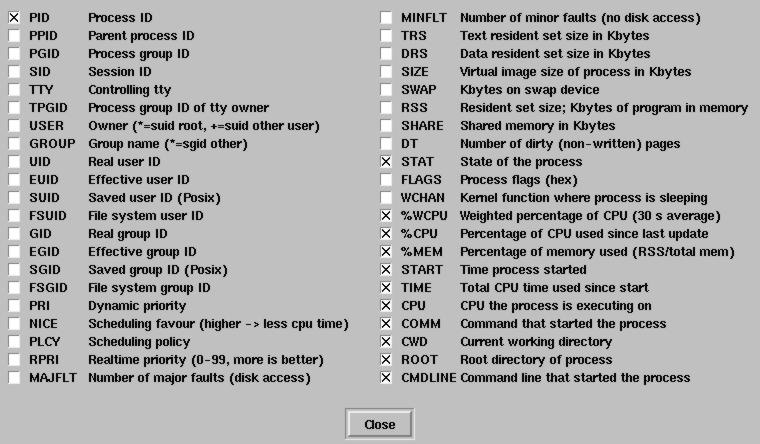
Figure 1. QPS Supported Fields
Since MOSIX's algorithms are decentralized, each node is both a master for processes that were created locally and a server for processes that migrated from other nodes. This implies that nodes can be added or removed from the cluster at any time, with minimal disturbances to the running processes.
MOSIX improves the overall performance by better utilizing the network-wide resources and by making the system easier to use. MOSIX's system image model is based on the home-node model. In this model, all the user's processes seem to run at the user's login-node. Each new process is created at the same node(s) as its parent process. Processes that have migrated interact with the user's environment through the user's home-node, but where possible, they use local resources. As long as the load of the user's login-node remains below a threshold value, all the user's processes are confined to that node. However, when this load rises above a threshold value, some processes may be migrated (transparently) to other nodes.
MOSIX schedules newly started programs in the node with the lowest current load. However, if the machine with the lowest load level announces itself to all the nodes in the cluster, then all the nodes will migrate newly started jobs to the node with the lowest load and soon enough this node will be overloaded. However, MOSIX does not operate in this manner. Instead, every node sends its current load status to a random list of nodes. This prevents a single node from being seen by all other nodes as the least busy and prevents any node from being overloaded.
How does MOSIX decide which node is the least busy among all the cluster nodes? This is a good question; however, the answer is a simple one.
MOSIX comes with its own monitoring algorithms that detect the speed of each node, its used and free memory, as well as IPC and I/O rates of each process. This information is used to make near optimal decisions on where to place the processes. The algorithms are very interesting because they try to reconcile different resources (bandwidth, memory and CPU cycles) based on economic principles and competitive analysis. Using this strategy, MOSIX converts the total usage of several heterogeneous resources, such as memory and CPU, into a single homogeneous cost. Jobs are then assigned to the machine where they have the lowest cost. This strategy provides a unified algorithm framework for allocation of computation, communication, memory and I/O resources. It also allows the development of near-optimal on-line algorithms for allocation and sharing these resources.
MOSIX uses its own filesystem, MFS, to make all the directories and regular files throughout a MOSIX cluster available from all nodes as if they were within a single filesystem. One of the advantages of MFS is that it provides cache consistency for files viewed from different nodes by maintaining one cache at the server disk node.
MFS meets the direct file system access (DFSA) standards, which extends the capability of a migrated process to perform some I/O operations locally, in the current node. This provision reduces the need of I/O-bound processes to communicate with their home-node, thus allowing such processes (as well as mixed I/O and CPU processes) to migrate more freely among the cluster's node, for load balancing and parallel file and I/O operations. This also allows parallel file access by proper distribution of files, where each process migrates to the node that has its files.
By meeting the DFSA provision, allowing the execution of system calls locally in the process' current node, MFS reduces the extra overhead of executing I/O-oriented system calls of a migrated process.
In order to test MOSIX, we set up the following environment: 1) a cabinet that consists of 13 Pentium-class CPU cards running at 233MHz with 256MB of RAM each; and 2) a Pentium-based server machine, PC1, running at 233MHz with 256MB of RAM. This machine was used as an NFS and DHCP/TFTP server for the 13 diskless CPUs.
When we start the CPUs, they boot from LAN and broadcast a DHCP request to all addresses on the network. PC1, the DHCP server, will be listening and will reply with a DHCP offer and will send the CPUs the information needed to configure network settings such as the IP addresses (one for each interface, eth0 and eth1), gateway, netmask, domain name, the IP address of the boot server (PC1) and the name of the boot file. The CPUs will then download and boot the specified boot file in the DHCP configuration file, which is a kernel image located under the /tftpboot directory on PC1. Next, the CPUs will download a ramdisk and start three web servers (Apache, Jigsaw and TomCat) and two streaming servers (Real System Server and IceCast Internet Radio).
For this setup, we used the Linux Kernel 2.2.14-5.0 that came with Red Hat 6.2. At the time we conducted this activity, MOSIX was not available for Red Hat; thus, we had to port MOSIX to work with the Red Hat kernel. Our plan was to prepare a MOSIX cluster that consists of the server, PC1 and the 13 diskless CPUs. For this reason, we needed to have a MOSIX-enabled kernel on the server, and we wanted to have the same MOSIX-enabled kernel image under the TFTP server directory to be downloaded and started by the CPUs at boot time. After porting MOSIX to Red Hat, we started the MOSIX modified installation script “mosix.install” that applied the patches to the 2.2.14-5.0 kernel tree on PC1.
Once we finished configuring the kernel and enabling the MOSIX features (using $make xconfig), we compiled it to get a kernel image:
cd /usr/src/linux
make clean ; make dep ;
modules_install
Next, we copied the new kernel image from /usr/src/linux/arch/i386/boot to /boot and we updated the System.map file:
cp /usr/src/linux/arch/i386/boot/bzImage
cp /usr/src/linux/arch/i386/boot/System.map
ln /boot/System.map.mosix /boot/System.map
One of the configuration files that was modified was lilo.conf. We added a new entry for the MOSIX kernel to make the server boot as a MOSIX node by default. The updated lilo.conf on PC1 looked like Listing 1.
Listing 1. A MOSIX-Modified lilo.conf.
Having done that, we needed to complete the configuration steps. In /etc/profile, we added one line to specify the number of nodes in the MOSIX cluster:
# Add to /etc/profile NODES=1-14
We created /etc/mosix.map that allows the local MOSIX node to see all other MOSIX nodes. The mosix.map looked as follows:
# Starting node  IP         Number of Nodes
1                x.x.x.x    13
14               y.y.y.y    1
We created the /mfs directory to be used as a mount point for the MOSIX filesystem. We added mosix.o to /lib/modules/2.2.14-5.0/misc/ so it can be loaded at boot time by the MOSIX startup file. Then we applied the same modifications to the ramdisk that will be downloaded by the diskless CPUs at boot time.
Once we completed these steps, we rebooted PC1, and when it was up and running, we rebooted the diskless CPUs. After reboot, the diskless CPUs received their IP addresses, booted with the MOSIX-enabled kernel, and downloaded the ramdisk using the TFTP protocol. Et voilà! All 14 nodes mounted /mfs as the MOSIX filesystem directory. Figure 2 shows a snapshot of /mfs on CPU10.

Figure 2. MFS Mount Point on CPU10
After starting the 14 nodes as a MOSIX cluster, we wanted to test our installation. By default, all the diskless CPUs mount an NFS directory on PC1. So we placed the Linux kernel 2.2.14 source code directory under that NFS space, making it visible to all nodes, and we started the kernel compilation process using MExec/MPMake, the parallel make, a contributed software that assigns new processes to the best available cluster nodes (available for download from MOSIX web site).
Figures 3, 4, 5 and 6 show snapshots of mon, a MOSIX tool that shows the load on all the nodes. As Figure 3 shows, there was a high load on node 14 because it was the node on which the compilation started. A few seconds later, Figures 4 and 5 show less load on CPU 14, and then Figure 6 shows a good distribution of the load among all the nodes.


Figure 3, 4, 5 and 6. MOSIX at Work Distributing Loads

Scalability
MOSIX supports configurations with large numbers of computers with minimal scaling overheads to impair the performance. You can have a simple low-end setup composed of several PCs connected via Ethernet, on the other hand, you can have larger configurations that include workstations and servers connected via higher speed LANs such as fast Ethernet. A high-end configuration may also include a large number of SMP and non-SMP workstations and servers connected via a high-performance LAN such as Gigabit-Ethernet.
Our last experiment will include testing MOSIX on a new self-contained NEBS-compliant cabinet that consists of 16 Pentium III processors powered with 512MB of RAM and running at 500MHz. Each CPU has two on-board Ethernet ports and is also paired with a four-port ZNYX Ethernet card (used to provide Ethernet redundancy). Eight of the CPUs have a RAID setup (RAID 0 and RAID 5) with three 18GB SCSI disks.
MOSIX for Linux is subject to the GNU General Public License version 2, as published by the Free Software Foundation. It is available for download from the MOSIX web site (see Resources).
MOSIX allows us to do an uninstall and clean up the kernel source it modified. During the initial installation, mosix.install modifies the following system configuration files: /etc/inittab, /etc/inetd.conf, /etc/lilo.conf, /etc/rc.d/init.d/atd and /etc/cron.daily/slocate.cron.
The original contents of these files are saved with the .pre_mosix extension and the changes made to kernel files are logged to the mos_uninstall.log file in the kernel-source directory. To uninstall MOSIX, you run the command ./mosix.install uninstall and answer the questions. When you are asked if you want to clean the Linux kernel sources, answer “yes”. The script will then attempt to revert all the changes that were made during a previous MOSIX installation. At the end you need to reboot the node so start it as a plain Linux node.
Clustering offers several advantages that result in sharing the processing and the ability to achieve higher performance. If you are interested in clustering your servers with efficient load-balancing software and you need support for high performance, then MOSIX can certainly be useful for you. It is easy to install and configure, and it works.
However, our initial interest with MOSIX was to understand its algorithms and investigate the possibility of using it for efficient distribution of web traffic over multiple processors. We found that MOSIX is not directly suitable for the type of functionality we want for a near telecom-internet server that we are aiming to prototype, mainly because it is missing a front-end tool for transaction-oriented load balancing such as the HTTP requests.
There have been many requests to the MOSIX mailing list asking about HTTP traffic distribution with MOSIX. I believe that if the authors would add this functionality to MOSIX, MOSIX will be one of the most popular software packages for Linux clusters.
The Systems Research Department at Ericsson Research Canada for providing the facilities and equipment as well as approving the publication of this article. Marc Chatel, Ericsson Research Canada, for his help and support in the lab.

Evangeline Paquin (lmcevpa@lmc.ericsson.se) is a computer science student at UQAM University in Montréal. She completed her coop training at Ericsson Research Canada working on Linux clustering solutions, and currently she is a part-time staff member in the System Research Department.

