
Using Python to Query MySQL over the Net
Recently, I became the owner of more than a thousand records of Go (an ancient oriental strategic board game) games played by professional or amateur players. All the games were stored in Smart Game Format (SGF), which is a text-based format designed to keep records of board games for two players. Naturally, I made them available to other players through my web page.
To make searching through the archive easier, I first used an HTML form with only one text input field. The user could enter a string (for example, a player name) that was passed to a Python CGI script which, in turn, invoked good old grep to find the matching files, as shown in Figure 1. But this is a crude way of finding information. For instance, it can be used to find all the games played by a certain player but not to find more complicated things, such as all the games that player played with black stones or all the games won by that player in 1995.

Figure 1. The Old, Crude Searching Method
In order to make a better search engine, I had to use a different approach. First, the database should describe the collection of game files. Then, a multiple input field form should be created to allow the user to search for various pieces of information at the same time. Finally, there should be a way to set up communication between the browser and database server, in order to make the result of the database query available to the user as an HTML document. Thus, the whole search would be performed as mapped in Figure 2.

Figure 2. A More Elegant Search Method
I chose MySQL 3.22.32 as the database and Python 1.5.2 for CGI scripting. I have played with Perl but prefer the feel of Python. The installation procedure for these programs has been explained already in many articles and will not be covered here. The reader should check the web sites in Resources for further details concerning installation. Communication between MySQL and Python is handled by a contributed module, presented below.
Python makes MySQL queries through a special module designed by Joerg Senekowitsch. Of course, several other modules are available on the Net, but MySQLmodule1.4 was easy to install and learn, and it worked very well for me. On some systems (like FreeBSD) it is possible to install this module at the same time as Python. On my Slackware 7.1 Linux, I had to build and install it as a dynamically loadable module. This is a three-step procedure: untar the MySQLmodule archive, compile the shared module and install the module somewhere in Python's library path.
Step one is fairly simple. As root, one would type:
myhost:~# tar xvzf MySQLmodule-1.4.tar.gz
A new directory named MySQLmodule-1.4/ will be created with several files, the most important of which are MySQLmodule.c (the source for the module to be compiled) and README (a file with installation and use information).
There are several tricky things about step two. For instance, one must know precisely where the libraries and include files for MySQL and Python can be found. On my system, MySQL 3.22.32 places the mysqlclient library in /usr/lib/mysql and the mysql.h include file in /usr/include/mysql. Python libraries can be found in /usr/lib/python1.5/config and the include file in /usr/include/python1.5. The command to compile MySQLmodule is:
myhost:~# gcc -shared -I/usr/include/mysql MySQLmodule.so
Another hint: the order of items in the above command line is important and must not be changed! Believe me, this is a hard-learned truth.
Step three consists of copying MySQLmodule.so to a directory where it can be found by Python at runtime. For Python 1.5 this could be /usr/lib/python1.5/lib-dynload, where other shared object files also reside. With Python 2.0 (which I also tested) I would recommend using the directory /usr/lib/python2.0/site-packages/.
Once the module is installed, it should be available from Python. It is a good idea to check this right away with a simple import statement such as:
myhost:~$ python
Python 1.5.2 (#1, May 28 2000, 18:04:10)
Copyright 1991-1995 Stichting Matematisch Centrum,
Amsterdam
>>> import MySQL
>>>
If Python doesn't complain with an error message, chances are the MySQL module is properly installed and working.
The user should be able to search the database for several items like the tournament name, the black and white player names, the date of the game (at least the year) and also the winner of the game. All this information is available in the SGF files along with the actual game record.
So, I wrote the HTML document shown in Listing 1. Yes, I like to write HTML by hand, and there is no need for anything more complicated. Of course, “myhost” has to be replaced with the actual hostname of the web server. The reader will also notice the HTML form acts by calling the CGI script named search.py once the submit button is clicked. The appearance of the document loaded by Netscape is shown in Figure 3.

Figure 3. Document as Loaded in Netscape
Each item in the HTML form has to be described in the database. To this end, I created a new database to store the tables. This is done as root, by typing:
myhost:~# mysqladmin create igo
where igo is the new database name. This is not enough though, because only root will have access to the new database. To grant only SELECT privileges to all users for the new database, root has to type:
myhost:~# mysql mysql
mysql> insert into db values (
'%','igo','','Y','N', 'N', 'N', 'N','N','N', 'N',
     'N', 'N');
This changes the table database in the MySQL internal database by
adding an entry for the igo database. Then, the MySQL dæmon
has to be restarted or the command mysql> flush
privileges; has to be typed so that the MySQL dæmon
becomes aware of the privilege change.
Now all users should be able to access data in database igo, but only root can change the data.
Creating the tables (one for each tournament) was easy. For instance, a table named gosei, for the tournament Gosei, was made with the following commands:
myhost:~# mysql igo
mysql> create table gosei (
        black varchar(30),
        white varchar(30),
        dt date,
        rez varchar(30),
        fname varchar(30),
        ;
Query OK, 0 rows affected, (0.00 sec)
mysql>
The table has five columns: black player's name, white player's name, the date of the game, the result and finally, the corresponding SGF file name.
Loading the data in the table is another matter. I suppose one way would be to type:
mysql> insert into gosei values ('Cho Chikun', 'Kato Masao', '1987-07-03', 'B+3.5', 'gosei87_1.sgf' );
but I'd rather learn a new programming language than enter that a thousand times. Fortunately, there is another way of loading data in a MySQL table—from a text file. Each row in the file matches a row in the table, and the fields are separated by white spaces, as shown in Table 1.
Table 1. Text to Be Loaded to MySQL Table
Suppose this file is also named gosei. To pass the data to a MySQL table, one would write
mysql> load data infile "gosei" into table gosei;
Then a query result should look like Table 2.
Table 2. Loading from a Text File
The reader might ask “Okay, but isn't making a huge text file another burden?” Actually, that's an easy task for yet another small Python script (that I will not show, because it's not directly related to our topic).
With the igo database created and the tables loaded with data, there was only one thing left to be done: write the Python CGI script that would take input from the user via the HTML form, query the database and produce a list of matching game files.
This program, named search.py is presented in Listing 2 [at the LJ ftp site]. It makes use of two great modules imported in the third and fourth lines. The CGI module is almost like magic: it just gets the data submitted by the HTML form as a Python dictionary. The programmer does not need to be concerned with details like the method (GET or POST) used to send form data to the CGI script. Don't you love Python?
The MySQL module is also easy to use. With four simple statements, it opens the connection to the desired database, sends the query, gets the results and stores them in a list of row lists (a Python list whose members each contain one row).
The script has the following structure: getting the HTML form data, creating the database query string according to the form data and querying a table and printing the matching results.
Since there is one for each Go tournament, step three is repeated through a for loop as many times as necessary. The Python code and the appended comments are rather self-explanatory, so I will only comment on the lines:
print '<li><a href="http://myhost' + \
'/cgi-bin/getsgf.py?file=' + e[0] + '">'
print e[0] + '</a>'
Here, e[0] is an SGF file name. Instead of merely printing the filename (which would be of limited help to the user), the print statements create an HTML anchor that sends the filename to the CGI script getsgf.py. This last script (which for the sake of simplicity will not be shown here) searches for the actual path to the SGF file and starts a Java applet to display the contents of the file in a nice, graphical way.
Of course, both search.py and getsgf.py must be made executable and moved to the cgi-bin directory. Also, a final trap to avoid: all the SGF game files must be placed somewhere within the DocumentRoot directory (as defined in httpd configuration files) in order to be found by a CGI script.
The result of running search.py is displayed in Figure 4 as seen by the user. Clicking on each filename starts the applet shown in Figure 5, which gradually displays the moves of the game.
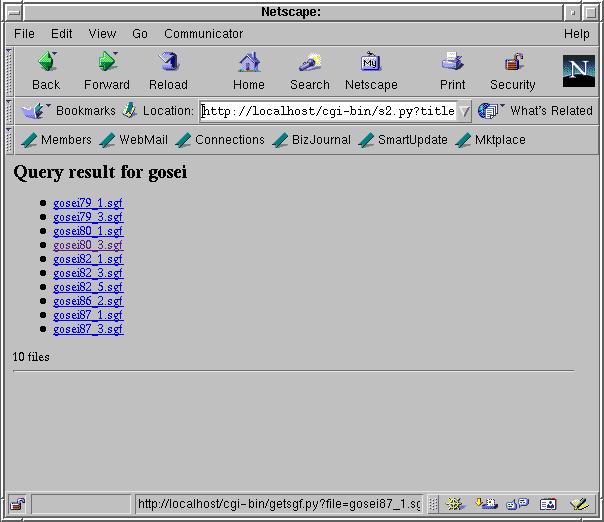
Figure 4. search.py Results
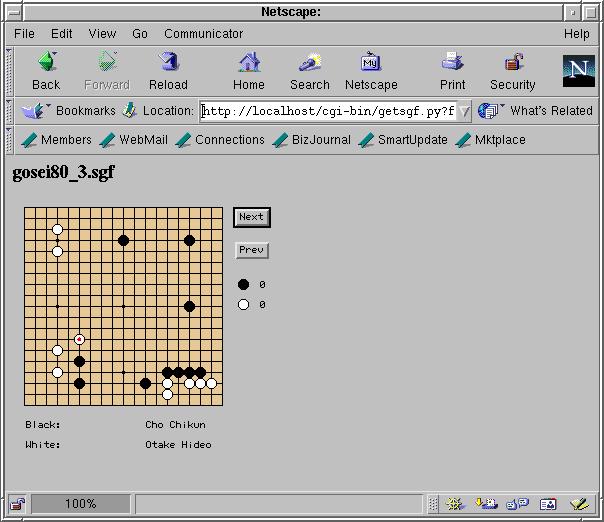
Figure 5. gose:80_3.sgf Applet
Python is a wonderful language. The MySQL module makes it easy to create small programs to retrieve data from a MySQL database. Python is also great for CGI scripting. Thus, having a database available to study through the web browser is just several lines of code away.
The application I have shown here is rather limited. The user can only search for five variables and in a fixed way, predetermined by the HTML form. However, it is conceivable for the user to write his or her own database queries through a textarea input field and view the query results on-line. In fact, the possibilities are limited only by the programmer's imagination.


