
Breaking through the Maximum Process Number
Process management is the most import part of an operating system. Its design and implementation can greatly affect performance. In a multiprocess OS, many processes run simultaneously, thus increasing the CPU usage and system performance. By running processes concurrently, we provide multiple services and serve more clients at the same time, which is the main task of a modern OS.
In the Linux Intel i386 architecture, multiprocess is already supported. By choosing proper process scheduling algorithms, it has lower average response time and relatively high system performance. But unfortunately, there is a limitation in the Linux kernel 2.2.x that limits the number of running processes to 4090. This number may be enough for a desktop system but is inadequate for an enterprise server.
Consider the basic principle of a typical web server, which is based on multiprocess/multithread technology. When a client request comes, the web server creates a child process or thread to handle the request. So it is easy for a heavy load server to have thousands of processes running. In fact, most of such enterprise servers run operating systems like Solaris, AIX, HP-UX, etc., rather than Linux.
Many Linux developers have noticed this problem and have tried to solve it. In experimental version 2.3.x and prerelease 2.4, this limitation has been dealt with. But, it will still be a while before the official release of 2.4, and it may take even longer for it to be stable. Does this mean we have to choose another OS? Is it possible to find a solution that can break through that limitation for Linux 2.2.x? In order to answer this question, first we have to know how process management in 2.2.x works.
Process management is tightly bound with memory management. Since the implementation of memory management is based on hardware architecture, we have to have a look at the i386 architecture first. In modern operating systems, virtual memory technology is widely employed. Thanks to virtual memory technology, software can use more memory than is physically present. That is to say, the memory addresses used by software are virtual and are converted to real address by processor-provided mechanisms during access.
There are two basic memory management methods: segmentation and paging. Segmentation means dividing memory into several segments and accessing memory by both segment pointer and offset. This method is used in early systems like PDP-11, etc. Paging means dividing memory into several fixed-size pages and using pages as the basic memory management unit. When accessing memory, an address is converted to a physical address according to the page table.
Memory management in the i386 architecture is called segmentation with paging. The virtual address space is divided into segments first by using two tables: the Global Descriptor Table (GDT) and Local Descriptor Table (LDT). After this, the virtual address is converted to a linear address. Then the linear address is converted to a physical address using two-level page tables: the Page Directory Table and Page Table. Figure 1 shows how the virtual address has been converted to a real address.

Figure 1. Virtual Address Convert

Figure 2. Global Descriptor Table
In Linux, the kernel runs in ring 0. By setting GDT, the kernel puts its code and data into a separate address space. All other programs run in ring 3 with their data and code in the same address space. Creating different page tables protects those user programs. The GDT table in Linux 2.2.x is shown below in Figure 2. In practice, a user program can use other code/data segments by setting LDT.
A process is a running program with all resources allocated. It is a dynamic concept. In the i386 architecture, “task” is an alternative name for process. For convenience, here we will use process only. Process management is a concept concerned with system initialization, process creation and destruction, scheduling, interprocess communication, etc. In Linux, process is actually a group of data structures including the context of process, scheduling data, semaphores, process queue, process id, time, signals, etc. This group of data is called Process Control Block or PCB. In implementation, PCB is in the bottom of the process stack.
Process management in Linux relies greatly on the hardware architecture. We have just discussed the basis of page-with-segment memory management in i386, but in fact, segment plays a more important role than just a block of memory. For example, Task Status Segment is one of the most important segments in i386. It contains much data that is required by the system. Each process must have a TSS pointed by TR register. According to the definition of i386, the selector in TR must select a descriptor in GDT. Additionally, the selector in LDTR, which defines a process LDT, must have a corresponding entry in GDT as well.
In order to satisfy the above requirements, Linux 2.2.x GDT is allocated for all possible processes. The maximum concurrent process number is defined when booting the kernel. The kernel reserves 2 GDT entries for each process.
In Linux 2.2.x, some process-management-concerned data structures are initialized when booting the system. The most important of these are GDT and the process list.
When the kernel starts, it must decide the size of GDT. Since two GDT entries must be kept in GDT for each process, the size of GDT is defined by the maximum concurrent process number. In Linux, this number is defined as NR_TASKS at compile time. According to Figure 2, the size of GDT is 10+2(with APM)+NR_TASKS*2.
The process list is actually an array of PCB pointers, defined below:
Struct task_struct *task[NR_TASKS] = {&init_task,};
In the above line, init_task is the PCB of the root process. After inserting this process into the process list, the process management mechanism can begin its work. Note the size of process list is also dependant on NR_TASKS.
In Linux 2.2.x process is created by a system call, fork. The new process is the child process of the original process. Using a clone can create a thread, which is actually a lightweight process. In fact, there is no real thread in Linux 2.2.x. Figure 3 shows how the fork system call works.
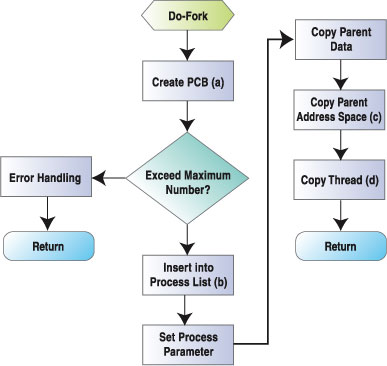
Figure 3. Fork System Call
The key steps in fork are:
Create the new process PCB: the kernel allocates two pages for the new process stack, and the PCB is put at the bottom of it.
Insert the new process into the process list: the kernel must find a empty entry from the process list. If the system has reached the maximum concurrent process limit, no empty entry will be found and the system call fails.
Copy parent address space: the child process has its own address space, but first it shares address space with its parent using copy-on-write mechanism. The corresponding GDT descriptor of the new process LDT is also created in this step.
Setting TSS for new process: the TSS of the new process is created in PCB and the corresponding GDT descriptor is also created.
The core of scheduling is the algorithm listed below. But here we just take a look at process switching. In Linux 2.2.x process switch is done in the switch_to function. It works like this:
load new TSS by setting TR
save old FS and GS registers into old PCB
load LDT if needed by new process
load new page tables for new process
load new process FS and GS
Note that the value of TR and LDTR are coming from PCB.
What is the maximum process number restriction? According to the above discussion, we can easily find why there is a maximum process number restriction. The NR_TASKS defined in Linux 2.2.x statically defines the maximum concurrent process number at the compile time. NR_TASKS also defined the size of GDT at compile time. As defined in i386 architecture, the maximum size of GDT is 8192*8 bytes, which means it can contain 8,192 descriptors. In Linux 2.2.x, when booting the kernel, GDT is used as described below:
NULL descriptor (entry 0), reserved descriptor (entry 1,6,7)
Kernel code and data descriptors (entry 2,3) and user code and data descriptors (entry 4,5)
APM BIOS descriptors (entry 8-11)
In total, 12 entries are used. And since each process needs two GDT entries, in theory we can get (8192 -12)/2 = 4090 processes running concurrently.
Although GDT size is restricted by hardware, we still can find a solution for this problem. For one CPU, only one process can be running at a certain time. That is to say, it is not necessary to reserve GDT descriptors for all possible processes at all. When a process is about to run, we set its descriptors dynamically.
After analyzing the PCB structure, we can find the TSS and LDT (if any) in it. So when doing a process switch, we can find these two segments by PCB pointer, like this:
TSS: proc->tss
LDT:proc->mm->segments
In fact, when doing a process switch, we can find the PCB pointer from the process list. Since both TSS and LDT can be found, keeping them in GDT at all times is unnecessary.
Our solution is to reserve only two GDT descriptors for each CPU, using common entries for all processes. For example, in a machine with two CPUs, four GDT entries are reserved. When process A will run on CPU1, GDT entry three and four will be set to the descriptor of TSS and LDT of process A. Old values of these entries are discarded. Remaining GDT entries are used just the same as the original system.
The basis of our solution is to set the process TSS and LDT descriptor dynamically (see Listing 1).
In the original design, when doing the fork operation, the tss.ldt and tss.tr in PCB are used to save selectors in LDTR and TR. According to the original algorithm, the selector of the LDT of a process may exceed its 16-bit limit. So we use extra variable tss.__ldth with tss.ldt to save the selector. Since tss.__ldth is not used in Linux 2.2.x, our modification won't break the kernel. The saving of LDTR and TR now works like this:
((unsigned long *) & (p->tss.ldt)) =
   (unsigned long)_LDT(nr);
if (*((unsigned long *) & (p->tss.ldt)) <
   (unsignedlong)(8192<< 3)
        set_ldt_desc(nr,ldt, LDT_ENTRIES);
        // original code here else{
        //do nothing
        //let the process switch code handle LDT
        //and TSS
}
One of the benefits of this implementation is that we can easily discover if this process number is greater than 4088 by inspecting the value of tss.ldt. This is important for performance.
If a process number is greater than 4,088, it has no reserved descriptor in GDT and must use the shared GDT entries. We can find these entries by this code:
SHARED_TSS_ENTRY + smp_processor_id();
Listing 2 shows the code for dealing with the shared GDT entries.
Listing 2. Using Shared GOT Entries
After doing these, we have broken through the maximum process number restriction. We can even add an extra parameter in the lilo configuration file to set this number dynamically. The following line will set the maximum process number to 40,000, which is much greater than 4,090:
Append = "nrtasks=40000"
According to the above solution, we can set the upper limit of concurrent process number to 2G, in theory. But in practice, hardware and OS still limit this number. When creating a new process, the kernel will allocate memory for it, like this:
Process stack (2 pages) + page table (1 page)
+ page directory table (1 page) = 4 pages
So if the computer has 1G memory and uses five pages per process where the OS uses 20M of memory, the maximum process number can be:
(1G - 20M) / 20K = 51404 ~= 50,000More practically, a process will use 30K memory at least, so the number now is:
50000 * (2/3) = 33,000This number is still much greater than 4,090.


