
Maragda: Running Linux from CD
The project described here is further proof that Linux is a powerful and versatile system.
My college has several trolleys that carry a computer (PC) and a VCR, and both are connected to a video projector. They have so many users that it's difficult to keep them working properly. This is especially true in the case of the computer; you can't ever be sure what software you will find on the hard disk.
I decided to use the projectors in the introductory programming course to show my students source C programs and how to run them step-by-step. I, of course, wanted to use Linux and its programming tools so that my students learn that Windows is not the only choice.
In this situation, I came to the conclusion that I needed some sort of portable Linux system, and I didn't want to use my notebook in the classroom.
My first idea was to try installing Linux on an Iomega Zip 250MB drive for parallel ports. After a few days of work I achieved it. It needs a floppy to boot the system, and the run speed is not too bad. Then I repeated the task, this time installing Linux on an IDE hard disk contained in the IDE box adapter for parallel ports. This configuration removes the limitation of 250MB disk space and speeds up the running of Linux.
From the lessons learned from these tasks, I asked myself, why not run Linux from a CD-ROM? That would be convenient and easier to use. In addition, students could use it to start learning Linux without having to install it on their computers. And so Maragda was born.
The final product is a bootable CD-ROM, so you must configure your BIOS to boot from the CD drive. If your BIOS doesn't support this, there is a solution: a bootable floppy that will also boot Linux from the CD. In fact, a raw image of the floppy is what the CD contains to boot itself.
The Linux software on the CD is installed from the Red Hat 6.2 distribution, and I prepared two arrangements. The first one is a full installation. It contains the base system, printer support, the X Window System, the VGA16 and framebuffer X servers, GNOME (or you can edit .xinitrc and uncomment the line for the window manager you like the most), network server workstation, authoring and publishing tools (LaTeX, etc.), Emacs, development tools (make, egcs, etc.), DOS/Windows connectivity, mail, WWW and news tools, and other packages such as rhide, ssh support and the JDK 1.2.
The second arrangement, which I call Maragda Teaching, is only equipped with part of the packages of the base system and X (to use fvwm2), with the complete development tools and other tools such as gv and rhide.
Full Maragda requires at least 64MB of RAM, while Maragda Teaching (and its tools) runs with only 32MB. There's a second arrangement of full Maragda that runs with 32MB but does not include room for tools such as Emacs or Netscape, which require more memory.
In both cases, the same kernel is used. It is version 2.2.14, and it supports (among other things) the network, the framebuffer device, the loop-back device, RAM disk and initial RAM disk.
One of the problems of any system intended for portability is how to adapt to different hardware. At the very least, the mouse and video (X) must be configured, and then the passwords, network identity and others. In the case of Maragda, it should be remembered that no change survives one session because the files on the CD are read-only.
Full Maragda is configured by default to support a PS2 mouse and the framebuffer device for video with a depth of 32. Network uses the driver 3c59x (a 3Com card) with identity maragda.gnd.upv.es (192.168.0.1).
However, full Maragda has an open door that allows you to decide on the configuration yourself. Just after the main file systems are mounted, the boot process stops and asks for an ext2 formatted floppy. Every file on the floppy will be merged into the system before the programs and d<\#230>mons are started.
Which files should be on the floppy? Consider the following list as a guide:
/etc/passwd/etc/shadow/etc/hosts/etc/hosts.allow/etc/hosts.deny/etc/resolv.conf/etc/HOSTNAME/etc/sysconfig/network-scripts/ifcfg-eth0/etc/sysconfig/network/etc/X11/XF86Config/etc/X11/X/etc/conf.modules
If you know nothing about these files or other configuration files, there is still hope for you. You must continue the boot and log in as root (I hope this will always be possible). The CD will be mounted in /mnt/cdrom. In /mnt/cdrom/system/config-touch you will find two scripts. Running Touch_all will touch all the files in the system. Then run the configuration tool you need (setup, xconfigurator or control-panel in X). Finally, run Find_newer. It will find the files updated by the configuration, and it will copy them to a directory named config in the current directory. Put the files on a floppy and you are done.
The configuration of Maragda Teaching is restricted. It does not ask for a floppy, and prompts you to choose one of four configurations already on the system:
PS2 mouse and frame buffer
serial mouse and frame buffer
PS2 mouse and vga
serial mouse and vga
In future versions of Maragda, I plan to detect the environment where Maragda is booting and auto configure it.
There are three things to do:
Prepare a software installation containing all the packages you want on Maragda; we'll call it source installation.
Distribute the source installation between two big files, ROOT.FS and WHOLE.FS; they both should fit inside an ext2 file system.
Develop a boot mechanism in charge of detecting the CD-ROM drive and locating ROOT.FS on it. Then, it should load ROOT.FS as a RAM disk, preparing it to be the root file system, and finally it should leave the boot process to continue on the root file system.
All the necessary pieces that do the work (mainly shell scripts) are arranged into two working directories:
boot: in charge of developing the boot mechanism
system: contains the tools to create ROOT.FS and WHOLE.FS from the source installation
I should mention that, perhaps, some device files (files under /dev) might not be correct due to the copy from an ext2 file system to a CD file system (iso9660). In this case, you should replace those files by the corresponding /dev files from your system.
Now, let's outline the relevant steps in the building process and describe the purpose of each shell script as well as the main configuration files. Minor details are left out of the explanation; if you decide to build your own Maragda-like system, you should consult doc/developer.html on the CD and carefully read each shell script on the working directories.
Figure 1 shows the main steps to be taken in the boot process.
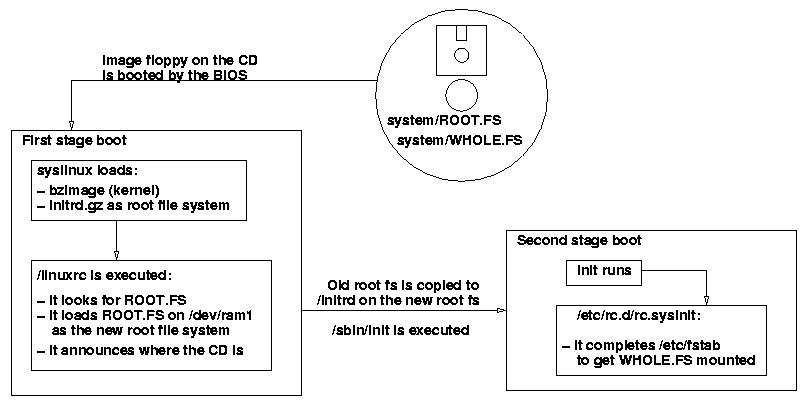
Figure 1. Main Steps of Boot Process
The target here is to create a bootable floppy disk that will be merged into the CD to make it bootable.
The boot loader for setting up the floppy is syslinux. It can boot a Linux system from a DOS-formatted floppy containing a kernel and an initial RAM disk file (compressed) with the root file system inside.
So, we'll need a kernel along with its loadable modules. (Only the kernel is required now.) I will not explain here how to compile a kernel but will only remark that it should support
framebuffer device
CD-ROM (iso9660 file system)
initial RAM disk
loop-back device
(You can find my kernel configuration on doc/developer.html.)
Now we have to build the initial RAM disk (initrd) holding the root file system for the first-stage boot. The easiest way to obtain one is to borrow it from a floppy rescue disk. But, I follow the “do it yourself” philosophy. The directory boot/initrd is a skeleton of the contents of my RAM disk. The script named Init_initrd fills that directory from scratch, copying files from the source installation. It creates directories, copies a subset of dev-files onto initrd/dev and populates initrd/bin. The size of an initrd must be kept small, so you should leave only the essential binaries on initrd/bin. Then you must run Cp_lib; it will copy the libraries on initrd/lib for the binaries you left before.
When you are finished, run Make_initrd_fs_gz. It will create a file (Minix formated), copying to it the files on boot/initrd and then compress it.
Now you have a kernel and an initial RAM disk. Next, you should generate the bootable floppy with syslinux. The syslinux configuration file, SYSLINUX.CFG, is contained in boot/syslinux_boot_floppy-20MB. The line:
append initrd=initrd.gz ramdisk_size=20480 vga=0x315
instructs the boot loader to load the initial RAM disk file on the floppy and passes two parameters to the kernel to inform it of the size of the RAM disk and the framebuffer video mode. The RAM disk size should be customized to the size of the ROOT.FS used.
Finally, the bootable floppy is created by the Write_syslinux_boot_floppy script. It will also extract a raw image of the floppy to be merged onto the CD.
The most relevant file here is boot/initrd/linuxrc (/linuxrc on the initial RAM disk) because this script is executed at boot up. It performs the main tasks intended for this stage:
It searches for the device holding the files:
/MARAGDA
/system/ROOT.FS
/system/WHOLE.FS
If that is found, it then states which device will be the new root file system:
mount -n /proc /proc -t proc
echo 0x101 > /proc/sys/kernel/real-root-dev
(0x101 represents /dev/ram1)
It dumps WHOLE.FS on /dev/ram1.
Finally, it writes on cdrom_dev which device the .FS files were found. This file will be consulted during the second-stage boot.
If everything goes okay, the boot process will continue by executing init, already in the new root file system. The old file system (initrd) will remain mounted under /initrd on the new one.
These files are created by the scripts on the system working directory and the files found there, starting with the source installation.
Cp_root is in charge of creating ROOT.FS, while Cp_whole will build WHOLE.FS. Both scripts use Make_fs to create file systems inside a file.
ROOT.FS should contain files and directories that need to be written and cannot live on a read-only file system. Writing will be possible since ROOT.FS will reside on a RAM disk. It is difficult to find out exactly what is required to be in ROOT.FS. After several attempts, I decided to copy at least the following directories: bin, sbin, lib (including lib/modules), home, var, etc.
For those directories notcopied, symbolic links are created, pointing to where WHOLE.FS will be mounted once Maragda is running (/mnt/whole_fs).
In addition, binaries and libraries are unstripped (symbols removed) to reduce space.
The configuration files for ROOT.FS are kept under system/config. Once ROOT.FS is populated from the source installation, system/config files are written to ROOT.FS overwriting existing files. Typical system/config files are:
the /home/jordi directory
/etc/X11/X and /etc/X11/XF86Config for configuring X
/etc/hosts* and /etc/sysconfig/network-scripts, for setting up network
/etc/passwd, for users' accounts
/etc/rc.d/init.d/* files, to drive the startup process
Especially important is the script system/config/etc/rc.d/rc.sysinit. It is run by init (in the second-stage boot). I patched it to complete the Maragda system. It adds some lines to Maragda's /etc/fstab to reflect where the CD is and, therefore, where WHOLE.FS is. Remember that this was announced by linuxrc (first-stage boot) on the file /initrd/cdrom_dev. Once fstab is completed, rc.sysinit goes on with the “side effect” that WHOLE.FS will be correctly mounted.
Of course, to test your emerging system, you do not need to record a CD. It can be booted easily by means of LILO, arranging files this way:
/system/MARAGDA
/system/ROOT.FS
/system/WHOLE.FS
/boot/bzImage-rd (the kernel)
/boot/1INITRD.GZ (the initial RAM disk for the first stage boot)
(System may be a symbolic link to the working directory.) You should add the following entry to /etc/lilo.conf:
image=/boot/bzImage-rd
label=maragda
initrd=/boot/1INITRD.GZ
literal="ramdisk_size=20480" # size of ROOT.FS
read-only
vga=0x315
and run LILO every time you make any change.
As you have already learned, the source installation is a directory containing a complete, installed Linux system. It can be the source for copying the ROOT.FS and WHOLE.FS files or even for installing Linux onto a hard-disk partition or onto a 250MB zip floppy. The script Prepare_install (under the system working directory) sets up a directory to receive RPM packages. Then, you can use Install_rpm to install those packages onto the source-installation directory.
Install_rpm installs packages from the Red Hat's 6.2 distribution CD (or from another place, if you change it). The names of packages to be installed are grouped in files under system/RPM_lists. For instance, base_inst lists the packages for the base-system installation. I created the listing files starting with the file RedHat/base/comps on the Red Hat CD.
If you install the packages in the right order (as it appears on Install_rpm) they should be installed with no problem. Install_rpm also reports which packages were not installed. In the case of base_inst it creates base_inst_not_installed. This is the only group of rpms that poses a problem. But, if you tell Install_rpm to install packages on base_inst_not_installed, finally all packages will be installed.
You may find all the scripts used on http://navel.eugan.upv.es/maragda/doc, including raw CD images of Maragda (and the instructions to record them).
Enjoy it.

