
Using Postfix for Secure SMTP Gateways
E-mail is easily the most popular and important Internet service today, which has made it a popular target of cyber-criminals and spam-happy miscreants. Adding to the problem is the inescapable reality that configuring sendmail, the most commonly used Mail Transfer Agent (MTA), is complicated, nonintuitive and easy to get wrong.
Wietse Venema, intrepid developer of TCP wrappers and co-creator of SATAN, has come through for us again: his program, postfix, provides an alternative to sendmail that is simpler in design, more modular, easier to configure and less work to administer. Equally important, it's been designed with scalability, reliability and sound security as fundamental requirements.
This article is intended to bring you up to speed quickly on how to use postfix on your network as a secure means of receiving e-mail from and delivering it to Internet hosts. In particular we'll focus on deploying postfix on firewalls, in DMZs and in other settings in which it will be exposed to contact with untrusted systems.
Is sendmail really that bad? That depends on what you need it to do—the learning curve may not be justified if your e-mail architecture is simple. But sendmail is unquestionably an extremely powerful, stable and widely deployed application that isn't going away anytime soon, nor should it. In fact, The Paranoid Penguin will probably feature a sendmail article some time in the next few months.
Both sendmail and postfix are Mail Transfer Agents. MTAs move e-mail from one host or network to another. These are in contrast to Mail Delivery Agents, which move mail within a system (i.e., from an MTA to a local user's mailbox, or from a mailbox to a file or directory). In other words, MTAs are like the mail trucks (and airplanes, trains, etc.) that move mail between post offices; Mail Delivery Agents are like the letter-carriers who distribute the mail to their destination mail boxes.
In addition to MTAs and MDAs, there are also various kinds of e-mail readers, including POP, POP3, and IMAP clients for retrieving e-mail from remote systems. These are also known as Mail User Agents, or MUAs. (There is no real-life simile for these, unless your mail is handed to you each day by a minion whose sole duty is to check your mail box now and then!) But we're not concerned with these or with MDAs, except to mention how they relate to MTAs.
By the way, if you still use UUCP, it's supported in postfix (and continues to be in sendmail, too); most MTAs support a variety of delivery “agents”, almost always UUCP and SMTP at the very least. Still, for the remainder of this article we'll assume you're interested in using postfix for SMTP (Simple Mail Transfer Protocol) transfers.
One very common use of SMTP, especially in organizations which use other e-mail protocols internally, is on an Internet e-mail gateway. Since SMTP is the lingua franca for Internet e-mail, there must be at least one SMTP host on any network that needs to exchange e-mail over the Internet. In such a network, the SMTP gateway acts as a liason between non-SMTP mail servers on the inside and SMTP hosts on the outside.
This “liason” functionality in and of itself isn't as important as it once was; the current versions of Microsoft Exchange, Lotus Notes, and many other non-SMTP-based e-mail server products have no problem communicating with SMTP servers directly. But there are still reasons to have all inbound (and even outbound) e-mail arrive at a single point, the chief reason being security.
There are two main security benefits to using an SMTP gateway. First, it's much easier to secure a single SMTP gateway from external threats than it is to secure multiple internal e-mail servers. Second, separating Internet mail from internal mail allows one to move Internet mail transactions off the internal network entirely. The logical place for an SMTP gateway is in a DMZ (“Demilitarized Zone”) network, separated from both the Internet and the internal network by a firewall.
As with DNS, FTP, WWW and any other publicly accessible service, the more protection you can place between potential hackertargets and your internal network, the better. Adding an extra NIC to your firewall, keeping public services in a separate network, is one of the cheapest and most effective ways of doing this—as long as you configure the firewall to carefully restrict traffic to/from the DMZ). It's also good risk management; in the (hopefully) unlikely event that your web server, for example, is compromised, it won't become nearly as convenient a launch pad for attacks on the rest of your network.
(For additional information on the DMZ technique of firewalling, see the article </#147>Securing DNS and BIND</#148>, page 92 of this issue.)
Thus, even organizations with only one e-mail server should still consider adding an SMTP gateway, even if that e-mail server already has SMTP functionality.
But what if your firewall is your FTP server, e-mail server, etc.? Although the use of firewalls for any service hosting is scowled upon by the truly paranoid, this is common practice for very small networks (e.g., home users with broadband Internet connections). And, in this foul-weather paranoiac's opinion, BIND and postfix pose much less of an exposure for a firewall than other service applications.
For starters, DNS and SMTP potentially involve less direct contact between untrusted users and the server's file system. (I say “potentially” because it's certainly possible, with badly written or sloppily configured software, to create extremely insecure DNS and SMTP services.) In addition, both BIND and postfix have “chroot” options and run as unprivileged users, two features that help reduce the danger of either service being used to somehow gain root access (we'll discuss both of these options in depth shortly.)
To understand how postfix works, it's useful to consider its background. The main purpose for postfix's existence is sendmail's complexity. Postfix is a full-featured MTA, and therefore its core functions are the same as any other's. But postfix was written with unusual attention to:
Security. Postfix was designed with security as a fundamental requirement rather than as an afterthought. It's obvious that Mr. Venema has taken the lessons of history (as chronicled by CERT, bugtraq, et al.) very much to heart. For example, the system doesn't trust any data, regardless of its source. And with least privilege in a chrooted jail (see below), risks are reduced. Furthermore, protective measures against buffer overflows and other user-input attacks have been implemented. If something still fails, postfix's protection mechanism tries to prevent any of the processes under its control from gaining rights they shouldn't have. Since postfix is comprised of many different programs that function without a direct relationship to each other, if something goes wrong, the chance that such a problem can be exploited by an attacker is minimized. Of course, we all know that no system is 100% secure; the goal must be to minimize and manage risks. Postfix is definitely engineered to minimize security risks.
Simplicity and compatibility. Postfix has been written in such a way that setting it up “from scratch” can take as little as five minutes. When you want to replace sendmail or other MTAs, it's even better: postfix by default can use the old configuration files!
Robustness and stability. Postfix was written with the expectation that certain components of the mail network (the Local Area Network, the Internet uplink, the local interfaces, etc.) will occasionally fail. By anticipating things that can go wrong at either end of any given transaction, postfix is capable of keeping the server up and running in many (if not most) circumstances. If, for instance, a message cannot be delivered, it is scheduled to be delivered later, without immediately initiating a continuous retry.
A key contributor to the stability and the speed of postfix is the intelligent way in which it queues mail. Postfix uses four different queues, each one of which is handled differently (see Figure 1):
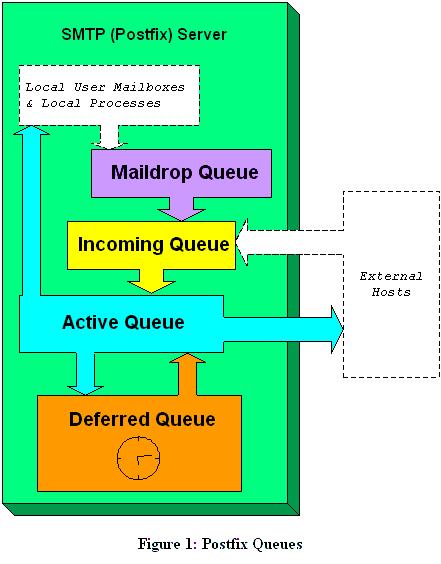
Figure 1. Postfix Queues
Maildrop queue. Mail that is delivered locally on the system is accepted in the Maildrop queue. Here, the mail is checked for proper formatting (and fixed if necessary) before being handed to the Incoming queue.
Incoming queue. The Incoming queue receives mail from other hosts, clients or the Maildrop queue. As long as e-mail is still arriving and as long as postfix hasn't really handled the e-mail, this queue is the place where the e-mails are kept.
Active queue. The Active queue is the queue that is used to actually deliver messages and therefore has the greatest potential risk of something going wrong. This queue has a limited size, and messages will be accepted only if there is space for them. That means e-mail in the Incoming and Deferred queues have to wait until the Active queue can accept them.
Deferred queue. E-mail that cannot be delivered is placed in the Deferred queue. This prevents the system from continuously trying to deliver e-mail and keeps the Active queue as short as possible in order to give newer messages priority. This also enhances stability. If the MTA cannot reach a domain, all the e-mail for that domain is placed in the Deferred queue, so that those messages will not needlessly monopolize system resources. Retry is scheduled with an increasing waiting time. When the waiting time expires, the e-mail is again placed in the Active queue for delivery; the system keeps track of retry history.
And now the part you've been waiting for (or have skipped directly to): postfix setup. Like sendmail, postfix uses a “.cf” text file as its primary configuration file called main.cf. However, “.cf” files in postfix use a simple “parameter=$value” syntax. What's more, these files are extremely well commented and use highly descriptive variable names.
In fact, if your e-mail needs are simple enough, it's probably possible for you to figure out much of what you need to know by editing main.cf and reading its comments as you go.
For many users, this is all one needs to do to configure postfix on an SMTP gateway:
Install postfix from a binary package via your local package tool (rpm, etc.) or by compiling from source and running postfix's INSTALL.sh script.
Open /etc/postfix/main.cf with the text editor of your choice.
Uncomment and set the parameter myhostname to equal your server's fully qualified domain name (FQDN), e.g., “myhostname = buford.dogpeople.org”.
Uncomment and set the parameter mydestination as follows, assuming this is the e-mail gateway for one's entire domain:
mydestination = $myhostname, localhost.$mydomain, $mydomain
NOTE: Enter the above line verbatim.
Save and close main.cf.
If desired, add a line to /etc/aliases diverting root's mail to a less-privileged account, e.g., root: mick. This is also the place to map aliases for users who are served by internal mail servers (for example, mick.bauer: mbauer@secretserver.dogpeople.org). When you are done editing and/or adding aliases, save the file and enter the command newaliases to convert it into a hash database.
Execute the command postfix start.
(NOTE: While this may be enough to get postfix working, it is not enough to secure it. Don't stop reading yet!)
As cool as that was, it may not have been enough to get postfix to do what needs to be done for your network. And even if it was, it behooves you to dig a little deeper: ignorance nearly always leads to bad security. Let's take a closer look at what we just did, and then move on to even niftier postfix tricks.
First, why did so little information need to be entered in main.cf? The only thing we added to it was our fully qualified domain name. In fact, depending on how your machine is configured, it may not have even been necessary to supply that!
This is because postfix uses system calls such as gethostname to glean as much information as possible directly from your kernel. If given the fully qualified domain name of your host, it's smart enough to know that everything past the first “.” is your name-domain, and it sets the variable mydomain accordingly.
You may need to add additional names to mydestination if your server has more than one FQDN (that is, multiple “A” records in your domain's DNS). For example, if your SMTP gateway doubles as your public FTP server, and thus has the name “ftp” associated with it in addition to its normal host name, your mydestination declaration might look something like this:
mydestination = $myhostname, localhost.$mydomain, ftp://www.$mydomain, $mydomain
It's important that any name by which your server can be legitimately referred to is contained in this line.
There were two other interesting things we did in the “quick and dirty” procedure. One was to start postfix with the command postfix start. Just as BIND uses ndc to control the various processes that comprise BIND, the postfix command can be used to manage postfix. Like BIND, postfix is actually a suite of commands, dæmons and scripts rather than a single monolithic program.
The most common invocations of the postfix command are postfix start, postfix stop and postfix reload. Start and stop are obvious; reload causes postfix to reload its configuration files without stopping and restarting. Another handy one is postfix flush, which forces postfix to immediately attempt to send all queued messages. This is particularly useful after changing a setting that you think may have been causing problems—in the event that your change worked, all messages delayed by the problem go out immediately. They'd go out regardless, but not as quickly.
The other thing we did was to add a line to /etc/aliases to divert root's e-mail to an unprivileged account. This is good healthy paranoia: we don't want to have to log in as the superuser for mundane activities such as viewing system reports, which are sometimes e-mailed to root. Be careful, however: if your unprivileged account uses a “.forward” file to forward your mail to some other system, you may wind up sending administrative messages over public bandwidth in clear text!
As alluded to in the quick and dirty procedure, aliases are also useful for mapping e-mail addresses for users who don't actually have accounts on the SMTP gateway. This practice has two main benefits. First, most users prefer meaningful e-mail names and short host /domain names, e.g., “john.smith@acme.com” rather than “jsmith023@mail77.midwest.acme.com”. Second, you probably don't want your users connecting to and storing mail on a publicly accessible server. Again, common sense tells us that any server the unwashed masses can commune with must be kept at arm's length. The greater the separation between public servers and private servers, the better. (And don't forget, POPmail passwords are transmitted in clear text!)
Still another use of aliases is the maintenance of mailing lists. An alias can point to not only an address or comma-separated list of addresses, but also to a mailing list. This is achieved with the :include:tag—without this, postfix will append mail to the file specified rather than using the file to obtain recipients. (This is a feature, not a bug; it's useful sometimes to write certain types of messages to a text file rather than to a mailbox.)
Here's part of an example alias file that contains all of these types of mappings:
postmaster:     root
mailer-daemon:  root
hostmaster:     root
root:           bdewinter
mailguys:       bdewinter,mick.bauer
mick.bauer:     mbauer@biscuit.stpaul.dogpeople.org
clients:        :include:/etc/postfix/clientlist.txt
spam-reports:   /home/bdewinter/spambucket.txt
One warning: if an alias points to a different mail server, that server must belong to a domain for which the SMTP gateway is configured to relay mail (i.e., either that server's FQDN or its domain must be listed in the mydestination declaration in main.cf).
Don't forget to run either newaliases or, hipper still, postalias /etc/aliases anytime you edit aliases. The postalias command is hipper because it can accept any correctly formatted alias file as its input. Both commands compress the alias file into a database file that can be searched repeatedly and rapidly each time a destination address is parsed; neither postfix nor sendmail directly use the text version of aliases.
If you have a large number of users and/or internal mail servers, alias-file updates lend themselves to automation, especially via Secure Shell (ssh) and Secure Copy (scp). Using scp with null-passphrase RSA (or DSS/El Gamal) keys, your internal mail servers can periodically copy their local alias files to the SMTP gateway, which can then merge them into a new /etc/aliases followed by postalias /etc/aliases. (Unfortunately, telling you exactly how to use scp/ssh is beyond the scope of this article.) This practice is especially useful in large organizations where different people control different mail servers: day-to-day e-mail account administration can be kept decentralized.
Junk mail is one of the most common and annoying types of e-mail abuse. Postfix offers protection against UCE (Unsolicited Commercial E-mail) via a couple of settings in main.cf. Some caution is in order, however: there's a fine line between spam and legitimate dissemination, and it's entirely possible that even modest UCE controls will cause some legitimate (i.e., desired) mail to be dropped.
Having said that, for most sites this is an acceptable risk (avoidable, too, through end-user education), and we recommend that at a minimum, you set the following in main.cf:
smtpd_recipient_limit. This setting indicates how many recipients may be addressed in the header of a single message. Normally, such a number should not exceed something like 500. It would be extreme to receive an e-mail that has 500 recipients and was not being sent to a mailing list.
smtpd_recipient_restricitons. Not every e-mail that arrives at your server should be accepted. This parameter instructs postfix to check each message's recipient-address base on one or more criteria. One of the easiest to maintain is the access database. This file lists domains, hosts, networks and users who are allowed to receive mail from your server. To enable it: (1) set check_recipient_access = hash:access; (2) create /etc/postfix/access (do a man 5 access for format/syntax); and (3) run postmap hash:/etc/postfix/access to convert the file into a database. Repeat step (3) each time you edit /etc/postfix/access.
smtpd_sender_restrictions. By default postfix will accept SMTP connections from everybody, potentially exposing your server to SMTP relaying, a method often used for UCE perpetrators who wish to hide their identities by “bouncing” their messages off unsuspecting SMTP relayers. If this occurs, it's possible and even likely that other servers will reject e-mail from your domain(s). Other protection mechanisms lie in the fact that it is always wise to check the sender against DNS. Although this costs some performance, it makes it harder to send the information from a faulty sender e-mail address. See the file /etc/postfix/sample-smtpd.cf for a list of possible list options for this parameter. Note that hash:access is one of them; the access database can be used not only to allow/disallow particular recipients, but senders as well. For a complete list of anti-UCE parameters and their exact syntax see /etc/postfix/sample-smtpd.cf.
In order to prevent giving out information that serves no purpose to legitimate external parties, it is wise to set in the main.cf file the parameter masquerade_domains = $mydomain (remember, “$mydomain” refers to a variable). If you wish to make an exception for mail sent by “root” (probably a good idea), you can set the parameter masquerade_exceptions = root. This will cause internal host names to be stripped from FQDSes in “From” addresses of outbound messages.
Now we come to one of the groovier things we can do to secure postfix: running it in a “chroot jail”. chroot is a UNIX command that confines the “chrooted” process to a specified directory; that directory becomes “/” for that process. This usually requires you to first create copies of things needed by the process but normally kept elsewhere. For example, if the process looks for “/etc/mydaemon.conf” upon startup but is being chrooted to “/var/mydaemon”, the process will actually look for “/var/mydaemon/etc/mydaemon.conf”.
The advantage to chrooting should be obvious: should a chrooted-postfix process become hijacked somehow, the attacker will find himself in a “padded cell” from which (hopefully) no sensitive or important system files or data can be accessed. This isn't a panacea, but it significantly. increases the difficulty of exploiting postfix.
Happily, the preparations required to chroot postfix are provided in a subdirectory of the postfix documentation called “examples”. These files aren't really shell scripts: they're suggested sequences of commands.
Better still, some binary distributions of postfix have installation scripts that automatically make these preparations for you after installing postfix. In SuSE, for example, the postfix RPM package runs a script that creates a complete directory tree for postfix to use when chrooted (etc, usr, lib, and so forth) in /var/spool/postfix, with the appropriate ownerships and permissions.
In addition to “provisioning” postfix's chroot jail, you need to edit /etc/postfix/master.cf to toggle the postfix dæmons you wish to run chrooted (i.e., put a “y” in the “chroot” column of each dæmon to be chrooted). Do not, however, do this for dæmons whose “command” column indicates that they are of type “pipe” or “local”. Some binary-package distributions toggle the appropriate dæmons to chroot automatically during postfix installation (again, SuSE does).
After configuring the chroot jail and editing master.cf, all you need to do is start postfix the way you normally would: postfix start. Postfix's master process handles the actual chroot-ing.
That's more than enough information to get you started. May your mail arrive promptly and the spamming filth stay out!



