
The Humble Beginnings of Linux
The histories of many programming projects are maintained by oral tradition. After all, what real programmer would take the time to write down what has happened? Because much of Linux was developed by way of e-mail conversations on the net, a slightly more firm record exists. The following is gleaned from those records.
I first worked with Minix in Fall 1989. Dr. Tanenbaum's system was a perfect vehicle for working with operating systems for those who couldn't afford a VAX. It ran on an 8086 with 640 Kbytes and a floppy drive. You could run a few programs in a multi-tasking environment and, since you had the source, you could change the system to your heart's content.
“But wait,” you say, “Minix isn't Linux. What are you talking about?”
“I'm just setting the stage, bear with me a moment.”
The intended target for Minix was students of operating systems in a computer science curriculum. I used it in teaching an upper division class where the term projects were to “enhance the system in some meaningful way.” The projects varied from a serial port driver, to virtual terminals, to simple memory management. No one took the giant step that Linus Torvalds took at the University of Helsinki. (I wish I could say one of my students was changing the course of personal computing!)
As you may know, the memory model of the 8086 is very limiting. It had easy access to only 640 Kbytes of non-virtual memory. Ugh! But that was the target system for Minix because it was the most common and cheapest system available.
Linus rejected that argument and decided that one needed virtual memory to be able to do anything interesting. Thus, he reckoned that an 80386 was the minimum processor for his system.
His project was to build a kernel for a virtual memory, pre-emptive, multi-user system. It would have much the same user interface as Minix (in fact it used the same file system as Minix for some time) and that of Unix.
From the beginning, Linus made reference to the GNU portable kernel, Hurd, and made it clear that he wasn't planning to supplant Hurd. Since Hurd was expected to be available in late 1992, Linux was clearly just a hackers' delight.
By the time Linus conceived of his project in April 1991, Minix had changed to support the improved Intel processors, but there was still room for extension. Initially Linux was cast in terms of a Minix project, but by late summer the divergence was starting to show.
Early versions were labeled 0.01 (Sept. 91), 0.02 (Oct. 91), 0.03 (Nov. 91), etc., as a hint that they weren't really releases so much as snapshots of work in progress.
Linus gathered a few supporters who would exercise and enhance his work and who appreciated receiving (and contributing) fixes as quickly as they were developed. The kernel soon came to support all the system calls expected of a Unix kernel as more restrictions were removed.
Linus ported gcc and bash, so there was a basic compiler and command interpreter in place. (Although, to be precise, the compilations were done under Minix up to version 0.12.) There was some discussion in comp.os.minix about the wisdom of going off and starting another OS, but Linus had his dream, or, some would say, he was stubborn and he persisted.
By January 1992, the 0.12 version took only modest care to build and operate and, thus, contributed a lot towards popularizing Linux.
It should be noted that this was not the only free Unix system for home computers. 386BSD was being developed in California and was a derivative of the Berkeley Unix that had been widely distributed on university campuses around the world. To some extent, 386BSD was a benchmark against which Linux was compared.
At the same time, the various GNU tools were becoming well established in the Unix domain. The standard C compiler, gcc, was regularly found to be better than most vendors' compilers, and the other tools were generally more robust and feature-full than the vendor versions. The fitting of the GNU applications to the Linux kernel was natural and necessary to the success of Linux.
The growing community of Linux users were not afraid to build up a system from sources around the world. A second outside product, the X Window System, provided a GUI interface for Linux users with high-end displays. A third product, NetBSD, provided a springboard to get full Internet support for Linux.
Production Releases
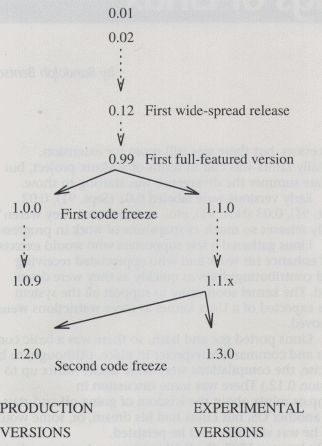
The initial numbering scheme had some limitations, but questions such as “Does 0.11 come before or after 0.2?” were safely avoided and the numbering quickly arrived at a limiting value of 0.99. That version was widely distributed, and it was regarded as the first full-featured version of the Linux kernel. There was, by then, a sizeable community of users who depended on a stable version of the kernel. Although there were many patches and sub-patches to this version—often arriving daily—the basic version 0.99 was suitable for release.
The Great Release took place at the start of 1994, when Linus identified a stable patch level (0.99pl14r), cleaned up a few last problems, and called it good. This operation was called a “code freeze” and resulted in version 0.99pl15, which held steady long enough for bug fixes, but no enhancements, to arrive.
Part of the code freeze and the Great Release was the recognition that Linux had become a suitable foundation for production systems—systems devoted to doing useful work, instead of being the object of a programmer's machinations. This posed a dilemma: how could Linux continue to evolve and yet be stable?
The solution was simple: have two development paths starting from the same point. The even-numbered releases (1.0.0, 1.0.1, 1.0.2, etc.) followed a slow, careful evolution of a production release system and the odd-numbered releases (1.1.0, 1.1.1, 1.1.2, etc.) were to be the fast-changing, experimental system. Version 0.99pl15, with a few fixes, was the basis of these two systems. Some important fixes moved 1.0.0 to 1.0.9 in the early months of 1994, but that system development path has been unchanged since mid-year. By contrast, 1.1.0 underwent over 50 changes in the first 10 months.
Plans are now afoot for the next major release. Again, the stable and well-tested features of the experimental versions (up past 1.1.60) will be incorporated in a production release called 1.2.0. Its twin, version 1.3.0, will be the basis of yet more experimental work on the kernel.
One thing that also happened with the Great Release was the release itself no longer catalogued its changes. This shortcoming was alleviated when Russell Nelson, nelson@crynwr.com volunteered to distribute a change summary shortly after each patch was distributed.
All during the development of the kernel, concurrent development was being done on the tools I've mentioned, as well as others. One of the topics of discussion by users was what they collected for their system. Since new users didn't want to hunt the net for the critical pieces, the idea of a “standard distribution” was established.
One common medium of exchange has been the floppy disk, so the distribution kits have generally been cast in terms of images of MS-DOS-readable disks. One can copy a friend's disk set and then bootstrap Linux. If you're anywhere near a large community, chances are there is a Linux or Unix users group nearby. If you're lucky, you'll find a set of floppies to borrow. If that fails, it's almost certain you'll find someone who will copy their distribution to your floppies.
Distribution kits include: Debian, MCC, Slackware, Software Landing Systems (SLS), SUSE, TAMU, Yggdrasil.
These distribution kits are generally deposited or maintained on an ftp site and mirrored to other ftp sites. Many bulletin boards maintain copies of these distributions. This gives you a second path to acquire Linux: all you have to do is download 50 Mbyte via modem.
The third and, I think, most significant path to acquiring Linux is CD-ROM. A number of companies publish one or more (I've seen as many as four) distributions on a single CD-ROM. The companies add lots of other material, such as X-Windows, the GNU sources and snapshots of archive sites (which contain other, non-distribution kit software), to their packages and sell them for $20 to $40. Since you can easily spend $20 in floppy disks for a distribution kit alone, this is quite a bargain! When one can now buy a single-speed CD-ROM drive for less than $100, getting a distribution by way of CD-ROM is very attractive.
Some of the current Linux CD-ROM publishers include: InfoMagic, Morse Telecommunication, Nascent, Red Hat Software, Trans-Ameritech, Walnut Creek and Yggdrasil Computing, Inc.
It should be noted that distribution kits have different numbering than the kernel itself, and CD-ROMs may have yet another way of identifying versions. This can lead to confusion when someone refers to “the Fall 1993 release” or “the 2.0 release”. If you look at /usr/src/linux/Makefile, you'll find the version, patch level, and sub-level in the first few lines. Look at the README-type files in the root of the distribution to determine the kit's version.
My first experience with Unix was in 1980, when I was handed three 2400' reels of half-inch magnetic tape and a two-foot high stack of xerographed manual pages. I was pointed to the VAX and wished the best of luck.
Those were heady times, living on the edge, working without a safety net. One's phone list (of other system administrators) was critical to one's survival. Everyone (the system administrators and select students) had the source code, and one was expected to dive into the kernel and fix things.
But things got boring for a while in the late 1980s: vendors distributed only object files for their Unix systems and there were commercially-available support groups to call. One was expected to manage configuration files and submit bug reports—and then wait for a correction.
In a conversation just last week, I pointed out that those golden days are with us again, only better. First, the number of sites and kernel programmers has grown ten-fold or a hundred-fold, so there are more folks contributing fixes and improvements. Second, since we're running on personal computers, the effects of our changes are localized, and we're even more free to explore. Finally, with widespread Internet service, we're so much better connected to one another.
These are such interesting times!
Randolph Bentson (bentson@grieg.seaslug.org) has been programming for money since 1969-writing more tasking kernels in assembly code than he wants to admit. His first high-level language operating system was the UCSD P-system. For nearly 14 years he has been working with Unix and for the last year he's been enjoying Linux. Randy is the author of the Linux driver for the Cyclades serial I/O card.


