
upFRONT
“Information wants to be $6.95.”
—Don Marti, VA Linux Systems
“Dot-coms are falling all around us like the frog plague at the end of the movie Magnolia.”
—Richard Thieme, in an “Islands in the Clickstream” essay
“For a list of the ways which technology has failed to improve our quality of life, press 3.”
—Phil Reed, on Slashdot
“People never grow up, they only learn how to act in public.”
—Tina Kimbley, Mudrealms.com
“Men are just teenage boys with credit cards.”
—Cindy Crawford
What were Linux people talking about in April and early May? Below is a sampling of some of the hotter news stories over the past few weeks, as reported in “The Rookery”, Linux Journal's on-line source for news, notes, quotes and reports from the field (updated daily and found at our web site, http://www.linuxjournal.com/):
Yopy's palm-sized Linux device set to debut this summer. Developers wanted!
A $17 million Linux supercomputer being used at NOAA's Forecast Systems Lab to improve weather forecasting.
Applixware's Linux division spinning off into its own company, VistaSource.
Linuxcare canceling its IPO plans.
Lineo accepting $37 million in funding.
New York and Northern Virginia geeks (including ESR) protest outside the Library of Congress. Their target: the infamous Digital Millennium Copyright Act.
After years of steady climbing, Apache's share of the web server market peaked, according to Netcraft. Through the second half of 1999, its shares slipped. So did Microsoft IIS, but as the end of the year came around, Microsoft suddenly surged up and Apache began to reciprocate in the downward direction.
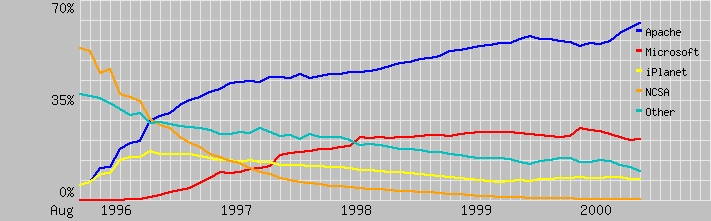
But that was for just one month. Since the first of the millennium, Apache has been steadily going up to reach record shares, and IIS has mostly gone down, relatively speaking (although in absolute numbers, it has been going up). In April, Apache tallied 8,812,960 web servers for a 1.48% increase to 61.53%. Microsoft was second, with 1,047,890 servers and a .16 percent increase to 21.09% of the total. Third was iPlanet, the family of Sun Solaris and Netscape servers sold by Sun. iPlanet servers may trail the leaders, but not among the top-traffic sites. “The Solaris/Netscape combination does particularly well amongst high-transaction SSL sites such as the leading retail brokerages, Charles Schwab, E*Trade, and Fidelity,” Netcraft says.
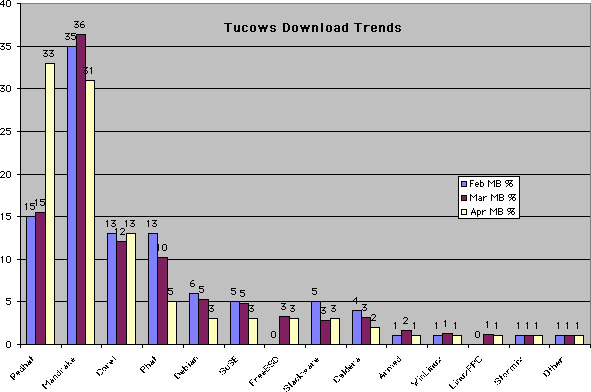
After two months at the number-one position in Tucows downloads (measured in MB), Mandrake yielded the lead to Red Hat which more than doubled, from 15 to 33% of the total share, edging out Mandrake's 31%. Number three Corel returned to its February level at 13%. Number four Phat Linux lost half its share in one month, from 10% to 5%. Debian also continued to drop, from 6% in February to 3% in April. SUSE, FreeBSD and Slackware were each tied and holding about even at 3%. Caldera continued dropping, to just 2%. Everybody else held even at 1% or less. (Note: While February and March were full months, April was tabulated through the first 25 days.)
NATURAL-LANGUAGE MARKET
The natural-language market is under attack by several competitors. The most successful of these so far is “Ask Jeeves” (ASKJ), Ask.com. Ask Jeeves is a proprietary, closed-source natural-language understanding program for the Web. ASKJ attracted much attention in 1999 with its wildly successful IPO. In addition to AskJ, there are a number of smaller, pre-IPO companies entering the highly valued natural-language market. Forecasters see fantastic growth in applications such as intelligent customer service agents, web-based help desks and customer support.
In October 1999, AskJ and Microsoft announced a partnership to provide natural-language-based help desk support for Windows 2000. ASKJ is to ALICE what MS is to Linux. Although the markets are much smaller, the stage is set for a classic open-source/closed-source battle.
Ask Jeeves has been a magnet for lawsuits. In 1999, the company was sued by MIT professors Boris Katz and Patrick Winston, among others, who claim they have the patent on web-based natural-language transactions. The ALICE project has been operating “under the radar” in stealth mode, under the GPL.
I am the leader of a group of Linux-like contributors to a gigantic open-source software project. Our goal is the creation of artificial intelligence using the natural language program ALICE. I developed AIML (Artificial Intelligence Markup Language) along with a crude interpreter, and released both under the GNU GPL. The result was the now-predictable, open-source magic: a team of developers from around the world began improving the code, creating content and providing an immense user base.
ALICE won the Loebner Prize, an annual “Turing Test”, in 2000, for being the computer program ranked closest to a human. The ALICE and AIML developers have created a library of content, numerous on-line documentation sites and versions of the ALICE server in both Java and C/C++. AIML is “platform-independent, language-independent” in the sense that ALICE robot scripts run on different interpreters on different operating systems. There are interfaces for HTTP, CGI, IRC, plain text, GUIs and even voice I/O (input/output).
There are at present four companies in various stages of starting up around ALICE and AIML technology. The developers have moved on to embedded system applications, intelligent customer service agents and entertainment applications of the technology. We are trying to stay “above the fray” and “not pick winners and losers”, as this technology begins to attract the attention of “suits and other real-world investors.” Does this story sound familiar?
—Dr. Richard Wallace, dr.wallace@mindspring.com
Low-Bandwidth Communication Tools for Science, by Enrique Canessa and Clement Onime, tells us how in Trieste they are building prototype on-line scientific tools to further enhance electronic collaboration and support the use of web navigation and database search by e-mail. ScientificTalk and www4mail are two such tools that are based on Linux and discussed here.
AIPS: A Historical Reminiscence by Patrick P. Murphy takes a look at the astronomical image processing system and how it is being used on Linux by the National Radio Astronomy Headquarters and astronomers the world over.
Four book reviews to help you decide if these books are worthwhile:
Linux Administration, A Beginner's Guide, review by Harvey Friedman.
Red Hat Linux 6 for Small Business, review by Paul Dunne.
Security Technologies for the World Wide Web, review by Wael A. Hassan.
Getting Started in Computer Consulting, review by Ralph Krause.
The use of cellular phones and other wireless devices has been rising exponentially. Recently, many of these devices have contained Internet-enabled functionality and even web-browsing software. If you run a popular Internet site, it's possible someone has tried to visit it with such a device and seen nothing! In this column, I'll show you how to configure the Apache web server to handle these requests successfully.
The leading Internet implementations on hand-held devices have used the Wireless Application Protocol, WAP. The idea comes from the wireless industry and is based on existing Internet technologies such as IP. Just as I use HTML for my site, mikal.org, I'll now use WML for people visiting my site over WAP.
WML stands for Wireless Markup Language and is based on XML. Similar to HTML, WML is read and interpreted by a browser built into a WAP-enabled device.
The first thing I need to do to handle wireless visitors is inform Apache about the MIME type I'll be using. I add MIME support for the WML file extension to the default MIME type configuration file in this way:
text/vnd.wap.wml wml
This file includes a definition of the most commonly known MIME types. On my file system, it's located in the /etc/mime.types directory.
I want to catch anyone visiting my web site with a wireless browser and send them to my WML page, welcome_wap_user.wml (listing below). For this purpose, I'll use Apache's powerful mod_rewrite module, available in version 1.2 or later. By using this, I can rewrite requested URLs on the fly based upon rule conditions. It's possible that mod_rewrite isn't already compiled into the server; check the Apache documentation for instructions on doing this. Specifically, I'll be looking at the HTTP_USER_AGENT and HTTP_ACCEPT environment variables to check for known WAP browsers.
<?xml version="1.0"?>
<!DOCTYPE wml PUBLIC "-//WAPFORUM//DTD WML 1.1//EN"
     "http://www.wapforum.org/DTD/wml1_1.1.xml">
<wml>
     <card>
     <p> Welcome to mikal.org! </p>
     </card>
</wml>
The mod_rewrite module can be used by placing the appropriate directives, shown below, in the httpd.conf Apache configuration file. Line 1 turns on the RewriteEngine. Jorrit Waalboer, from the WML programming list at eGroups.com, provided me with the RewriteCond statements in lines 2-7 to determine if the client is a WAP browser. If RewriteCond matches one of these browsers, RewriteRule tells Apache to serve welcome_wap_user.wml.
RewriteEngine on
# Catch most WAP browsers
RewriteCond %{HTTP_ACCEPT} text/vnd\.wap\.wml [OR]
# WinWAP, WAPjag
RewriteCond %{HTTP_USER_AGENT} wap [OR]
# Nokia emulators (sdk)
RewriteCond %{HTTP_USER_AGENT} 7110
# Rewrite!!
RewriteRule ^[\./](.*)$  /welcome_wap_user.wml [L]
To activate these changes, I'll need to restart Apache.
I can now check my site, but I'll need a WAP-compatible device. For this purpose, I use the UP.Simulator, part of UP.SDK, the Phone.com software development kit. The UP.SDK supports development of WAP services written in WML. After a quick check with the UP.Simulator, I see my site is now WAP-aware and ready for the future of wireless Internet.
For additional information on WAP, WML or building a WAP service, see Resources.
—Philip Mikal (philip_mikal@yahoo.com) is an Internet technology consultant based in Silicon Valley. He can be reached at mikal.org.
USENIX; June 19-23, 2000; San Diego, CA; http://www.usenix.org/events/usenix2000/
LinuxFest; June 20-24, 2000; Kansas City, KS: http://www.linuxfest.com/
PC Expo; June 27-29, 2000; New York, NY; http://www.pcexpo.com/
LinuxConference; June 27-28, 2000; Zürich, Switzerland; http://www.linux-conference.ch/
Libre Software Meeting #1, July 5-9, 2000; Bordeaux, France, www.abul.org/rmll1-fr.html and rmll1-uk.html
Summer COMDEX; July 12-14, 2000; Toronto, Canada; http://www.zdevents.com/comdex/.
O'Reilly/2000 Open Source Software Convention; July 17-20, 2000; Monterey, CA; conferences.oreilly.com/convention2000.html
Linux share of web servers in the domains .td (Chad), .ne (Niger), .lr (Liberia), .gq (Equatorial Guinea), .cf (Central African Republic) and .dj (Djibouti): 100%
Total number of Linux web servers in the .td, .ne, .lr, .gp, .cf and .dj domains: 32
Linux share of web servers in the .gg (Guernsey, Alderney and Sark) domain: 67.6%
Total number of Linux web servers in the .gg domain: 97
Linux share of web servers in the .md (Republic of Moldova) domain: 67.5%
Total number of Linux web servers in the .md domain: 564
Linux share of web servers in the .ro (Romania) domain: 59.7%
Total number of Linux web servers in the .ro domain: 1,645
Linux share of web servers in the .de (Germany) domain: 42.7%
Total number of Linux web servers in the .de domain: 197,670
Linux share of web servers in the .ru (Russian Federation) domain: 15.1%
Total number of Linux web servers in the .ru domain: 3,498
BSD family share of web servers in the .ru domain: 52.6%
Total number of BSD web servers in the .ru domain: 12,211
Total number of Google users early in its development: 10,000
Total number of current Google users: 10,000,000
Number of new domains registered during a 10-day period in March, 2000: 1,000,000
Registration rate of new domains, per second, during the same period: 1
Number of gallons of fresh water required to produce one pat of butter: 100
Number of gallons of fresh water required to produce a chicken egg: 120
Number of gallons required to produce a loaf of bread: 300
Number of gallons required to produce a pound of beef: 3500
1-14: The Internet Operating System Counter (www.leb.net/hzo/ioscount)
15-16: New Media
17-18: Netcraft
19-22: David Siegel
On May Day (May 1, 2000), a point when financial markets seemed to have lost faith in Linux as a “Big Trend” (many Linux stocks lost most of their value in the first third of the year), a big chunk of change—$37 million, to be exact—was invested in Lineo, Inc., which is emerging as the leading embedded Linux software company.
In an interesting twist, the list of sources for that money includes only three venture capital firms. Another fourteen investors are actual or potential Lineo customers, including familiar names like Motorola, Samsung, Mitsubishi, Compaq, Citrix and Acer—plus a raft of motherboard, laptop and component manufacturers in Taiwan, Japan and Korea. These include DaiShin Information and Communications, First International Computer, Global Alliance, Hikari Tsushin, Arima and Mitac International. The VCs are Egan Managed Capital, J&W Seligman and Astoria Capital Partners.
These manufacturers are players. “There is a substantial interest on the part of major manufacturers in embedded Linux. And we include in that category a variety of software, hardware, components and solutions for embedded systems. These are smart companies that got to where they are by knowing how both to predict market trends and sense what's happening right now,” says Lyle Ball, Vice President of Communications and co-founder of Lineo.
The most interesting aspect of this news is that it appears to be something unusual: a very traditional “Old Economy” play. These manufacturers want to put Linux in their products, not just score a big run-up off a Lineo IPO (which, of course, they certainly wouldn't mind).
To get the significance of this, consider the little-discussed fact that every company has two markets: one for its goods and services and another for itself. Before the New Economy showed up, the latter market was extremely secondary, even for publicly traded companies. Value was all. Growth mattered, but there was no prevailing imperative to take a new company public or to run its value up to the sky overnight. But the get-big-quick imperative of the New Economy led to biased business conversations over the last several years, so that talk about investment has drowned out talk about the fundamentals of business. And this kind of talk has been endemic to the commercial Linux market ever since Red Hat went public last August and instantly branded Linux as the hot “growth topic” of 1999.
But this investment appears to be operating on the Old Economy imperative, which is to support product and service innovation. At least, this is what a long and manufacturer-heavy list of investors suggests.
What this also suggests is that Linux will probably expand from servers to appliances and other embedded devices more quickly than it will spread to clients—although there is no shortage of desktop and laptop manufacturers on this list of investors.
As Lineo sees it, the embedded Linux market shapes up this way:
automotive systems
radar controls
global positioning systems
anti-lock brakes and car infrastructure
Internet set-top boxes
smart appliances
security
environmental controls (thermostats, light and water irrigation systems)
software controllers
process automation
manufacturing equipment
industrial (e.g., assembly-line) automation
“These are categories where we already have customers or expect to have them as demand spreads,” Ball says. He expects demand to spread quickly because Linux's advantages lower the threshold of adoption well below competing operating systems, including familiar embedded operating systems such as Wind River, ISI and QNX. These virtues include open OS code source, an in-place worldwide support infrastructure, a huge developer community and base of knowledge, and relatively easy code adaptation across different processor types. “Linux is the Switzerland of Internet connectivity and infrastructure,” Ball adds. “You're not making NetWare Internet-savvy here. You're taking something that's extremely native to the Net and adapting it to a whole class of new Net-native devices. And you're doing it with the support of many thousands of Linux developers, all over the world, vs. relatively few working for proprietary embedded OS companies. That's why our community is bypassing the development schedules that have determined embedded growth in the past, and accelerating a whole new schedule. We're putting the embedded Linux growth schedule on Internet time.”
Linus Torvalds seems to agree. He has been talking up embedded Linux for a while now, and his employer, Transmeta, has more or less the same intentions as Lineo.
“Now you can imagine a Coke machine as a Net-native connected device,” Ball says. This might have been thinkable in the old embedded processing world, but it wasn't do-able because there wasn't a Net-native embedded OS that was familiar to the very people who are doing the most to deploy the Net itself. Now that it's do-able, it will be very interesting to watch the progress across Lineo's list of market categories.
—Doc Searls

