
An Appetite for Discovery
Ah, it is a beautiful night, non? Welcome, mes amis. Sit down and François will get you a glass of wine. I must tell you, mes amis, that this month's special issue on Science and Engineering has your chef feeling rather pensive this evening.
Some say that science has become rather dry lately. I find this idea difficult to understand as we stand on the threshold of unraveling the human genetic code, as new extra-solar planets are discovered on an almost daily basis, as human spacecraft orbit distant asteroids or gather cometary dust. If science has become boring, then I would suggest it is the presentation of science that has become dry. It's time to put some excitement back into the study of life, the universe and everything else for that matter. You are running Linux on your computer, non? Then it is time for you, mes amis, to join the search for knowledge.
Linux's scalable nature and multi-user UNIX roots make it an ideal platform for scientific work. Now everyone can have a workstation for data collection and analysis, mathematical and statistical modeling, and magnifique visualizations and simulations. Even better, Linux's open source means that scientists and engineers don't have to wait for some company to create the tools they need. Add to that Linux's network-ready and network friendly design, and you have the best environment not only for research, but for collaboration with your peers. Scientists have been using UNIX machines for years precisely for these reasons. With Linux, things have gotten even better. When the going gets tough and more horsepower is needed than can be generated by a single machine, Linux is still the answer with low-cost Beowulf clusters.
No longer do we, the general public, have to watch science take place in the shadowy temples of distant laboratories. With the power of Linux, everyone can be a participant. Proof of Linux's prowess in the scientific world is as easy to find as a trip to the SAL web site (Scientific Applications on Linux) at sal.kachinatech.com/index.shtml.
For instance, you could start a collection of meteorological data for your area. Using a program like Kweather, you can monitor daily weather events in your area such as temperature highs and lows or precipitation. Kweather lets you graph the results so you can track patterns over time. Are we truly experiencing a warming trend? Memory is fragile, as I am often reminded when I comment on the 14-foot-high snowbanks of my childhood. With Kweather and disciplined observation, you can know for sure. For your copy of Kweather, pay a visit to J<\#252>rgen Hochwald's web site at www.privat.kkf.net/~juergen.hochwald/linux/kweather/e_index.html.
But why, mes amis, would we want to concern ourselves merely with the world around us when an infinite number of other worlds seek to capture our curious imaginations, yet another click of the mouse away? Besides being an aficionado of wine, good food and heavenly sauces, your humble chef is also an amateur astronomer. Ah, the mysteries of the universe! François! More wine, please.
And so, the next item on our menu comes to us courtesy of Aaron Worley, who brings us Hitchhiker 2000 (HH2000). This wonderful program is a solar system simulator, a digital orrery (Marcel's Collins defines it as a “mechanical model of the solar system in which the planets can be moved at the correct relative velocities around the sun”). Aaron calls his site “The Hitchhiker's Guide to the Solar System”.
HH2000 is educational, surely; but mostly, the program is just plain fun. The idea is that you have a camera mounted on your celestial body of choice, any planet or any moon in the solar system. You can choose comets and asteroids as well. HH2000 comes with a healthy database of objects and the means to add more by way of .CSV-format files (comma-separated values). The effects are great, too. Depending on your angle of view, which you can change by dragging your mouse around the view screen, you'll notice the planets' night side is realistically in shadow. Using the center mouse button (with my two-button mouse, the right button did the job), you can zoom in or out by dragging the mouse pointer up or down. With a single click, you can flip the viewing from local orbit to deep space to an orbital view.
This eye on the sky uses OpenGL or Mesa libraries (I used Mesa) for 3-D effects, both of which can be a little resource-hungry at times. For maximum effect, you might want something punchier than my 150MHz Pentium notebook. Still, even under this environment, I found Hitchhiker to be plenty acceptable, which brings us to requirements. HH2000 is built on GNOME libraries, so you'll either need to be running GNOME or have the libraries loaded. If you are like François and me, you probably have both desktop environments loaded already. Before you can start exploring, you will likely need one other piece of software (aside from OpenGL or Mesa). Download the gtkglarea libraries as well, and compile them. You will find links to all these pieces on the Hitchhiker 2000 web site (see Resources). Finally, pick up the HH2000 code. Binaries for glibc2.0 systems are available, as is source code. With my Red Hat 6.2 system, I compiled the program from source. The steps are simple:
tar -xvfz hh2000-0.3-0.tar.gz
cd hh2000-0.3-0
 ./configure
make
make install
Running the program is done by typing hh2000. Now, sit back and enjoy the ride. Careful on that gas pedal.
For the truly serious astronomer, Elwood Downey brings us our next item, and what a masterpiece this is. XEphem is a star-charting package that pretty much does it all. You start by identifying your location (in my case, Toronto, Ontario) and clicking “Update”. XEphem loads the appropriate latitude and longitude information for your chosen city. If you need to be more accurate than “next door is okay”, it is possible to enter that information manually as well. Want to see what portion of the moon will be visible April 30, 2007? You can change the date through the calendar interface, click “Update” once again, then select “View” and “Moon”. The major planets are available at a click, as is a solar system view, which can be animated and its angle of viewing changed.
Every program like XEphem needs a star chart. For many amateur astronomers like myself, the planets are there as a warmup to the real meat of observing, namely the stars and deep sky objects. XEphem comes through with a fantastic star chart that allows you to define many viewing options. For instance, you can activate constellation lines, labels, define the types of objects you would like to see (galaxies, open clusters, double stars, etc.) or the minimum display brightness for these objects. XEphem also lets you center in on an object and zoom in with a simple slide control.
Exploring with XEphem is almost too much fun (as your humble chef discovered while trying to finish this article). Mais, qu'est-ce que c'est? That open cluster just below Cepheus looks interesting. Would you like to see what it looks like through a very powerful telescope? Center the object, click on “View Image” and let the Space Telescope Science Institute and the Hubble Space Telescope give you a close-up! Quite honestly, mes amis, the features are just too numerous to mention. Here's another bonus. Next time your friends who run that other operating system tell you about all the great software you can't run on Linux, show them XEphem. Then watch their faces when you tell them they can't have it for the other OS.
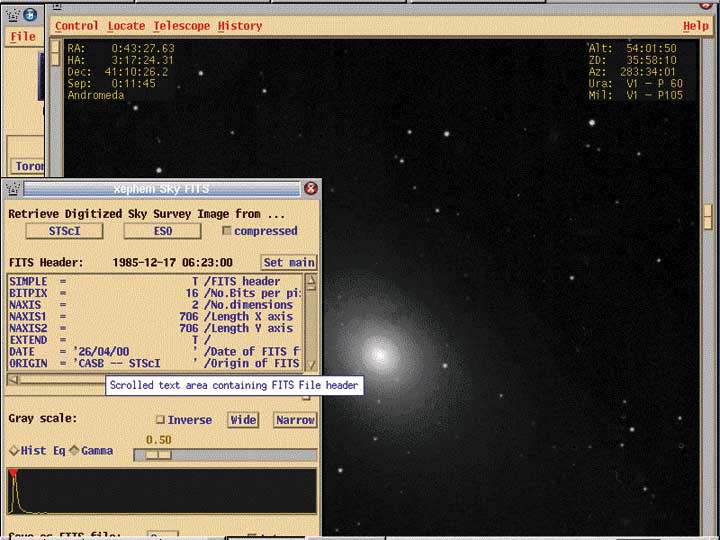
Figure 1. M31—A XEphem Celestial Close-up
XEphem is a commercial product, but it is also available as a free download. I will tell you that the download version is still fairly spectacular. The CD-ROM (commercial version), however, comes with much more, including the full Hubble Guide Star Catalog (not included in the download), a huge number of additional deep sky objects, a full printed manual, and pre-built binaries for various platforms. While you can connect to the Internet when you want additional information such as a close-up (as in the previous paragraph), you may find it well worth the price.
If you want to build XEphem yourself, you will also need either Motif or the freeware LessTif from the Hungry Programmers (do they know Chez Marcel is open, I wonder?). It is available at http://www.lesstif.org/ for download. Building LessTif is a matter of downloading lesstif-current.tar.gz from the web site and following these now-familiar steps:
tar -xvfz lesstif-current.tar.gz
cd lesstif-current
 ./configure
make
make install
Next, you need to download your copy of XEphem. At the time of this writing, the latest version was xephem-3.2.3.tar.gz. Building XEphem is a little different than the usual “configure” and “make”. Here are the steps:
tar -xzvf xephem-3.2.3.tar.gz
cd xephem-3.2.3/libastro
 ./xmkmf
make
cd ../GUI/xephem
 ./xmkmf
make
make install
Finally, why not join in the greatest adventure of them all: SETI, the Search for Extraterrestrial Intelligence? Your Linux system is ideally suited to this task. Since you are running a true multi-user system, it is possible to have a setiathome process running in the background (reniced so it doesn't draw too heavily on your system resources). Who knows? You may be the one who decodes the first signal from a distant civilization, like California—I joke, seulement, non? Nevertheless, visit the SETI@home pages, register as a SETI explorer, download your client and do your part in exploring what may be humankind's most exciting new frontier. [You can join the Linux Journal Reader Group too.]
There is no compiling or linking to do. You simply download the client and untar it. For instance, I downloaded the 2.4 version of the client. After untarring the bundle, I renamed the directory (you will see why) and ran the client from there.
tar -xvf setiathome-2.4.i386-pc-linux-gnu-glibc2.1.tar
mv setiathome-2.4.i386-pc-linux-gnu-glibc2.1
setiathome
cd setiathome
 ./setiathome
You can also launch the program from a crontab (as I do) and just leave it running in the background. Here is my crontab entry:
0 * * * * cd /root/setiathome; ./setiathome\
-graphics<\n> -nice 19 > /dev/null 2> /dev/null
Currently, SETI@home runs with a text-only client, but the latest version also comes with an experimental “screensaver mode” program called xsetiathome. The -graphics option in the crontab above is required if you wish to use this experimental “xsetiathome” GUI front end. Even before this GUI feature was added, Linux SETI users were creating their own GUI clients to give setiathome a friendlier face. One of my favorites is still TkSETI from Rick Macdonald. You can download TkSETI from www.cuug.ab.ca/~macdonal/tkseti/tkseti.html. One of the things I like about it is the ability to check my progress against my other friends who run SETI@home. At this moment, Chef Marcel's lovely wife, Sally, is way ahead, but François is way behind.
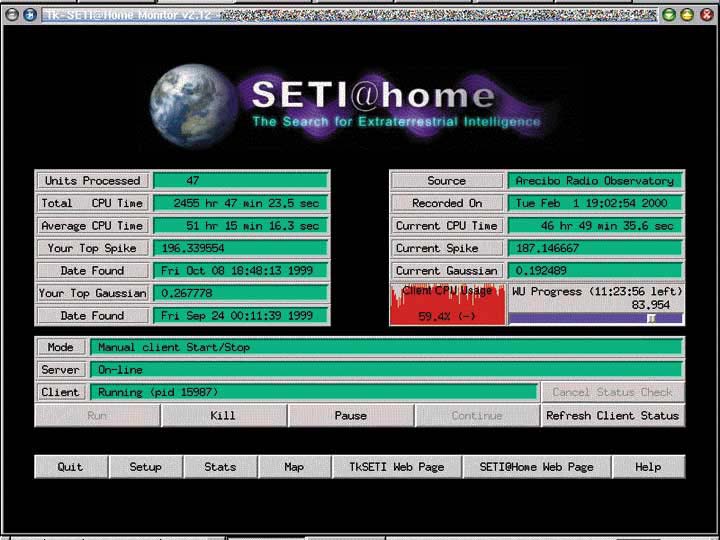
Figure 2. Keeping Tabs on SETI@home with TkSETI
Oui, mes amis, it is that time again. I hope you enjoyed the items on today's menu and that you will find yourselves exploring other tasty avenues on your own. In the meantime, it is a clear night and Chef Marcel has the telescope set up out back. If you wish to join me, François will pour you a final glass of wine and we will savor the Chablis while we search the heavens. Join me again next time at Chez Marcel. Bon Appétit!


