
Jigsaw: A Revolutionary Web Server for Linux


The Jigsaw Web Server is designed to be a demonstration in technology rather than a full-fledged release. Initially, it was intended as a project to experiment new technologies. However, as of Jigsaw 2.0, the server broke the rules of test platforms to be more robust than the average web server, making it worthwhile to take a serious look at its features, potentials and possible future deployment.
The design philosophy of Jigsaw is to make it as portable, flexible and extensible as possible, while still providing a functional and robust web server. The design goals are met by having the Jigsaw server run within any Java-supported environment.
At its core, having an object-oriented design and implementation, Jigsaw is nothing more than a set of Java classes and extension modules. Therefore, adding capabilities to the server is not complicated. We can dynamically add our own modules where every resource available to the server is an object, as opposed to a CGI script, and any object is available to end users via HTTP. The server can thus be extended by writing new resource objects. This is the replacement for CGI, where server extensions have to be written as processes. Jigsaw also supports CGI for use with existing CGI scripts.
Jigsaw's developers emphasize providing a well-structured source code, a full set of core Application Program Interfaces (APIs) and a high-quality set of documentation.
These factors offer a complete experimental platform that can be used by as many researchers as possible. This contributes to the success of Jigsaw as an open-source project providing a valuable draft to the future of the HTTP protocol and object-oriented web servers.
The Jigsaw server runs on any platform supporting Java. It has been tested on Windows 95/NT and Solaris 2.x. Many people have also reported successful installation and use on other platforms such as OS/2, MacOS, BeOS, Linux, AS-400 and AIX. I installed the Jigsaw server on two workstations powered by Red Hat 6.1 and 6.2, with JDK 1.1.8 and JDK 1.2.2 respectively, and in both cases it worked fine.
To install the Jigsaw server, you need to have JDK installed on your system. Downloading the latest version from http://java.sun.com/ is recommended.
After installing JDK, you need to set up the PATH permanently in the startup file to have access to the JDK bin directory. If you are using the C shell, edit the ~/.cshrc file in your home directory and add the following line:
set path=(/usr/local/jdk1.2.2/bin $path)
Please note that you need to change the path according to your own installation path. Then load the startup file ~/.cshrc to activate the changes just applied.
% source ~/.cshrcNow you will be able to access the Java binary directory without typing the full path.
The latest (non-stable) distribution, Jigsaw 2.1.1, can be downloaded from the W3C home page. It contains the Java source code, the documentation and the pre-compiled classes. The 2.1.1 version, released in March 2000, includes new features such as XML-based serialization, Servlet 2.2 implementation, a new RFC2616 compliant cache, image metadata extraction using content negotiation, as well as digest authentication and ACL-based authentication.
Having installed JDK and set your path, you can proceed to install Jigsaw on your Linux system by following three steps:
Unpack the distribution file
Set up the environment
Build the property files
In the following subsections, we will examine each of these steps.
The distribution comes in the form of jigsaw-x.x.x.tar.gz. You need to choose a place to unpack it. I installed it under /usr/local/Jigsaw. However, you can install it in a directory of your choice. Since the selection of the installation directory will not be the same for all of us, we will call this directory INSTDIR. You have to change INSTDIR with the absolute path where you have unpacked the distribution.
To unpack the distribution, at the shell prompt you apply:
% tar -xzvf jigsaw-x.x.x.tar.gz
This will create a number of directories under the Jigsaw main directory:
Jigsaw/src jigsaw sourcesJigsaw/scripts sample scripts to start the Jigsaw server and the JigAdmin serverJigsaw/classes pre-compiled classesJigsaw/lib native code support for SolarisJigsaw/Jigsaw the root directory to run the server in
The Jigsaw/Jigsaw directory contains:
The configuration directory for the server
The configuration directory for the administration server
The directory for log files
The directory for caching when using Jigsaw as a caching proxy
The exported file space
Next, we specify to the Java interpreter the place where Jigsaw classes are stored. We do this by setting the CLASSPATH environment variable. For Jigsaw 2.1.0 and up, we set it as follows:
% CLASSPATH=INSTDIR/Jigsaw/classes/jigsaw.jar:INSTDIR/Jigsaw/classes/sax.jar:INSTDIR/Jigsaw/classes/xp.jar:.% export CLASSPATH
The last step is to build the property files. We do that by switching into the Jigsaw subdirectory:
% cd INSTDIR/Jigsaw/Jigsaw
and execute:
% java Install
After completing the installation procedure, we are set to run Jigsaw. We switch into the installation directory and type in the following command:
% java org.w3c.jigsaw.Main -host host -root INSTDIR/Jigsaw/Jigsaw
where host is the full IP hostname of the machine, and INSTDIR is the absolute path of the location where we have unpacked the distribution file.
Alternatively, we could run the provided script that would start the Jigsaw sever for us:
% ./script/jigsaw.sh &
Jigsaw will run and produce a debug message such as the following:
[root@byblos ]# ./scripts/jigsaw.shloading properties from: /usr/local/Jigsaw/Jigsaw/config/server.props
*** salvaging resource manager state...
*** resource store state salvaged, using: 1
*** Warning : JigAdmin[2.1.1]: no logger specified, not logging.
JigAdmin[2.1.1]: serving at http://byblos.lmc.ericsson.se:8009/*** salvaging resource manager state...*** resource store state salvaged, using: 31
Jigsaw[2.1.1]: serving at http://byblos.lmc.ericsson.se:8001/
To verify that the Jigsaw server is up and running, start your favorite web browser and point it to your workstation address at port 8001, which is the default port for the Jigsaw server. Et voilà! We get the Jigsaw server home page (see Figure 1), similar to the Apache installation home page.
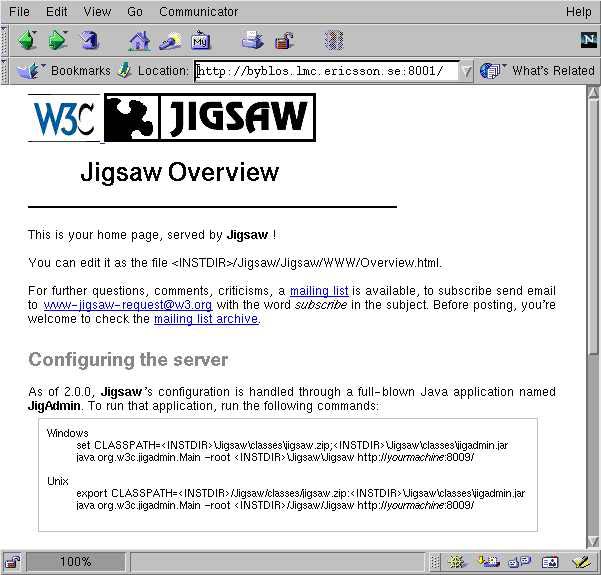
Figure 1. Jigsaw Server Home Page
Similarly, to check if the JigAdmin server started properly, we follow the same procedure except that we specify port 8009, which is the default port for the JigAdmin Server.
Now the Jigsaw server is up and running. However, if you reboot the machine, Jigsaw will not automatically start. To set up Jigsaw to start at boot time, you need to follow three steps:
1. Create a file called, for instance, jigsawstart with the following contents:
#!/bin/sh# Jigsaw Launcher Script
#
# Note:
# The paths JIGSAW_HOME and LD_JIGSAW_LIBRARY_PATH need
# to be adjusted to reflect your own installation
# Define Jigsaw Path
JIGSAW_HOME=/usr/local/Jigsaw/
export JIGSAW_HOME

# Define Jigsaw libraries Path
LD_JIGSAW_LIBRARY_PATH=${JIGSAW_HOME}/lib
export LD_JIGSAW_LIBRARY_PATH

CLASSPATH=${JIGSAW_HOME}/classes/jigsaw.jar:${JIGSAW_HOME}/classes/sax.j
ar:${JIGSAW_HOME}/classes/xp.jar:${JIGSAW_HOME}/classes/servlet.jar
export CLASSPATH
/usr/local/jdk1.2.2/bin/java -Xms16m -Xmx128m org.w3c.jigsaw.Main
-root
${JIGSAW_HOME}/Jigsaw $*
2. Save the file in /bin or /usr/bin and allow execution permission on it by typing % chmod +x jigsawstart
3. Edit /etc/rc.d/rc.local and add an entry to start up the jigsawstart script. All we need to do is add the following lines at the end of rc.local:
echo "Running Jigsaw ..."/usr/bin/jigsawstart &
This procedure guarantees Jigsaw start up at boot time.
Jigsaw comes with an administration tool called JigAdmin. JigAdmin is a graphical interface that communicates with the JigAdmin Administration Server. This server can administer multiple Jigsaw servers running on the same machine, provided that those servers have been launched by the same Java Virtual Machine.
The version of JigAdmin that comes with Jigsaw 2.1.1 is built with Swing components; it is easy to use with drag-and-drop features. Additionally, it comes with an extensive documentation explaining how to run JigAdmin, the command-line options, and a complete explanation for its menus and their functionality.
The default configuration files provided by the default installation are designed to start two servers, an instance of the Jigsaw server and one JigAdmin Server. However, to start the JigAdmin, we can also use the provided sample script:
% ./scripts/jigadmin.sh &
We get the authentication window (see Figure 2). The realm used to access the server is admin, the default user is admin and the default password is also admin. It is highly recommended to modify the username and password after you log in the first time.

Figure 2. Jigadmin Authentication Window
After the authentication phase, we receive the JigAdmin main window (Figure 3), from which we control the server configuration (Figure 4).
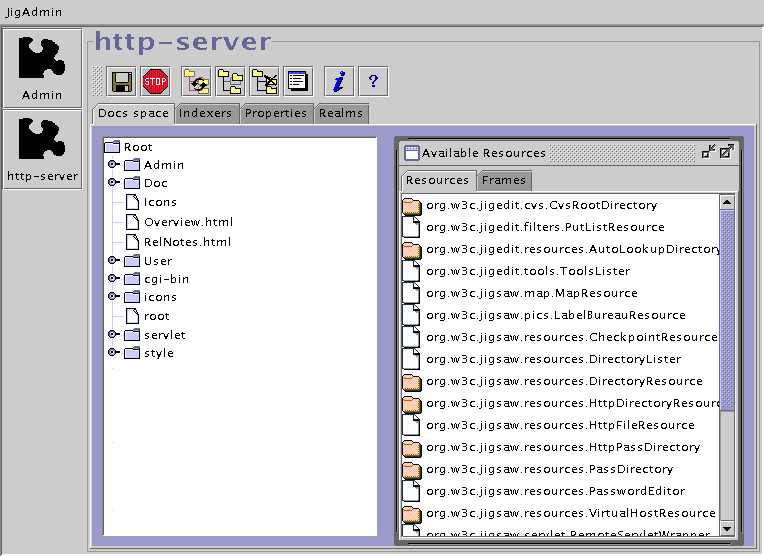
Figure 3. Main Screen for JigAdmin httpd-server
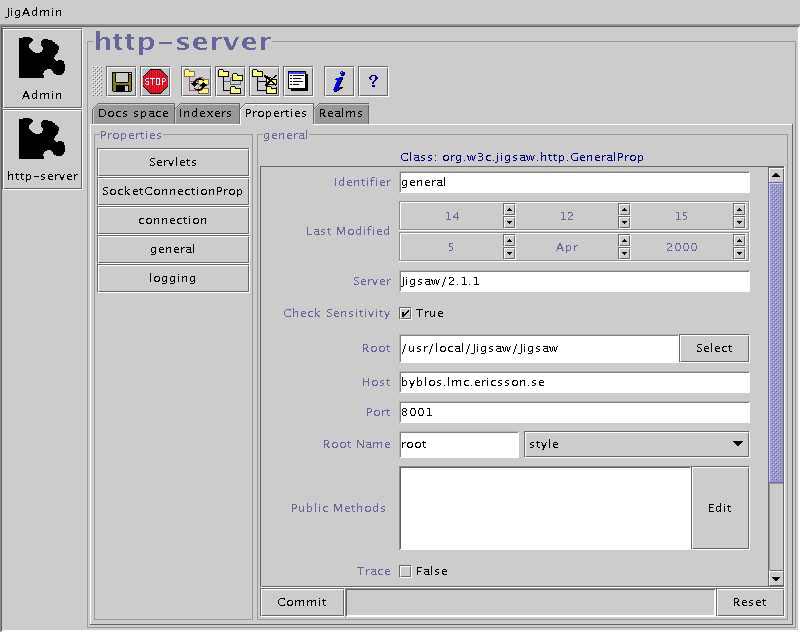
Figure 4. Server Properties Screen Shot
Now that the JigAdmin server is running, we can access it with the following command:
% java org.w3c.jigadmin.Main [-root root] [url]
The default root is your current directory. So if you are in the same directory where you started Jigsaw, you do not need the -root option. If you are running the administration server on the same machine, using the default port 8009, you do not need to provide a URL; it is the administration server's. However, if you are not in the root directory, you can access the administration server with:
% java org.w3c.jigadmin.Main -root INSTDIR/Jigsaw/Jigsaw/
Jigsaw comes with a very organized and rich set of documentation that is divided into six sections:
A Quick Start document covering the basics on how to install and run the server.
A Basic Concepts document discussing Jigsaw's design, authentication and access control.
The Jigsaw Configuration Manual covers the basics of installing and running the server to descriptions of the most complex configurations you can do with Jigsaw.
A Frequently Asked Questions document that answers all the FAQs about Jigsaw and its use.
A Programmer's Documentation guide describing Jigsaw from a programmer's point of view and indicating how to extend it to fulfill your own needs.
A User's Guide.
W3C released a Jigsaw Proxy Package that is a ready-to-run Jigsaw server configured as a proxy server. It is configured with a pre-installed caching proxy module and comes with an HTTP/1.1 server and client. Jigsaw also supports SSL with Jigsaw-SSL 2.01 beta which is public domain software that allows Jigsaw to use iSaSiLk as an SSL-provider. IAIK Jigsaw-SSL provides a SSLv3 supporting extension to the W3C HTTP Jigsaw server architecture for dealing securely with any incoming client request. IAIK JigsawSSL has been updated to operate on W3C's Jigsaw version Jigsaw 2.0.1.
Jigsaw is not the sort of web server around which you would build an enterprise-level Internet presence. Nonetheless, if you are serious about staying ahead of the curve on web protocols and infrastructures, you will want to have a test-bed machine running Jigsaw.
W3C is responsible for overseeing web standards, and anyone wishing conformity with HTTP/ 1.1 and the upcoming HTTP-NG (Next Generation) will want to do some testing with Jigsaw, as the latest version is totally HTTP 1.1-compliant. I highly recommend trying it out.


